
Weight Capacity for Mobile Workstations: How Much You Actually Need
ExtremeSpec is reader-supported: some links on this page are affiliate links, and as an Amazon Associate ExtremeSpec earns from qualifying purchases at no extra cost to you. Learn more.
Weight capacity for a mobile workstation should be between 100 lbs and 200 lbs depending on the specific equipment load. You need to identify the heaviest single item you plan to place on the surface and add a 20% safety margin to ensure the frame does not flex or fail under sustained use.
Recommended Weight Capacity by Use Case
| Use Case | Recommended Weight Capacity | Why this number |
|---|---|---|
| Heavy desktop PC and peripherals | 150 to 200 lbs | Calculated to support a standard tower (40-50 lbs) plus dual monitors and heavy docking hardware. |
| Nursing station equipment load | 100 to 150 lbs | Based on the requirement to hold medical supplies, monitors, and heavy-duty carts. |
| Student laptop and textbooks | 50 to 100 lbs | Derived from a standard 5 lb laptop plus 10-15 lbs of books and a 20% safety buffer. |
| Mobile workstation with heavy hardware | 150 lbs | A baseline for luggable workstations requiring stability for high-performance components. |
Mobile Workstations we have reviewed in detail
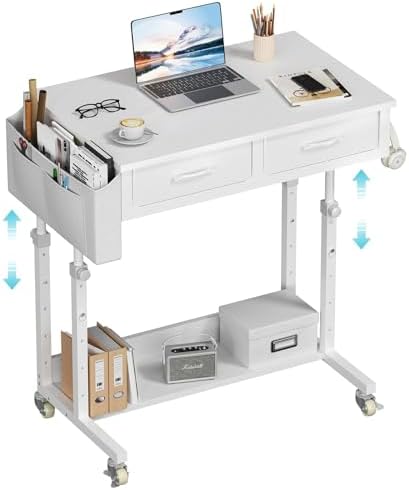
Each of the 3 shown here has its own full review on this site; they run from $114.99 to $214.71.
If you are working in a tight area, see the best mobile workstation for small spaces.


What happens if you go under or overbuy weight capacity?
Going under the required weight capacity for a mobile workstation risks structural failure or permanent deformation of the frame. If the load exceeds the limit, the surface may bow, causing the workstation to become unstable or causing the casters to sink into the floor. You risk a costly return or a physical rebuild if the frame buckles under the weight of your equipment.
To find a setup that fits your hardware, view the best mobile workstation for laptop use.
How overbuying weight capacity increases the size and cost of a workstation
Overbuying weight capacity is a trade-off that often results in a larger, heavier, and more expensive frame than you actually need. A workstation built to support 500 lbs will likely have thicker steel plates and larger components that increase the overall footprint of the unit. While it ensures safety, it may result in a piece of furniture that is difficult to maneuver through doorways or store in a compact workspace.
For those requiring specific ergonomics, explore the best mobile workstation for height adjustable needs.
What is the common mistake with Weight Capacity?
The most common mistake with weight capacity is focusing on the maximum load limit instead of the surface area and weight distribution. A high weight capacity rating only tells you the point of structural failure; it does not tell you if the workstation is large enough to hold your gear comfortably. You should optimize for the total footprint of your equipment rather than just the total weight.
Why workstation surface area dimensions matter more than weight limits
For example, a workstation might support 300 lbs, but if the surface area is only 24 inches deep, a large monitor and a laptop will not fit side-by-side. You lose usable workspace when you prioritize a high weight rating over the actual dimensions of the work surface. Ensure the surface area accommodates the physical dimensions of your primary tools before confirming the weight limit is sufficient.
Educators looking for mobility should see the best mobile workstation for teachers.
How does Weight Capacity interact with other specs?
Weight capacity for a mobile workstation interacts directly with the wheel diameter and the total weight of the unit itself. A high weight capacity often requires a heavier frame, which increases the “dead weight” of the workstation before you even place a single item on it. If the frame is heavy, you need larger wheels to ensure the unit remains mobile.
You can learn more about the height adjustment range for mobile workstations before buying.
Balancing mobile workstation weight limits with caster size for mobility
If you choose a workstation with a high weight capacity but small wheels, the friction between the casters and the floor may make it impossible to move. Think of it like a heavy suitcase with tiny wheels; it might hold the contents, but it won’t roll smoothly across the floor. You must balance the load limit with the wheel size to ensure the workstation remains a “luggable” unit rather than a stationary desk.
New users can learn what a mobile workstation is and how it works in our guide.
Matching the weight capacity of the lifting mechanism to the surface
Another interaction occurs between weight capacity and height adjustment range. Some mobile workstations use gas-lift cylinders for height adjustment. These cylinders have their own internal weight limits. If you exceed the weight capacity of the surface, you may also exceed the weight limit of the lifting mechanism, causing the desk to sink even if the frame remains intact. Always verify that the lifting mechanism is rated for the same weight as the surface area.
If these options don’t fit your needs, explore the alternatives to a mobile workstation.
Understanding Weight Distribution on the Surface
Weight distribution refers to how the load is spread across the surface area of the mobile workstation. A high weight capacity is only useful if the weight is distributed evenly across the structural supports. If you place a heavy object on the very edge of the surface, it creates a leverage effect that can cause the frame to tip or the wheels to twist.
Distributing heavy equipment over primary support legs to maximize capacity
To maximize the weight capacity of your mobile workstation, place your heaviest items, such as a desktop tower or a large monitor, toward the center or over the primary support legs. This reduces the stress on the outer edges of the frame. By distributing the load, you can often use a workstation with a lower rated capacity safely because the stress is not concentrated in one point.
You can see our full analysis on the WINAZ Rolling Desk performance.
How Wheel Load Limits Affect Mobility
Wheel load refers to the maximum amount of weight each individual caster can support. This is a separate metric from the weight capacity of the desk surface. If a workstation has four wheels and a surface weight capacity of 200 lbs, each wheel must be able to support at least 50 lbs of the total weight.
We provide a detailed look at the SOHO Mobile Workstation spec breakdown.
Checking caster load ratings to prevent wheel damage or bending
When selecting a mobile workstation, check the load rating of the casters specifically. If the wheels are rated for less than the weight of the desk plus your equipment, the wheels may flatten or the mounting plates may bend. For heavy-duty use, look for industrial-grade casters that are rated for the full weight of the workstation to ensure smooth movement across different floor types.
For technical details on this laptop, view the Precision 5520 spec analysis.
The Relationship Between Surface Area and Load
Surface area is the total flat space available on the top of the mobile workstation. While weight capacity tells you how much the frame can hold, surface area tells you how much you can actually work on. A common conflict arises when a user needs a high weight capacity for heavy gear but has limited floor space.
Research the hardware capabilities in our full Precision 5530 spec review.
Selecting reinforced heavy-duty frames for high-weight compact workstations
If you have a high-weight requirement but a small footprint, you must look for workstations with reinforced “heavy-duty” frames that maintain a compact shape. These models often use thicker gauge steel to provide the necessary strength without increasing the dimensions of the work surface. Always measure your primary equipment first to determine the minimum surface area required before looking at the weight capacity.