
Mobile Workstation Explained: What It Is and How It Works
ExtremeSpec is reader-supported: some links on this page are affiliate links, and as an Amazon Associate ExtremeSpec earns from qualifying purchases at no extra cost to you. Learn more.
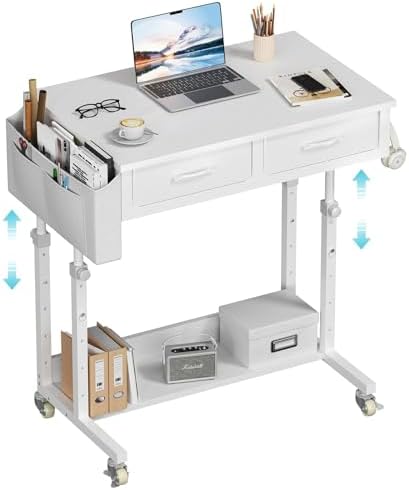
A mobile workstation is a portable work surface that combines a desk and storage unit on a wheeled base to create a mobile office. You need a mobile workstation when you require a dedicated, full-sized workspace that can be moved between different rooms or locations without the need for a permanent installation. Before you choose one, you should measure your required surface area and the width of your doorways to ensure the unit can move through your space.
Mobile workstations reduce setup time by providing a portable workspace
Standard desks are often fixed to a floor or a wall, which limits their utility to a single room. This creates a bottleneck for users who need to move heavy equipment, multiple monitors, or large project materials between a storage area and a workspace. A mobile workstation solves this by providing a stable, height-adjustable platform that follows the user. It eliminates the need to set up and tear down a workspace every time a task changes, which reduces the time spent on physical labor and prevents the wear and tear caused by constantly moving heavy items across a floor.
How a Mobile Workstation Functions
The functionality of a mobile workstation relies on the conversion of a stationary piece of furniture into a mobile unit through a series of mechanical interactions.
- The user identifies a task requiring a larger surface than a standard table, such as a 3D modeling project or a multi-monitor setup.
- The user places the mobile workstation on a flat floor surface.
- The caster system engages with the floor, allowing the user to apply force to the frame to move the unit.
- The user adjusts the height of the workstation to match their ergonomic needs, which shifts the vertical position of the entire structure.
- The user locks the casters to create a static, stable surface that does not move while they work.
Mobile Workstations we have reviewed in detail
Prices across these 3 run from $114.99 to $214.71; each one has a full review here.
Our site offers a full review of the Claiks Mobile Standing Desk for more technical details.


Parts and Standards That Matter for a Mobile Workstation
The performance of a mobile workstation depends on specific structural components and hardware standards that dictate how it handles weight and connects to your tools.
Caster Type and Floor Compatibility
Caster Type determines the floor surface compatibility and maneuverability of the workstation. If you work on carpet, you need large-diameter wheels to prevent the unit from getting stuck or tipping. For hard floors like tile or concrete, smaller, high-durability wheels provide better maneuverability. Choosing the wrong caster type can result in the workstation becoming difficult to push or, in some cases, causing damage to the flooring surface.
Surface Material and Workspace Durability
Surface Material affects the durability and ease of cleaning for different work environments. A laminate surface provides a consistent texture that resists scratches from tools or equipment. A wood-grain finish might offer more aesthetic appeal but may require more frequent maintenance to prevent moisture damage. The material you choose dictates how much weight and friction the top surface can withstand during heavy use.
USB-C Power Delivery for Charging
USB-C Power Delivery (PD) determines if a laptop can be charged via a single cable or a dock. This standard allows the workstation to act as a power hub, providing the necessary wattage to charge high-performance laptops while they are in use. Without PD support, you might need to run separate power bricks for each device, cluttering the workspace and limiting the mobility of your setup.
For a deep dive into the hardware, look at our full review of the Precision 5530.
ANSI/I/O Layout for Peripheral Support
ANSI/I/O Layout ensures keyboard compatibility across different mobile workstation hardware.
What a Mobile Workstation Changes in Practice
Having a mobile workstation changes the way you manage physical space by allowing for a “hot-desking” style of operation within a home or office. In a studio environment, you can move the workstation to a high-light area for creative work and then push it into a corner to clear the floor for other activities. This mobility is essential when you need to move large projects, such as architectural models or large-format prints, from a storage area to a work area.
Mobile workstations offer flexibility but lack stability for heavy machinery
The difference shows up most clearly when you need to change your environment based on the task. For example, a mobile workstation allows you to move your entire setup into a conference room or a different office suite for a day. However, the difference does not show up when you are performing a task that requires a stationary, heavy-duty anchor, such as a high-vibration lathe or a heavy industrial press. In those cases, the mobility of the workstation becomes a liability rather than an asset.
You can find a detailed breakdown in our full review of the WINAZ Rolling Desk.
How much space does the base take up compared to the top surface?
The base of a mobile workstation typically takes up more floor area than the top surface to ensure stability. Because the weight of the workstation is distributed over a larger footprint, the base is designed to prevent the unit from tipping over when the top surface is loaded with heavy equipment. You should expect the base to extend several inches beyond the perimeter of the work surface to maintain a low center of gravity.
Who Needs a Mobile Workstation and Who Does Not
A mobile workstation is necessary for professionals who need a full-sized desktop experience but lack a permanent, dedicated office space. This includes designers, engineers, and content creators who move between different rooms or need to bring their workspace to different locations frequently. If your work requires heavy equipment that needs to be moved daily, the mobility of the unit justifies the extra footprint.
Standard desks suit users who prioritize a small footprint over mobility
You do not need a mobile workstation if your work is performed on a laptop or a small tablet that can be used on a standard chair or a small side table. If you never need to move your equipment more than a few feet or if you do not require a large surface area for multiple monitors, a standard desk is a more space-efficient choice. A mobile workstation is a solution for mobility and scale, not for users who prioritize a minimal footprint over workspace size.