
Mobile Workstation Warranties: What to Check Before You Buy
ExtremeSpec is reader-supported: some links on this page are affiliate links, and as an Amazon Associate ExtremeSpec earns from qualifying purchases at no extra cost to you. Learn more.
Mobile workstation warranties typically provide a 12 to 36-month coverage period, with the most common reason for a claim refusal being evidence of liquid ingress or physical impact damage. You need a minimum of 12 months of coverage to protect against internal component failure during a standard project lifecycle. Before purchasing, identify your specific usage requirements to determine if a 1-year or 3-year term provides the necessary protection for your hardware’s expected lifespan.
What does a mobile workstation warranty normally cover?
A mobile workstation warranty normally covers internal hardware failures and manufacturing defects that occur during standard operation. This coverage typically includes the motherboard, processor, memory modules, and internal storage drives. If a component fails due to a defect in its construction or a flaw in the manufacturing process, the warranty ensures the part is repaired or replaced at no cost to the user.
- Motherboard and logic board failures
- Processor malfunctions or stability issues
- Memory module defects
- Internal storage drive failures
- Internal cooling fan malfunctions
- Power supply unit failures (internal)
Environmental factors and user-induced damage void mobile workstation warranties
A mobile workstation warranty normally excludes damage caused by external factors, environmental extremes, or unauthorized modifications. Because these machines are designed for mobility, the distinction between a manufacturing defect and “user-induced” damage is a primary point of contention in claims. If a device fails because it was dropped or exposed to moisture, the warranty will likely be voided.
To understand the basics, see our guide on how a mobile workstation works and its primary functions.
- Liquid spills or submersion damage
- Cracked screens or chassis housing
- Damage from electrical surges or improper power sources
- Software-related issues or operating system errors
- Damage caused by third-party hardware modifications
- Wear and tear on non-permanent parts like batteries or keys
Examples from this category, each with its own review here
3 options shown here, $109.99 to $1499.99, each with its own full review behind its name.

How does where you buy a mobile workstation affect the warranty?
How where you buy a mobile workstation affects the warranty depends on the legal relationship between the seller and the manufacturer. If you buy direct from the maker, the manufacturer handles the claim directly, which often results in the fastest turnaround for parts and repairs. This is the most straightforward path for securing the terms listed in the official documentation.
How buying from an authorised retailer coordinates mobile workstation repairs
Buying from an authorised retailer usually means the retailer acts as an intermediary for the warranty claim. You contact the retailer, who then coordinates with the manufacturer to facilitate the repair or replacement. This adds a layer of communication but typically maintains the same coverage levels as a direct purchase from the maker.
Learn about different configurations by viewing the different types of mobile workstations available today.
Risks of manufacturer warranty refusal from marketplace sellers
Buying from a marketplace seller introduces a risk where the seller may not be an official distributor. In this scenario, the manufacturer might refuse to honor the warranty because the unit was sold through an unofficial channel. A buyer might find themselves stuck between a seller who no longer responds and a manufacturer who refuses to service the hardware.
Limited seller warranties replace manufacturer coverage on refurbished units
Buying from a refurbished or open-box seller usually replaces the manufacturer’s warranty with a limited seller warranty. These warranties are often shorter, ranging from 30 to 90 days, and rarely cover the same depth of internal components. If a refurbished unit fails after the seller’s period ends, the original manufacturer’s warranty is often already voided or never applied.
Regional mismatches in grey-market imports prevent warranty fulfillment
Buying from an importer or grey-market seller means the product was intended for a different region or market. These units often lack the local parts and support infrastructure required to fulfill a warranty claim. If a component fails, the manufacturer may refuse service because the serial number does not match the region’s authorized inventory.
Ensure a proper fit by looking at our guide on choosing the right height adjustment range for your needs.
What actions void a mobile workstation warranty?
Actions that void a mobile workstation warranty include any physical interference with the internal hardware or the integrity of the chassis. Opening the case to upgrade RAM or storage can void the warranty if the manufacturer uses tamper-evident seals. If these seals are broken, the manufacturer may classify the entire unit as “user-modified” and deny any future claims.
Overclocking processors or GPUs causes thermal damage and voids coverage
Overclocking the processor or GPU can also void coverage in many cases. While some modern systems allow for minor adjustments, exceeding the manufacturer’s stated power limits can lead to thermal damage. If a component fails due to sustained high-voltage operation beyond the specified limits, the warranty will not cover the repair.
You can see the full breakdown in our full WINAZ Rolling Desk review.
Third-party power adapters cause electrical damage excluded from warranty
Using non-certified power adapters or charging cables is another common way to void coverage. A power surge caused by a third-party brick can fry the motherboard’s power delivery system. Because the manufacturer cannot verify the safety standards of a third-party cable, they often refuse to cover electrical damage resulting from such accessories.
Modifying BIOS or firmware leads to permanent loss of coverage
Modifying the BIOS or firmware with third-party tools can lead to a permanent loss of warranty. If a firmware flash “bricks” the machine, the manufacturer may view this as a software-induced failure rather than a hardware defect. This creates a situation where the user is responsible for the cost of a motherboard replacement.
What should you do before buying to ensure a future claim works?
To ensure a future claim works, you must establish a clear paper trail and verify the specific coverage limits before the purchase is finalized. A buyer who fails to document the initial condition of the machine may find it impossible to prove that a defect was present at the time of sale.
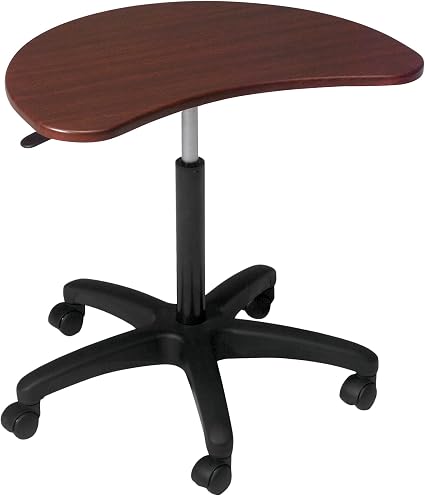
Learn more about this wood-finish option in our full Balt Pop Workstation review.
- Request the specific warranty document in writing before payment
- Record the serial number and take photos of the device’s physical condition
- Confirm the “Return Merchandise Authorization” (RMA) process for your region
- Verify if the warranty covers “on-site” repair or requires shipping to a depot
- Keep the original purchase receipt in a digital and physical format
Why warranty contracts exclude intentional external damage from coverage
Think of a warranty like a car’s insurance policy; it only pays out if the circumstances of the “accident” match the rules of the contract. If you drive the car into a lake, the insurance won’t cover the engine because the damage was caused by an excluded event. Similarly, a warranty only covers “accidental” internal failures, not “intentional” external damage.
If a buyer fails to confirm the specific coverage limits before purchase, they risk paying for a repair that costs more than the remaining value of the machine. This mistake can result in a total loss of the investment when a critical component fails outside of the expected coverage.
Steps to identify required warranty duration and save documentation
A buyer first identifies the required warranty duration based on their project timeline. They then verify the specific terms for the chosen model, ensuring that the core components they use most are covered. Finally, they save the documentation and serial numbers to ensure a smooth process if a claim becomes necessary.
See the detailed specs in our full SOHO Mobile Workstation review.
When is an extended warranty worth it for a mobile workstation?
An extended warranty is worth it for a mobile workstation if you perform high-intensity tasks like 3D rendering or long-duration video exports. These tasks put constant stress on the cooling system and the GPU, increasing the likelihood of a component failure after the initial 12-month period. If your work requires the machine to run at high utilization for more than 8 hours a day, the extra cost of an extended plan provides a safety net for the most expensive parts of the hardware.
Why extended warranties offer low value for light office tasks
An extended warranty is not worth it if you primarily use the machine for light office tasks or web browsing. In these use cases, the likelihood of a major hardware failure within the first two years is statistically low. For a standard user, the cost of an extended warranty often exceeds the cost of simply replacing the machine in three years, making the premium a poor use of funds.
The other luggable workstation guides we have published
- Choosing the Best Mobile Workstation for Home Office Use
- The Mobile Workstations That Work Best for Students
- Which Portable Mobile Desk with Wheels Is Best?
- Best Mobile Workstations for Laptops
- Height Adjustable Mobile Workstations Compared
- Which Budget Mobile Workstation Works for a Nursing Station?