
Height Adjustment Range for Mobile Workstations: How to Choose Yours
ExtremeSpec is reader-supported: some links on this page are affiliate links, and as an Amazon Associate ExtremeSpec earns from qualifying purchases at no extra cost to you. Learn more.
Height Adjustment Range for mobile workstations is the total distance in inches between the lowest and highest positions of the work surface. You need to identify your specific seated and standing height requirements before selecting a unit with a range that accommodates both.
Which Height Adjustment Range Suits You?
| If this is you | The Height Adjustment Range that suits you | Why |
|---|---|---|
| You primarily work seated in a standard office chair. | 10 to 12 in | A smaller range allows for more precise, incremental adjustments between different seating positions. |
| You alternate between sitting and standing throughout the day. | 13 to 15 in | A larger range ensures the surface can move from a standard desk height to a comfortable standing height for most users. |
| You are exceptionally tall or use a specialized standing desk. | 15 in or greater | A wider range provides the necessary clearance for taller users who require the surface to be raised significantly higher. |
| You work in a space with limited vertical clearance. | 10 to 12 in | A shorter range limits how high the surface can travel, ensuring it does not hit ceiling fixtures or overhead storage. |
Examples from this category, each with its own review here
From $114.99 to $1399.95: 3 of the 7 in this category we have reviewed in full.

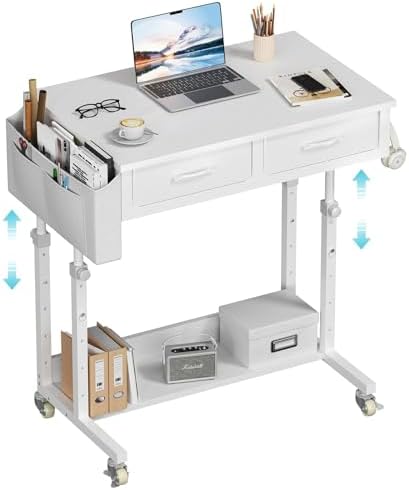

How do I measure my required Height Adjustment Range?
To establish your required Height Adjustment Range, you must measure your personal workspace needs in inches. Start by measuring the height of your current desk surface while you are seated in your preferred chair. Next, measure the height of the surface when you are standing in a comfortable posture with your elbows at a 90-degree angle. Subtract the seated height from the standing height to find your required range.
Minimum mobile workstation travel range prevents shoulder and back strain
The difference between these two measurements is the minimum range a mobile workstation must provide to accommodate your movement. If your calculated range is 14 in, you must select a unit that provides at least that much travel. Do you find that your current desk is too low when standing? A difference of even 2 in can cause significant strain on the shoulders and lower back over a long shift.
Manufacturer specifications confirm the specific height adjustment range of a workstation
Check the manufacturer’s specifications for the “Height Adjustment Range” or “Travel Range” to confirm the capability. This figure is usually listed in the technical specifications section of the product information. Look for a specific number in inches rather than a general description of the motor’s power or speed. If the manufacturer does not state a specific range, you cannot be certain the unit will reach your required heights.
What happens if the Height Adjustment Range is incorrect?
Choosing a Height Adjustment Range that is too small results in a surface that cannot reach a comfortable standing height. If the range only covers 10 in, a shorter user might find the desk sits at their waist rather than their chest height. This forces the user to hunch over, leading to neck strain and reduced productivity during standing intervals.
Limited travel range reduces workstation versatility for shared office spaces
A range that is too small also limits the ability to adjust for different chairs or different users in the same space. If the travel is restricted, you may find the desk is either too high for a standard chair or too low for a tall person. This lack of flexibility makes the workstation less versatile for shared environments.
Large height adjustment ranges may lack the precision for perfect comfort
Conversely, a Height Adjustment Range that is unnecessarily large may not be a failure, but it can sometimes indicate a lack of precision. Some larger ranges move in larger increments, which can make it harder to find the exact “sweet spot” for your elbows. If a workstation moves in 2 in jumps, you may find yourself constantly adjusting it because it sits slightly too high or too low for comfort.
What should I do if my requirements fall between two values?
When your required Height Adjustment Range falls between two common values, such as 13 in and 15 in, you should prioritize the higher range. A larger range provides more versatility and ensures that you will not be limited by the physical travel of the motor. If you need 13.5 in of travel, a 15 in range provides that buffer plus extra room for growth or different chair heights.
Choosing a 15 inch range accommodates a wider variety of heights
The risk of a range being too small is a physical limitation that prevents use, while the risk of a range being larger than needed is simply a matter of having extra capacity. If you are unsure of your exact standing height, it is safer to choose a model with a 15 in range. This ensures the workstation can accommodate a wider variety of heights than a 10 in or 12 in model.
Maximum height capacity ensures the workstation fits the tallest intended user
Consider the height of your tallest intended user when making this decision. If the workstation is for a household where multiple people will share the surface, the maximum height is often more important than the minimum. A 15 in range is more likely to accommodate a tall user than a 13 in range. Selecting the larger range eliminates the risk of the desk being physically unable to reach the necessary height for the tallest person in the room.
Standard 10 to 15 inch ranges require personal measurements for fit
The research on the mobile workstations we evaluated shows that many units state a range between 10 in and 15 in. Because these values are common, most standard mobile workstations will accommodate a wide variety of users. However, because there is no single “best” number, you must rely on your own measurements to ensure the travel distance matches your body’s requirements. If you cannot find a product that meets your specific measurement, you may need to reconsider your seating or standing height goals to fit within the available 10 in to 15 in range.
The rest of our luggable workstation guides
- Choosing the Best Mobile Workstation for Home Office Use
- The Mobile Workstations That Work Best for Students
- Which Portable Mobile Desk with Wheels Is Best?
- Best Mobile Workstations for Laptops
- Height Adjustable Mobile Workstations Compared
- Which Budget Mobile Workstation Works for a Nursing Station?