
AI GPU Alternatives: Other Ways to Get the Same Result
ExtremeSpec is reader-supported: some links on this page are affiliate links, and as an Amazon Associate ExtremeSpec earns from qualifying purchases at no extra cost to you. Learn more.
AI GPU hardware provides the local processing power required to run large language models, generate images, and perform high-speed tensor mathematics. Owning a dedicated card is only necessary if a user requires constant, low-latency access to high-memory environments for large-scale inference or training. For many tasks, the cost of hardware ownership is replaced by cloud access, specialized local hardware, or integrated solutions that provide the same outputs without the upfront capital expenditure of a discrete card.
How does Cloud GPU rental work for AI GPU tasks?
Cloud GPU rental works by providing on-demand access to high-performance hardware hosted in remote data centers via a web interface or API. This route allows a user to access enterprise-grade hardware, such as the NVIDIA H100 or H200, which are the standard for high-throughput data center operations. Because these machines are shared resources, the cost is based on time—often billed per hour or per second—rather than an upfront purchase of the hardware itself.
Cloud rental provides high peak capacity for large model training
Cloud rental beats buying a physical card when the project requires a specific peak capacity that exceeds consumer hardware limits. For example, training a model that requires more than 24GB of VRAM makes cloud rental the only viable option for many, as it avoids the need to purchase multiple interconnected GPUs. The cost of ownership for such a setup includes not just the hardware, but also the electricity and cooling required to run high-TDP components continuously. Cloud access allows a user to scale up for a specific training run and then scale down to zero cost when the task is finished.
Before making a purchase, understand AI GPU warranties and what to check first.
Cloud rental becomes less cost effective for constant inference tasks
This route stops making sense when the frequency of use becomes constant. If a user performs inference tasks every hour of every day, the cumulative hourly cost of a cloud subscription will eventually exceed the amortized cost of owning a local card. For a user running a personal chatbot for 10 hours a day, the “break-even” point typically occurs within 6 to 9 months of continuous use. Cloud rental is the optimal choice for periodic, high-intensity bursts of work where the hardware would otherwise sit idle.
Where these choices show up in our reviews
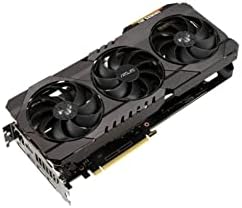
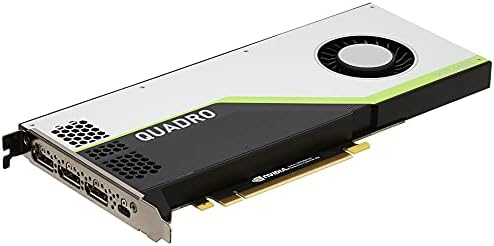
3 options shown here, $129.99 to $324.49, each with its own full review behind its name.
Understanding the hardware starts with learning the different types of AI GPUs available.

What are the benefits of Refurbished GPUs for AI work?
Refurbished GPUs provide a way to acquire high-memory hardware at a lower price point than new retail units. These are typically older generations of cards that have been tested, cleaned, and prepared for resale by third-party vendors or manufacturers. The primary advantage is the ability to access higher VRAM capacities, which is the most critical metric for loading large models into local memory.
Refurbished cards offer high VRAM capacity at a lower price
Buying a refurbished card is a strategic choice when the goal is to maximize the amount of data a processor can store in its local memory without paying the “new” premium for the latest architecture. Older cards often provide the same VRAM capacity as newer, more expensive models but at a significantly lower price. Because AI tasks often depend on the model fitting into the available memory, a refurbished card with 24GB of VRAM can be more useful for a specific task than a newer card with only 8GB or 12GB of VRAM.
You can see how the GeForce GT 1030 performs in our full analysis.
Software library compatibility limits the use of refurbished hardware
This option stops making sense when the required software libraries are no longer supported by the older hardware generation. For instance, if a specific AI framework requires a hardware architecture that was released in the last two years, a refurbished card from a three-year-old generation will not function. Buyers must verify that the specific CUDA version or driver requirements of their software are compatible with the hardware’s manufacture date before purchasing.
Can Integrated Graphics handle AI GPU tasks?
Integrated graphics perform AI tasks by sharing the system’s main memory (RAM) rather than using a dedicated pool of VRAM. In this setup, the CPU and the integrated GPU share the same memory chips on the processor. This means the amount of memory available for AI tasks is limited by the amount of system RAM installed and the amount the BIOS allocates to the integrated graphics unit.
Integrated graphics suit small models and basic inference tasks
Integrated graphics beat buying a dedicated card when the user only needs to run very small models or perform basic inference that does not require high-speed data movement. Because integrated graphics lack the high memory bandwidth of a dedicated card, they are significantly slower for large-scale operations. However, for a user who only needs to run a small, 1-billion-parameter model for occasional use, integrated graphics allow the task to be completed without any additional hardware cost.
Check out our full RX 550 review for a detailed spec breakdown.
System memory limits and CUDA core needs hinder integrated graphics
This route stops making sense the moment a model exceeds the available system RAM or requires a high number of CUDA cores to maintain a usable speed. If a model requires more than the available system memory, the system will trigger an Out of Memory (OOM) error, which is the specific crash occurring when the model weights and KV cache exceed available memory. For any task requiring high-speed data movement between the memory and the processor, integrated graphics will result in a bottleneck that makes the experience impractical.
How do Laptops with built-in AI accelerators compare?
Laptops with built-in AI accelerators use specialized hardware, such as NPUs (Neural Processing Units), to handle specific AI tasks while leaving the main CPU and GPU free for other operations. These accelerators are integrated directly into the laptop’s processor architecture. They are designed to handle the repetitive, math-heavy tasks of AI inference with high energy efficiency.
Take a look at our full GTX 1660 Super review for more data.
Built-in laptop accelerators provide portable and power efficient AI
Laptops with built-in accelerators beat buying a dedicated AI GPU when portability and power efficiency are the primary requirements. These units are designed to run at lower power draws, meaning they do not require the massive power supplies or cooling systems associated with desktop GPUs. For a user who needs to run a local transcription tool or a basic image enhancement on a mobile device, an NPU provides the necessary acceleration without draining the battery or generating excessive heat.
Integrated accelerators lack the power for large scale LLM training
This solution stops making sense for heavy model training or running large-scale LLMs. Most integrated AI accelerators are designed for specific, pre-defined tasks like background blur in video calls or basic text prediction. They do not have the VRAM capacity or the raw processing power to handle the 70B parameter models that a dedicated AI GPU can manage. If the task requires high-performance tensor mathematics on a large model, the built-in accelerator will lack the necessary resources.
Detailed performance data is available in our full RTX 4060 iCraft review.
Comparison of AI GPU Alternatives
| Route | Who it suits | Main Advantage | Where it breaks down |
|---|---|---|---|
| Cloud GPU Rental | Researchers and developers with intermittent, high-intensity needs. | Access to enterprise-grade hardware (H100/H200) without ownership costs. | Becomes expensive for 24/7 continuous operation. |
| Refurbished GPUs | Budget-conscious users who need high VRAM capacity. | Significant cost savings on high-capacity memory. | May lack support for the latest software libraries. |
| Integrated Graphics | Users running very small models or basic inference. | Zero additional hardware cost. | Severe performance bottlenecks and OOM errors on large models. |
| Built-in Accelerators | Mobile users needing efficient, specific AI features. | High power efficiency and portability. | Cannot handle large-scale training or large LLMs. |
When is buying a dedicated AI GPU the right answer?
Buying a dedicated AI GPU is the correct choice when the user requires consistent, low-latency access to a large amount of VRAM for daily operations. This condition is met when the cost of cloud rental exceeds the purchase price of the hardware within a 6-month period of active use. If the user’s workflow requires running models that exceed the memory limits of integrated graphics or built-in accelerators, a dedicated card becomes a necessity.
Local hardware eliminates latency and meets specific CUDA core requirements
Ownership is also the correct choice when the user needs to avoid the latency of a remote connection. For real-time applications where the time spent waiting for data to travel to a cloud server and back is unacceptable, local hardware is required. Finally, if a user requires a specific number of CUDA cores to achieve a required inference speed—such as a specific number of operations per second for real-time video processing—a dedicated GPU provides the necessary hardware floor to meet that requirement.