
Mobile Workstation Terms and Specs, Explained in Plain English
ExtremeSpec is reader-supported: some links on this page are affiliate links, and as an Amazon Associate ExtremeSpec earns from qualifying purchases at no extra cost to you. Learn more.
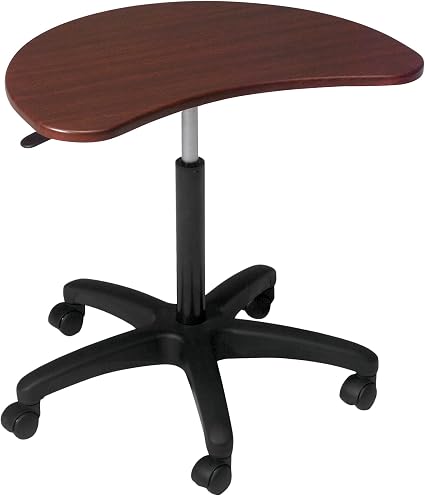
A mobile workstation is a portable work surface designed to support a laptop or computer while providing a stable, often height-adjustable, workspace for mobile use. You need a surface that maintains stability during typing and provides enough clearance for your peripherals when you move from a fixed desk to a more mobile environment. You should measure your primary workspace depth and determine if you need a surface that accommodates a laptop and a separate mouse or if you require a larger area for a laptop and an external monitor.
How Physical Dimensions and Materials Affect Mobile Workstation Storage
Physical dimensions of a mobile workstation determine whether the unit fits into your current storage space or moves easily between rooms. Most listings focus on the surface area, which is the total flat space available on the top surface.
If you need specific ergonomic options, see our comparison of height adjustable mobile workstations.
- Surface Area – This measures the total flat space available on the top surface; a larger number provides more room for multiple devices, while a smaller number is easier to store in tight spaces.
- Surface Material – This refers to the material used for the tabletop, such as wood, metal, or particleboard; wood and metal offer different levels of durability and ease of cleaning depending on your work environment.
- Desktop Material – This specific material type is stated in 1 of the 7 listings we screened, which identifies the base material as either wood, metal, or particleboard.
- Assembly Required – This indicates if the unit arrives pre-built or requires setup; 3 of the 7 listings we screened state that assembly is required.
- Weight Capacity – This measures the maximum load the structure can support; a higher number ensures the desk remains stable when you place heavy equipment or multiple monitors on the surface.
- Height Adjustment Range – This measures the total distance between the lowest and highest positions; 3 of the 7 listings we screened state a range, with a median of 13 inches.
Mobility and Movement Features
Mobility features define how the workstation moves across your floor and how it handles different surfaces. The weight of the unit and the type of wheels determine the effort required to move it.
- Caster Type – This determines the floor surface compatibility and maneuverability; different types of wheels allow for smoother movement on carpet versus hard flooring.
- Wheel Diameter – This measures the distance across the center of the wheel; a larger diameter typically provides better floor clearance and smoother movement over small obstacles.
Where these choices show up in our reviews
Each of the 3 shown here has its own full review on this site; they run from $109.99 to $199.99.
We provide a detailed analysis in our full review of the Claiks Mobile Standing Desk.


Connectivity Standards for Simplified Mobile Workstation Cable Management
Connectivity standards for a mobile workstation ensure that your laptop and peripherals can communicate and receive power without a mess of cables. You should prioritize standards that allow for single-cable setups to keep your mobile workspace organized.
Technical users can see our full review of the Precision 5530 for hardware specs.
- USB-C Power Delivery (PD) – This standard determines if a laptop can be charged via a single cable or a dock; choosing a workstation that supports PD-compatible ports allows you to power your device directly from a central hub.
- ANSI/I/O Layout – This ensures keyboard compatibility across different mobile workstation hardware; standard layouts ensure that your peripheral buttons and ports align with your existing equipment.
- Docking Station – This is an external device that expands connectivity for peripherals; you need a dock that matches the specific ports on your laptop to turn a mobile workstation into a full desktop setup.
- External Monitor – This is a secondary display that increases screen real estate for productivity; you must ensure the monitor’s connection type matches the outputs available on your laptop or docking station.
How do I choose the right size for my space?
Choosing the right size for your space depends on the specific items you intend to place on the surface. If you only use a laptop, a smaller surface area is often sufficient for portability. However, if you plan to use an external monitor, you must measure the width of that monitor and add at least 10 cm of clearance on either side to ensure the workstation is wide enough. A common mistake is selecting a surface that is too narrow for a monitor, which forces you to sit at an awkward angle or prevents you from using a mouse comfortably.
What is the difference between surface area and weight capacity?
The difference between surface area and weight capacity is the distinction between available space and structural limits. Surface area measures the total flat space available on the top surface, which tells you if your equipment will fit. Weight capacity measures the maximum load the structure can support, which tells you if the desk will remain stable or collapse under the weight of your gear. You can have a large surface area that has a low weight capacity, which is a risk if you plan to place heavy hardware like a desktop PC or multiple large monitors on the unit.
You can see a deep dive in our full review of the Pmnianhua Mobile Desk.
Does portability affect the surface area?
Portability often involves a trade-off with surface area and weight. A highly portable luggable workstation may have a smaller surface area to ensure it can be moved easily or fit into a small room. If you require a large workspace for complex tasks, you may need to accept a larger footprint that is less easy to move. You should decide if your primary need is a large stationary-style surface that moves occasionally or a compact surface that moves frequently.