Mini Server Explained: What It Is and How It Works
ExtremeSpec is reader-supported: some links on this page are affiliate links, and as an Amazon Associate ExtremeSpec earns from qualifying purchases at no extra cost to you. Learn more.
A mini server is a compact computing device designed to provide dedicated host services, such as file storage, web hosting, or media streaming, while occupying minimal physical space. You need a dedicated machine when your primary computer cannot run background tasks 24 hours a day without impacting your daily work speed. You should first determine your required concurrent user count and the total volume of data you intend to host to establish your hardware baseline.
How mini server architecture improves efficiency and reliability over desktops
Standard personal computers often struggle with the constant uptime required for server tasks. When a desktop PC stays on indefinitely to host a database or a private cloud, it consumes significant electricity and generates constant heat, which can degrade components over time. A mini server solves this by providing a high-density architecture where the hardware is optimized for efficiency and reliability rather than high-end graphics or user-facing peripherals. It allows you to isolate your data and services from your primary workspace, ensuring that a crash in a hosted application does not take down your personal files or internet connection.
If you are looking for private cloud storage, see the best mini server for nextcloud.
How a Mini Server Processes Data
The operation of a mini server follows a linear path from the moment a request enters the network to the moment the data is delivered to the user.
Network security enthusiasts can find a mini server for firewall appliance use in our comparison.
- The network interface receives an incoming request, such as a request to open a file or load a webpage.
- The CPU processes the instructions required to handle that request, determining which files or data points need to be accessed.
- The system memory acts as a temporary workspace, holding the active data the CPU needs to manipulate in real-time.
- The storage controller identifies the physical location of the data on the drives and initiates a read or write operation.
- The system retrieves the data from the storage medium and passes it back through the CPU and memory.
- The network interface sends the completed data packet back across the wire to the requesting device.
Mini Servers we have reviewed in detail
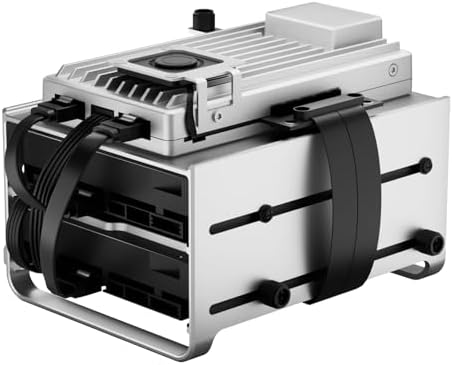
Prices across these 3 run from $329 to $699.95; each one has a full review here.


Parts and Standards That Matter to a Buyer
The physical components of a mini server dictate the speed, reliability, and expansion potential of your hosted services.
Software engineers should browse the best mini server for development to find a suitable workstation.
Processor and Memory Capacity for Multi-Core Tasks and Workspace
The processor determines how many simultaneous tasks the server can handle before performance drops. For most home laboratory use cases, a multi-core processor is necessary to prevent a single heavy task from locking up the entire system. Memory capacity measures the total temporary workspace for active data; if you run multiple virtual machines or heavy containers, you will need a higher amount of RAM to prevent the system from swapping data to the slower storage drive.
Small businesses on a budget can find the best mini server for small office under $1000.
Storage Interfaces and NVMe vs SATA
The storage interface dictates the maximum IOPS (Input/Output Operations Per Second) available for database and cache performance. NVMe is a high-speed interface that connects directly to the PCIe lanes, providing significantly faster access for high-demand applications. SATA is an older standard that is often more cost-effective for large volumes of “cold” storage, such as backups or media libraries, where extreme speed is less critical than total capacity.
Expansion Slots and IPMI for Hardware Growth and Remote Management
A PCIe slot allows for expansion of networking or storage controllers, letting you add faster network cards or dedicated hardware RAID controllers as your needs grow. IPMI (Intelligent Platform Management Interface) enables remote power management and out-of-band hardware monitoring, which allows you to restart or check the health of the server even if the main operating system has crashed or is turned off.
Discover various hardware options by exploring the different types of mini servers.
Software Compatibility and x86_64 vs ARM64
The underlying architecture determines software compatibility for containers and virtualization. x86_64 is the standard for most enterprise software and legacy applications. ARM64 is a power-efficient architecture that is increasingly common in mobile and edge computing; however, you must ensure your specific software stack supports ARM64 before choosing a device based on this architecture to avoid compatibility issues.
Consider other options by viewing the various mini server alternatives available today.
What a Mini Server Changes in Practice
Owning a mini server changes your workflow by providing a persistent “always-on” environment for data. In a practical sense, this means you can access your files from a smartphone or a laptop at a coffee shop as if they were on a local drive. It creates a dedicated environment where a crashed script or a runaway process only affects the server, not your primary workstation. This separation is vital for maintaining uptime for services like a home automation hub or a private VPN.
Detailed specifications are available in our full Supermicro A1SRi-2558F Intel C2558 EKSMC2558M557-M review.
When a mini server provides better value than cloud storage
The difference is not always noticeable in small tasks. If you only need to share a few files occasionally, a standard cloud storage service may be more convenient. The value of a mini server emerges when you require low-latency access to large amounts of data or when you need to run services that require a specific network configuration that a public cloud provider does not support. It provides a middle ground between a massive enterprise rack and a simple external hard drive.
How Does This Compare to a Standard Desktop PC?
A mini server compares to a standard desktop PC by prioritizing reliability and power efficiency over raw graphical power and peripheral support. While a desktop PC can run server software, it often lacks the specialized features like IPMI for remote management or the high-density storage configurations found in dedicated small-form-factor servers. A mini server is purpose-built to stay on for months at a time, whereas a desktop PC is designed for intermittent use with a monitor, keyboard, and mouse.
Performance details are available in our full Intel N100 Mini PC review.
Who Needs a Mini Server and Who Does Not?
You need a mini server if you require 24/7 uptime for services like a home media server, a private cloud, or a development environment that must be accessible from multiple devices simultaneously. It is the correct choice if you need to manage a large volume of data locally without paying monthly subscription fees to a cloud provider. You should prioritize a mini server when your requirements include specific hardware standards like x86_64 for software compatibility or specific storage speeds that a standard PC cannot efficiently provide.
View the technical breakdown in our full Zimaboard 2 1664 review.
Situations where a mini server is not necessary for data storage
You do not need a mini server if your primary goal is occasional file sharing or if you only need to run a single application that you can open on your laptop when needed. If your data requirements are small enough to fit on a single external drive that you plug in only when necessary, the complexity and power draw of a dedicated server will not provide a meaningful benefit. For most users, the decision rests on whether you need the data to be “live” and accessible at all times, rather than just stored.