
The Types of Mini Servers, Explained
ExtremeSpec is reader-supported: some links on this page are affiliate links, and as an Amazon Associate ExtremeSpec earns from qualifying purchases at no extra cost to you. Learn more.
Mini servers come in three primary types defined by their processor thermal design power (TDP) and management capabilities. You need a device with a TDP of 15W or less for basic background tasks, while enterprise needs dictate a system with IPMI support for remote management. Determine your requirement by identifying the maximum power draw your environment allows and whether you need to manage the hardware without a physical monitor or keyboard attached.
Mini Server Types Among the Listings We Screened
| Type | What sets it apart | Listings we screened | Price range |
|---|---|---|---|
| Entry-Level Home Server | processor TDP up to 15W | 1 | $329 |
| Mid-Range Workstation | processor TDP 15 to 65W | 0 | – |
| Enterprise Mini Server | IPMI support: yes | 2 | $699.95 to $2794.95 |
Counted over the 4 listings this site screened; a listing that does not state the figure a type is defined by is not counted under any type.
Where these choices show up in our reviews
Prices across these 3 run from $329 to $699.95; each one has a full review here.
If you are building a gaming setup, see our guide to entry-level mini servers for game hosting.

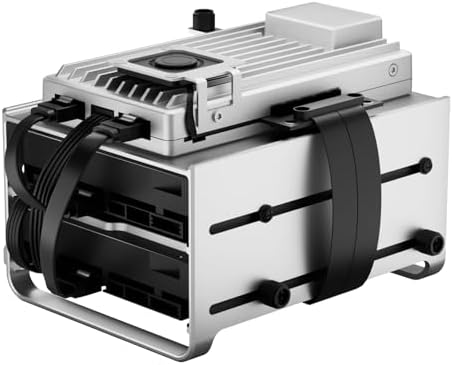

Entry-Level Home Servers with 15W or Less Processor TDP
Entry-level home servers are defined by a processor TDP of 15W or less. This category is designed for users who need to run a single service, such as a file share or a network-attached storage (NAS) unit, while keeping electricity costs and heat output at a minimum. Because these units operate at low power, they are often used in environments where active cooling is limited or where the user wants to avoid the noise of high-speed fans.
How low-TDP mini servers handle consistent low-intensity tasks
You choose this type when your primary goal is high efficiency over raw processing power. These systems excel at handling consistent, low-intensity tasks like hosting a personal website or a small media library. However, they give up the ability to run multiple resource-heavy applications simultaneously, such as several virtual machines or complex containers. If you attempt to run a heavy database on a low-TDP processor, the system may experience thermal throttling, which causes the CPU to slow down to prevent overheating, leading to erratic performance drops.
Matching a mini server power profile to specific user tasks
The cost of selecting the wrong power tier is a system that cannot complete its primary task. If you choose a low-power unit for a high-demand workload, the processor will struggle to keep up, resulting in slow response times or application crashes. A buyer typically starts by identifying a simple task, like hosting a private cloud. They then look for a device that fits a low-power profile to ensure the unit remains quiet and cool in a home office. They end up with a reliable, always-on device that consumes minimal electricity.
Media enthusiasts can find the best mini server for plex to stream high-quality content.
Mid-Range Workstations with 15W to 65W Processor TDP
Mid-range workstations are defined by a processor TDP between 15W and 65W. These systems provide a balance between the low-power requirements of home use and the high-performance demands of professional workloads. They are intended for users who need to run more complex software, such as development environments, media transcoding, or multiple simultaneous containers.
Why mid-range mini servers provide more headroom for bursty workloads
This type of mini server performs better than entry-level options when you need to handle bursty workloads or multi-threaded applications. It provides more headroom for CPU-intensive tasks, allowing for faster data processing and smoother multitasking. By choosing this tier, you give up the extreme power efficiency of the 15W class, meaning these units generally require more robust cooling solutions and may have a higher impact on your electricity bill. They sit in a middle price band, offering a path to professional performance without the cost of enterprise-grade hardware.
Balancing high performance and small space in mid-range workstations
When requirements conflict, such as needing high performance in a small space, the mid-range tier is the standard compromise. You must ensure your power supply and cooling can handle the higher TDP. If you underestimate the heat output of a 65W processor in a compact chassis, the hardware may limit its own speed to stay within safe temperatures. A buyer identifies a need for a more capable workstation, finds a unit with a moderate TDP, and ends up with a versatile machine capable of handling both daily tasks and heavy projects.
If these hardware options aren’t right, consider exploring different mini server alternatives.
Enterprise Mini Server
Enterprise mini servers are defined by the inclusion of IPMI (Intelligent Platform Management Interface) support. IPMI is a set of standards that allows for remote management of a server’s hardware, including the ability to power the unit on or off and monitor temperatures even if the operating system is not running. This type is designed for professional environments where the server must be accessible 24/7 from a different location.
How enterprise units provide remote accessibility and hardware management
Enterprise units excel at reliability and remote accessibility. They allow a system administrator to manage the hardware without needing a physical monitor, keyboard, or mouse connected to the device. This is a critical requirement for servers located in data centers or dedicated server closets. In exchange for this management capability, these units often come with higher costs and may have more complex configurations than consumer-facing models. They sit at the highest price point of the category.
Why IPMI support in enterprise units prevents physical travel for reboots
The cost of choosing a non-enterprise unit for a professional role is the loss of remote control. If a system crashes and does not have IPMI, you may have to physically travel to the machine to reboot it or check the hardware status. A buyer identifies a need for remote management, looks for IPMI support, and ends up with a system that can be managed from a different building. This ensures the server remains available even during hardware failures or system hangs.
For a deep dive into this specific hardware, look at our full Supermicro A1SRi-2558F Intel C2558 EKSMC2558M557-M review.
Comparison of Mini Server Types
| Type | Best-Fit Buyer | Main Advantage | Main Compromise |
|---|---|---|---|
| Entry-Level Home Server | Home users running single services | Low power and heat output | Limited processing power |
| Mid-Range Workstation | Developers and power users | Balanced performance | Higher power consumption |
| Enterprise Mini Server | Data centers and IT professionals | Remote IPMI management | Highest cost |
How to Tell Which Mini Server Type You Need?
You belong in the Entry-Level Home Server category if your primary use case involves running a single, low-intensity service like a personal file share or a basic home automation hub. You should check if your environment has limited space for cooling or if you want to keep your electricity costs as low as possible. If your requirements do not exceed a 15W power draw, this type provides the most efficient solution.
When to choose a mid-range workstation for development environments
You should consider a Mid-Range Workstation if you need to run multiple containers, a development environment, or perform media transcoding. Check if your tasks involve sustained CPU usage that requires more than a 15W limit but do not require remote hardware management. This tier is the correct choice when you need a balance of speed and size for professional-grade tasks.
Why enterprise mini servers are necessary for remote hardware management
You belong in the Enterprise Mini Server category if you need to manage the hardware remotely or if the server will be located in a different room or building from your workstation. Check if your requirements include the ability to power cycle the machine or monitor hardware health via IPMI. If you need to ensure the server is reachable even when the OS is down, this is the necessary choice.
For a detailed performance breakdown, view our full Zimaboard 2 1664 review.
Industry Benchmarks for Mini Servers
The Intel N100 serves as the baseline for low-power, high-efficiency consumer-grade homelab hardware. This reference point establishes the standard for what a modern, low-power processor can achieve in a small form factor. In comparison, the mini servers we evaluated provide various levels of performance, with some staying near this low-power baseline and others moving toward higher TDP limits to provide more processing power.
How the Supermicro SYS-E301-9D sets the enterprise mini server benchmark
The Supermicro SYS-E301-9D acts as the professional benchmark for high-density, multi-port enterprise mini servers. It represents the standard for how many ports and what level of management a professional-grade compact server should offer. The enterprise-tier options in our research provide features like IPMI to match the management standards of this benchmark, while the lower-tier options prioritize the low-power efficiency seen in consumer-grade hardware.