Mini Server Terms and Specs, Explained in Plain English
ExtremeSpec is reader-supported: some links on this page are affiliate links, and as an Amazon Associate ExtremeSpec earns from qualifying purchases at no extra cost to you. Learn more.
Mini servers are compact computers designed to provide 24/7 hosting for applications, storage, or virtualization. You need at least 16GB of RAM to run modern Docker containers or ZFS file systems reliably. Measure your required concurrent tasks and choose a system where the total memory capacity exceeds your peak usage by at least 20%.
Mini Server Performance and Connectivity
- Number of LAN Ports – This measures the physical network interfaces available for hardwired connections. We screened 4 of 4 listings which stated they offer between 2 and 4 ports.
- IPMI Support – This enables remote power management and out-of-band hardware monitoring so you can manage the server without a physical monitor. 2 of the 4 listings we screened state they include this feature.
- x86_64 vs ARM64 – This determines software compatibility for containers and virtualization. x86_64 is the standard for most legacy applications, while ARM64 provides higher power efficiency for specific cloud-native workloads.
- Network Throughput – This measures the maximum data transfer speed over the wire, such as 1GbE or 10GbE. A higher number means faster file transfers between your server and your local network.
- NVMe vs SATA – This dictates the maximum IOPS available for database and cache performance. NVMe uses a faster interface than SATA, providing significantly lower latency for high-frequency read and write operations.
- SFP+ Module – This is a hot-swappable transceiver that enables high-speed fiber optic connectivity. You must match the module type to the specific port standard on the mini server to achieve speeds above 1Gbps.
Mini Server Storage Capacity and Expansion
- Drive Bay Count – This is the number of physical slots available to house hard drives or SSDs. 3 of the 4 listings we screened state they offer between 2 and 4 bays.
- Storage Slots – This refers to the internal mounting points for storage media. 2 of the 4 listings we screened state the number of slots available.
- NVMe SSD – This provides high-speed primary storage for databases and fast boot times. You should match the NVMe drive’s physical size, such as M.2 2280, to the slot provided by the server.
- PCIe Slot – This allows for expansion of networking or storage controllers by adding a physical card into the motherboard. The number of lanes available determines how many devices you can run at full speed simultaneously.
Mini Server Hardware and Memory
- RAM Type – This defines the generation of memory, such as DDR3, DDR4, or DDR5. The listings we screened state DDR4 for 2 models, DDR3 for 1, and DDR5 for 1.
- RAM Stick – This is the individual physical module of memory. You must match the RAM stick’s generation, speed, and physical size to the motherboard’s specifications to ensure the system boots.
- Processor TDP – This measures the maximum thermal power consumption of the CPU in Watts. A lower TDP allows for a fanless design, while a higher TDP enables more processing power for heavy workloads.
- Fanless Design – This describes a server that operates without internal moving parts to cool the components. 2 of the 4 listings we screened state they feature a fanless design, which reduces noise and removes a mechanical point of failure.
Where these choices show up in our reviews
Each of the 3 shown here has its own full review on this site; they run from $329 to $699.95.


What are the most common mini server terms confused?
RAM Capacity vs Storage Capacity: RAM is the temporary workspace for active data and is measured in gigabytes (GB), while storage is the permanent space for files and is measured in gigabytes (GB) or terabytes (TB). You need more RAM to run more simultaneous apps and more storage to hold more files.
If you are looking for low-power efficiency, check our full Intel N100 Mini PC breakdown.
Network Throughput vs Internet Speed: Network throughput is the speed of the connection between your server and your local router, while internet speed is the speed of the connection from your router to the outside world. A 10GbE port will not make your internet faster if your ISP only provides 1Gbps.
NVMe vs SATA: NVMe is a high-speed protocol and physical interface for flash memory, whereas SATA is an older standard primarily used for spinning hard drives. NVMe provides much higher IOPS, which is the primary metric for database performance.
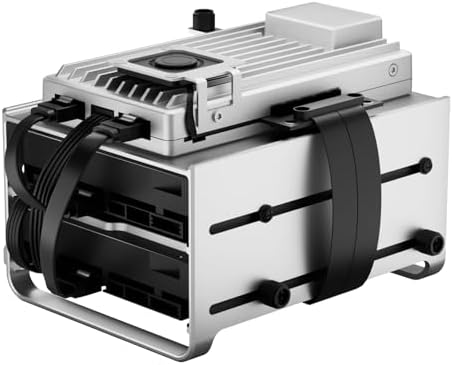
For a detailed look at this 2-bay unit, view our full Zimaboard 2 1664 analysis.
How do I choose the right mini server for my needs?
How do I choose the right mini server for my needs depends on your specific workload requirements for memory, storage, and connectivity. If you plan to run multiple virtual machines, you must prioritize RAM capacity over storage speed. If your priority is high-speed data access for a database, prioritize the NVMe interface and the number of PCIe lanes available for expansion. For remote management, ensure the listing states IPMI support so you can access the hardware even if the operating system is unresponsive.
Will a fanless mini server handle heavy loads?
Will a fanless mini server handle heavy loads depends entirely on the Processor TDP and the specific thermal limits of the chassis. Fanless designs are ideal for low-power tasks like file sharing or lightweight web hosting. If you intend to run sustained, heavy calculations, a fanless unit may experience thermal throttling, which causes the processor to slow down to prevent damage. You should check the maximum supported TDP of the server to ensure it matches your intended use case.