
Versatile 2-in-1 Laptops for Students Compared: Run ChromeOS On Versatile Flip Designs
Our Top 3 Picks for Students
The best 2-in-1 laptop for college students is the Intel Samsung Chromebook Plus V2 2-in-1 Laptop XE520QAB-K03US which holds 64GB of storage for students who need a portable device for campus use.
The picks are right below, in order. Everything after them is the reasoning, if you want it.
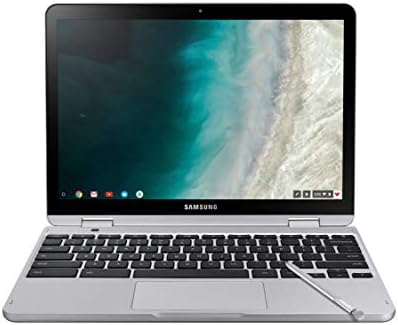
#1 – Intel Samsung Chromebook Plus V2 2-in-1 Laptop XE520QAB-K03US
Best for: students who need a portable 2-in-1 laptop with a built-in pen for note-taking.
Why the Intel Samsung Chromebook Plus V2 2-in-1 Laptop XE520QAB-K03US is our #1 pick
- Listed at $299.99 in November 2026 – entry among those compared; the price moves, so check it
- 4.3 rating from 2,207 ratings
RAM: 4GB · Storage Capacity: 64GB

#2 – Intel ASUS Chromebook Flip C434 2-in-1 Laptop
Best for: students who prefer a larger 14-inch screen and a backlit keyboard for typing-heavy assignments.
Why the Intel ASUS Chromebook Flip C434 2-in-1 Laptop is our #2 pick
- Listed at $345 in November 2026 – mid-range among those compared; the price moves, so check it
- 4.0 rating from 1,836 ratings
RAM: 4GB · Storage Capacity: 64GB

#3 – MediaTek Lenovo Chromebook Duet ZA6F0031US
Best for: students who prioritize a lightweight, tablet-first form factor for carrying between classes.
Why the MediaTek Lenovo Chromebook Duet ZA6F0031US is our #3 pick
- Listed at $259.99 in November 2026 – entry among those compared; the price moves, so check it
- 4.3 rating from 1,362 ratings
RAM: 4GB · Storage Capacity: 64GB
For a deep dive into the specs, see our full review of the Allwinner 300e.
How Extreme Spec picked: we started from the 200 most-reviewed 2-in-1 Laptop listings in our retail dataset, removed duplicates, accessories, off-category products and 2 listings whose price did not fit their specifications, and 64 qualified. The picks on this page were selected from those 64 candidates against this topic’s requirements. The order of the picks reflects fit to this topic; each shows its rating and the number of ratings behind it, so you can weigh how much to trust it. Specifications come from manufacturer listings and ratings from verified Amazon buyer reviews (data checked November 2026).
Our Verdict and How We Chose
Imagine you are heading to a crowded lecture hall and need a device that fits easily into a small bag without sacrificing the ability to type comfortably. A 2-in-1 laptop solves this by offering two distinct modes in a single chassis.
The Samsung Chromebook Plus V2 2-in-1 Laptop XE520QAB-K03US fits this need by offering a 12.2-inch display that balances portability and workspace. You might prefer the Lenovo Chromebook Duet if you want a sub-1-lb device, or the ASUS Chromebook Flip C434 2-in-1 Laptop if you prefer a 14-inch screen for split-screen multitasking.
We filtered 64 2-in-1 Laptops and compared 13 models here at Extreme Spec to find these picks. The prices range from $259.99 to $345, while the median price of the 13 products in our comparison is $499.98.
Understand the article scope to see which models are included in this guide.
Follow the buying guide to learn how to select the best device for your budget.
Use the audience checklist to find the perfect match for your specific student profile.
For a more robust business option, view the Latitude 3189 convertible review.
What This Page Concludes About 2-in-1 Laptops for Students
- Top pick: Intel Samsung Chromebook Plus V2 2-in-1 Laptop XE520QAB-K03US at $299.99 (RAM: 4GB).
- Also picked: Intel ASUS Chromebook Flip C434 2-in-1 Laptop at $345; MediaTek Lenovo Chromebook Duet ZA6F0031US at $259.99.
- We compared 13 2-in-1 Laptops, from $249.99 to $1545.25, median $499.98.
- Best buyer rating in the comparison: Intel HP Chromebook Plus x360 14b 2 in 1 Laptop at 4.4/5 from 1,356 ratings.
- Not covered by these picks: run multiple browser tabs and office apps simultaneously – it takes at least 8GB, and none of the picks reaches it. The Lenovo IdeaPad Flex 5i 14 Chromebook Plus, which we reviewed, does it at $524 (8GB, $224.01 more than our top pick).
- Cheapest in the comparison that can store a full semester of lecture recordings and PDFs: Intel Lenovo Flex 14 Convertible Laptop at $249.99 (128GB).
2-in-1 Laptops for Students Compared Side by Side
| Product | Price | Rating | RAM | Storage Capacity | Screen Resolution |
|---|---|---|---|---|---|
| Intel HP Chromebook Plus x360 14b 2 in 1 Laptop | $279.99 | 4.4 (1,356 ratings) | 8GB | 256GB | 19201080 |
| Intel Microsoft Surface Pro 7 | $1012.25 | 4.4 (1,279 ratings) | 16GB | 512 | Not stated |
| Intel Samsung Galaxy Book5 Pro 360 | $1545.25 | 4.4 (304 ratings) | Not stated | 1 TB | 2880×1800 |
| Intel Lenovo IdeaPad Flex 5i Chromebook Plus | $499.98 | 4.2 (1,325 ratings) | 8GB | 256GB | 1920×1200 |
| Lenovo IdeaPad Flex 5i 14 Chromebook Plus | $524 | 4.3 (1,292 ratings) | 8GB | 256GB | 1920×1200 |
| Intel ASUS Chromebook Flip CX1 Convertible Laptop | $299.99 | 4.4 (427 ratings) | 8GB | 128 GB | 1920×1080 |
| Intel Lenovo Flex 14 Convertible Laptop | $249.99 | 4.3 (362 ratings) | 8GB | 128GB | 1920 X 1080 |
| Intel Dell Inspiron 14 5406 2 in 1 | $699 | 4.3 (312 ratings) | 12GB 3200MHz DDR4 | 512GB SSD | 1920 x 1080 |
| AMD Dell Inspiron 13 7000 2-in-1 | $699.99 | 4.2 (306 ratings) | 8GB DDR4 | 256GB | 1920×1080 |
| Intel Microsoft Surface Pro 8 | $542 | 4.2 (305 ratings) | 16GB Memory | 256GB SSD | Not stated |
| Intel Samsung Chromebook Plus V2 2-in-1 Laptop XE520QAB-K03US | $299.99 | 4.3 (2,207 ratings) | 4GB | 64GB | Not stated |
| Intel ASUS Chromebook Flip C434 2-in-1 Laptop | $345 | 4.0 (1,836 ratings) | 4GB | 64GB | 1920×1080 |
| MediaTek Lenovo Chromebook Duet ZA6F0031US | $259.99 | 4.3 (1,362 ratings) | 4GB | 64GB | 1920 x 1200 |
Prices are approximate and move frequently – check the current price before deciding. “Not stated” means the manufacturer listing does not give that figure – we do not estimate it.
Among our top picks, the MediaTek Lenovo Chromebook Duet ZA6F0031US is the value leader because it offers 4GB of RAM for $65.00 per unit.
Each Pick for Students, Reviewed in Detail
The 3 picks below are reviewed in the same order as the cards above.
Intel Samsung Chromebook Plus V2 2-in-1 Laptop XE520QAB-K03US
The Samsung Chromebook Plus V2 2-in-1 Laptop XE520QAB-K03US provides a high value-to-performance ratio for students who need a versatile hybrid laptop for school. It balances a 4GB memory capacity with a 64GB built-in storage space and a 12.2″ display suitable for both research and note-taking.
What we like: The included built-in pen requires no charging, which simplifies the workflow for students taking handwritten notes. It features a 13 MP rear webcam with autofocus and zoom, and the 16:10 aspect ratio provides more vertical space for reading documents than standard widescreen displays.
Keep in mind: The 4GB of RAM is below the 8GB reference figure required for smooth multitasking across many browser tabs. This model is best suited for students primarily using web-based applications rather than heavy multi-tasking.
Intel ASUS Chromebook Flip C434 2-in-1 Laptop
The Intel ASUS Chromebook Flip C434 2-in-1 Laptop is a durable option for students who prioritize a larger screen for productivity. It features a 14″ touchscreen FHD display and a 360-degree hinge that allows for tablet mode, which is the ability to fold the device completely flat for handheld use.
What we like: The all-aluminum metal body provides a sturdy build, and the backlit keyboard assists with typing in low-light environments. Its 1920×1080 resolution provides clear text for writing papers and viewing lecture slides.
Keep in mind: Like the Samsung model, the 4GB of memory is below the 8GB reference figure for heavy multitasking. This device is best for students who need a larger 14″ screen but don’t require intensive local processing.
MediaTek Lenovo Chromebook Duet ZA6F0031US
The MediaTek Lenovo Chromebook Duet ZA6F0031US is a highly portable 2-in-1 laptop designed for students who need to carry a light device between classes. It features a detachable keyboard and an aluminum alloy tablet body weighing less than 1 lb.
What we like: The 10.1″ IPS display offers 1920 x 1200 resolution, and the 10-point multi-touch touchscreen supports various navigation styles. It also states 10 hours of battery life, providing enough power for a full day of lectures.
Keep in mind: The 4GB of RAM is below the 8GB reference figure for heavy multitasking. This model is best for students who prioritize portability and a tablet-first experience over a large laptop screen.
Best 2-in-1 for a budget of under $700
The MediaTek Lenovo Chromebook Duet ZA6F0031US is the most affordable option at the $259.99 mark. All three selected models fall well under the $700 limit, offering students high-quality build materials and Chrome OS functionality at a lower price point than many Windows-based hybrid PCs.
Best model for heavy video editing vs. writing papers
None of these products are suitable for heavy video editing as they all utilize 4GB of RAM, which is below the 8GB reference figure needed for professional creative software. For writing papers and general research, any of these three options are capable, but the Intel ASUS Chromebook Flip C434 2-in-1 Laptop offers a larger 14″ screen for better text visibility during long writing sessions.
Student Budget and Usage Requirements
To determine if these models meet your specific needs, check your required storage and memory requirements before you order. If you need to run multiple browser tabs and office apps simultaneously, you should look for 8GB of RAM, as these models state 4GB. If you need to store a full semester of lecture recordings and PDFs, you should look for 100GB of storage, as these models state 64GB.
You can find a complete breakdown in our review of the Lenovo Flex 5.
The Specs That Decide a Hybrid Laptop for Students
Battery Life for Full Lecture Days
Prioritize a battery life of at least 10 hours to ensure the 2-in-1 Laptop lasts through a full day of classes without needing a power outlet. The MediaTek Lenovo Chromebook Duet ZA6F0031US states 10 hours of battery life, which provides a consistent experience for long lectures. While the Intel Samsung Chromebook Plus V2 2-in-1 Laptop and Intel ASUS Chromebook Flip C434 2-in-1 Laptop do not state a specific battery duration, the median for the other 2-in-1 Laptop options we compared is 10 hours. Students using these hybrid PCs should check the specific battery life for their model to confirm it covers their daily schedule.
How a weight under 3 pounds improves hybrid laptop portability
Look for a weight under 3 pounds to ensure the device remains easy to carry between classrooms and libraries all day. The MediaTek Lenovo Chromebook Duet ZA6F0031US weighs less than 1 lb, making it a highly portable choice for students who prioritize a light load. The Intel ASUS Chromebook Flip C434 2-in-1 Laptop weighs 2.9 pounds, while the Intel Samsung Chromebook Plus V2 2-in-1 Laptop weighs 2.98 pounds. These options are significantly lighter than the Microsoft Surface Pro Series, which serves as the industry benchmark for high-end detachable form factor and screen quality.
ChromeOS app compatibility for school software on 2-in-1 laptops
Verify that your required school apps are supported on Chrome OS, the primary operating system for these picks, which allows for a streamlined and secure experience. These 2-in-1 Laptop models are designed to run web-based applications and Google Play Store apps. Because Chrome OS is less demanding than some desktop systems, it allows these devices to remain responsive during standard coursework. Students should check the Google Play Store for their specific educational tools before purchasing to confirm compatibility.
How built-in stylus latency affects note-taking on hybrid PCs
Select a model with a built-in or compatible stylus to facilitate natural handwriting and sketching during lectures. The Intel Samsung Chromebook Plus V2 2-in-1 Laptop includes a built-in pen that requires no charging, removing the need to manage extra accessories. The MediaTek Lenovo Chromebook Duet ZA6F0031US is USI pen compatible, which means it supports a stylus for input, though a pen is sold separately. The Intel ASUS Chromebook Flip C434 2-in-1 Laptop does not state a stylus included or a specific standard. A student starts a lecture by opening the device, selects a note-taking app, and uses the stylus to write directly on the touchscreen. They finish the session with digital notes synced to their account, avoiding the need for physical paper.
The Jobs Buyers Ask About, Checked Against Each Pick
Each row is a job this page’s buyers ask about, worked out from each pick’s listed storage capacity and RAM and a typical need for the job.
| What you want to do | What it takes | How each pick does |
|---|---|---|
| Store a full semester of lecture recordings and PDFs | at least 60 to 100GB | Intel Samsung Chromebook Plus V2 2-in-1 Laptop XE520QAB-K03US: only at the easier end (64GB); Intel ASUS Chromebook Flip C434 2-in-1 Laptop: only at the easier end (64GB); MediaTek Lenovo Chromebook Duet ZA6F0031US: only at the easier end (64GB) |
| Run multiple browser tabs and office apps simultaneously | at least 8GB | Intel Samsung Chromebook Plus V2 2-in-1 Laptop XE520QAB-K03US: no (4GB); Intel ASUS Chromebook Flip C434 2-in-1 Laptop: no (4GB); MediaTek Lenovo Chromebook Duet ZA6F0031US: no (4GB) |
The needs are typical figures for each job, not manufacturer claims, and each pick’s result is worked out from its listed specifications. Your own job’s figure is the one that decides.
Who Buys 2-in-1 Laptops, and What It Really Costs
Who buys a 2-in-1 Laptop, and what each one needs
- High school students — 8GB RAM (short term memory for active tasks) to run web browsers and multiple tabs simultaneously
- Art and design students — 3:2 or 16:10 aspect ratio (vertical screen space) for better layout visibility in tablet mode
- Note-taking students — 1080p resolution (baseline for text clarity) to ensure sharp text during long study sessions
- Remote learners — x86 vs ARM architecture (software compatibility) to ensure their specific school applications run correctly
- Creative media students — 1080p resolution (baseline for text clarity) to view high-definition video content without blur
What a hybrid PC really costs, and where to buy one
What to budget for on top of the hybrid PC
- Protective sleeve — prevents scratches and dents on the chassis
- Stylus pen — allows for handwriting and drawing on the screen
- External mouse — provides a more ergonomic way to navigate than a trackpad
- Extended warranty — covers mechanical issues like hinge fatigue (wear on the opening mechanism)
What you can leave out of the budget
- Docking station — most 2-in-1 laptops have enough ports for basic peripherals
- External monitor — the 3:2 or 16:10 aspect ratio provides sufficient screen real estate for most student tasks
- Premium carrying case — a basic sleeve provides the same protection for a lower cost
Where this kind of product is normally sold
- Big-box retailers — offer immediate pickup and easy in-store returns
- Online marketplaces — provide frequent bundling with accessories like mice or bags
- Manufacturer websites — offer direct shipping and specific configuration choices
- Electronics specialty stores — provide hands-on testing of the hinge and screen quality
What These Hybrid Laptops Need, and What to Check on Arrival
What you need to get started
All three hybrid laptops require a power source to charge the internal battery before you begin your first session.
- The Intel Samsung Chromebook Plus V2 2-in-1 Laptop includes a built-in pen (no charging required) for handwriting and drawing.
- The MediaTek Lenovo Chromebook Duet does not include a stylus, which you must purchase separately to use the USI pen compatible screen.
- The Intel ASUS Chromebook Flip C434 does not include a stylus.
Verifying your purchase on arrival
Warranty coverage and return periods vary by seller and country.
- Confirm the 10.1 inch IPS display on the MediaTek Lenovo Chromebook Duet is free of cracks, as the aluminum alloy tablet body is more exposed than the other models.
- Verify the 360 degree hinge on the Intel ASUS Chromebook Flip C434 moves smoothly in all four directions to ensure the 14 inch screen remains stable.
- Check that the 64GB of storage is recognized by the system to ensure you can begin downloading apps from the Google Play Store, the primary source for mobile applications.
- Inspect the 12.2″ screen on the Intel Samsung Chromebook Plus V2 2-in-1 Laptop for any dead pixels or touch responsiveness issues.
Charge the device to 100% and run a full system update before you begin your first school assignment.
Check the FAQ for answers to common questions about 2-in-1 devices.
Review the minimum requirements to ensure the laptop meets your academic needs.
View the comparison table to see the key specifications side by side.
Buying Questions About 2-in-1 Laptops for Students, Answered
How much storage do I really need for my major’s files?
The amount of storage you need for your major’s files depends on whether you prioritize local access or cloud storage, which is the primary way students manage files on these devices by saving them to remote servers. Each of the three 2-in-1 laptops we evaluated—the Samsung Chromebook Plus V2, the ASUS Chromebook Flip C434, and the Lenovo Chromebook Duet—states a 64GB storage capacity. While 64GB is enough to store a full semester of lecture recordings and PDFs at the easier end of the 60 to 100GB range, you should check if your specific major requires larger local files before you order. If your coursework requires more space, you can supplement these internal drives using cloud storage or the expandable storage on the Samsung model, which supports up to 400GB via microSD card.
Which 2-in-1 laptop is best for heavy multitasking?
The 2-in-1 laptop that is best for heavy multitasking requires at least 8GB of RAM to run multiple browser tabs and office apps simultaneously without constant page refreshing. Because the Samsung Chromebook Plus V2, the ASUS Chromebook Flip C434, and the Lenovo Chromebook Duet all state 4GB of RAM, none of these options provide enough memory for high-demand multitasking. If you need to keep dozens of tabs open at once, you should look for a hybrid PC that specifies a higher memory figure.
Is the Lenovo Chromebook Duet portable enough for classes?
The Lenovo Chromebook Duet is portable enough for classes because it weighs less than 1 lb (15.8 ounces). This makes it the lightest option among the 2-in-1 laptops we compared, weighing significantly less than the 2.9 lb Samsung and ASUS models.
Should I choose the ASUS Chromebook Flip C434 for note-taking?
If you want to choose the ASUS Chromebook Flip C434 for note-taking, you may prefer its 14-inch touchscreen FHD display which provides a larger workspace than the 10.1-inch Lenovo Duet. The ASUS model features a 360-degree hinge that allows it to function as a tablet, while the Samsung model includes a built-in pen for direct input.
See our top picks for a quick glance at the best-rated laptops.
Consult the setup and warranty notes for information on software and support.
Read the detailed reviews for an in-depth look at every individual model.
Make sure to learn how to choose your 2-in-1 display size before purchasing.
Who Should Skip These hybrid PCs
When you are multitasking between several browser tabs and office applications for a school project, the 4GB of RAM in the Samsung Chromebook Plus V2, the ASUS Chromebook Flip C434, and the Lenovo Chromebook Duet may limit your performance. Because these models each state 4GB of memory, they do not meet the 8GB RAM requirement for running multiple heavy applications simultaneously without page refreshing.
If you require a device capable of heavy multitasking or high-end video editing, these selections are the wrong tool because they do not reach the 8GB RAM threshold. You should consider a more powerful hybrid PC or a high-end detachable laptop that meets your specific performance requirements.
The other hybrid laptop guides we have published
ExtremeSpec is reader-supported: some links on this page are affiliate links, and as an Amazon Associate ExtremeSpec earns from qualifying purchases at no extra cost to you. Learn more.