
Which 2-in-1 Laptop with Touchscreen Is Best?
Our Top 3 Picks with Touchscreen
The best 2-in-1 laptop with touchscreen is the Intel Samsung Galaxy Book Flex which features a 13.3 Inches display for users who need a portable, high-quality hybrid PC.
You are not here to run a research project. You are here to find a 2-in-1 Laptop that works and get on with it – these 3 are the ones we picked.

#1 – Intel Samsung Galaxy Book Flex
Best for: users who need a portable 2-in-1 for running multiple browser tabs and office apps simultaneously.
Why the Intel Samsung Galaxy Book Flex is our #1 pick
- Listed at $1099 in November 2026 – mid-range among those compared; the price moves, so check it
- 4.4 rating from 484 ratings
RAM: 8GB · Storage Capacity: 512GB
For comparison on RAM, pick #2 states 16GB LPDDR5 and pick #3 states 16GB.

#2 – Intel ASUS ROG Flow Z13
Best for: power users who need a high-performance hybrid PC capable of running demanding software and multiple browser tabs.
Why the Intel ASUS ROG Flow Z13 is our #2 pick
- Listed at $1749.99 in November 2026 – premium among those compared; the price moves, so check it
- 4.0 rating from 332 ratings
RAM: 16GB LPDDR5 · Storage Capacity: 512GB PCIe SSD
Against the other picks on RAM, pick #1 states 8GB and pick #3 states 16GB.
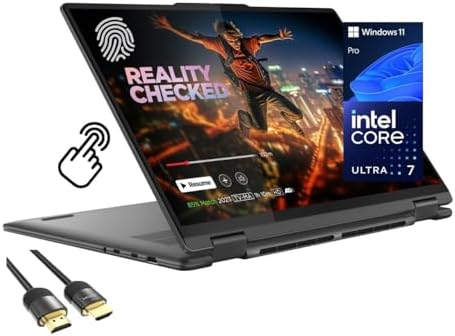
#3 – Lenovo Yoga 7i 2-in-1 Laptop
Best for: productivity-focused users who need a large 16-inch screen and high-capacity storage for multitasking.
Why the Lenovo Yoga 7i 2-in-1 Laptop is our #3 pick
- Listed at $1199.99 in November 2026 – premium among those compared; the price moves, so check it
- 4.6 rating from 230 ratings
RAM: 16GB · Storage Capacity: 2TB
To put that RAM in context, pick #1 states 8GB and pick #2 states 16GB LPDDR5.
Take a look at how the Lenovo Flex 5 performs in our detailed analysis.
How Extreme Spec picked: we started from the 200 most-reviewed 2-in-1 Laptop listings in our retail dataset, removed duplicates, accessories, off-category products and 2 listings whose price did not fit their specifications, and 64 qualified. The picks on this page were selected from those 64 candidates against this topic’s requirements. The order of the picks reflects fit to this topic; each shows its rating and the number of ratings behind it, so you can weigh how much to trust it. Specifications come from manufacturer listings and ratings from verified Amazon buyer reviews (data checked November 2026).
Our Pick and How the List Was Built
If you are a student or professional who needs to take notes in a lecture or meeting, the ability to quickly flip the screen into a tablet mode is more important than raw processing power.
The Intel Samsung Galaxy Book Flex fits this workflow by including a Bluetooth-enabled S Pen for immediate note-taking. You might prefer the Intel ASUS ROG Flow Z13 for its 16:10 aspect ratio or the Lenovo Yoga 7i 2-in-1 Laptop for its 16GB of RAM and large workspace.
We selected these models after screening 64 2-in-1 Laptops and comparing 10 options here at Extreme Spec. These picks range from $1099 to $1749.99, while the median price of the 10 products in our comparison is $699.50.
See exactly what models are included in the scope of this roundup.
Check the essential hardware and minimum requirements for a smooth experience.
View our curated list of the top picks for every budget.
Hybrid Laptops with Touchscreen in Brief, Before You Read the Rest
- Top pick: Intel Samsung Galaxy Book Flex at $1099 (RAM: 8GB).
- Also picked: Intel ASUS ROG Flow Z13 at $1749.99; Lenovo Yoga 7i 2-in-1 Laptop at $1199.99.
- We compared 10 2-in-1 Laptops, from $529.99 to $1749.99, median $699.50.
- Best buyer rating in the comparison: Lenovo Yoga 7i 2-in-1 Laptop at 4.6/5 from 230 ratings.
- Cheapest in the comparison that can run multiple browser tabs and office apps simultaneously: Intel Lenovo Yoga C740 2-in-1 at $529.99 (8GB).
Hybrid Laptops with Touchscreen Compared Side by Side
| Product | Price | Rating | RAM | Storage Capacity | Screen Resolution |
|---|---|---|---|---|---|
| Intel Samsung Galaxy Book Flex | $1099 | 4.4 (484 ratings) | 8GB | 512GB | Not stated |
| Intel ASUS ROG Flow Z13 | $1749.99 | 4.0 (332 ratings) | 16GB LPDDR5 | 512GB PCIe SSD | 1920×1200 |
| Lenovo Yoga 7i 2-in-1 Laptop | $1199.99 | 4.6 (230 ratings) | 16GB | 2TB | 1920 x 1200 |
| Intel Dell Inspiron 14 5406 2 in 1 | $699 | 4.3 (312 ratings) | 12GB 3200MHz DDR4 | 512GB SSD | 1920 x 1080 |
| AMD Dell Inspiron 13 7000 2-in-1 | $699.99 | 4.2 (306 ratings) | 8GB DDR4 | 256GB | 1920×1080 |
| Intel Microsoft Surface Pro 8 | $542 | 4.2 (305 ratings) | 16GB Memory | 256GB SSD | Not stated |
| Intel Lenovo Yoga C740 2-in-1 | $529.99 | 4.3 (254 ratings) | 8GB | 256GB | 1080p |
| NVIDIA Lenovo Yoga 7i 2-in-1 Laptop | $1299 | 4.3 (217 ratings) | 24GB | 1TB | 1920 x 1080 |
| AMD Lenovo Flex 5 14 81X20005US | $673 | 4.4 (7,042 ratings) | 16GB | 256GB | 1920 x 1080 |
| AMD Lenovo Flex 14 81SS0005US | $569.99 | 4.3 (3,862 ratings) | 12GB | 256GB | 1920 x 1080 |
Prices are approximate and move frequently – check the current price before deciding. “Not stated” means the manufacturer listing does not give that figure – we do not estimate it.
Among our top picks, the Lenovo Yoga 7i 2-in-1 Laptop is the value leader because it provides 16GB of RAM for $75.00 per unit.
Each Pick with Touchscreen, Examined One by One
The 3 picks below are reviewed in the same order as the cards above.
Intel Samsung Galaxy Book Flex
The Samsung Galaxy Book Flex made this list as a premium flagship 2-in-1 laptop that offers a high-quality QLED touchscreen and a 20-hour battery life for versatile use.
What we like: The QLED touchscreen provides 100% color volume for accurate visuals, while the 8GB of RAM meets the requirement for running multiple browser tabs and office apps simultaneously. It includes a Bluetooth-enabled S Pen and a backlit keyboard for improved usability in different modes.
Keep in mind: With 8GB of RAM, this model is suited for standard productivity rather than heavy video editing or high-end gaming.
Intel ASUS ROG Flow Z13
The ASUS ROG Flow Z13 was selected for its high-performance gaming capabilities and its unique tablet form factor equipped with dedicated graphics.
What we like: It features an NVIDIA GeForce RTX 3050 GPU and 16GB LPDDR5 RAM, which provide the power needed for intensive tasks. The 120Hz refresh rate—the rate at which the screen updates to ensure smooth touchscreen interaction—and a 16:10 aspect ratio offer a fluid and spacious viewing experience.
Keep in mind: The 56WHrs battery capacity may limit usage time when the GPU is under heavy load during gaming.
Lenovo Yoga 7i 2-in-1 Laptop
The Lenovo Yoga 7i 2-in-1 Laptop is our high-capacity productivity pick, offering a large screen and significant internal storage.
What we like: This model provides a 16-inch display and a massive 2TB of storage for large files. Its 16GB of RAM and Intel Core Ultra 7 155U processor provide the memory and processing power required for heavy multitasking compared to just watching movies.
Keep in mind: The 16-inch size makes it less portable than the 13-inch alternatives on this list.
Learn how to make the right choice by visiting the buying guide.
Consider exploring the alternatives to a 2-in-1 laptop if these models do not fit your needs.
How to Choose a 2-in-1 Laptop with Touchscreen
How high refresh rates affect 2-in-1 laptop touch sensitivity
Prioritize a high refresh rate for smoother motion, though you should expect a price increase of several hundred dollars to move from standard displays to high-performance screens like the 120Hz panel on the Intel ASUS ROG Flow Z13. Does a faster refresh rate matter for your workflow? For most users, the 120Hz rate provides a smoother visual experience than the standard panels found on other 2-in-1 laptops, but the 1920×1200 resolution on the Flow Z13 provides the baseline clarity needed for crisp text. We found that the Intel ASUS ROG Flow Z13 set these apart here by offering a high-frequency response that is often reserved for gaming hardware.
How a 16:10 aspect ratio provides more vertical screen space
Look for a 16:10 aspect ratio to gain more vertical screen real estate, which helps when viewing documents or editing timelines in tablet mode. Both the Intel ASUS ROG Flow Z13 and the Lenovo Yoga 7i 2-in-1 Laptop feature this 16:10 ratio, providing more height than the standard 16:9 format. While the Intel Samsung Galaxy Book Flex does not state a specific ratio, the 16:10 standard on the other two models provides a more productive workspace for professional tasks.
How stylus pressure levels enable varied line thickness for drawing
Ensure the device supports an Active Pen, which is a specialized stylus that uses pressure sensitivity to allow for varied line thickness in drawing and note-taking. The Intel Samsung Galaxy Book Flex includes a Bluetooth-enabled S Pen, and the Intel ASUS ROG Flow Z13 supports active stylus input for precision work. While the Lenovo Yoga 7i 2-in-1 Laptop does not state its specific pressure level or stylus support, an Active Pen is the standard for those needing to replace a traditional pen’s feel in a digital workspace.
How 360-degree hinge engineering ensures 2-in-1 laptop durability
Weight your choice based on the hinge engineering, as the Lenovo Yoga 9i Series serves as the industry standard for premium 360-degree hinge durability and build materials. The Lenovo Yoga 7i 2-in-1 Laptop utilizes a 360 flip-and-fold design to transition between laptop, tablet, tent, and stand modes. While the Intel Samsung Galaxy Book Flex and the Intel ASUS ROG Flow Z13 also offer 360-degree functionality, the Yoga 7i 2-in-1 Laptop is built on a platform designed to withstand repeated folding cycles.
How 100% sRGB color gamut ensures accurate touchscreen images
Check for a high color gamut to ensure images look vibrant and accurate, such as the 100% sRGB coverage found on the Intel ASUS ROG Flow Z13. The Intel Samsung Galaxy Book Flex also features 100% color volume on its QLED touchscreen, which provides a wide range of hues for media consumption. For those needing professional-grade accuracy, the Flow Z13 includes PANTONE Validated status, a certification that ensures the colors on the screen match industry standards for print and digital media.
Compare the technical specifications side by side in the comparison table.
Find the perfect match for your needs in the audience checklist.
What Each Job Calls For vs What These Picks State
Match the job you actually need done to the figure it calls for, then check which picks state that figure or more. Where none do, the row says so.
| What you want to do | The figure it calls for | Picks at or above it |
|---|---|---|
| Use a touchscreen for drawing or note-taking | Active stylus support | Galaxy Book Flex, ROG Flow Z13 |
| Switch between laptop and tablet modes | 360-degree hinge | Galaxy Book Flex, Yoga 7i 2-in-1 Laptop |
| Play high-end games on a portable hybrid | Dedicated GPU | ROG Flow Z13 |
These figures are the levels this category is generally held to, not manufacturer claims. A pick at or above a figure states that number; how it reaches it and the rest of your setup still decide the job, so check them against your own workload before buying.
Who Buys Hybrid Laptops, and What It Really Costs
Who buys a hybrid PC, and what each one needs
- Graphic design students — 3:2 or 16:10 aspect ratio for more vertical workspace
- Real estate agents — 1080p resolution for clear image viewing on the go
- Digital illustrators — a high-quality digitizer layer to prevent ghost touching
- Corporate executives — 8GB RAM to handle multiple browser tabs and apps
- Remote project managers — a 360-degree hinge for switching between typing and viewing
What a 2-in-1 Laptop really costs, and where to buy one
What to budget for on top of the 2-in-1 Laptop
- Protective sleeve — prevents scratches on the screen and chassis
- Stylus pen — allows for precise input on the touchscreen
- External docking station — connects multiple monitors and peripherals
- Extended warranty — covers mechanical issues like hinge fatigue
What you can leave out of the budget
- External mouse — the touchscreen and trackpad handle most navigation
- Dedicated cooling pad — the internal system manages heat through the chassis
- Memory upgrade — most 2-in-1 models have soldered memory that cannot be changed
Where this kind of product is normally sold
- Big-box electronics retailers — offer immediate pickup and standard return windows
- Manufacturer websites — provide direct warranty handling and custom configurations
- Online marketplaces — offer competitive pricing and frequent bundled accessories
- Business technology resellers — provide bulk purchasing options and corporate support
Review the necessary setup and warranty notes before you buy.
Dive deeper into the specifics with the detailed reviews of each model.
Find quick answers to common concerns in the FAQ.
Getting Started with Any of These Picks
Pre-purchase requirements for your 2-in-1 laptop
You need a standard power outlet and a compatible power adapter to maintain battery life during use.
- The Intel Samsung Galaxy Book Flex includes a Bluetooth-enabled S Pen for precise drawing and handwriting input, so you do not need to purchase one separately.
- The Intel ASUS ROG Flow Z13 supports an active stylus, but the data does not state if one is included in the box.
- The Lenovo Yoga 7i 2-in-1 Laptop does not state if a stylus is included, meaning you may need to purchase one separately.
Verifying your hybrid PC upon arrival
Warranty coverage and return policies vary by seller and country.
- Check the screen for any cracks or dead pixels; the 13.3-inch and 16-inch displays are high-value components that are difficult to repair.
- Verify the touchscreen responsiveness and stylus input; you should run a basic drawing test to ensure the digitizer layers are calibrated.
- Confirm the battery capacity and charging status; the 56WHrs on the ASUS ROG Flow Z13 or the 20-hour rated life on the Samsung Galaxy Book Flex should be verifiable via the system’s power settings.
- Install the necessary driver updates to ensure touch and stylus compatibility with the Windows operating system.
Perform a full system update and a 15-minute stress test of the hinge mechanism as soon as you unbox the device.
What Buyers Still Want to Know About hybrid PCs with Touchscreen
Is the hinge design 360-degree or is it a detachable tablet?
The 2-in-1 laptop form factor is split between 360-degree hinges and detachable designs. A 360-degree hinge allows the screen to fold completely around the keyboard, while a detachable design separates the screen from the base entirely. The Lenovo Yoga 7i 2-in-1 Laptop and the Intel Samsung Galaxy Book Flex both state a 360 flip-and-fold design, whereas the Intel ASUS ROG Flow Z13 is a tablet form factor.
Why does the battery life drop so much when the screen brightness is turned up?
Battery life drops when screen brightness is increased because the display backlight requires more power to illuminate the pixels. For example, the Intel Samsung Galaxy Book Flex states a battery life of up to 20 hours, though this figure may vary based on the QLED touchscreen’s brightness settings. A high-brightness screen is like a lightbulb in a room: the brighter it shines, the faster it drains the power source.
Which 2-in-1 laptop should I buy for heavy multitasking?
If you need a 2-in-1 laptop for heavy multitasking, the Lenovo Yoga 7i 2-in-1 Laptop with 16GB of RAM is a strong choice for the $1199.99 price point. The Intel ASUS ROG Flow Z13 also offers 16GB LPDDR5 RAM to handle demanding workloads efficiently.
Which touchscreen laptop is suitable for digital painting?
The touchscreen laptop suitable for digital painting depends on your need for a stylus and screen real estate. The Intel Samsung Galaxy Book Flex includes a Bluetooth-enabled S Pen, while the Intel ASUS ROG Flow Z13 supports an active stylus and features a 120Hz refresh rate for smoother strokes.
Who Should Skip These 2-in-1 Laptops
The Intel ASUS ROG Flow Z13 includes 16GB LPDDR5 RAM and an NVIDIA GeForce RTX 3050 GPU. The 16GB of memory allows for more demanding multitasking and heavier applications than the 8GB standard. Because this model uses a tablet form factor with a 13.4-inch 16:10 display, it prioritizes high-performance mobile computing. The RTX 3050 GPU enables gaming and creative tasks that standard integrated graphics cannot handle. You can run several demanding applications at once because the 16GB of memory provides a larger buffer for active processes.
If you require a device for professional-grade 4K video production or high-end 3D modeling, these three picks do not meet those demands. These models are designed for mobile productivity and general use rather than sustained, high-heat workstation tasks that require dedicated cooling and higher-tier hardware.
If you need a high-performance workstation that exceeds these specifications, you should look for a dedicated gaming laptop or a mobile workstation with a dedicated cooling system. For those seeking a more portable experience for creative work, see the best 2-in-1 laptop for drawing under $1200.
The rest of our 2-in-1 Laptop guides
ExtremeSpec is reader-supported: some links on this page are affiliate links, and as an Amazon Associate ExtremeSpec earns from qualifying purchases at no extra cost to you. Learn more.