Why local AI matters for privacy and hardware control
ExtremeSpec is reader-supported: some links on this page are affiliate links, and as an Amazon Associate ExtremeSpec earns from qualifying purchases at no extra cost to you. Learn more.
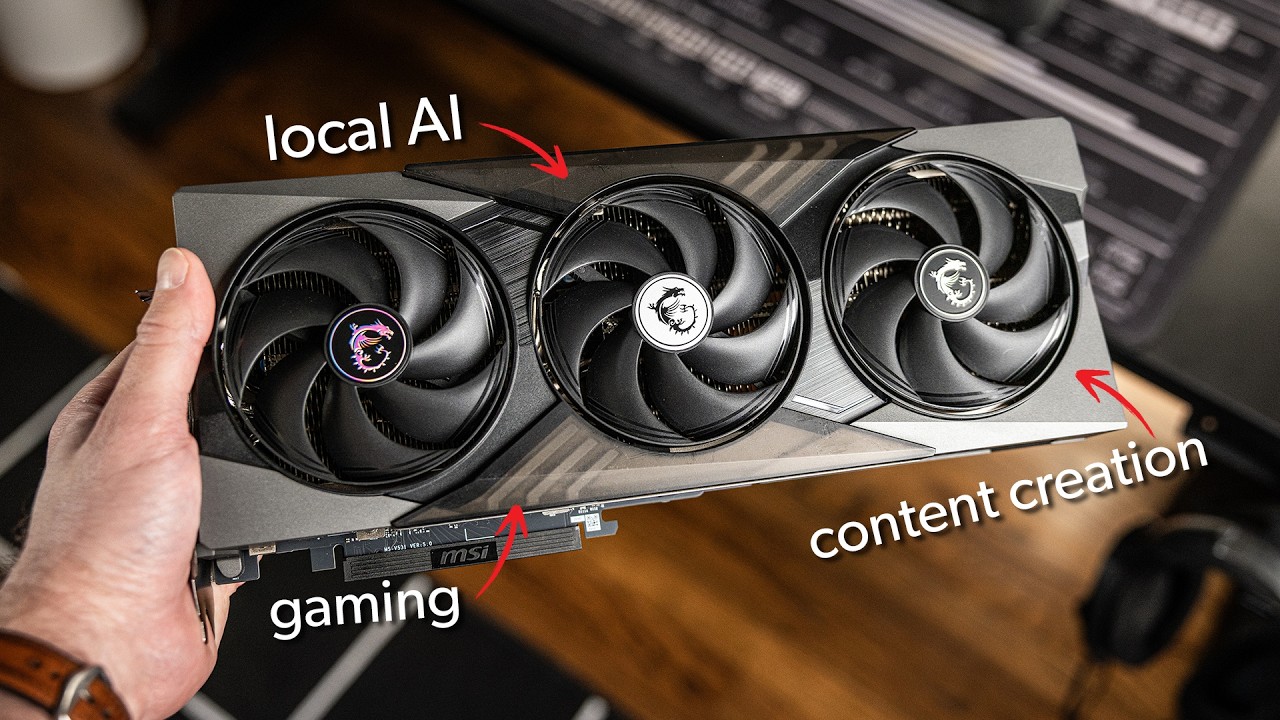
Local AI provides complete data privacy and hardware control for complex tasks when utilizing a GPU with 16GB of VRAM, as argued by the PCWorld host. The benefits of this local approach diminish if the hardware lacks sufficient VRAM to handle the model’s complexity. Privacy-conscious users and high-volume AI users should act on this.
Who should act on local AI and who can skip it
Readers who should act on local AI
- Privacy-conscious users should adopt local AI to ensure sensitive information never leaves their personal system.
- High-volume AI users should switch to local hardware to eliminate recurring per-token costs associated with cloud providers.
- PC hardware enthusiasts should prioritize GPUs with high VRAM to leverage tensor cores for local LLM workloads.
- Researchers and data analysts should set up local systems to conduct specialized projects like podcast research or sports betting data crunching.
Readers who should skip local AI
- General consumers looking for a simple chat app should stick to cloud-based solutions for ease of use and immediate access.
- Mobile-only users should continue using mobile-optimized AI applications rather than investing in PC hardware.
What to do next about local AI
- Identify a specific project, such as podcast research or sports betting data, to define the specific model requirements.
- Check for a GPU with 16GB of VRAM to ensure the system can handle complex tasks without hitting a memory ceiling.
- Download the LM studio application to provide the primary interface for downloading and running large language models.
- Install the MSI Zone Lucky Claw agent to automate and execute specific tasks using the local model.
Local AI provides privacy, performance, and hardware control over cloud-based solutions
Local AI provides three core advantages over traditional cloud-based solutions: privacy, performance, and hardware control. Because data remains on the local machine, users can process sensitive information without the risk of third-party exposure. Performance has also improved as local models become more efficient, allowing for faster inference on modern hardware. Finally, local setups grant users total control over the hardware configuration and the model outputs, preventing the inconsistencies that occur when cloud providers change their back-end models.
Why would a user risk their data in a cloud environment? Most cloud-based solutions lack the privacy controls of a local machine because data is transmitted to and stored on external servers. This lack of control means the user loses oversight of how their information is utilized or stored once it leaves their system.
The hidden costs and limitations of cloud-based AI
Cloud-based solutions rely on a variable cost structure where usage is measured in tokens. Every request generated costs money, which can become expensive for users who require frequent or high-volume AI interactions. This contrasts with local AI, which requires a fixed upfront investment in hardware but allows for unlimited local generation without per-token charges.
Control remains a significant limitation of the cloud. Because users do not own the hardware, they cannot guarantee consistent outputs or prevent the cloud provider from updating the underlying model. Local AI offers a hedge against these changes by keeping the entire pipeline—from hardware to model—within the user’s direct control.
The GPU is the main component for running local AI
The GPU is the main component for running local AI. These systems rely on tensor cores, which are specific hardware components designed to accelerate AI workloads. These cores measure performance in TOPS (trillions of operations per second), allowing the hardware to process complex mathematical operations much faster than a standard CPU or NPU.
What are tensor cores?
Tensor cores are specialized hardware circuits inside a GPU designed to accelerate the matrix mathematics used in AI. They allow the GPU to perform trillions of operations per second (TOPS) specifically for neural networks. These cores are the reason GPUs are the preferred hardware for local AI over standard CPUs.
What are TOPS?
TOPS is a measurement of trillions of operations per second. It quantifies the speed at which a processor, like a GPU with tensor cores, can execute the heavy math required for AI. Higher TOPS values generally indicate a faster ability to process AI-related workloads.
Inside the GPU, VRAM is king. The amount of VRAM determines how complex of a task the system can handle because the model must fit within the dedicated video memory. While 12GB of VRAM, such as that found in the RTX 5070, serves as a starting point, 16GB of VRAM, as seen in the RTX 5070 Ti, is the identified sweet spot for complex tasks. The 16GB model provides a 4GB buffer over the 12GB starting point, which allows the system to handle larger and more intricate models.
What is VRAM?
VRAM is the dedicated video memory located on a GPU. It stores the data required for the GPU to process images, videos, and AI models. Having more VRAM allows a computer to run larger and more complex AI models without crashing or slowing down.
Practical use cases for local AI systems
Identifying a specific project is the best way to begin using local AI. For example, the host used a local system to perform deeper research for their podcast content. Similarly, the host’s coworker, Brad Charcas, set up a local system to crunch large numbers to make better-informed decisions for sports betting. These examples demonstrate how local AI can be tailored to specific, data-intensive projects that require high levels of privacy and heavy computational power.
LM studio and MSI Zone Lucky Claw provide local interfaces for large language models
Users can begin by downloading the LM studio application to provide a local interface for running large language models. For those who want to go beyond simple chat, an agent like the MSI Zone Lucky Claw can be used to automate and execute specific tasks through LM studio. This software combination allows users to turn a standard gaming PC into a production-ready local AI workstation.
Local AI and Cloud AI privacy, cost structure, hardware control, and model consistency compared
| Feature | Local AI | Cloud AI |
|---|---|---|
| Privacy | High (Local Only) | Lower (Shared Cloud) |
| Cost Structure | Fixed Hardware Cost | Variable Per-Token Cost |
| Hardware Control | Total Control | No Control |
| Model Consistency | Fixed/Stable | Variable/Dynamic |
By moving to local AI, users trade the convenience of a managed service for the autonomy of a self-hosted system. This transition is particularly beneficial for professionals who need to process sensitive data or for enthusiasts who want to maximize the utility of their high-end GPUs.
How to implement a local AI system
Setting up a local AI environment requires a shift from software-only thinking to hardware-centric planning. Users should first define their project to determine if their current hardware can meet the VRAM requirements. Once the hardware is secured, installing a front-end like LM studio provides the necessary tools to interact with the models.
This transition from ‘Software as a Service’ to ‘Hardware as a Foundation’ ensures that the user owns the means of production. For many, this provides a vital hedge against changes in cloud provider terms or the degradation of model quality over time. If you have a GPU with 16GB of VRAM, you already own the most important component for a high-performing local setup.
A sports betting enthusiast uses a 16GB VRAM GPU to analyze betting data
Suppose Brad, a sports betting enthusiast, wants to analyze complex betting data without paying for cloud tokens or sharing his personal data with a third party. Brad identifies his specific project, selects a GPU with 16GB of VRAM, and installs the LM studio application to crunch the numbers locally. Brad successfully performs his analysis with full privacy and no ongoing per-token costs. If Brad had instead chosen a GPU with only 12GB of VRAM, he would have been limited to much smaller, less complex models, potentially failing to process the large datasets required for his sports betting decisions.
MSI and the MSI Zone Lucky Claw developer have not confirmed price or benchmarks
- MSI has not announced the official retail price for the RTX 5070 Ti.
- The developer of the MSI Zone Lucky Claw has not released specific performance benchmarks for the tool.
Frequently Asked Questions
Why should I run local AI instead of using a cloud-based system?
Running local AI provides three main benefits: privacy where data stays on your machine, improved performance through local model optimization, and total control over the hardware and model outputs. It is the ideal choice for users who want to avoid per-token costs and maintain data sovereignty.
What GPU hardware is required for local AI?
The GPU is the primary hardware component because it contains tensor cores that accelerate AI workloads. While 12GB of VRAM is a starting point, 16GB of VRAM is the sweet spot for running complex tasks and larger models.
How much does it cost to use cloud AI?
Cloud AI workloads are measured in tokens, which means you pay for the amount of data the model processes. This creates a variable cost that can scale quickly with high-volume usage, unlike the fixed cost of local hardware.
How do I start running local AI on my PC?
To start running local AI, you should first pick a specific project to define your requirements. Then, download the LM studio application to run the large language model and use an agent like MSI Zone Lucky Claw to automate specific tasks.
Reported from Why local AI matters, published by PCWorld.