
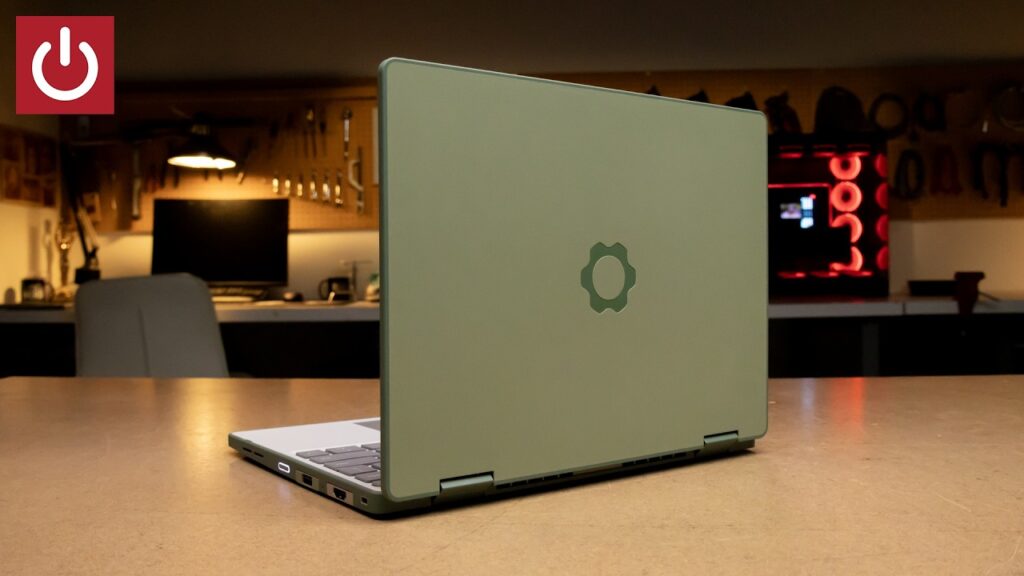
The Framework Laptop 12 starts at $699 and features a 12-inch 360-degree rotating touchscreen for versatile use. This modular design introduces a “modularity tax” where repairability and port flexibility come at the cost of the extreme battery life found in closed systems. The Framework Laptop 12 suits parents and Linux beginners who prioritize repairable electronics, while professional editors and hardcore gamers should skip this model.
Is the Framework Laptop 12 the right choice for you?
Readers who should buy the Framework Laptop 12
- Parents of school-aged children should pick the Framework Laptop 12 because its durable plastic chassis and repairable parts turn accidental damage into a teachable moment.
- Linux beginners should buy the Framework Laptop 12 as it comes with Fedora pre-installed and uses Plasma Discover for easy app management.
- DIY hardware enthusiasts should choose the Framework Laptop 12 to utilize the expansion card system and QR-coded repair guides.
- Budget-conscious students should opt for the Framework Laptop 12 which provides a functional, repairable laptop at a $699 price point.
Readers who should skip the Framework Laptop 12
- Professional video editors should skip the Framework Laptop 12 and look at high-performance workstations for better thermal management.
- Hardcore gamers should skip the Framework Laptop 12 and choose laptops with higher-wattage dedicated cooling.
What to do next about the Framework Laptop 12
- Check the nominal fee for each expansion card to determine daily port requirements.
- Verify UC 2.0 compatibility for your preferred active stylus before purchase.
- Select a color scheme from the Sage, Lavender, or Bubble Gum options.
- Test Fedora’s Plasma Discover for app installation to confirm your Linux workflow.
The Framework Laptop 12 provides a modular 2-in-1 design for Linux
The Framework Laptop 12 features an Intel Core Series 3 processor, 32GB of RAM, and a 12-inch 360-degree rotating touchscreen. The chassis is constructed from a thick plastic material to survive “twists and tumbles” from younger users. Users can choose from five color schemes, including Sage, Lavender, and Bubble Gum.
The Framework Laptop 12 serves as a pedagogical tool for children to learn hardware repair. By making the internals accessible, the device shifts the focus from disposable consumption to long-term ownership and technical literacy. This approach turns a potential catastrophe into a teachable moment for young learners.
Repairability and modularity define the Framework Laptop 12
Assessment of the Framework Laptop 12 focuses on its repairability, modularity, and port flexibility. The testing also prioritizes thermal management (fan noise), battery endurance, and Linux compatibility. These criteria ensure the device functions as a long-term tool rather than a disposable commodity.
Performance trade-offs and the modularity tax
The Framework Laptop 12 handles standard work and play tasks with ease thanks to the generous 32GB of RAM. However, heavy-duty multitasking or gaming causes the fans to spin up quickly and the system to struggle. This performance ceiling is a “modularity tax” where the physical space required for repairability limits the thermal overhead available for high-power components.
Battery endurance for the Framework Laptop 12 remains a point of friction. The device failed to last eight hours while streaming a YouTube video at 70% brightness, which is less than the endurance offered by a MacBook. The design choice of a thick plastic chassis and 360-degree hinge allows the device to survive physical impacts, but this physical volume restricts the battery density available for long-term use.
The expansion card system and port logic
The expansion card slot system allows users to hot-swap and mix-and-match four ports based on daily needs. Thunderbolt 4 speeds are specifically limited to the rear two ports on the Intel Core Series 3 model. Users can carry only the ports they need for the day, reducing cable clutter and weight.
What is Thunderbolt 4?
Thunderbolt 4 is a high-speed hardware interface standard for data, video, and power. It allows for high-bandwidth connections to external displays and storage. For the Framework Laptop 12, this standard is only available on specific rear slots.
Linux workflow on the Framework Laptop 12 starts immediately with Fedora pre-installed. Plasma Discover provides a simple way to find and install new applications right from the start menu. Creative users can also utilize the 12-inch touchscreen with any UC 2.0 compatible active stylus.
What is UC 2.0?
UC 2.0 is a hardware standard for active styluses. It allows the laptop to recognize pressure and tilt from a stylus for drawing and note-taking. This standard ensures the Framework Laptop 12 works with a wide range of compatible pens.
Repairability as a core design philosophy
The Framework Laptop 12 includes a physical screwdriver in the box to facilitate immediate hardware changes. Every internal component, from the motherboard to the display bezel, features a nearby QR code that links to step-by-step repair guides. This system allows users to order a replacement part and perform the repair themselves at a fraction of the cost of a new device.
Pricing and comparison to the market
The Framework Laptop 12 starts at a $699 price point for the pre-built model, which is $100 cheaper than the previous generation. Users wanting to save money can choose the DIY edition for $549, though this requires purchasing RAM, storage, and an OS separately.
How the Framework Laptop 12 differs from the DIY edition
- Pre-built Model
- Starts at $699 and includes RAM, storage, and Fedora.
- DIY Edition
- Starts at $549 and requires the user to provide their own RAM, storage, and operating system.
Comparison to MacBook and Dell XPS 13
- Framework Laptop 12
- Offers high repairability, a 360-degree hinge, and a modular expansion card system.
- MacBook
- Provides a closed system with superior battery endurance and thermal management.
- Dell XPS 13
- Offers a thin and light design as a point of comparison for build and portability.
Choosing the Framework Laptop 12 over a MacBook means sacrificing battery endurance for a device you can fix. Choosing the DIY edition over the pre-built model means spending more time on configuration for a $100 savings.
Still unconfirmed details for the Framework Laptop 12
- Framework has not announced the specific release date for the 2026 model.
- Framework has not specified the official warranty terms for the new 12-inch chassis.
The official release date has not been confirmed by Framework; readers should check the official website for the latest shipping schedule. Warranty terms for the 2026 model have not been established; users should verify the specific coverage for the 12-inch model before purchasing.
A high school student chooses the Framework Laptop 12 for its repairability
Leo is a high school student who wants a laptop he can fix himself while learning Linux. He looks at the Framework Laptop 12 and identifies the $699 pre-built price point and the pre-installed Fedora environment. Because Leo wants to avoid the complexity of sourcing his own hardware, he chooses the pre-built model over the $549 DIY version.
Leo’s decision would flip if he needed to perform professional 4K video editing every day. In that scenario, the fan noise and battery limitations of the Framework Laptop 12 would make a MacBook a more suitable choice for his workflow.
The Framework Laptop 12 succeeds as a gateway to Linux by prioritizing the ability to repair and understand hardware over the raw power of a locked system.
Frequently Asked Questions
Is the Framework Laptop 12 good for heavy gaming?
The Framework Laptop 12 is not ideal for heavy-duty gaming as the fans quickly spin up and the device can struggle with heavy multitasking. Users seeking high-performance gaming should look at dedicated gaming laptops.
How long does the battery last?
The Framework Laptop 12 did not last eight hours when streaming a YouTube video in full screen at 70% brightness. Users may achieve better results by lowering the brightness or optimizing power settings in Fedora.
Does it work with my existing stylus?
The Framework Laptop 12 works with any UC 2.0 compatible active stylus. Framework also offers a matching stylus in various color schemes for approximately $59.
How do I fix it if it breaks?
The Framework Laptop 12 can be fixed using the included screwdriver and the step-by-step guides found via the QR codes on each part. Users can order specific replacement parts directly from Framework for most components.
What happens if I do heavy multitasking?
The Framework Laptop 12 will experience increased fan noise and may struggle with very heavy-duty multitasking. This is a result of the thermal limitations inherent in the modular design.
How easy is it to upgrade the RAM?
The Framework Laptop 12 is designed to be entirely user repairable and upgradeable with the included screwdriver. Users can swap modules to increase capacity as their needs change.
Can I get Thunderbolt 4 on all ports?
The Framework Laptop 12 provides Thunderbolt 4 speeds only on the rear two ports. The front ports do not support these speeds on the Intel Core Series 3 model.
How long is the release window?
Framework has not announced a specific release date for the 2026 model yet. Readers should check the official Framework website for the latest availability updates.
Based on PCWorld’s The new Framework 12 is the perfect first Linux laptop.