
Choosing the Best 2-in-1 Laptop for Home Use: Support 360-Degree Hinges for Versatile Daily Tasks
Our Top 3 Picks for Home Use
The best 2-in-1 laptop for home use is the Intel Lenovo Flex 14 Convertible Laptop because its 128GB storage capacity provides enough space for a full year of high-resolution photos for home users.
Most 2-in-1 Laptop options look identical on a listing page. These 3 are the ones that differ where it actually matters.
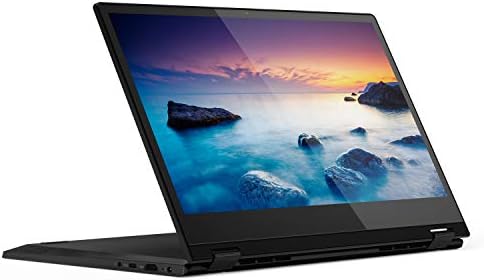
#1 – Intel Lenovo Flex 14 Convertible Laptop
Best for: home users needing a budget-friendly hybrid PC to store a full year of high-resolution photos.
Why the Intel Lenovo Flex 14 Convertible Laptop is our #1 pick
- Listed at $249.99 in November 2026 – entry among those compared; the price moves, so check it
- 4.3 rating from 362 ratings
RAM: 8GB · Storage Capacity: 128GB
Against the other picks on RAM, pick #2 states 12GB 3200MHz DDR4 and pick #3 states 16GB.

#2 – Intel Dell Inspiron 14 5406 2 in 1
Best for: households requiring a mid-range convertible laptop with ample storage for 4K video clips.
Why the Intel Dell Inspiron 14 5406 2 in 1 is our #2 pick
- Listed at $699 in November 2026 – mid-range among those compared; the price moves, so check it
- 4.3 rating from 312 ratings
RAM: 12GB 3200MHz DDR4 · Storage Capacity: 512GB SSD
To put that RAM in context, pick #1 states 8GB and pick #3 states 16GB.

#3 – Lenovo Yoga 7i Ultra 7 256V
Best for: power users seeking a premium 2-in-1 laptop with a 16-inch screen for heavy multitasking.
Why the Lenovo Yoga 7i Ultra 7 256V is our #3 pick
- Listed at $1165.99 in November 2026 – premium among those compared; the price moves, so check it
- 4.5 rating from 4,657 ratings
RAM: 16GB · Storage Capacity: 1 TB
For comparison on RAM, pick #1 states 8GB and pick #2 states 12GB 3200MHz DDR4.
You might also consider exploring the alternatives to a 2-in-1 laptop if your needs differ.
How Extreme Spec picked: we started from the 200 most-reviewed 2-in-1 Laptop listings in our retail dataset, removed duplicates, accessories, off-category products and 2 listings whose price did not fit their specifications, and 64 qualified. The picks on this page were selected from those 64 candidates against this topic’s requirements. The order of the picks reflects fit to this topic; each shows its rating and the number of ratings behind it, so you can weigh how much to trust it. Specifications come from manufacturer listings and ratings from verified Amazon buyer reviews (data checked November 2026).
The Verdict, and the Basis for It
When you need a device that handles both a child’s schoolwork and your own personal organization, the laptop must offer reliable performance without a complex learning curve.
The Lenovo Flex 14 Convertible Laptop is a practical fit for this home environment because it runs on Windows 10. For users who need the highest performance for creative work, the Lenovo Yoga 7i Ultra 7 256V is the better choice, while the Dell Inspiron 14 5406 2 in 1 offers a balanced middle ground with 12GB of RAM.
We selected these options by screening 64 2-in-1 laptops and comparing 10 models here at Extreme Spec. These picks span a range from $249.99 to $1165.99, with a median price of $636.50.
Use the audience checklist to find the perfect match based on your specific lifestyle and needs.
View our top picks for a quick glance at the best 2-in-1 laptops ranked by performance.
Consult the buying guide to learn the key criteria that determine which device is right for you.
hybrid PCs for Home Use: The Findings in Brief
- Top pick: Intel Lenovo Flex 14 Convertible Laptop at $249.99 (RAM: 8GB).
- Also picked: Intel Dell Inspiron 14 5406 2 in 1 at $699; Lenovo Yoga 7i Ultra 7 256V at $1165.99.
- We compared 10 2-in-1 Laptops, from $249.99 to $1199.99, median $636.50.
- Best buyer rating in the comparison: Lenovo Yoga 7i 2-in-1 Laptop at 4.6/5 from 230 ratings.
- Cheapest in the comparison that can keep 50GB of high-resolution photos and 4K video clips: Intel Lenovo Flex 14 Convertible Laptop at $249.99 (128GB).
hybrid PCs for Home Use: Price, Rating and Specs Compared
| Product | Price | Rating | RAM | Storage Capacity | Screen Resolution |
|---|---|---|---|---|---|
| Intel Lenovo Flex 14 Convertible Laptop | $249.99 | 4.3 (362 ratings) | 8GB | 128GB | 1920 X 1080 |
| Intel Dell Inspiron 14 5406 2 in 1 | $699 | 4.3 (312 ratings) | 12GB 3200MHz DDR4 | 512GB SSD | 1920 x 1080 |
| Lenovo Yoga 7i Ultra 7 256V | $1165.99 | 4.5 (4,657 ratings) | 16GB | 1 TB | 1920 x 1200 |
| AMD Dell Inspiron 13 7000 2-in-1 | $699.99 | 4.2 (306 ratings) | 8GB DDR4 | 256GB | 1920×1080 |
| Intel Microsoft Surface Pro 8 | $542 | 4.2 (305 ratings) | 16GB Memory | 256GB SSD | Not stated |
| Intel Lenovo Yoga C740 2-in-1 | $529.99 | 4.3 (254 ratings) | 8GB | 256GB | 1080p |
| Lenovo Yoga 7i 2-in-1 Laptop | $1199.99 | 4.6 (230 ratings) | 16GB | 2TB | 1920 x 1200 |
| Lenovo IdeaPad Flex 5i Chromebook Plus | $599.99 | 4.4 (220 ratings) | 8GB | 384GB | 1920×1200 |
| Intel HP Pavilion x360 2-in-1 Laptop | $319.99 | 4.4 (220 ratings) | 8GB | 128 GB | Not stated |
| AMD Lenovo Flex 5 14 81X20005US | $673 | 4.4 (7,042 ratings) | 16GB | 256GB | 1920 x 1080 |
Prices are approximate and move frequently – check the current price before deciding. “Not stated” means the manufacturer listing does not give that figure – we do not estimate it.
Among our top picks, the value leader is Intel Lenovo Flex 14 Convertible Laptop because it offers the lowest price per unit of RAM.
Each Pick for Home Use, Reviewed
The 3 picks below are reviewed in the same order as the cards above.
Intel Lenovo Flex 14 Convertible Laptop
The Lenovo Flex 14 made this list because it offers a balanced entry point for home use, providing enough storage and memory to handle everyday household tasks reliably.
What we like: This model includes a 128GB NVMe SSD, which provides enough permanent data space to store a full year of high-resolution photos. The 8GB of RAM meets the category requirement for running multiple browser tabs and office apps simultaneously without constant page refreshing.
Keep in mind: The 128GB storage capacity may limit users who need to keep large amounts of 4K video clips on the internal drive.
Intel Dell Inspiron 14 5406 2 in 1
We selected the Dell Inspiron 14 5406 2 in 1 for its high storage capacity and mid-range performance, making it a versatile choice for home media and productivity.
What we like: With a 512GB SSD, this laptop provides ample space for large media libraries and high-resolution photo storage. It also features 12GB of RAM, which provides more short-term memory for active tasks than the 8GB baseline.
Keep in mind: The 16:9 aspect ratio provides less vertical screen real estate for productivity compared to the 16:10 ratio found on other hybrid PCs.
Lenovo Yoga 7i Ultra 7 256V
The Lenovo Yoga 7i Ultra 7 256V is our premium pick for home use, offering high-end specifications and a large display for intensive tasks and entertainment.
What we like: This model features 16GB of LPDDR5X memory, which provides significant short-term memory for heavy multitasking. The 16-inch IPS touchscreen—a display type that improves viewing angles and color accuracy—is paired with a 1TB PCIe SSD for extensive data storage.
Keep in mind: The 16-inch display size and higher price point make this model less suitable for users prioritizing maximum portability over screen real estate.
A 2-in-1 that folds into a tablet, like these 360-degree hinge models, allows the screen to flip back for drawing or media viewing, while a detachable keyboard model separates into two distinct pieces. These folding designs provide a continuous hinge for stability in tent or stand modes, whereas detachable models offer a thinner tablet profile when the keyboard is removed.
For a student or casual home user, the Intel Lenovo Flex 14 Convertible Laptop offers the best value by providing the 8GB of RAM and 128GB of storage needed for standard tasks at the lowest price point of the three.
If you prioritize display interaction, see our ranking of the best 2-in-1 laptop with touchscreen.
What Matters Most in a 2-in-1 Laptop for Home Use
Hinge Durability for Frequent Flipping
Prioritize 360-degree hinge engineering like the Lenovo Yoga 9i Series, which is the standard for premium hinge construction, to ensure the screen remains stable in tent or tablet modes. The Lenovo Yoga 7i Ultra 7 256V features a 360 2-in-1 design that allows for four different positions, while the Intel Dell Inspiron 14 5406 2 in 1 and Intel Lenovo Flex 14 Convertible Laptop also offer convertible functionality for home use. Unlike the high-end Lenovo Yoga 9i Series, which focuses on premium build materials, these models provide the mechanical movement needed for domestic tasks without the same luxury hardware requirements.
Screen Brightness for Living Room Lighting
Look for a brightness level of at least 300 nits to ensure visibility in a well-lit living room, as the Lenovo Yoga 7i Ultra 7 256V states 300 nits for its IPS touchscreen. While the Intel Dell Inspiron 14 5406 2 in 1 and Intel Lenovo Flex 14 Convertible Laptop provide 1920 x 1080 resolution for clear text, they do not state a specific brightness figure in the data. If you need to see the screen clearly from a distance, verify the nit rating on the specific model before purchase to ensure it clears the dimness of standard monitors.
Multimedia speaker clarity for home entertainment on 2-in-1 laptops
Check the specific audio hardware for your home entertainment needs, as the data for these 2-in-1 laptops does not state a speaker wattage or driver type. While the Lenovo Yoga 7i Ultra 7 256V includes Dolby Vision for its display, the audio output capability is not listed in the specifications for any of the three picks. For a home setup, you may need to compare the specific speaker configuration in the manual to see if it supports stereo separation for movie watching.
How keyboard travel depth affects typing on hybrid laptops
Weigh the keyboard feel against your typing volume by looking for a full-sized layout, though the specific travel depth in millimeters is not stated for the Intel Lenovo Flex 14 Convertible Laptop, Intel Dell Inspiron 14 5406 2 in 1, or Lenovo Yoga 7i Ultra 7 256V. Most 2-in-1 laptops prioritize a low-profile design to maintain a thin chassis, which can limit the depth compared to a traditional desktop keyboard. If you type for hours, find a model that includes a backlit keyboard, which the Lenovo Yoga 7i Ultra 7 256V provides.
Battery Life for Long Streaming
For long streaming sessions, you need a battery that can sustain playback for several hours, with the Lenovo Yoga 7i Ultra 7 256V stating up to 26.5 hours for local video playback. The Intel Lenovo Flex 14 Convertible Laptop states a shorter duration of 8 hours, which may limit your ability to watch media away from a power outlet. Because battery life varies based on screen brightness and resolution, the 26.5-hour figure on the Yoga 7i is the highest capacity available among the options we evaluated.
Meeting multitasking and creative requirements with 8GB or 16GB RAM
You need 8GB of RAM as the minimum to run modern web browsers and multitasking without constant page refreshing, a threshold all three picks meet or exceed. The Lenovo Yoga 7i Ultra 7 256V provides 16GB of LPDDR5X memory, which is what puts heavy multitasking in reach while the 8GB on the Intel Lenovo Flex 14 Convertible Laptop might limit you to lighter tasks. For your specific creative apps, check that the hardware supports the required standards; for example, the Lenovo Yoga 7i Ultra 7 256V uses an Intel Core Ultra 7 processor with Intel Arc 140V graphics, while the Intel Dell Inspiron 14 5406 2 in 1 uses 11th Generation Intel Core i7-1165G7 with Intel Iris Xe graphics. These integrated graphics units handle hardware acceleration for video and photo editing, but the specific performance for high-end 3D rendering is not stated in the data.
Visit the FAQ to find quick answers to common questions about 2-in-1 laptop usage.
Check the comparison table to see the technical specifications of each model side by side.
Find the setup and warranty notes for information on initial configuration and manufacturer support.
For a more budget-friendly option, explore our full review of the Chromebook Flip C302.
Each Job, What It Takes and How the Picks Do
Each row is a job this page’s buyers ask about, worked out from each pick’s listed storage capacity and RAM and a typical need for the job.
| What you want to do | What it takes | How each pick does |
|---|---|---|
| Keep 50GB of high-resolution photos and 4K video clips | at least 100GB | Intel Lenovo Flex 14 Convertible Laptop: yes (128GB); Intel Dell Inspiron 14 5406 2 in 1: yes (512GB); Lenovo Yoga 7i Ultra 7 256V: not stated |
| Run multiple browser tabs and office apps simultaneously | at least 8GB | Intel Lenovo Flex 14 Convertible Laptop: yes (8GB); Intel Dell Inspiron 14 5406 2 in 1: yes (12GB); Lenovo Yoga 7i Ultra 7 256V: yes (16GB) |
| Store a full year of high-resolution photos | at least 128GB | Intel Lenovo Flex 14 Convertible Laptop: yes (128GB); Intel Dell Inspiron 14 5406 2 in 1: yes (512GB); Lenovo Yoga 7i Ultra 7 256V: not stated |
Each need is a typical figure for that job rather than a manufacturer claim, and the picks’ results come from their listed specifications. Where your job is bigger or smaller than the typical one, go by your own figure.
Who Buys hybrid PCs, and What It Really Costs
Who buys a convertible laptop, and what each one needs
- Remote administrative assistants — 8GB RAM (short term memory for active tasks) to manage multiple browser tabs
- University students — 1080p Resolution (baseline for text clarity) for reading long research papers
- Digital artists — 3:2 or 16:10 Aspect Ratio (extra vertical screen space) for larger canvas area
- Home office managers — x86 vs ARM Architecture (software compatibility and power efficiency) to run specific business tools
- Content creators — 1080p Resolution (baseline for text clarity) to ensure sharp visuals during video editing
What a 2-in-1 Laptop really costs, and where to buy one
What to budget for on top of the 2-in-1 Laptop
- Protective sleeve — prevents scratches on the screen and chassis
- Stylus pen — allows for precise input on the touchscreen
- Extended mouse — provides more ergonomic control than a trackpad
- External monitor — provides more screen real estate for multitasking
What you can leave out of the budget
- External docking station — most 2-in-1 laptops have built-in ports for peripherals
- Dedicated cooling pad — internal systems manage heat without extra external fans
- Premium carrying case — a basic sleeve provides sufficient protection for home use
Where this kind of product is normally sold
- Big-box electronics retailers — offer immediate pickup and standard manufacturer warranty handling
- Online marketplaces — provide frequent bundling with accessories and competitive pricing
- Manufacturer direct stores — offer direct warranty support and exclusive configuration options
See the article scope to understand which specific models and categories are included in this guide.
Review the core requirements to identify the minimum technical specifications needed for a smooth home experience.
Explore the detailed reviews for an in-depth look at the features and performance of every model.
Before the First Use, and After Delivery
What you need before these laptops work
Each 2-in-1 laptop requires a standard AC power outlet to charge the internal battery before use. Because these are hybrid PCs, you also need a flat, stable surface to support the chassis during heavy tasks or when using the device in laptop mode.
- The Intel Lenovo Flex 14 Convertible Laptop does not include a stylus, which you must purchase separately for precise drawing and handwriting input.
- The Intel Dell Inspiron 14 5406 2 in 1 and the Lenovo Yoga 7i Ultra 7 256V do not state whether a stylus is included in the box.
- The Lenovo Yoga 7i Ultra 7 256V uses a 70Wh battery, which requires a power brick that supports its specific charging protocol to ensure compatibility with standard power bricks.
What to check when your order arrives
Warranty coverage and return windows differ by seller and country. Confirm these details through your specific retailer before the return period ends.
- Verify the screen is free of cracks or pressure marks, as the 16-inch display on the Lenovo Yoga 7i Ultra 7 256V is a large surface area prone to transit damage.
- Check that the 360-degree hinge moves smoothly in all directions, as hinge fatigue can make the screen loose or impossible to open after repeated use.
- Confirm the charging port matches your existing power brick or that the included cable fits the port, as incorrect power delivery can affect charging speeds.
- Inspect the chassis for any dents or gaps in the seams to ensure the structural integrity of the convertible design.
Power on the device and run a full system update immediately to ensure the drivers are current while you still have the option to return the unit.
Questions Buyers Ask Before Choosing Convertible Laptops for Home Use
Which 2-in-1 laptop is best for home use?
The 2-in-1 laptop that is best for home use depends on your specific needs for speed and storage. The Lenovo Yoga 7i Ultra 7 256V offers 16GB of RAM and 1TB of storage for heavy multitasking, while the Intel Dell Inspiron 14 5406 2 in 1 provides 12GB of RAM and 512GB of storage for around $699.
Will the Intel Lenovo Flex 14 Convertible Laptop store a full year of high-resolution photos?
Yes, the Intel Lenovo Flex 14 Convertible Laptop can store a full year of high-resolution photos because it states a 128GB storage capacity. This meets the 128GB requirement for a year of high-resolution photo storage.
Does the Lenovo Yoga 7i Ultra 7 256V support biometric authentication?
The Lenovo Yoga 7i Ultra 7 256V does not state it includes biometric authentication, which is a security feature that uses your fingerprint or face to unlock the device.
Which hybrid PC should I buy for everyday domestic tasks?
If you need a versatile laptop for domestic tasks, the Intel Dell Inspiron 14 5406 2 in 1 provides a balance of 12GB of RAM and 512GB of SSD storage. This model is available for around $699 and handles multiple browser tabs and office apps simultaneously with ease.
To understand the technical details better, view our guide to 2-in-1 laptop terms and specs.
Who Should Skip These 2-in-1 Laptops
If you require a machine for professional video editing or high-end 3D rendering, these three picks do not meet those requirements. These models are designed for home use and domestic tasks rather than sustained high-performance workloads that exceed the thermal and processing limits of a thin 2-in-1 chassis.
For professional-grade creative work, you should look for dedicated workstation laptops with dedicated GPUs and advanced cooling systems. If you need a device specifically for artistic work, see the best 2-in-1 laptop for drawing under $1200.
More 2-in-1 Laptop explainers and comparisons
ExtremeSpec is reader-supported: some links on this page are affiliate links, and as an Amazon Associate ExtremeSpec earns from qualifying purchases at no extra cost to you. Learn more.