NVIDIA OpenShell: Securing AI Agents with System-Level Enforcement
ExtremeSpec is reader-supported: some links on this page are affiliate links, and as an Amazon Associate ExtremeSpec earns from qualifying purchases at no extra cost to you. Learn more.
NVIDIA OpenShell provides a reference architecture that enforces agent permissions at the granularity of system calls, file access, and network connections. This architecture moves beyond “soft” model alignment by establishing a hardware-enforced permission ceiling that prevents autonomous agents from overstepping their assigned tasks. The NVIDIA OpenShell architecture suits AI security engineers who need to prevent unauthorized system access, while general consumers should skip it in favor of standard AI applications.
Who NVIDIA OpenShell is actually for
Readers who should buy NVIDIA OpenShell
- AI security engineers should use NVIDIA OpenShell to enforce system-call level permissions on autonomous agents.
- Enterprise IT architects should adopt NVIDIA OpenShell to implement formal verification of permission ceilings for agentic workflows.
- AI infrastructure developers should deploy NVIDIA OpenShell to create secure sandboxes for large-scale agentic AI.
- Cybersecurity researchers should utilize NVIDIA OpenShell to study hardware-level AI safety and trust domains.
Readers who should skip NVIDIA OpenShell
- General consumers should skip NVIDIA OpenShell and instead use standard AI applications that do not require infrastructure-level security.
- Mobile app developers should skip NVIDIA OpenShell and focus on mobile-specific AI integration libraries instead.
What to do next about NVIDIA OpenShell
- Install the NVIDIA OpenShell CLI to begin the configuration process.
- Create a sandbox using the CLI to isolate the target autonomous agent.
- Run a favorite agent within the sandbox to verify permission enforcement.
Moving beyond LLM guardrails to system-level enforcement
NVIDIA OpenShell shifts the focus of agentic AI security from model behavior to system-level architecture. Most current security methods rely on model alignment, which asks the model to follow rules through its training and prompting. This approach creates a “soft” safety layer that can be bypassed by sophisticated prompt injections or logic errors.
NVIDIA OpenShell establishes a “hard” security layer by enforcing permissions outside the model’s reach. It treats the AI model as an untrusted entity that must operate within a strictly defined environment. By moving the trust boundary to the kernel and hardware, the system ensures that even a fully compromised agent cannot perform actions the underlying infrastructure does not permit.
How NVIDIA OpenShell differs from LLM guardrails
- Location of Enforcement
- LLM guardrails are internal to the model; NVIDIA OpenShell is external to the agent.
- Enforcement Method
- LLM guardrails use software-only checks; NVIDIA OpenShell uses system calls and hardware isolation.
- Safety Type
- LLM guardrails rely on model alignment; NVIDIA OpenShell relies on hardware trust domains.
How NVIDIA OpenShell enforces granular permissions
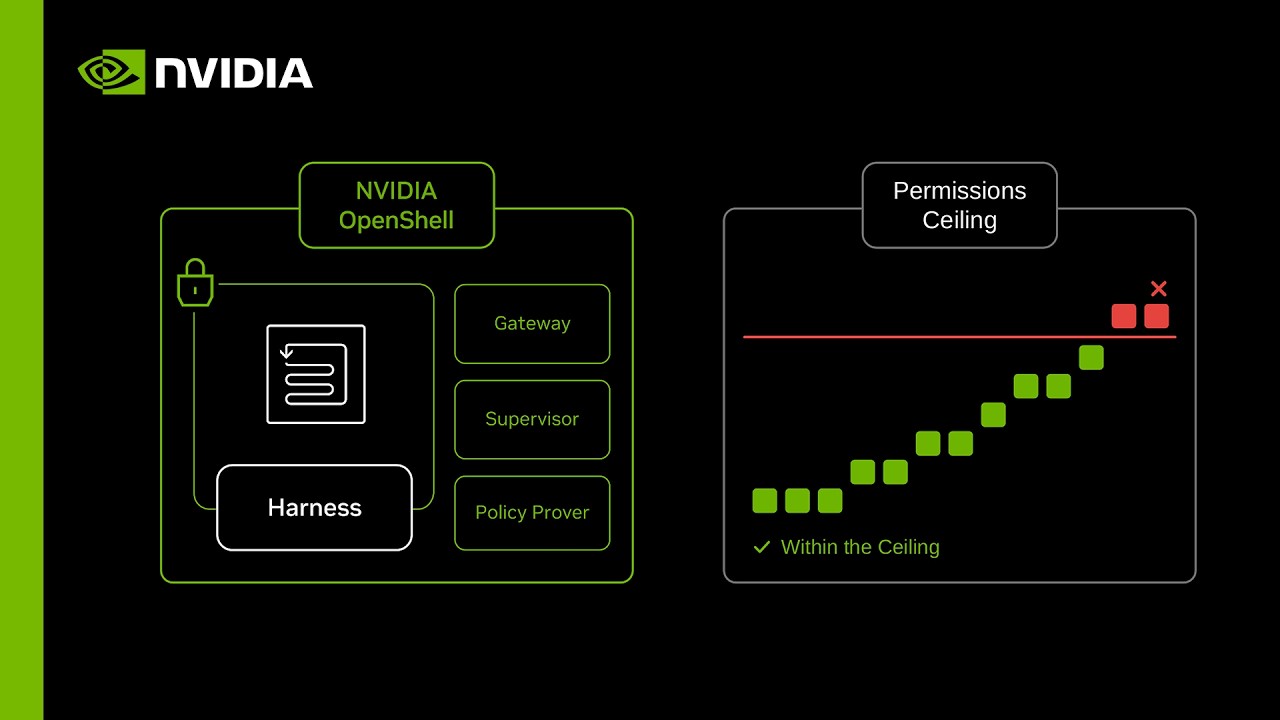
NVIDIA OpenShell operates by defining a precise permission ceiling for every autonomous agent. The system uses a policy prover to check every proposed action against these predefined limits. If an agent attempts a change that exceeds its allowed scope, the policy prover denies the change immediately.
What is a policy prover?
A policy prover is a software component that evaluates proposed security policies against a predefined set of rules. It acts as a gatekeeper, checking if a requested action fits within the authorized permission ceiling. This prevents agents from gaining more access than intended during their reasoning process.
NVIDIA OpenShell enforces these rules at the granular level of system calls, file access, and network connections. This means an agent cannot simply “reason” its way into accessing a forbidden file or escalating its own privileges. The hardware and software logic work together to ensure the agent remains within its sandbox.
Sandbox architecture and supervisor-led network routing
NVIDIA OpenShell places every autonomous agent inside an isolated sandbox with no direct route to the internet. This isolation ensures that the agent cannot exfiltrate data or connect to unauthorized systems on its own. All communication must pass through an external supervisor that manages the agent’s interaction with the outside world.
NVIDIA OpenShell uses a supervisor to hold sensitive credentials like SSH keys outside the agent’s memory. When an agent needs to access a specific endpoint, the supervisor verifies the action against the policy and injects the required key only for that specific request. A compromised agent cannot leak a key it never had because the key never existed within its environment.
NVIDIA Sentry and hardware-isolated trust domains
NVIDIA Sentry provides an optional layer of defense that functions outside the host’s main operating system. This component runs on NVIDIA Bluefield 4 hardware to create a hardware-isolated trust domain for security enforcement. By separating the security logic from the host, NVIDIA Sentry ensures that a compromise of the host’s main OS does not automatically grant an attacker control over the security layer.
NVIDIA Sentry monitors the agent’s reasoning traffic in real-time to detect intent before it becomes an action. Because the reasoning traffic passes through the Sentry, the system can intervene the moment a non-permitted plan is formed. What happens if the agent tries to do something it shouldn’t? NVIDIA Sentry identifies the unauthorized intent and acts before the model can execute the final step.
Real-time quarantine and tamper-evident auditing
NVIDIA Sentry enables the system to quarantine a model in milliseconds if it attempts a non-permitted action. This millisecond-level response prevents the model from completing a malicious request before it can impact the network. The speed of the response is the key to preventing data exfiltration in real-time.
NVIDIA OpenShell also creates tamper-evident records that operators can verify for forensic investigation. These records provide an audit trail that is resistant to alteration by the agent or a malicious actor. Operators can use these records to determine exactly what the agent attempted to do and how the system responded.
Adopting OpenShell via the command line
NVIDIA OpenShell is released as an open-source architecture under the Apache 2.0 license. This ensures that enterprise users can adapt the framework to their specific infrastructure and compliance requirements. The open-source nature allows for community auditing and customization of the security layers.
NVIDIA OpenShell is designed for rapid adoption, requiring only two commands to get started. Users first install the CLI and then use it to create a sandbox and launch their agent. This simplifies the deployment of complex security infrastructure for developers who need to move quickly.
Sarah’s scenario for securing database agents
Sarah is an AI infrastructure engineer at a fintech company deploying an agent to manage database queries. She needs to ensure the agent cannot access sensitive HR files or other non-related databases while still allowing it to perform its primary function. Sarah installs the NVIDIA OpenShell CLI and defines a policy that limits the agent’s reach to a specific database IP and a set of allowed system calls.
When she runs the agent, it correctly processes customer queries but is blocked by the supervisor if it attempts to ping an internal HR server. The policy prover confirms the request is outside Sarah’s defined permission ceiling and denies it instantly. If Sarah didn’t need this level of strict security, she might have used standard LLM guardrails, but the hardware-enforced sandbox provides the guarantee her company requires.
NVIDIA has not announced pricing for NVIDIA OpenShell and Bluefield 4 hardware
- NVIDIA has not announced the official pricing for the OpenShell reference architecture.
- Readers should check the official NVIDIA press release for details on enterprise licensing.
- NVIDIA has not announced the specific pricing for the Bluefield 4 hardware required for Sentry.
- Readers should consult local hardware vendors to compare current unit costs for Bluefield 4.
The current architecture relies on the assumption that hardware-level isolation is the only way to achieve true zero-trust for AI agents. While this provides the highest level of security, it requires specific hardware like the Bluefield 4, which may limit its deployment to high-assurance environments.
Frequently Asked Questions
What is the difference between OpenShell and standard LLM guardrails?
The difference between OpenShell and LLM guardrails is that OpenShell enforcement happens outside the agent at the system-call and hardware level. While guardrails rely on the model’s own logic to stay within bounds, OpenShell uses a physical and logical perimeter to block unauthorized actions.
How does OpenShell handle sensitive credentials like SSH keys?
OpenShell handles sensitive credentials by keeping keys with a supervisor outside the agent’s sandbox. The supervisor only injects the keys into the request path on the way to an approved endpoint, ensuring a compromised agent never has access to the keys in its own memory.
What hardware is required for NVIDIA Sentry?
The hardware required for NVIDIA Sentry is the NVIDIA Bluefield 4. This smartNIC provides the hardware-isolated trust domain necessary to monitor agent activity and enforce policies independently of the host system.
How quickly can Sentry respond to a non-permitted action?
Sentry can respond to a non-permitted action in milliseconds. By monitoring reasoning traffic, the system can identify an unauthorized intent and cut the connection before the agent can execute the final action.
Based on NVIDIA’s Introducing NVIDIA OpenShell Reference Architecture for Safer AI Agents.