
The 2-in-1 Laptops That Work Best for Office Work
Our Top 3 Picks for Office Work
The best 2-in-1 laptop for work is the Lenovo Yoga 7i 2-in-1 Laptop which provides 2TB of storage for heavy file management and suits professionals needing high-capacity local data.
Most 2-in-1 Laptop options look identical on a listing page. These 3 are the ones that differ where it actually matters.
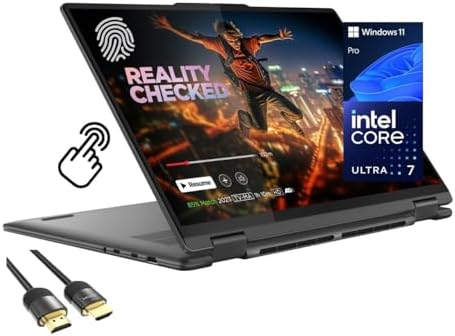
#1 – Lenovo Yoga 7i 2-in-1 Laptop
Best for: users needing high storage capacity for large project files.
Why the Lenovo Yoga 7i 2-in-1 Laptop is our #1 pick
- Listed at $1199.99 in November 2026 – premium among those compared; the price moves, so check it
- 4.6 rating from 230 ratings
RAM: 16GB · Storage Capacity: 2TB

#2 – Lenovo Yoga 7i Ultra 7 256V
Best for: buyers prioritizing long battery life for mobile office work.
Why the Lenovo Yoga 7i Ultra 7 256V is our #2 pick
- Listed at $1165.99 in November 2026 – premium among those compared; the price moves, so check it
- 4.5 rating from 4,657 ratings
RAM: 16GB · Storage Capacity: 1 TB

#3 – Intel Samsung Galaxy Book5 Pro 360
Best for: professionals requiring high-resolution screen clarity for detailed tasks.
Why the Intel Samsung Galaxy Book5 Pro 360 is our #3 pick
- Listed at $1545.25 in November 2026 – premium among those compared; the price moves, so check it
- 4.4 rating from 304 ratings
Storage Capacity: 1 TB · Screen Resolution: 2880×1800
If you prefer a ChromeOS environment, explore the best Chromebook Plus 2-in-1 laptop for your productivity needs.
How Extreme Spec picked: we started from the 200 most-reviewed 2-in-1 Laptop listings in our retail dataset, removed duplicates, accessories, off-category products and 2 listings whose price did not fit their specifications, and 64 qualified. The picks on this page were selected from those 64 candidates against this topic’s requirements. The order of the picks reflects fit to this topic; each shows its rating and the number of ratings behind it, so you can weigh how much to trust it. Specifications come from manufacturer listings and ratings from verified Amazon buyer reviews (data checked November 2026).
Our Pick and How the List Was Built
You might be a professional who needs to move from a desk to a meeting room, requiring a device that functions as a tablet for note-taking but retains a full keyboard for typing. This transition requires a balance of weight and screen real estate that smaller 13-inch models may lack.
The Lenovo Yoga 7i 2-in-1 Laptop fits this scenario with its 16″ display, providing ample room for spreadsheets and documents. You might prefer the Lenovo Yoga 7i Ultra 7 256V for its rapid charge capabilities or the Intel Samsung Galaxy Book5 Pro 360 for its included stylus.
We selected these models after screening 64 2-in-1 Laptops at Extreme Spec, focusing on high-performance hardware for professional productivity. The shortlist covers a price range from $1165.99 to $1545.25, while the median price of the 10 products in our comparison is $980.22.
You can evaluate the specific performance of these units in our spec breakdown of the Chromebook Spin 513.
What the Data Says About hybrid PCs for Office Work
- Top pick: Lenovo Yoga 7i 2-in-1 Laptop at $1199.99 (RAM: 16GB).
- Also picked: Lenovo Yoga 7i Ultra 7 256V at $1165.99; Intel Samsung Galaxy Book5 Pro 360 at $1545.25.
- We compared 10 2-in-1 Laptops, from $529.99 to $1545.25, median $980.22.
- Best buyer rating in the comparison: Lenovo Yoga 7i 2-in-1 Laptop at 4.6/5 from 230 ratings.
- Cheapest in the comparison that can run a professional video editing suite with active assets: AMD Lenovo Flex 5 14 81X20005US at $673 (16GB).
hybrid PCs for Office Work: Price, Rating and Specs Compared
| Product | Price | Rating | RAM | Processor | Screen Resolution |
|---|---|---|---|---|---|
| Lenovo Yoga 7i 2-in-1 Laptop | $1199.99 | 4.6 (230 ratings) | 16GB | Intel Core | 1920 x 1200 |
| Lenovo Yoga 7i Ultra 7 256V | $1165.99 | 4.5 (4,657 ratings) | 16GB | Intel Core | 1920 x 1200 |
| Intel Samsung Galaxy Book5 Pro 360 | $1545.25 | 4.4 (304 ratings) | Not stated | Intel Core | 2880×1800 |
| AMD HP Envy x360 2-in-1 Laptop | $948.19 | 4.4 (676 ratings) | 8GB | AMD Ryzen | 1920 x 1080 |
| Intel Samsung Galaxy Book Flex | $1099 | 4.4 (484 ratings) | 8GB | Intel Core | Not stated |
| Intel Microsoft Surface Pro 7 | $1012.25 | 4.4 (1,279 ratings) | 16GB | Intel Core | Not stated |
| Intel Dell Inspiron 14 5406 2 in 1 | $699 | 4.3 (312 ratings) | 12GB 3200MHz DDR4 | Intel Core | 1920 x 1080 |
| AMD Lenovo Flex 5 14 81X20005US | $673 | 4.4 (7,042 ratings) | 16GB | AMD Ryzen | 1920 x 1080 |
| Intel Lenovo Yoga C740 2-in-1 | $529.99 | 4.3 (254 ratings) | 8GB | Intel Core | 1080p |
| Intel Dell Inspiron 5000 Touchscreen 2-in-1 | $699 | 4.1 (196 ratings) | 8GB | Intel Core | 1920 x 1080 |
Prices are approximate and move frequently – check the current price before deciding. “Not stated” means the manufacturer listing does not give that figure – we do not estimate it.
Among our top picks, the Lenovo Yoga 7i Ultra 7 256V is the value leader because it provides 16GB of RAM for $72.87 per unit.
Each Pick for Office Work, Examined One by One
The 3 picks below are reviewed in the same order as the cards above.
Lenovo Yoga 7i 2-in-1 Laptop
The Lenovo Yoga 7i 2-in-1 Laptop made this list because it provides high-end hardware and a large 16″ screen for heavy office multitasking. Its 16GB of RAM and 2TB of storage offer the capacity needed for professional workflows that standard models lack.
What we like: This model features a 2TB storage capacity, which provides significant permanent data space for large files. The 16GB of RAM allows it to run a professional video editing suite with active assets or handle multiple browser tabs and office apps simultaneously without performance drops.
Keep in mind: The 1920 x 1200 resolution is a standard WUXGA display, which may offer less pixel density than higher-resolution screens for high-detail creative work.
Lenovo Yoga 7i Ultra 7 256V
The Lenovo Yoga 7i Ultra 7 256V is included for its balance of high-performance Intel Core Ultra 7 processing and a large 16-inch workspace. It provides the memory and processing power required for demanding professional productivity tasks.
What we like: This hybrid PC includes 16GB of LPDDR5X memory with a speed of 8533MHz, which supports smooth multitasking and high-speed data access. It also features a 70Wh battery, which supports up to 26.5 hours of local video playback.
Keep in mind: The 1TB storage capacity is smaller than the 2TB found on the other Yoga 7i model, which may limit users with very large local archives.
Intel Samsung Galaxy Book5 Pro 360
The Intel Samsung Galaxy Book5 Pro 360 earned a spot for its high-resolution screen and portable 3.73-pound design. It serves as a premium option for users who need a high-quality display for office work and creative tasks.
What we like: The 2880×1800 resolution provides a higher pixel count than the other models on this list, which improves text clarity. It also includes a stylus, which allows for immediate note-taking or sketching on the screen.
Keep in mind: The 1TB storage capacity is lower than the 2TB available on the Lenovo Yoga 7i 2-in-1 Laptop.
Which model is best for someone who mostly types but wants to occasionally sketch notes?
The Lenovo Yoga 7i 2-in-1 Laptop is the best choice for typing-heavy work because its 16″ 16:10 aspect ratio provides extra vertical space for documents. For occasional sketching, the Intel Samsung Galaxy Book5 Pro 360 is a strong alternative because it includes a stylus, though it does not state a specific refresh rate to measure touch interface smoothness. The Lenovo Yoga 7i Ultra 7 256V also provides a large 16″ 16:10 workspace for typing but does not include a stylus.
A user opens the laptop, types a long report, and then folds the 360-degree hinge to tablet mode to sketch a diagram. They rely on the 16:10 aspect ratio to see more lines of text at once. The process ends with a completed document and a finished sketch on the same device.
Identify your must-have specs in the requirements.
View the best options quickly in our top picks.
See the technical differences in the comparison table.
For a deeper dive into the hardware, see our full Lenovo Chromebook Duet review to see how it performs.
How to Choose a 2-in-1 Laptop for Office Work
How keyboard travel depth affects typing on the Lenovo Yoga 7i
The Lenovo Yoga 7i 2-in-1 Laptop features a 360 flip-and-fold design that maintains a standard laptop keyboard layout, while the Lenovo Yoga 7i Ultra 7 256V offers a similar tactile experience. For professional use, these models provide a more traditional typing feel compared to the thinner, more compressed keys often found on the Microsoft Surface Pro Series, which is the industry benchmark for high-end detachable form factor and screen quality. The Lenovo Yoga 7i 2-in-1 Laptop provides a 16″ display and a 16:10 aspect ratio, which gives you more vertical room for spreadsheets while keeping the keys spaced for accuracy.
NPU Performance for AI Tasks
Look for an NPU (Neural Processing Unit) with 40+ TOPS to handle local AI tasks like background blur in video calls or real-time transcription without taxing the main CPU. The Lenovo Yoga 7i Ultra 7 256V states an NPU performance of 40+ TOPS, which is the specific metric for how many trillions of operations per second the dedicated AI hardware can process. This hardware allows the system to manage smart features like AI Select and Phone Link more efficiently. While the Intel Samsung Galaxy Book5 Pro 360 also features an Intel Core processor, its specific NPU TOPS rating is not stated in the data. Having a dedicated NPU helps prevent the system from slowing down when you use modern office tools that rely on machine learning for automation.
Battery Life under Heavy Load
You need a battery capacity of at least 70Wh to ensure the device lasts through a full day of office work, especially when running demanding software. The Lenovo Yoga 7i Ultra 7 256V states a 70Wh battery capacity and can provide up to 26.5 hours of local video playback. The Intel Samsung Galaxy Book5 Pro 360 also states a battery life of up to 25 hours. For heavy office use, these high capacities mean you won’t have to hunt for a power outlet as often as you might with smaller, lighter hybrid PCs.
Port selection for connecting peripherals to a 2-in-1 laptop
Select a model with at least two USB Type-C ports and an HDMI port to connect external monitors, docking stations, and high-speed drives. The Lenovo Yoga 7i 2-in-1 Laptop includes 2x USB Type-C, 2x USB Type-A, and 1x HDMI port, providing high connectivity for a variety of peripherals. Having a dedicated HDMI port means you can plug into a conference room display without needing a dongle. If you need to connect a Micro SD card for transferring large files, the Lenovo Yoga 7i 2-in-1 Laptop specifically states it includes a Micro SD Card Reader.
How thermal management prevents throttling during long office tasks
Thermal management prevents throttling during long office tasks by moving heat away from the processor to keep speeds consistent. The Lenovo Yoga 7i Ultra 7 256V uses an Intel Core Ultra 7 256V with 8 cores and 8 threads to balance power and heat. Effective cooling is what keeps the 16″ screen and 16:10 aspect ratio usable during intensive multitasking without the chassis becoming uncomfortably hot. For office privacy, these models also support Biometric Authentication for secure login. To ensure the device stays cool, avoid using it on soft surfaces like blankets, which can block the vents.
Determine your ideal match by checking the audience checklist.
Find answers to common queries in the FAQ.
Review the technical requirements and the setup support.
Academic users can find a specialized list of the best 2-in-1 laptop for students to handle coursework.
Each Job, What It Takes and How the Picks Do
Each row is a job this page’s buyers ask about, worked out from each pick’s listed RAM and storage capacity and a typical need for the job.
| What you want to do | What it takes | How each pick does |
|---|---|---|
| Run a professional video editing suite with active assets | at least 16GB | Lenovo Yoga 7i 2-in-1 Laptop: yes (16GB); Lenovo Yoga 7i Ultra 7 256V: yes (16GB); Intel Samsung Galaxy Book5 Pro 360: not stated |
| Keep 100GB of work files on the device | at least 100GB | Lenovo Yoga 7i 2-in-1 Laptop: not stated; Lenovo Yoga 7i Ultra 7 256V: not stated; Intel Samsung Galaxy Book5 Pro 360: not stated |
| Run multiple browser tabs and office apps simultaneously | at least 8GB | Lenovo Yoga 7i 2-in-1 Laptop: yes (16GB); Lenovo Yoga 7i Ultra 7 256V: yes (16GB); Intel Samsung Galaxy Book5 Pro 360: not stated |
Each need is a typical figure for that job rather than a manufacturer claim, and the picks’ results come from their listed specifications. Where your job is bigger or smaller than the typical one, go by your own figure.
Who Buys hybrid PCs, and What It Really Costs
Who buys a convertible laptop, and what each one needs
- Administrative assistants — 8GB RAM (short term memory for active tasks) to manage multiple browser tabs and spreadsheets simultaneously
- Real estate agents — 3:2 or 16:10 aspect ratio (more vertical screen space) for viewing property listings and documents in tablet mode
- Corporate consultants — 1080p resolution (baseline for text clarity) to ensure sharp text during long periods of document review
- Graphic designers — x86 vs ARM architecture (software compatibility and power efficiency) to run specific creative suites without compatibility issues
- Project managers — 360-degree hinge engineering (standard for premium 360-degree hinge) to switch between laptop and tablet modes during meetings
What a 2-in-1 Laptop really costs, and where to buy one
What to budget for on top of the 2-in-1 Laptop
- Protective sleeve — protects the chassis from scratches and minor impacts during travel
- Stylus pen — allows for handwritten notes and sketching on the touchscreen
- Docking station — provides extra ports for external monitors and peripherals
- Extended warranty — covers mechanical failures like hinge fatigue (screen becoming loose or hard to open)
What you can leave out of the budget
- External mouse — the touchscreen and trackpad provide sufficient navigation for office tasks
- Separate tablet — the 2-in-1 form factor combines both devices into one unit
- High-end carrying case — most 2-in-1 laptops fit into standard backpacks or messenger bags
Where this kind of product is normally sold
- Big-box electronics retailers — offer immediate local pickup and standardized return windows
- Manufacturer websites — provide direct access to specific configurations and direct warranty handling
- Online marketplaces — offer competitive pricing and frequent bundling with accessories
- Business technology resellers — provide volume discounts and dedicated support for corporate fleets
Learn how to choose the right model in the buying guide.
Understand the boundaries of this list in the scope.
Explore in-depth analysis in the detailed reviews.
Budgeting for your new device is simple when you see what each 2-in-1 laptop price level gets you.
Getting Started with Any of These Picks
Required Setup for Your 2-in-1 Laptop
Each of these hybrid PCs requires a standard power outlet and a compatible power adapter to maintain battery levels during work. You will also need a flat, stable surface to operate the 360-degree hinges without putting undue stress on the display assembly.
- The Intel Samsung Galaxy Book5 Pro 360 includes a stylus, which allows for precise drawing and handwriting input, so you do not need to purchase one separately.
- The Lenovo Yoga 7i 2-in-1 Laptop and Lenovo Yoga 7i Ultra 7 256V do not state that a stylus is included, meaning you may need to buy one if you plan to use the tablet mode for note-taking.
- The Lenovo Yoga 7i Ultra 7 256V features a 70Wh battery, while the Intel Samsung Galaxy Book5 Pro 360 states a 25-hour battery life; will these last through your full workday? The 25-hour rating on the Samsung provides a high ceiling for endurance during long office shifts.
Verifying Your Order Upon Arrival
Warranty coverage and return windows differ by seller and country, so you should verify the specific terms provided by your retailer immediately. Check the following details before the return window closes to ensure the hardware meets your requirements:
- Confirm the screen resolution, such as the 2880×1800 on the Samsung or the 1920 x 1200 on the Lenovo models, to ensure the display meets your clarity needs for office work.
- Verify the physical condition of the 360-degree hinge and the touchscreen surface, as these are the primary mechanical points of failure for convertible laptops.
- Check that the included ports, such as the Gigabit LAN port on the Lenovo Yoga 7i 2-in-1 Laptop, match the wired connectivity you need for your office setup.
Plug the device into a power source and run a basic system update as soon as you unbox it to ensure the Windows operating system is current before your first work session.
What Buyers Still Want to Know About Convertible Laptops for Office Work
Which 2-in-1 laptop is best for heavy multitasking?
The 2-in-1 laptop best for heavy multitasking is the Lenovo Yoga 7i 2-in-1 Laptop or the Lenovo Yoga 7i Ultra 7 256V, as both provide 16GB of RAM. These 16GB of memory allow for running multiple browser tabs and office apps simultaneously without constant page refreshing.
Will the Lenovo Yoga 7i 2-in-1 Laptop store a full year of high-resolution photos?
Yes, the Lenovo Yoga 7i 2-in-1 Laptop can store a full year of high-resolution photos because it includes a 2TB storage capacity. This large amount of permanent data space provides significantly more room than the 1TB or 512GB options found in other models.
Which flip laptop is best for graphic design?
The flip laptop best for graphic design is the Intel Samsung Galaxy Book5 Pro 360 because it features a 2880×1800 screen resolution. This high pixel count provides the clarity needed for detailed work, paired with a 16″ display size for a large workspace.
Which hybrid PC should I buy for everyday domestic tasks?
If you need a hybrid PC for everyday domestic tasks, the Lenovo Yoga 7i Ultra 7 256V offers a balance of 16GB of RAM and a 1TB PCIe SSD for around $1165.99. This model also includes a 360-degree hinge for use in laptop, tablet, tent, and stand modes.
Understanding the different hardware configurations is easier when you view the different types of 2-in-1 laptops available.
Who Should Skip These 2-in-1 Laptops
To avoid hinge fatigue, which is a mechanical failure where the screen becomes loose or impossible to open after repeated use, check the hinge tension and build quality of the 360-degree hinge. Think of a high-quality hinge like a well-balanced door hinge; it must distribute weight evenly to prevent the metal from weakening over time. If the hinge feels loose or lacks resistance, it may not withstand the repeated folding required for 2-in-1 use.
To avoid thermal throttling, where performance drops during intensive tasks due to the thin chassis heat constraints, check the cooling vents and the intended workload of the device. High-performance tasks generate heat that must escape the body; if the heat cannot escape quickly enough, the processor slows down to cool off. For heavy video rendering, ensure the laptop has adequate ventilation space.
Every 2-in-1 Laptop guide in this category
ExtremeSpec is reader-supported: some links on this page are affiliate links, and as an Amazon Associate ExtremeSpec earns from qualifying purchases at no extra cost to you. Learn more.