
Best All in One Computer with 16GB RAM
Our Top 3 Picks with 16GB RAM
The best all in one computer with 16gb ram is the Intel HP Pavilion All-in-One PC which uses 16 GB to run multiple browser tabs and office apps simultaneously for business or personal use.
Most All-in-One Computer options look identical on a listing page. These 3 are the ones that differ where it actually matters.
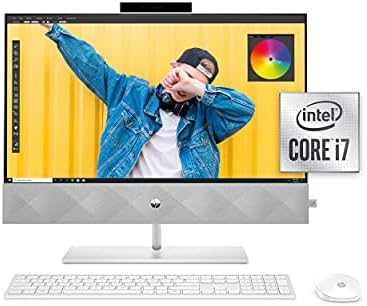
#1 – Intel HP Pavilion All-in-One PC
Best for: running multiple browser tabs and office apps simultaneously.
Why the Intel HP Pavilion All-in-One PC is our #1 pick
- Listed at $1129 in November 2026 – premium among those compared; the price moves, so check it
- 4.3 rating from 213 ratings
RAM: 16 GB · SSD Capacity: 512 GB
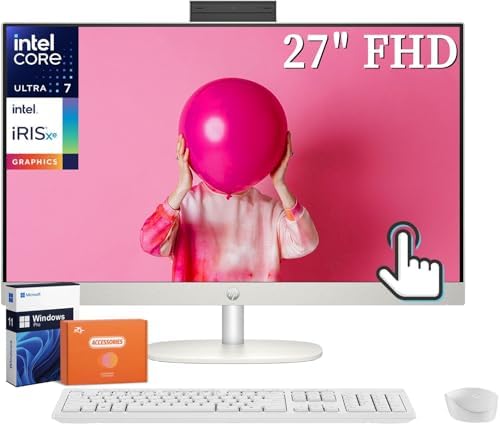
#2 – HP Business All in One Desktop
Best for: high-performance multitasking and professional office workflows.
Why the HP Business All in One Desktop is our #2 pick
- Listed at $1499.99 in November 2026 – premium among those compared; the price moves, so check it
- 4.3 rating from 119 ratings
RAM: 16 GB · SSD Capacity: 1 TB

#3 – Lenovo 24 23.8" All-in-One Desktop
Best for: a balanced 16GB RAM setup for everyday productivity.
Why the Lenovo 24 23.8" All-in-One Desktop is our #3 pick
- Listed at $799.99 in November 2026 – mid-range among those compared; the price moves, so check it
- 4.3 rating from 396 ratings
RAM: 16GB · SSD Capacity: 512GB
You can also find our full review of the AOC A249221 for a deeper dive into its technical specifications.
How Extreme Spec picked: we started from the 200 most-reviewed All-in-One Computer listings in our retail dataset, removed duplicates, accessories, off-category products and 5 listings whose price did not fit their specifications, and 107 qualified. The picks on this page were selected from those 107 candidates against this topic’s requirements. The order of the picks reflects fit to this topic; each shows its rating and the number of ratings behind it, so you can weigh how much to trust it. Specifications come from manufacturer listings and ratings from verified Amazon buyer reviews (data checked November 2026).
What We Recommend and Why
Small home offices often require a computer that combines a full-sized monitor with enough power to handle a full workday of multitasking. Finding a machine that doesn’t require a separate tower while maintaining high memory capacity is the primary goal for these setups.
The Intel HP Pavilion All-in-One PC fits this scenario by integrating a 24 inch display with 16 GB of RAM for consistent performance. You might prefer the HP Business All in One Desktop for its 1 TB NVMe SSD capacity, or the Lenovo 24 23.8″ All-in-One Desktop for its 99% sRGB color accuracy.
We screened 107 All-in-One Computers and compared 10 in this page’s table at Extreme Spec. The options range from $799.99 to $1499.99, with the median price of the 10 products in our comparison being $899.99.
Consult the buying guide to understand the key criteria for choosing your ideal machine.
Check the setup and warranty notes for information on installation requirements and technical support.
View the comparison table to see the specifications of every model side by side.
All-in-One Computers with 16GB RAM: The Short Version
- Top pick: Intel HP Pavilion All-in-One PC at $1129 (RAM: 16 GB).
- Also picked: HP Business All in One Desktop at $1499.99; Lenovo 24 23.8″ All-in-One Desktop at $799.99.
- We compared 10 All-in-One Computers, from $569.99 to $1499.99, median $899.99.
- Best buyer rating in the comparison: Intel HP Pavilion All-in-One 13Z68AA#ABA at 4.5/5 from 817 ratings.
- Cheapest in the comparison that can run multiple browser tabs and office apps simultaneously: Lenovo 24″ FHD All-in-One Desktop at $569.99 (16GB).
All-in-One Computers with 16GB RAM Compared Side by Side
| Product | Price | Rating | RAM | SSD Capacity | Processor Core Count |
|---|---|---|---|---|---|
| Intel HP Pavilion All-in-One PC | $1129 | 4.3 (213 ratings) | 16 GB | 512 GB | Not stated |
| HP Business All in One Desktop | $1499.99 | 4.3 (119 ratings) | 16 GB | 1 TB | 12 cores |
| Lenovo 24 23.8″ All-in-One Desktop | $799.99 | 4.3 (396 ratings) | 16GB | 512GB | 8-core |
| Intel HP Pavilion All-in-One 13Z68AA#ABA | $1449 | 4.5 (817 ratings) | 16 GB | 512 GB | Not stated |
| Intel HP Pavilion All-in-One Desktop | $1029.99 | 4.5 (302 ratings) | 16 GB | 1 TB | Not stated |
| Intel Dell Inspiron 7730 All in One | $759.99 | 4.5 (275 ratings) | 16GB | 512 GB | Not stated |
| Inegrated HP 27-dp0160 All-in-One Desktop | $999.99 | 4.5 (258 ratings) | 16 GB | 512 GB | Not stated |
| AOC A249221-FN3D5G/33 | $649.97 | 4.5 (276 ratings) | 16GB | 512GB | 4 cores |
| Lenovo 24 All-in-One Desktop | $729.99 | 4.1 (169 ratings) | 16 GB | 512 GB | 4-core |
| Lenovo 24″ FHD All-in-One Desktop | $569.99 | 4.2 (171 ratings) | 16GB RAM | 128GB PCIe SSD | 4 |
Prices are approximate and move frequently – check the current price before deciding. “Not stated” means the manufacturer listing does not give that figure – we do not estimate it.
Among our top picks, the value leader is Lenovo 24 23.8″ All-in-One Desktop because it provides 16GB of RAM for the lowest price per unit.
The Full Review of Each Pick with 16GB RAM
The 3 picks below are reviewed in the same order as the cards above.
Intel HP Pavilion All-in-One PC
The Intel HP Pavilion All-in-One PC made this list because it provides a balanced entry point for users who need to run multiple browser tabs and office apps simultaneously without a high-end price tag.
What we like: This model features 16 GB of RAM, which provides enough short-term data storage for smooth multitasking and modern web browser overhead. It includes an IPS display, a standard that provides better viewing angles and color accuracy than many budget alternatives.
Keep in mind: The storage is a 1TB HDD, which is slower for opening large files than an SSD, and the 24-inch screen may be small for those requiring a large creative workspace.
HP Business All in One Desktop
We selected the HP Business All in One Desktop for its high-performance internal hardware, specifically designed for heavier workloads and professional environments.
What we like: This unit features a 12-core processor and 16 GB of DDR5 RAM, which provides high memory bandwidth for demanding tasks. It also includes a 1 TB PCIe NVMe M.2 SSD, a storage type that allows for faster data access than standard hard drives.
Keep in mind: The 27-inch screen is an anti-glare display rather than an IPS panel, which may affect color depth for professional studio work.
Lenovo 24 23.8″ All-in-One Desktop
The Lenovo 24 23.8″ All-in-One Desktop is included as a versatile mid-range option that balances modern connectivity with a high-quality display.
What we like: The 23.8-inch IPS anti-glare screen offers 99% sRGB color accuracy, which is a high standard for color reproduction. It also includes 16 GB of DDR4 RAM to handle multitasking and a 512 GB PCIe NVMe SSD for responsive performance.
Keep in mind: The 8-core processor is less powerful than the 12-core option in the HP Business model, making it better suited for home office tasks than heavy creative studio production.
How does the screen quality differ between the budget and high-end models?
Screen quality differs primarily in panel technology and color accuracy. The Lenovo 24 23.8″ All-in-One Desktop provides 99% sRGB color accuracy, a figure that is not stated for the other models.
Which model is best for a home office versus a creative studio?
The HP Business All in One Desktop is suited for a creative studio because it features a 12-core processor and a 1 TB PCIe NVMe M.2 SSD for handling large files and heavy processing. For a home office, the Intel HP Pavilion All-in-One PC or the Lenovo 24 23.8″ All-in-One Desktop are suitable choices, as both provide 16 GB of RAM for smooth multitasking across multiple apps.
Review the requirements to ensure the hardware meets your specific professional needs.
See our top picks for a ranked list of the best 16GB RAM models available.
Visit the FAQ to find answers to common questions about all-in-one systems.
What to Look For in an Integrated Desktop with 16GB RAM
Memory Bandwidth
You should prioritize 16GB of RAM to ensure smooth multitasking and modern web browser overhead, which is the category’s minimum for these tasks. 16GB of RAM is enough for heavy multitasking or office apps because it provides the short-term data storage required for active tasks. The Intel HP Pavilion All-in-One PC, HP Business All in One Desktop, and Lenovo 24 23.8″ All-in-One Desktop all state 16GB. While the HP Business All in One Desktop uses DDR5 memory—which provides higher bandwidth than the DDR4 found in the other models—all three picks provide the necessary capacity for the user’s requirements.
Why an 8 core processor count improves simultaneous application processing
Look for at least 8 cores if you plan to run multiple applications simultaneously, as this determines the number of simultaneous processing pathways available. The HP Business All in One Desktop leads the group with 12 cores, while the Lenovo 24 23.8″ All-in-One Desktop provides 8 cores. The Intel HP Pavilion All-in-One PC does not state a core count. Higher core counts allow the system to handle background processes without slowing down your primary active window.
How NVMe SSD storage improves boot times and file access speeds
Prioritize NVMe SSD storage over traditional hard drives to ensure the system remains responsive during boot-up and file access. The HP Business All in One Desktop and Lenovo 24 23.8″ All-in-One Desktop both state they use NVMe SSDs, which are significantly faster than the HDD listed for the Intel HP Pavilion All-in-One PC. While the Intel HP Pavilion All-in-One PC offers a 1TB HDD option, the NVMe options in the other models provide the faster data retrieval needed for modern software.
Comparing standard integrated desktops to workstation-grade thermal management
Evaluate the intended use of the machine against workstation-grade AIOs (e.g., HP Z series), which serve as the benchmark for sustained performance and thermal management. Because these are integrated desktops rather than workstation-grade units, they are designed for standard office and personal tasks rather than sustained, high-heat workloads. The HP Business All in One Desktop features an Intel Core Ultra 7 155U, which is designed for efficiency to manage heat within its slim chassis. For heavy sustained loads, ensure your workflow does not exceed the thermal limits of a consumer-grade integrated system.
Checking for HDMI and USB 2.0 ports on integrated desktops
Check your required peripherals and ensure you have the necessary connections, such as an HDMI port for external monitors or USB 2.0 for standard input devices. The HP Business All in One Desktop and Lenovo 24 23.8″ All-in-One Desktop both state they include USB 2.0 ports. The Intel HP Pavilion All-in-One PC does not state its port configuration. If you need to connect a high-speed external drive, verify if the specific model provides a USB 3.0 or Type-C port, as these are not listed for all selections.
What Each Job Calls For vs What These Picks State
Match the job you actually need done to the figure it calls for, then check which picks state that figure or more. Where none do, the row says so.
| What you want to do | The figure it calls for | Picks at or above it |
|---|---|---|
| Keep the system responsive with plenty of storage | 512GB SSD | none of them state this figure |
| Run many browser tabs and office apps at once | 16GB RAM | Intel HP Pavilion All-in-One PC, HP Business All in One Desktop, Lenovo 24 23.8″ All-in-One Desktop |
| Run high-end video editing or 3D rendering | Dedicated GPU | None of these picks state a dedicated GPU; a workstation-grade AIO would be required |
These figures are the levels this category is generally held to, not manufacturer claims. A pick at or above a figure states that number; how it reaches it and the rest of your setup still decide the job, so check them against your own workload before buying.
Who Buys All-in-One Computers, and What It Really Costs
Who buys an All-in-One Computer, and what each one needs
- Content creators — 16GB RAM for smooth multitasking and modern web browser overhead
- Office managers — 512GB SSD for baseline system responsiveness and usable storage capacity
- Graphic designers — IPS panels for better viewing angles and color accuracy
- Data analysts — 16GB RAM to handle large datasets in active memory
- Remote educators — 512GB SSD to store large amounts of lesson materials
What an AIO desktop really costs, and where to buy one
What to budget for on top of the AIO desktop
- Peripherals — keyboard and mouse for basic input
- Extended monitor — extra screen space for multitasking
- External storage — additional space for long-term file archiving
- Surge protector — power strip to protect against electrical spikes
What you can leave out of the budget
- External GPU — extra graphics card since integrated GPU limits are handled by the AIO
- Additional RAM sticks — if the system has non-upgradable components
- Dedicated cooling pads — the AIO design handles its own thermal management
Where this kind of product is normally sold
- Big-box retailers — easy in-store returns and standard manufacturer warranties
- Online marketplaces — competitive pricing and frequent shipping bundles
- Manufacturer direct — specific configurations and direct technical support
- Specialty electronics stores — expert advice on thermal throttling and hardware specs
Explore the detailed reviews for an in-depth look at each individual computer’s performance.
Examine the scope to see the full range of products included in this roundup.
What It Takes to Run One, and What to Verify
What you need before setup
Each of these all-in-one computers requires a standard AC power outlet to function. You will also need a flat, stable surface with enough clearance to accommodate the base and the screen’s footprint.
- The Intel HP Pavilion All-in-One PC runs on Windows 10 Home, which may require a manual update to Windows 11 if you prefer the newer interface.
- The Lenovo 24 23.8″ All-in-One Desktop does not state a specific operating system in the research data, so you should verify the included software before use.
Verifying your purchase on arrival
Warranty coverage and return windows vary by seller and country, so check your specific receipt for those terms. Confirm these details before the return window closes to ensure the unit meets your needs:
- Confirm the storage type, such as the 1 TB PCIe NVMe M.2 SSD on the HP Business All in One Desktop, as this determines how quickly your files and apps load.
- Check the physical condition of the screen and the stand, as these are the most exposed components during shipping and are difficult to repair.
Plug the unit into power and complete the initial OS setup while the return window is still open.
Built-in webcams and microphones for video calls on included peripherals
The Intel HP Pavilion All-in-One PC, the HP Business All in One Desktop, and the Lenovo 24 23.8″ All-in-One Desktop all include a built-in webcam and microphone for video calls, so you do not need to purchase external versions for basic meetings.
Using external docking stations and privacy filters to expand workspaces
If you need more ports for your peripherals, you can add an External Docking Station, which expands port connectivity for peripherals like extra monitors or hard drives. For those working in shared spaces, a Privacy Filter protects screen visibility from side angles by reducing reflections and limiting the viewing field. To keep your workspace organized, you can use Cable Management to keep the workspace organized for an all-in-one setup by grouping and hiding the power and data cords.
New users should first learn how an All-in-One Computer works before making a final purchase decision.
All-in-One Computers with 16GB RAM: The Questions This Choice Raises
Which 16GB ram aio desktop should I buy for multitasking?
The 16GB ram aio desktop that suits heavy multitasking is the HP Business All in One Desktop, which features a 12-core processor to manage multiple active tasks. You can choose this model for around $1,500 to handle demanding workflows alongside your 16GB of memory.
What is the price difference between a 16GB model and an 8GB model?
The price difference between a 16GB model and an 8GB model depends on the specific manufacturer, but 16GB is the minimum for smooth multitasking and modern web browser overhead. Since the data for 8GB models is not stated, you should compare the specific retail price of your preferred brand to see if the extra memory fits your budget.
Will this computer work with my existing wireless printer and mouse?
Yes, these all-in-one computers work with existing wireless printers and mice because they include standard wireless connectivity like Wi-Fi 6. The Lenovo 24 23.8″ All-in-One Desktop and HP Business All in One Desktop both state Wi-Fi 6 support, which allows them to connect to your home network for peripheral use.
How much memory does a student all in one pc need?
A student all in one pc needs 16GB of RAM to ensure the system remains responsive while running research tabs and school software simultaneously. All three selected models, including the Intel HP Pavilion All-in-One PC, provide 16GB of memory to meet this requirement.
Use the audience checklist to identify which model best fits your specific user profile.
Who Should Skip These AIO desktops
If your work requires high-end video editing or 3D rendering, these three picks are the wrong tool because none of them feature a dedicated GPU. You need a machine with a discrete graphics card to handle those specific workloads without the system slowing down or crashing. For those demanding professional creative capabilities, you should look for a workstation-grade desktop or a high-end laptop with a dedicated graphics processor.
Browse our other integrated desktop pages
- Affordable All in One Desktops Under 500 Dollars Compared
- Which All in One Computer Is Best for a Home Office?
- Best All in One Desktop with Touchscreen
- All in One Computers for Students Compared
- Choosing the Best All in One Desktop for Small Spaces
- The All in One Computers That Work Best for Creative Work Under $1600
ExtremeSpec is reader-supported: some links on this page are affiliate links, and as an Amazon Associate ExtremeSpec earns from qualifying purchases at no extra cost to you. Learn more.