
The All in One Computers That Work Best for Creative Work Under $1600: Power Creative Projects with Dedicated Graphics
Our Top 3 Picks for Creative Work Under $1600
The best all in one computer for video editing and graphic design under 1600 is the HP Business All in One Desktop which features a 12 cores processor to power heavy creative workloads.
3 picks, 3 different buyers. Find the one whose description sounds like you and stop reading.
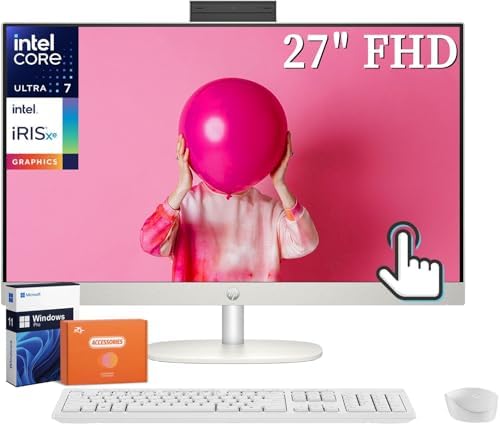
#1 – HP Business All in One Desktop
Best for: users needing a 12-core processor for modern video editing suites.
Why the HP Business All in One Desktop is our #1 pick
- Listed at $1499.99 in November 2026 – premium among those compared; the price moves, so check it
- 4.3 rating from 119 ratings
RAM: 16 GB · SSD Capacity: 1 TB
To put that RAM in context, pick #3 states 32GB DDR4 RAM.

#2 – Intel HP All in One Desktop
Best for: creatives who require a 12-core processor for smooth 3D modeling workspaces.
Why the Intel HP All in One Desktop is our #2 pick
- Listed at $1599.99 in November 2026 – premium among those compared; the price moves, so check it
- 4.6 rating from 694 ratings
RAM: 16 GB · SSD Capacity: 1 TB
For comparison on RAM, pick #3 states 32GB DDR4 RAM.

#3 – NVIDIA Dell Inspiron 7730 i7730-7180WHT-PUS
Best for: high-demand projects requiring 32GB of RAM to hold large creative project files in memory.
Why the NVIDIA Dell Inspiron 7730 i7730-7180WHT-PUS is our #3 pick
- Listed at $1299.99 in November 2026 – mid-range among those compared; the price moves, so check it
- 4.5 rating from 178 ratings
RAM: 32GB DDR4 RAM · SSD Capacity: 1TB SSD
Against the other picks on RAM, pick #1 states 16 GB and pick #2 states 16 GB.
How Extreme Spec picked: we started from the 200 most-reviewed All-in-One Computer listings in our retail dataset, removed duplicates, accessories, off-category products and 5 listings whose price did not fit their specifications, and 107 qualified. The picks on this page were selected from those 107 candidates against this topic’s requirements. The order of the picks reflects fit to this topic; each shows its rating and the number of ratings behind it, so you can weigh how much to trust it. Specifications come from manufacturer listings and ratings from verified Amazon buyer reviews (data checked November 2026).
Our Verdict and How We Chose
If you are upgrading from a laptop to a permanent creative workstation, you need a large enough display to manage complex timelines without constant zooming. A 27″ screen provides the physical real estate necessary for precise graphic design work.
The HP Business All in One Desktop provides a 27″ FHD IPS Touchscreen for your creative projects, while the NVIDIA Dell Inspiron 7730 i7730-7180WHT-PUS is the preferred choice if you need the 32GB DDR4 RAM capacity for heavy multitasking.
We selected these models after screening 107 All-in-One Computers and comparing 10 options here at Extreme Spec. These picks range from $1299.99 to $1599.99, with a median price of $1291.99.
For a deeper dive into the hardware, view our full review of the HP 24-cb1142.
What the Data Says About All-in-One Computers for Creative Work Under $1600
- Top pick: HP Business All in One Desktop at $1499.99 (RAM: 16 GB).
- Also picked: Intel HP All in One Desktop at $1599.99; NVIDIA Dell Inspiron 7730 i7730-7180WHT-PUS at $1299.99.
- We compared 10 All-in-One Computers, from $759.99 to $1599.99, median $1291.99.
- Best buyer rating in the comparison: Intel HP All in One Desktop at 4.6/5 from 694 ratings.
- Cheapest in the comparison that can run a large creative project file in memory: Dell All-in-One Desktop ec27250 at $932 (32GB).
All-in-One Computers for Creative Work Under $1600: Price, Rating and Specs Compared
| Product | Price | Rating | RAM | Display Size | Display Resolution |
|---|---|---|---|---|---|
| HP Business All in One Desktop | $1499.99 | 4.3 (119 ratings) | 16 GB | 27″ | 1920×1080 |
| Intel HP All in One Desktop | $1599.99 | 4.6 (694 ratings) | 16 GB | 27″ | 1920×1080 |
| NVIDIA Dell Inspiron 7730 i7730-7180WHT-PUS | $1299.99 | 4.5 (178 ratings) | 32GB DDR4 RAM | 27-inch | FHD |
| Intel HP Pavilion All-in-One 13Z68AA#ABA | $1449 | 4.5 (817 ratings) | 16 GB | 27 Inches | 27 Inches |
| Intel HP Pavilion All-in-One Desktop | $1029.99 | 4.5 (302 ratings) | 16 GB | 27-inch | 27-inch |
| Intel Dell Inspiron 7730 All in One | $759.99 | 4.5 (275 ratings) | 16GB | 27-inch | 27-inch |
| Dell All-in-One Desktop ec27250 | $932 | 4.5 (121 ratings) | 32 GB | 27 | 27 |
| AMD HP All-in-One Desktop PC 27-cr0012 | $1298.99 | 4.3 (169 ratings) | 32 GB | 27 inch | 27 inch |
| Intel Dell Inspiron 7700 AIO | $1284.99 | 4.5 (524 ratings) | 12GB | 27-inch | 27-inch |
| Intel HP All-in-One Desktop PC | $985 | 4.4 (147 ratings) | 12 GB | 27 inch | 27 inch |
Prices are approximate and move frequently – check the current price before deciding. “Not stated” means the manufacturer listing does not give that figure – we do not estimate it.
Among our top picks, the NVIDIA Dell Inspiron 7730 i7730-7180WHT-PUS is the value leader because it provides 32GB of RAM for $40.62 per unit.
Each Pick for Creative Work Under $1600, Reviewed in Detail
The 3 picks below are reviewed in the same order as the cards above.
HP Business All in One Desktop
The HP Business All in One Desktop made this list because its 12-core processor and 16 GB of RAM provide the necessary processing pathways for heavy creative workflows like video editing and graphic design.
What we like: This model features a 12-core processor, which provides enough simultaneous processing pathways to run a modern video editing suite. It also includes a 1 TB PCIe NVMe M.2 SSD, a high-speed storage standard that allows for faster data access than standard solid-state drives.
Keep in mind: The 16 GB of memory provides enough space for 3D modeling, but it sits at the lower end of the range for running very large creative project files in memory.
Intel HP All in One Desktop
We included the Intel HP All in One Desktop for its 12-core processing power and 16 GB of DDR5 memory, which are core requirements for a creative workstation under $1600.
What we like: This model utilizes DDR5 memory, which offers higher bandwidth than older standards, and a 12-core processor for demanding tasks. It also features an Intel IrisX graphics system, which provides more graphical capability than standard integrated graphics.
Keep in mind: Like the HP Business model, the 16 GB of RAM is sufficient for most tasks but may be a limit if you frequently work with massive, uncompressed project files.
NVIDIA Dell Inspiron 7730 i7730-7180WHT-PUS
The NVIDIA Dell Inspiron 7730 i7730-7180WHT-PUS earned a spot here due to its high RAM capacity and dedicated graphics, making it a versatile choice for media production.
What we like: This model provides 32 GB of DDR4 RAM, which offers more short-term data storage for active tasks than the other options. It also features a dedicated nvidia geforce mx570a graphics chip, which helps with 3D modeling and GPU-intensive creative work.
Keep in mind: The 32 GB of memory uses the DDR4 standard, which has lower bandwidth than the DDR5 found in other models on this list.
Power and Value for Your Money
The HP Business All in One Desktop and Intel HP All in One Desktop offer high core counts for a similar price point, but the Dell provides a higher memory ceiling for the lower price.
2D Illustration vs. 3D Modeling
For 2D illustration, any of these models work well, but the NVIDIA Dell Inspiron 7730 i7730-7180WHT-PUS is the better choice for 3D modeling because it includes a dedicated nvidia geforce mx570a graphics chip.
3D modeling relies heavily on the graphics processor to render complex geometries, while 2D illustration relies more on the CPU and RAM for brush strokes and layers.
Think of the GPU like a specialist artist who handles the complex painting, while the CPU is the manager coordinating all the different parts of the project at once.
Follow the buying guide to understand our selection criteria.
Compare all models side by side in the comparison table.
Review the setup and warranty notes before making your purchase.
The Specs That Decide an All In One Desktop for Creative Work Under $1600
How Dedicated GPU Architecture Benefits Creative Work Under $1600
Prioritize a dedicated GPU like the NVIDIA GeForce MX570A if your creative workflow involves 3D modeling or complex rendering, as it provides a separate hardware pathway for graphics. While the HP Business All in One Desktop and Intel HP All in One Desktop utilize integrated graphics—meaning the processor handles both general tasks and visuals—the NVIDIA Dell Inspiron 7730 i7730-7180WHT-PUS includes a dedicated chip for heavier workloads. Integrated graphics are sufficient for standard photo editing, but the dedicated GPU on the Dell model provides a buffer against performance drops during intensive visual tasks. These units sit below the performance ceiling of High-Refresh Rate Gaming AIOs, which establish the upper limit of integrated GPU capabilities by prioritizing high frame rates over general productivity.
Why High Color Gamut Coverage Matters for Design Projects
Look for a high color gamut to ensure accurate color reproduction for design projects, where the range of colors the screen can display matches real-world subjects. For creative work like photo and video editing, color accuracy is essential to prevent colors from looking washed out or incorrect in the final export. While the specific color gamut percentages are not stated for these models, the HP Business All in One Desktop and Intel HP All in One Desktop feature Anti-Glare displays to maintain visibility under various lighting conditions. These screens provide the baseline for consistent visual feedback during the design process.
How Thermal Management Systems Prevent Performance Throttling
Monitor thermal management by looking for systems that prevent thermal throttling, a failure mode where the computer intentionally slows down to reduce heat during sustained CPU or GPU loads. The HP Business All in One Desktop and Intel HP All in One Desktop feature 12-core processors, which provide the simultaneous processing pathways needed for heavy multitasking without immediate overheating. These models are designed for sustained desktop use, though they do not reach the specialized cooling benchmarks of workstation-grade AIOs like the HP Z series, which are built for extreme, continuous heat dissipation. For most creative tasks, these 12-core systems provide a stable thermal envelope.
Why 12-Core Processors and Multi-Core Clock Speeds Matter
You need a 12-core processor and at least 16GB of RAM to run a modern video editing suite or handle heavy multitasking without significant lag. The HP Business All in One Desktop and Intel HP All in One Desktop both state 12 cores, providing the necessary pathways for video codecs to determine the ability to export various media formats quickly. For even heavier multitasking, the NVIDIA Dell Inspiron 7730 i7730-7180WHT-PUS offers 32GB of DDR4 RAM, which is enough to run a large creative project file in memory. Higher core counts allow the system to distribute the load of rendering across multiple pathways simultaneously.
How 1920×1080 Display Resolution Provides Creative Workspace
Choose a minimum of 1920×1080 resolution to ensure enough screen real estate for timeline editing and multi-window layouts. All three selected models provide a 27-inch display, which offers a large physical area for your workspace. The HP Business All in One Desktop, Intel HP All in One Desktop, and NVIDIA Dell Inspiron 7730 i7730-7180WHT-PUS all provide 1080p resolution, which is the standard for clear text and sharp imagery in creative applications. Larger screens help reduce eye strain during long editing sessions.
Each Job, What It Takes and How the Picks Do
Each row is a job this page’s buyers ask about, worked out from each pick’s listed SSD capacity and RAM and processor core count and a typical need for the job.
| What you want to do | What it takes | How each pick does |
|---|---|---|
| Keep a large library of 1080p movies | 250 to 500GB for 12 months, 80% usable – about 315 to 625GB of SSD capacity | HP Business All in One Desktop: not stated; Intel HP All in One Desktop: not stated; NVIDIA Dell Inspiron 7730 i7730-7180WHT-PUS: not stated |
| Run a large creative project file in memory | at least 16 to 32GB | HP Business All in One Desktop: only at the easier end (16GB); Intel HP All in One Desktop: only at the easier end (16GB); NVIDIA Dell Inspiron 7730 i7730-7180WHT-PUS: yes (32GB) |
| Run a modern video editing suite | at least 6 to 8 cores | HP Business All in One Desktop: yes (12 cores); Intel HP All in One Desktop: yes (12 cores); NVIDIA Dell Inspiron 7730 i7730-7180WHT-PUS: not stated |
| Run a smooth 3D modeling workspace | at least 16GB | HP Business All in One Desktop: yes (16GB); Intel HP All in One Desktop: yes (16GB); NVIDIA Dell Inspiron 7730 i7730-7180WHT-PUS: yes (32GB) |
Each need is a typical figure for that job rather than a manufacturer claim, and the picks’ results come from their listed specifications. Where your job is bigger or smaller than the typical one, go by your own figure.
Who Buys All-in-One Computers, and What It Really Costs
Who buys an All-in-One Computer, and what each one needs
- Graphic designers — 16GB RAM (short-term data storage for active tasks) for smooth multitasking
- Video editors — 512GB SSD (permanent data storage space) to handle large media files
- Architecture students — IPS panels (better viewing angles and color accuracy) for precise drafting
- Content creators — High-refresh rate gaming AIOs (upper limit of integrated GPU capabilities) for smooth rendering
- Freelance photographers — 16GB RAM to manage high-resolution image exports without system lag
What an all-in-one really costs, and where to buy one
What to budget for on top of the all-in-one
- External storage — extra space for long-term archives beyond the internal drive
- Peripherals — a mouse and keyboard for efficient navigation and input
- Software licenses — tools for editing video or creating 3D designs
- Surge protector — protects hardware from sudden power spikes
What you can leave out of the budget
- Desktop tower — the AIO includes the computer and screen in one unit
- External monitor — the integrated display provides the primary workspace
- Additional RAM — the selected models meet the 16GB threshold for current tasks
Where this kind of product is normally sold
- Big-box retailers — standard return windows and easy in-person support
- Online marketplaces — competitive pricing but requires careful shipping inspection
- Manufacturer websites — direct warranty handling and potential for custom configurations
- Specialized electronics stores — expert advice and immediate hands-on testing
What These All In One Desktops Need, and What to Check on Arrival
Standard Power and Memory Requirements for All In One Desktops
You need a standard power outlet and a flat surface to operate these all-in-one desktops.
- The NVIDIA Dell Inspiron 7730 i7730-7180WHT-PUS requires 32GB DDR4 RAM, which provides enough short-term data storage for active tasks like running large creative project files in memory.
- The HP Business All in One Desktop and Intel HP All in One Desktop both state 16GB of RAM, which is the minimum for smooth multitasking and modern web browser overhead.
- The Intel HP All in One Desktop includes a 310 Black Wired Keyboard in the box, while the other two models do not state an included keyboard in the data.
Verifying Your Purchase
Warranty coverage and return windows differ by seller and country.
- Verify the screen is free of dead pixels or pressure marks, as the 27-inch FHD IPS and FHD displays are the primary visual interface for creative work.
- Check that the 1 TB NVMe SSD or solid state drive is recognized by the system to ensure you have the 1 TB of permanent data storage space for your files.
- Confirm the touchscreen functionality on the HP Business All in One Desktop, Intel HP All in One Desktop, and NVIDIA Dell Inspiron 7730 i7730-7180WHT-PUS to ensure the digitizer is responsive.
- Check the USB Type-C 5Gbps signaling rate port on the HP Business All in One Desktop and Intel HP All in One Desktop to ensure it matches the requirements of your external peripherals.
Perform a system update and run a color calibration tool—software used to maintain consistent colors across the display—within the first hour of use while the return window is still open.
USB Type-C Port Options for External Creative Peripherals
You have 1 USB Type-C 5Gbps signaling rate port for external drives and drawing tablets on the HP Business All in One Desktop and Intel HP All in One Desktop without using a hub.
The NVIDIA Dell Inspiron 7730 i7730-7180WHT-PUS does not state a USB Type-C port, so you should check the specific port configuration for this model to see if it supports your peripherals.
The HP Business All in One Desktop and Intel HP All in One Desktop also state USB 2.0 ports, which provide a basic connection for low-bandwidth accessories.
For creative workflows that require more connections than these built-in ports provide, you can use an External Docking Station, which expands port connectivity for peripherals.
See our curated list of the top picks for quick browsing.
Learn about the research scope to see what we included.
Get answers to common questions in the FAQ.
You can also find the complete spec breakdown for the HP 22-df0224 to see how it handles your daily tasks.
Buying Questions About All-in-One Computers for Creative Work Under $1600, Answered
Can I upgrade the storage or RAM later if I run out of space?
Most all-in-one desktops are sealed units, meaning you cannot typically add more memory or storage once the initial purchase is complete. Because you cannot easily swap components like a traditional desktop, verify the specific storage and RAM values for the model you choose before you order.
What extra accessories like a mouse or specialized keyboard do I need to get started?
The Intel HP All in One Desktop includes a 310 Black Wired Keyboard and mouse to get you started immediately. For the HP Business All in One Desktop and the NVIDIA Dell Inspiron 7730 i7730-7180WHT-PUS, the listing does not state whether these peripherals are included in the box.
Which all-in-one computer is best for creative work under $1600?
This higher memory capacity allows you to run a large creative project file in memory, which is a common bottleneck for content creators.
Which all-in-one desktop should I buy for a primary workstation?
The all-in-one desktop you should buy for a primary workstation depends on your required core count, with the HP Business All in One Desktop and Intel HP All in One Desktop both providing 12 cores. These 12 cores provide enough processing power to run a modern video editing suite efficiently.
Dive deeper into our analysis in the detailed reviews.
Check the technical requirements to see if these specs meet your needs.
Find your perfect match using the audience checklist.
Who Should Skip These All-in-ones
If you require a machine capable of heavy-duty 8K video production or high-end 3D rendering that exceeds the capabilities of a 12-core processor, these models are the wrong tool. These units are designed for content creation and professional office work, not for high-end production environments that require dedicated workstation-grade cooling and multi-GPU configurations.
For those needing more extreme processing power or a modular system that can be upgraded as your needs grow, you should look for a dedicated workstation tower. If you are looking for a more basic setup, see the best all in one computer for home office.
Every all in one desktop guide in this category
ExtremeSpec is reader-supported: some links on this page are affiliate links, and as an Amazon Associate ExtremeSpec earns from qualifying purchases at no extra cost to you. Learn more.