
Choosing the Best All in One Desktop for Small Spaces: Fits On a Compact Desk with Slim Profiles
Our Top 3 Picks for Small Spaces
The best space saving All In One PC is the SAINTDISE All-in-One Desktop Computer which holds 512 GB of storage for students and home users seeking a compact footprint.
We went through 13 All-in-One Computer options to build this list. These 3 are the ones worth your time.

#1 – SAINTDISE All-in-One Desktop Computer
Best for: basic everyday use in very small spaces.
Why the SAINTDISE All-in-One Desktop Computer is our #1 pick
- Listed at $429.99 in November 2026 – entry among those compared; the price moves, so check it
- 4.1 rating from 121 ratings
RAM: 8 GB · SSD Capacity: 512 GB
Against the other picks on RAM, pick #2 states 32 GB and pick #3 states 16 GB.

#2 – Dell All-in-One Desktop ec27250
Best for: users who need high memory capacity for intensive multitasking.
Why the Dell All-in-One Desktop ec27250 is our #2 pick
- Listed at $932 in November 2026 – premium among those compared; the price moves, so check it
- 4.5 rating from 121 ratings
RAM: 32 GB · SSD Capacity: 1T
To put that RAM in context, pick #1 states 8 GB and pick #3 states 16 GB.
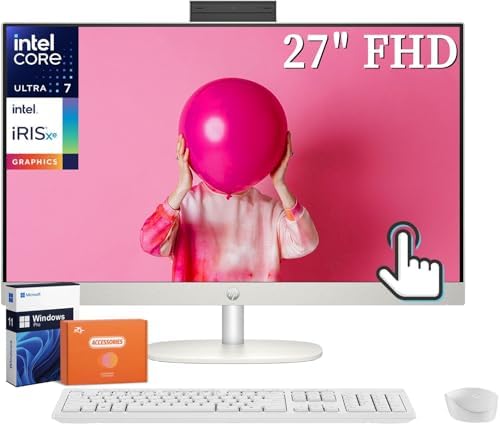
#3 – HP Business All in One Desktop
Best for: professional workflows requiring a high core count and Windows 11 Pro.
Why the HP Business All in One Desktop is our #3 pick
- Listed at $1499.99 in November 2026 – premium among those compared; the price moves, so check it
- 4.3 rating from 119 ratings
RAM: 16 GB · SSD Capacity: 1 TB
For comparison on RAM, pick #1 states 8 GB and pick #2 states 32 GB.
You can also see our full breakdown of the HP 22-dd0110 to see how its specs meet your needs.
How Extreme Spec picked: we started from the 200 most-reviewed All-in-One Computer listings in our retail dataset, removed duplicates, accessories, off-category products and 5 listings whose price did not fit their specifications, and 107 qualified. The picks on this page were selected from those 107 candidates against this topic’s requirements. The order of the picks reflects fit to this topic; each shows its rating and the number of ratings behind it, so you can weigh how much to trust it. Specifications come from manufacturer listings and ratings from verified Amazon buyer reviews (data checked November 2026).
Our Pick and How the List Was Built
When you are furnishing a studio apartment or a tiny home office, every square inch of desk surface is a premium resource. You need a computer that integrates the monitor and internals into a single, slim unit to keep the area open.
The SAINTDISE All-in-One Desktop Computer fits this compact requirement by offering a 23.8 inch IPS display that provides clear viewing angles in tight quarters. Opt for the Dell All-in-One Desktop ec27250 if you need the 1 TB SSD capacity, or the HP Business All in One Desktop for its 12 core processing power.
We selected these models after screening 107 All-in-One Computers and comparing 13 models here at Extreme Spec. Our curated list covers a price range from $429.99 to $1499.99, with the median price of the 13 products in our comparison being $450.
Understand the scope of this guide by viewing the article scope.
Identify your technical needs in the hardware requirements.
See our favorite models at a glance in our top picks.
All In One Computers for Small Spaces: The Findings in Brief
- Top pick: SAINTDISE All-in-One Desktop Computer at $429.99 (RAM: 8 GB).
- Also picked: Dell All-in-One Desktop ec27250 at $932; HP Business All in One Desktop at $1499.99.
- We compared 13 All-in-One Computers, from $299.99 to $1499.99, median $450.
- Best buyer rating in the comparison: Intel HP All-in-one Computer at 4.5/5 from 406 ratings.
All In One Computers for Small Spaces Compared Side by Side
| Product | Price | Rating | RAM | Display Size |
|---|---|---|---|---|
| Intel HP 22-df0224 All-in-One Desktop | $525.88 | 4.2 (1,194 ratings) | 16GB | 21.5″ |
| Intel HP All-in-one Computer | $699.99 | 4.5 (406 ratings) | 32GB | 21.5″ |
| Intel HP All-in-One Desktop Computer | $539.99 | 4.4 (282 ratings) | Not stated | 21.5″ |
| Intel HP All-in-One Desktop Computer | $399.99 | 4.1 (321 ratings) | 8GB | 21.45 Inches |
| Intel HP All-in-One PC | $429.99 | 4.2 (263 ratings) | 4 GB | 20.7-inch |
| AMD HP 21.5″ All-in-One 22-dd0110 | $450 | 4.4 (250 ratings) | 4 GB | 21.5″ |
| AMD HP 22-dd0032 All-in-One PC | $419.99 | 4.5 (191 ratings) | 8 GB | 21.5″ |
| Intel Lenovo ThinkCentre M810z All in One | $299.99 | 4.2 (185 ratings) | 8GB Ram | 21.5″ |
| Intel Lenovo IdeaCentre AIO 3i | $518 | 4.2 (152 ratings) | 8 GB | 22″ |
| STGSivir 22 Display Core i3-8100T 16G 512G | $409.99 | 3.2 (136 ratings) | 16 GB | 22″ |
| SAINTDISE All-in-One Desktop Computer | $429.99 | 4.1 (121 ratings) | 8 GB | 23.8 inch |
| Dell All-in-One Desktop ec27250 | $932 | 4.5 (121 ratings) | 32 GB | 27 |
| HP Business All in One Desktop | $1499.99 | 4.3 (119 ratings) | 16 GB | 27″ |
Prices are approximate and move frequently – check the current price before deciding. “Not stated” means the manufacturer listing does not give that figure – we do not estimate it.
Among our top picks, the value leader is Dell All-in-One Desktop ec27250 because it provides the highest memory capacity for a small footprint.
Each Pick for Small Spaces, Examined One by One
The 3 picks below are reviewed in the same order as the cards above.
SAINTDISE All-in-One Desktop Computer
The SAINTDISE All-in-One Desktop Computer made this list because its 23.8-inch display provides a compact footprint that fits easily into small spaces. It offers an entry-level solution for users who need a dedicated workstation without the bulk of a traditional tower.
What we like: This model includes an IPS display, which provides wide viewing angles and accurate colors for everyday use. It also features 512 GB of SSD storage, providing the baseline for system responsiveness and usable storage capacity.
Keep in mind: The 8 GB of RAM falls below the 16 GB minimum for smooth multitasking and modern web browser overhead. This makes the unit better suited for basic tasks rather than heavy multi-application workflows.
Dell All-in-One Desktop ec27250
The Dell All-in-One Desktop ec27250 is a strong option for a home office where you need a larger screen but still require a space-efficient design. While it has a larger 27-inch display than the other picks, it maintains a slim profile with a stand that provides space for a keyboard underneath.
What we like: This unit features 32 GB of RAM, which provides ample short-term data storage for active tasks. It also includes a 1 TB SSD and a 5MP+IR camera with HDR technology for high-quality video calls.
Keep in mind: The 27-inch display is larger than the 21.5-inch or 23.8-inch models, which might be too large for the smallest studio apartments.
HP Business All in One Desktop
The HP Business All in One Desktop is the best choice for a tiny studio apartment or a compact workspace where you need high-end performance in a small form factor. It packs a 12-core processor into a 27-inch footprint, offering significant processing power for demanding tasks.
What we like: This model includes 16 GB of DDR5 RAM, which meets the minimum for smooth multitasking and modern web browser overhead. It also features a 1 TB PCIe NVMe M.2 SSD, a high-speed storage standard that improves data access speeds.
Keep in mind: The 27-inch display and the $1,499.99 price point make this a premium choice that may exceed the needs of a basic home setup.
Learn how to make the right choice in the buying guide.
For a deeper look at the display and performance, view our detailed analysis of the HP 24-CB0010.
If an integrated system isn’t right for you, explore the alternatives to an All-in-One computer for similar results.
How to Choose an All-in-One Computer for Small Spaces
Base footprint dimensions for small space all-in-one computers
The smallest footprint these desktops actually take up on a desk is defined by the base dimensions, with the HP Business All in One Desktop measuring 7.23 x 16.5 x 21.28 inches. You should prioritize the footprint of the stand over the screen size to ensure the unit fits your workspace. The SAINTDISE All-in-One Desktop Computer and Dell All-in-One Desktop ec27250 provide larger 23.8-inch and 27-inch displays respectively, but their specific base dimensions are not stated. While workstation-grade AIOs like the HP Z series are known for robust thermal management in larger chassis, these compact models focus on a smaller physical footprint to save desk space. How much desk surface will you have left?
How integrated webcam placement affects privacy in compact setups
Look for a pop-up camera or a high-resolution sensor to ensure privacy and video quality in a compact setup. The Dell All-in-One Desktop ec27250 features a 5MP+IR camera with HDR technology and a pop-up design, which physically hides the lens when not in use. High-refresh rate gaming AIOs often prioritize large screens over integrated cameras, whereas these models integrate the camera to maintain a minimalist aesthetic for small spaces.
Cable management options and port availability for all-in-one units
Weigh the number of available ports against your peripheral needs, as all-in-one units limit external expansion. The HP Business All in One Desktop provides 1 USB Type-C 5Gbps port, while the SAINTDISE All-in-One Desktop Computer provides USB 3.0. The Dell All-in-One Desktop ec27250 does not state its specific port types. Efficient power supply efficiency is important for minimizing the energy footprint of these units, which helps keep the internal components cool in a small chassis. Because these are all-in-one systems, you should check if your primary peripherals (like a mouse or keyboard) can connect via the included ports to keep the desk clear of extra wires.
Stand adjustability and tilt range for ergonomic small workspaces
Prioritize a stand with a wide tilt range to ensure ergonomic comfort in a small workspace. The Dell All-in-One Desktop ec27250 allows for a 0 to 20 degrees tilt adjustment. The HP Business All in One Desktop and SAINTDISE All-in-One Desktop Computer do not state their tilt or height limits. While workstation-grade AIOs often feature heavy-duty mounting, these compact models rely on integrated stands that provide the necessary height to clear a keyboard.
Port accessibility and physical layout for compact desktop setups
Check the physical layout of the ports to ensure you can reach them without moving the unit. The Dell All-in-One Desktop ec27250 does not state its port configuration. In a small space, you need to know if the ports are located on the side or the rear; since these values are not stated, you should verify the side-access availability for your specific desk depth before ordering. These models provide the necessary connectivity for standard peripherals while maintaining a compact footprint.
View the technical specifications side by side in the comparison table.
Find the perfect match for your specific needs in the audience checklist.
If you are confused by technical jargon, learn common All-in-One computer terms explained in plain English.
What Each Job Calls For vs What These Picks State
Match the job you actually need done to the figure it calls for, then check which picks state that figure or more. Where none do, the row says so.
| What you want to do | The figure it calls for | Picks at or above it |
|---|---|---|
| Keep the workspace clear with a minimalist setup | All-in-One Form Factor | SAINTDISE All-in-One Desktop Computer, Dell ec27250, HP Business All in One Desktop |
| Run modern web browsers and multiple apps smoothly | 16GB RAM | Dell ec27250, HP Business All in One Desktop |
| Store a large library of personal files and media | 1TB SSD Capacity | Dell ec27250, HP Business All in One Desktop |
These figures are the levels this category is generally held to, not manufacturer claims. A pick at or above a figure states that number; how it reaches it and the rest of your setup still decide the job, so check them against your own workload before buying.
Who Buys All In One Computers, and What It Really Costs
Who buys an all in one desktop, and what each one needs
- University students — 16GB RAM (short-term data storage for active tasks) to handle multiple browser tabs and research tools
- Home office workers — 512GB SSD (permanent data storage space) to store large documents and system files
- Content creators — High-refresh rate gaming AIOs (upper limit of integrated GPU capabilities) to manage video rendering
- Small business owners — IPS panels (better viewing angles and color accuracy) for accurate visual work in shared spaces
- Remote data analysts — DDR5 memory (faster memory bandwidth) to handle large datasets without system lag
What an All-in-One Computer really costs, and where to buy one
What to budget for on top of the All-in-One Computer
- Peripherals — Keyboard and mouse for basic navigation and input
- External storage — Additional drive for long-term archiving of large media files
- Power protection — Surge protector to prevent electrical damage to the internal components
- Docking station — Extra ports for connecting multiple external monitors or hardware
What you can leave out of the budget
- External monitor — The integrated display provides a complete visual output
- Desktop tower — The all-in-one design combines the computer and screen into one unit
- Internal GPU — Integrated graphics handle most standard tasks without a separate card
Where this kind of product is normally sold
- Big-box retailers — Standardized return windows and easy in-person support
- Online marketplaces — Competitive pricing and wide selection of configurations
- Manufacturer websites — Direct warranty handling and potential for custom shipping options
- Specialized electronics stores — Expert advice on technical specifications and immediate local pickup
Check the logistics and coverage in the setup and warranty notes.
Dive deeper into each model’s performance in the detailed reviews.
Get quick answers to common questions in the FAQ.
Protecting your investment is vital, so review the standard All-in-One computer warranties before making a final purchase.
Getting Started with Any of These Picks
Setting up your compact workstation
When you need to join a video call from a desk with limited surface area, you need to know if the hardware handles the audio and video without extra peripherals. The Dell All-in-One Desktop ec27250 includes a 5MP+IR camera with HDR technology and dual Bluetooth speakers for spatial sound, while the HP Business All in One Desktop features a touchscreen and an Anti-Glare display. The SAINTDISE All-in-One Desktop Computer does not state a webcam or microphone in its specifications.
Power and surface requirements before using these all-in-one computers
All three models require a standard power outlet to operate and a flat surface to support the base or stand.
- The HP Business All in One Desktop requires a Windows 11 Pro environment for its specific software features.
- The SAINTDISE All-in-One Desktop Computer arrives with DOS, meaning you must install an operating system before use.
- The Dell All-in-One Desktop ec27250 provides a stand with space for a keyboard underneath to maximize your desk area.
Verifying your order on arrival
Warranty coverage and return terms vary by seller and country, so verify these details with your specific retailer before the return window closes.
- Confirm the screen is free of dead pixels or pressure marks, as the IPS and Anti-Glare panels are integrated into the main chassis and are not user-serviceable.
- Check that the 512 GB or 1 TB storage capacity matches your order, as these drives determine your permanent data storage space.
- Verify the physical dimensions against your workspace, as the 21.5-inch to 27-inch sizes determine the footprint on your desk.
Power on the unit and verify the display resolution and port availability immediately to ensure the hardware is functional before you begin your setup.
What Buyers Still Want to Know About All In One Desktops for Small Spaces
How much does it cost to upgrade the storage later if I run out of space?
The cost to upgrade storage depends on whether the specific all-in-one desktop uses a modular drive or soldered components. While the HP Business All in One Desktop uses a 1 TB PCIe NVMe M.2 SSD, the data does not state if this slot is user-accessible or if the storage is soldered to the board.
Can I connect my existing printer and mouse easily to this?
Connecting existing peripherals like a printer or mouse depends on the available port standards for each all-in-one computer. The SAINTDISE All-in-One Desktop Computer provides USB 3.0 ports, while the HP Business All in One Desktop provides USB 2.0 ports for connecting your external hardware.
Which all-in-one desktop is best for a small space?
The all-in-one desktop best for a small space is the SAINTDISE model due to its 23.8 inch display. This size provides a compact footprint compared to the 27 inch screens found on the Dell and HP models.
Which all-in-one computer has the most RAM?
The all-in-one computer with the most RAM is the Dell All-in-One Desktop ec27250, which features 32 GB of memory. This amount of short-term data storage allows for heavy multitasking and many open browser tabs simultaneously.
Who Should Skip These All-in-One Computers
To prevent thermal throttling, which causes sudden performance drops during sustained CPU or GPU loads, you should check the cooling specifications for high-performance tasks. If a machine lacks adequate heat dissipation, the processor will slow itself down to stay cool. This is a risk for sustained video editing or 3D rendering.
If your work requires professional-grade video editing or heavy 3D rendering, these models are the wrong tool because they lack the dedicated high-end GPU power required for those tasks. These systems are designed for office productivity and general home use.
For high-end creative work, you should look for workstation-grade AIOs or desktops with dedicated high-performance graphics cards. You can also find more specialized options in our guide for best all in one computer for creative work under $1600.
The rest of our All-in-One guides
- The All in One Computers That Work Best for Creative Work Under $1600
- Which All in One Desktop Is Best for Seniors?
- Best All in One Computer with 16GB RAM
- Affordable All in One Desktops Under 500 Dollars Compared
- Which All in One Computer Is Best for a Home Office?
- Best All in One Desktop with Touchscreen
ExtremeSpec is reader-supported: some links on this page are affiliate links, and as an Amazon Associate ExtremeSpec earns from qualifying purchases at no extra cost to you. Learn more.