
Which All in One Computer Is Best for a Home Office?
Our Top 3 Picks for Home Office
The best all in one computer for home office is the Intel Dell Inspiron 7700 AIO which provides a 27-inch display for users needing a large workspace.
Most All-in-One Computer options look identical on a listing page. These 3 are the ones that differ where it actually matters.

#1 – Intel Dell Inspiron 7700 AIO
Best for: users who need a large 27-inch display for a home office and want to store up to 25 months of high-resolution family photos.
Why the Intel Dell Inspiron 7700 AIO is our #1 pick
- Listed at $1284.99 in November 2026 – mid-range among those compared; the price moves, so check it
- 4.5 rating from 524 ratings
RAM: 12GB · SSD Capacity: 256 GB
Against the other picks on RAM, pick #2 states 16GB and pick #3 states 16 GB.

#2 – Lenovo 24 23.8" All-in-One Desktop
Best for: those prioritizing smooth multitasking with 16GB of memory and a 512GB SSD for reliable everyday office tasks.
Why the Lenovo 24 23.8" All-in-One Desktop is our #2 pick
- Listed at $799.99 in November 2026 – entry among those compared; the price moves, so check it
- 4.3 rating from 396 ratings
RAM: 16GB · SSD Capacity: 512GB
To put that RAM in context, pick #1 states 12GB.
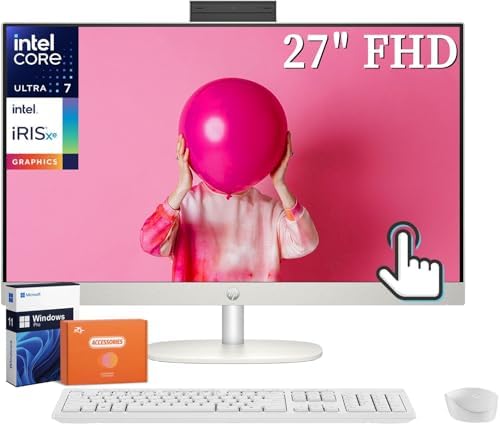
#3 – HP Business All in One Desktop
Best for: power users requiring high-performance processing with 12 cores and a 1TB SSD for large file storage.
Why the HP Business All in One Desktop is our #3 pick
- Listed at $1499.99 in November 2026 – premium among those compared; the price moves, so check it
- 4.3 rating from 119 ratings
RAM: 16 GB · SSD Capacity: 1 TB
For comparison on RAM, pick #1 states 12GB.
You can find our full review of the Inspiron 7730 to see how its components handle daily tasks.
How Extreme Spec picked: we started from the 200 most-reviewed All-in-One Computer listings in our retail dataset, removed duplicates, accessories, off-category products and 5 listings whose price did not fit their specifications, and 107 qualified. The picks on this page were selected from those 107 candidates against this topic’s requirements. The order of the picks reflects fit to this topic; each shows its rating and the number of ratings behind it, so you can weigh how much to trust it. Specifications come from manufacturer listings and ratings from verified Amazon buyer reviews (data checked November 2026).
Our Verdict and How We Chose
If you are replacing an older desktop to create a clean, cable-free workspace, the physical footprint of the unit determines how much desk space remains for your peripherals.
The Intel Dell Inspiron 7700 AIO offers a large 27-inch screen in a compact form factor for a spacious setup, while the Lenovo 24 23.8″ All-in-One Desktop serves those who prefer a slightly smaller 23.8-inch footprint. The HP Business All in One Desktop is the best fit for those who need a 12-core processor to handle intensive professional applications.
We selected these three models after screening 107 All-in-One Computers and comparing 10 at Extreme Spec. The options on this page range from $799.99 to $1499.99, with a median price of $1291.99.
See the full boundaries of this guide in the scope.
Learn how to select the right model in the buying guide.
Find the perfect match for your role in the audience checklist.
All-in-One Computers for Home Office in Brief, Before You Read the Rest
- Top pick: Intel Dell Inspiron 7700 AIO at $1284.99 (RAM: 12GB).
- Also picked: Lenovo 24 23.8″ All-in-One Desktop at $799.99; HP Business All in One Desktop at $1499.99.
- We compared 10 All-in-One Computers, from $759.99 to $2399.99, median $1291.99.
- Best buyer rating in the comparison: Intel HP All in One Desktop at 4.6/5 from 694 ratings.
- Cheapest in the comparison that can store a full year of high-resolution family photos: Intel Dell Inspiron 7730 All in One at $759.99 (about 25 to 49 months).
All-in-One Computers for Home Office Compared Side by Side
| Product | Price | Rating | RAM | Display Size |
|---|---|---|---|---|
| Intel Dell Inspiron 7700 AIO | $1284.99 | 4.5 (524 ratings) | 12GB | 27-inch |
| Lenovo 24 23.8″ All-in-One Desktop | $799.99 | 4.3 (396 ratings) | 16GB | 23.8″ |
| HP Business All in One Desktop | $1499.99 | 4.3 (119 ratings) | 16 GB | 27″ |
| Intel HP Pavilion All-in-One Desktop | $1029.99 | 4.5 (302 ratings) | 16 GB | 27-inch |
| Intel Dell Inspiron 7730 All in One | $759.99 | 4.5 (275 ratings) | 16GB | 27-inch |
| Inegrated HP 27-dp0160 All-in-One Desktop | $999.99 | 4.5 (258 ratings) | 16 GB | 27-inch |
| NVIDIA Dell Inspiron 7730 i7730-7180WHT-PUS | $1299.99 | 4.5 (178 ratings) | 32GB DDR4 RAM | 27-inch |
| AMD HP All-in-One Desktop PC 27-cr0012 | $1298.99 | 4.3 (169 ratings) | 32 GB | 27 inch |
| NVIDIA Dell All in One Desktop Computer | $2399.99 | 4.5 (113 ratings) | 32 GB | 27 Inches |
| Intel HP All in One Desktop | $1599.99 | 4.6 (694 ratings) | 16 GB | 27″ |
Prices are approximate and move frequently – check the current price before deciding. “Not stated” means the manufacturer listing does not give that figure – we do not estimate it.
Among our top picks, the value leader is Lenovo 24 23.8″ All-in-One Desktop because it provides 16GB of RAM for $50.00 per unit.
Each Pick for Home Office, Reviewed in Detail
The 3 picks below are reviewed in the same order as the cards above.
Intel Dell Inspiron 7700 AIO
The Intel Dell Inspiron 7700 AIO made the list because it provides a large 27-inch screen and a respectable 12GB of memory, making it a reliable choice for a home office setup that needs a significant display area.
What we like: This model features a 27-inch Infinity Touch Display, which allows for direct interaction with the screen for navigating documents or creative tasks. It includes a 1 TB secondary SATA HDD, providing ample space to store a large library of high-resolution family photos for over 12 months.
Keep in mind: The 256 GB NVMe SSD provides about 12 to 25 months of storage for high-resolution photos, but it is short of the 12 months needed to store a large library of 1080p movies. The 12GB of RAM is sufficient for running multiple browser tabs and office apps only at the easier end of the performance range.
Lenovo 24 23.8″ All-in-One Desktop
The Lenovo 24 23.8″ All-in-One Desktop is a strong mid-range option that balances a high-quality IPS anti-glare display with 16GB of RAM and 512GB of storage.
What we like: The 16GB of DDR4 RAM provides enough memory to run multiple browser tabs and office apps simultaneously. It also features an 8-core processor, which provides enough processing pathways to run a basic home office suite smoothly.
Keep in mind: The 23.8-inch display is smaller than the 27-inch options, which may be a factor for those who prefer a larger workspace. The 512GB SSD can hold a large library of 1080p movies for about 10 to 20 months, satisfying the 12-month requirement only at the lighter end of the storage usage.
HP Business All in One Desktop
The HP Business All in One Desktop is a high-performance choice for a home office, offering a 12-core processor and a large 1 TB SSD for heavy multitasking and data storage.
What we like: This model features a 12-core processor and 16GB of DDR5 memory, providing high processing capacity and fast short-term data storage for active tasks. It also includes a 1 TB PCIe NVMe M.2 SSD, which provides significant permanent storage space for large files and applications.
Keep in mind: At the $1499.99 mark, this is the most expensive option on the list. The 27-inch FHD IPS Touchscreen offers high clarity, but the price reflects its position as a high-performance business-oriented machine.
The Lenovo 24 23.8″ All-in-One Desktop offers the best balance of performance versus price for a standard office worker because it provides 16GB of RAM and an 8-core processor at a lower price point than the 27-inch models. For a home office, you should count how many high-resolution movies you plan to store per year; if you need to store more than 250GB of 1080p video annually, you should choose a model with 1 TB of storage like the HP Business All in One Desktop. If you plan to keep your storage needs lower, the 512GB SSD on the Lenovo 24 23.8″ All-in-One Desktop provides enough space for several years of photo storage.
For a budget-friendly option, view our spec breakdown of the STGSivir 22 Display model.
The Specs That Decide an Integrated Desktop for Home Office
How integrated webcam quality affects home office video calls
Look for a built-in HD webcam to ensure clear video during home office meetings without needing external hardware. The HP Business All in One Desktop and the Lenovo 24 23.8″ All-in-One Desktop both state they include a webcam, while the Intel Dell Inspiron 7700 AIO does not state a camera is included. For a home office setup, a dedicated camera allows you to join calls immediately upon powering on the machine. You start your day by opening a conferencing app, see your clear image on the screen, and join your team without hunting for a USB plug. This streamlines the transition from personal tasks to professional meetings.
How USB port connectivity supports home office peripheral connections
Prioritize models with USB 2.0 or higher to connect your mouse, keyboard, and external drives. The Lenovo 24 23.8″ All-in-One Desktop and the HP Business All in One Desktop both state they include USB 2.0 ports, which provide the standard connection for most office peripherals. If you need to connect high-speed external storage, check if the specific model provides USB 3.2 or Type-C, as the Intel Dell Inspiron 7700 AIO does not state its specific port types. You plug in your peripherals once, and they remain ready for use throughout your work shift. This setup keeps your workspace organized by eliminating the need for a separate docking station.
How 27-inch screen real estate provides workspace for side-by-side windows
Select a 27-inch display to provide enough workspace for side-by-side windows, as the Intel Dell Inspiron 7700 AIO and the HP Business All in One Desktop both offer this larger size. For a more compact home workspace, the Lenovo 24 23.8″ All-in-One Desktop provides a smaller footprint while maintaining an FHD (1920 x 1080) resolution. To run multiple browser tabs and office apps simultaneously without lagging, you need at least 8 to 16GB of RAM; the Lenovo 24 23.8″ All-in-One Desktop and the HP Business All in One Desktop both state 16GB, which is enough for this task. A 27-inch screen allows you to view large spreadsheets or documents with less scrolling. You open your primary work window and a secondary reference doc, finding both clearly visible and legible for your 8-hour shift.
Thermal Management for Long Tasks
Choose a model with a high core count to maintain sustained performance during long work hours, which is the primary function of thermal management in this category. The HP Business All in One Desktop states it has 12 cores, providing more simultaneous processing pathways than the 8-core Lenovo 24 23.8″ All-in-One Desktop. While workstation-grade AIOs like the HP Z series are the benchmark for thermal management and sustained performance, these home office models rely on their integrated designs to stay cool. The Intel Dell Inspiron 7700 AIO features a processor that reaches up to 4.7 GHz, while the HP Business All in One Desktop reaches up to 4.8 GHz. You begin a long rendering or data processing task, the internal cooling system manages the heat, and the machine maintains its speed without a sudden drop in performance. This prevents the failure mode of thermal throttling, where the system slows down to protect itself from overheating.
If you are confused by technical jargon, see our guide to All-in-One Computer Terms and Specs.
The Jobs Buyers Ask About, Checked Against Each Pick
Each row is a job this page’s buyers ask about, worked out from each pick’s listed SSD capacity and RAM and processor core count and a typical need for the job.
| What you want to do | What it takes | How each pick does |
|---|---|---|
| Store a full year of high-resolution family photos | 100 to 200GB for 12 months, 80% usable – about 125 to 250GB of SSD capacity | Intel Dell Inspiron 7700 AIO: about 12 to 25 months; Lenovo 24 23.8″ All-in-One Desktop: about 25 to 49 months; HP Business All in One Desktop: not stated |
| Keep a large library of 1080p movies | 250 to 500GB for 12 months, 80% usable – about 315 to 625GB of SSD capacity | Intel Dell Inspiron 7700 AIO: about 5 to 10 months; Lenovo 24 23.8″ All-in-One Desktop: about 10 to 20 months; HP Business All in One Desktop: not stated |
| Run multiple browser tabs and office apps simultaneously | at least 8 to 16GB | Intel Dell Inspiron 7700 AIO: only at the easier end (12GB); Lenovo 24 23.8″ All-in-One Desktop: yes (16GB); HP Business All in One Desktop: yes (16GB) |
| Run a basic home office suite | at least 4 cores | Intel Dell Inspiron 7700 AIO: not stated; Lenovo 24 23.8″ All-in-One Desktop: yes (8 cores); HP Business All in One Desktop: yes (12 cores) |
The needs are typical figures for each job, not manufacturer claims, and each pick’s result is worked out from its listed specifications. Your own job’s figure is the one that decides.
Who Buys All-in-One Computers, and What It Really Costs
Who buys an All-in-One Computer, and what each one needs
- Content creators — ability to avoid an integrated GPU bottleneck (a limit on graphics power) during video rendering
- Remote administrative assistants — 16GB RAM (short-term data storage) for smooth multitasking across many browser tabs
- Data analysts — 512GB SSD (permanent storage space) to maintain system responsiveness with large datasets
- Graphic designers — IPS panels (screens with wide viewing angles) for accurate color representation
- Software developers — DDR5 memory (faster data transfer) to future-proof the machine against software updates
What an AIO desktop really costs, and where to buy one
What to budget for on top of the AIO desktop
- Uninterruptible power supply — protects against data loss during power outages
- External docking station — connects multiple peripherals like monitors and printers
- Extended mouse pad — provides a larger surface for precise cursor movement
- Privacy screen filter — prevents others from seeing the display in public spaces
What you can leave out of the budget
- External monitor — the integrated display provides a full screen experience
- Desktop tower — the all-in-one design combines the computer and screen
- Additional internal hard drive — the SSD provides sufficient permanent storage for most home office files
Where this kind of product is normally sold
- Big-box electronics retailers — offer easy in-person returns and immediate product pickup
- Online marketplaces — provide frequent bundle deals and a wide variety of shipping options
- Manufacturer direct stores — offer direct warranty handling and specialized configuration choices
Consider exploring the alternatives to an All-in-One Computer if you need a different hardware configuration.
What These Integrated Desktops Need, and What to Check on Arrival
What you need before you start
You need a standard power outlet to provide electricity for these integrated desktops to function.
- The Intel Dell Inspiron 7700 AIO operates on Windows 10 Home.
- The Lenovo 24 23.8″ All-in-One Desktop does not state a specific operating system version in the data.
What to check when your order arrives
Warranty coverage and return windows vary by seller and country.
- Verify the 27-inch display on the Intel Dell Inspiron 7700 AIO and HP Business All in One Desktop for cracks, as large glass panels are difficult to repair.
- Confirm the touch functionality on the HP Business All in One Desktop and Intel Dell Inspiron 7700 AIO, as these are specialized sensors that can fail to register input.
- Check the 16GB DDR4 RAM on the Lenovo 24 23.8″ All-in-One Desktop to ensure the system recognizes the full memory capacity for multitasking.
- Inspect the NVMe SSD storage on all three models to ensure the drive is recognized by the BIOS for data access.
Plug the unit in and run a system update immediately to ensure the drivers are current while your return window is still open.
Peripherals and workspace setup
You can spend around $50 to $100 on a high-quality webcam and external speakers to supplement the built-in hardware for professional calls.
If you need a dedicated camera, look for one with 1080p resolution to match the FHD display of these machines. For audio, external speakers provide better clarity than integrated drivers for home office meetings.
To maintain a clean home office aesthetic, you can use cable management—tools like clips or sleeves that bundle and hide power and data cords—to organize the workspace. If you need more ports for peripherals, an External Docking Station (which expands port connectivity for peripherals) is a useful addition, provided it is compatible with the USB ports listed on your specific model.
For privacy in shared spaces, a Privacy Filter protects screen visibility from side angles by narrowing the viewing cone of the display.
Find answers to common queries in the FAQ.
Identify your specific hardware needs in the job requirements.
View all models side by side in the comparison table.
Buying Questions About All-in-One Computers for Home Office, Answered
Which all-in-one computer has a screen big enough for two windows side-by-side?
The all-in-one computer with a screen big enough for two windows side-by-side is the Intel Dell Inspiron 7700 AIO or the HP Business All in One Desktop, both of which feature a 27-inch display. These larger dimensions provide the extra surface area needed to view and edit two documents simultaneously without significant overlap.
Can I easily connect all my current peripherals like printers, docks, and monitors?
Connecting current peripherals like printers, docks, and monitors is supported by the Lenovo 24 23.8″ All-in-One Desktop and the HP Business All in One Desktop, as both state they include USB 2.0 ports. These ports provide the standard interface for most legacy office equipment and wired accessories.
Which all-in-one computer is best for a home office?
The best all-in-one computer for a home office depends on your specific multitasking needs and available workspace.
Is the Intel Dell Inspiron 7700 AIO worth it for my workspace?
The Intel Dell Inspiron 7700 AIO is worth it if you require a large 27-inch touch display and Intel Iris Xe graphics for your home office. This model is available for around $1284.99 and includes a 256 GB NVMe SSD for your primary files.
Browse the best options quickly in our top picks.
Check the installation details in the setup and warranty notes.
Explore in-depth analysis of every model in the detailed reviews.
Before making a final purchase, review what to look for in All-in-One Computer Warranties.
Who Should Skip These AIO desktops
Storage capacity determines how much data you can keep on the machine permanently. The Lenovo 24 23.8″ All-in-One Desktop holds 512GB of data on its NVMe SSD, which is enough to store a full year of high-resolution family photos with 80% usable space. The 256GB SSD in the Dell model provides enough space for 12 to 25 months of high-resolution photos, but it is short of the 12 months required for a large library of 1080p movies.
To avoid performance drops during sustained CPU or GPU loads caused by thermal throttling, check the processor’s maximum turbo frequency and the cooling design in the manufacturer’s documentation. Because these integrated desktops have non-upgradable components, the lifespan of the machine is limited to the initial specs; if you require more than the stated 12GB or 16GB of RAM in the future, these models will not allow for a memory upgrade.
If you need to perform professional video editing or intensive 3D rendering, these integrated desktops may experience an integrated GPU bottleneck because they lack dedicated graphics hardware. For these specific tasks, you should look for a workstation-grade AIO or a desktop with a discrete graphics card.
The other integrated desktop guides we have published
- All in One Computers for Students Compared
- Choosing the Best All in One Desktop for Small Spaces
- The All in One Computers That Work Best for Creative Work Under $1600
- Which All in One Desktop Is Best for Seniors?
- Best All in One Computer with 16GB RAM
- Affordable All in One Desktops Under 500 Dollars Compared
ExtremeSpec is reader-supported: some links on this page are affiliate links, and as an Amazon Associate ExtremeSpec earns from qualifying purchases at no extra cost to you. Learn more.