
Can the Precision 5520 Mobile Workstation handle large file transfers quickly?
ExtremeSpec is reader-supported: some links on this page are affiliate links, and as an Amazon Associate ExtremeSpec earns from qualifying purchases at no extra cost to you. Learn more.
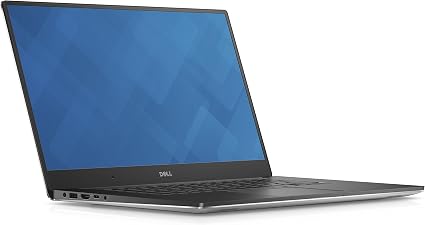
To ensure maximum speeds, you must verify that your external drives use NVMe SSDs—fast storage drives that use flash memory—and that your cables support the full bandwidth of the port. You should also check that your external power supply provides enough wattage to prevent thermal throttling, which is a performance drop that occurs when a device gets too hot during heavy work.
Thunderbolt 3 ports enable high-speed data transfers on the Precision 5520
The Thunderbolt 3 port on this workstation allows for high-speed connectivity, though the specific maximum read/write speed depends on the external drive you connect. We selected the Precision 5520 for this review because it represents a common professional mobile workstation, a portable computer designed for heavy-duty tasks like 3D rendering. For a mobile workstation buyer, ensuring high-speed data transfer is critical because moving large project files between the laptop and external RAID arrays is a frequent bottleneck in professional workflows. The 512GB SSD provides internal space, and the 32 GB max memory supports large data sets, but the system’s ability to move data relies heavily on that Thunderbolt 3 interface. We don’t know the exact wattage of the included power adapter, so you should confirm your power source can sustain peak speeds during sustained I/O tasks.
You can find a detailed side-by-side comparison in our full Precision 5520 spec breakdown.
What to Check Before Buying the Precision 5520
- Verify that your external storage supports Thunderbolt 3 to ensure you aren’t limited by a slower connection standard.
- Check if your external RAID array supports daisy-chaining, which lets you connect multiple drives to a single port.
- Confirm your external power supply provides sufficient wattage to keep the workstation from slowing down during large transfers.
- Ensure your external drives use NVMe SSDs to maximize the speed of the data path.
- Check if you need more than the 512GB of internal storage provided by the factory.
Comparing the Precision 5520 to Other Options
The Precision 5520 sits in a category of high-end mobile workstations where professional-grade performance meets portability. If you require a machine that balances a 15.6-inch Infinity Edge display with high-speed connectivity, this model is a strong candidate. However, if your workflow requires a higher internal storage capacity than 512GB or a different screen size, you might look at other workstation models that offer larger internal drives or different chassis dimensions. Buyers who prioritize the specific Thunderbolt 3 ecosystem for external storage will find this configuration useful, while those who do not use external arrays might find other configurations more suitable for their needs.
For those worried about performance, see if the Precision 5520 has enough memory for heavy multitasking.
If you need a reliable workstation for moving large files and require Thunderbolt 3 connectivity, choose the Precision 5520. For users who need more than 512GB of internal storage or different hardware configurations, you should consider other mobile workstation options.