
Samsung Chromebook 4 Chrome OS 11.6″ HD Intel Celeron N4000 Laptop XE310XBA-K03US
ExtremeSpec is reader-supported: some links on this page are affiliate links, and as an Amazon Associate ExtremeSpec earns from qualifying purchases at no extra cost to you. Learn more.
Table of Contents
Samsung Chromebook 4 XE310XBA-K03US
The Samsung Chromebook 4 Chrome OS XE310XBA-K03US is a budget-friendly laptop that runs Google’s Chrome operating system, featuring an 11.6-inch HD display, Intel Celeron N4000 processor, 4GB RAM, and 32GB storage. This lightweight laptop typically costs between $200-300 and serves students, remote workers, and casual users who primarily need web browsing, document editing, and cloud-based applications. The device boots in seconds, includes built-in Google Workspace apps, and offers extended battery life for all-day productivity.
Key Features and Benefits
The Samsung Chromebook 4 delivers essential computing capabilities through its streamlined design and Chrome OS integration. The 11.6-inch HD display provides clear visuals for daily tasks like web browsing, email management, and document creation. Chrome OS enables instant startup, typically booting in under 10 seconds, while automatic updates maintain system security without user intervention.
Battery performance usually ranges from 8-12 hours depending on usage patterns, making the Chromebook 4 suitable for full workdays or extended study sessions. The lightweight construction, typically around 2.6 pounds, enhances portability for students and mobile professionals. Google Workspace integration includes access to Gmail, Drive, Docs, Sheets, and Slides without requiring separate installations.
Understanding Chromebook Limitations

Chrome OS functions primarily as a web-based operating system, which means most applications require internet connectivity. Users cannot install traditional Windows or Mac software like Adobe Creative Suite, Microsoft Office desktop versions, or specialized professional tools. The 32GB eMMC storage provides limited local file storage, though cloud storage through Google Drive offers 15GB free space.
The Intel Celeron N4000 processor handles basic tasks efficiently but struggles with resource-intensive applications such as video editing, 3D modeling, or high-end gaming. Multiple browser tabs with heavy websites can slow performance, and offline functionality remains limited compared to traditional operating systems. Users accustomed to extensive software libraries may find Chrome OS restrictive for advanced computing needs.
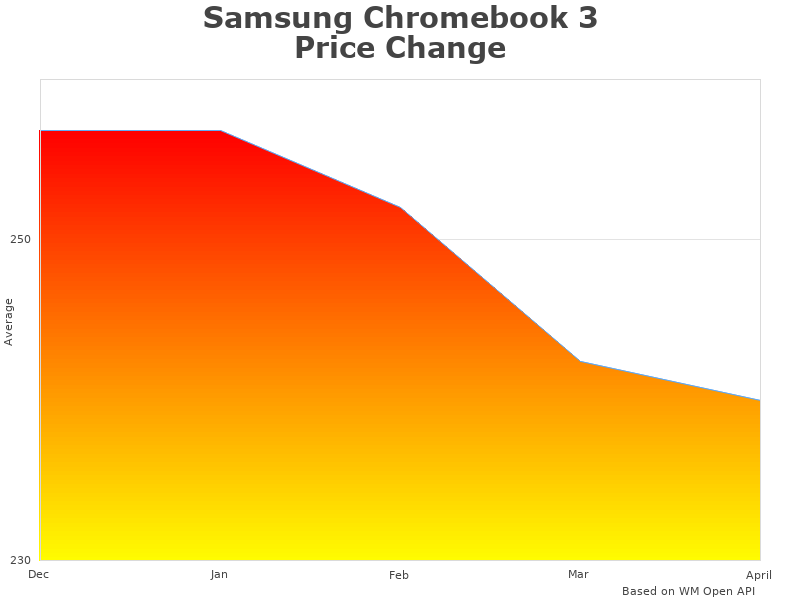
How Samsung Chromebook XE310XBA-K03US data representation price was changing
What Defines the Chromebook Category
Chromebooks represent a distinct laptop category that differs significantly from traditional Windows or Mac computers. These devices run Chrome OS, Google’s lightweight operating system built around the Chrome browser and cloud computing. The Samsung Chromebook 4 XE310XBA-K03US exemplifies this category with its focus on web-based applications, cloud storage, and simplified user experience.
The fundamental difference lies in software architecture. Where traditional laptops rely on locally installed programs, Chromebooks operate primarily through web applications and Progressive Web Apps (PWAs). This design philosophy enables lower hardware requirements, reduced costs, and enhanced security through automatic updates and sandboxed application environments.
How Intel Celeron Processors Work in Chromebooks

The Intel Celeron N4000 processor in the Samsung Chromebook 4 represents Intel’s entry-level CPU line designed for basic computing tasks. This dual-core processor operates at base frequencies around 1.1GHz, with burst speeds reaching approximately 2.6GHz when additional performance is needed. For Chrome OS devices, this processing power proves adequate since the operating system requires fewer resources than traditional desktop environments.
Celeron processors prioritize energy efficiency over raw performance, contributing to extended battery life in portable devices. The processor handles office productivity tasks effectively, including document editing, web browsing, and video streaming. However, users requiring intensive computational work should consider processors optimized for development tasks or creative applications.
Why Chromebooks Offer Budget-Friendly Computing
Chromebooks maintain lower price points through several cost-reduction strategies. Chrome OS requires minimal storage space and system resources, allowing manufacturers to use less expensive components while maintaining acceptable performance. The operating system itself is free for manufacturers, unlike Windows licensing fees that add to laptop costs.
Cloud-based storage reduces the need for large internal storage drives, typically the most expensive component in traditional laptops. Most Chromebooks include 32GB-64GB of local storage compared to 256GB-1TB in conventional laptops. This approach works effectively for users who store documents, photos, and files in cloud services like Google Drive, Dropbox, or OneDrive.
Manufacturing partnerships between Google and hardware companies like Samsung enable cost efficiencies through streamlined production processes and component sourcing. The simplified hardware requirements, combined with Chrome OS optimization, create devices that deliver functional computing experiences at accessible price points for students, seniors, and budget-conscious consumers.
Essential Chromebook Characteristics
- Lightweight design typically weighing 2-4 pounds for enhanced portability
- Fast boot times usually under 10 seconds from power button to desktop
- Automatic system updates that install security patches without user intervention
- Built-in virus protection through Chrome OS security architecture
- Extended battery life commonly ranging 8-12 hours for typical usage
- Cloud-first approach with Google Workspace integration for productivity
- Access to Android apps through Google Play Store on compatible models
How Samsung Design Enhances Chrome OS Experience
Samsung brings decades of hardware expertise to the Chromebook market, combining reliable build quality with Chrome OS efficiency. The XE310XBA-K03US features Samsung’s attention to display quality, keyboard feel, and thermal management that enhances the overall user experience beyond basic functionality.
The collaboration between Samsung hardware engineering and Google software optimization creates devices that maximize Chrome OS capabilities. Samsung’s manufacturing scale enables competitive pricing while maintaining build quality standards. The 11.6-inch form factor balances screen real estate with portability, making it suitable for classroom environments, coffee shop work sessions, and travel scenarios.
Connectivity options include USB-C ports for modern peripheral compatibility, along with traditional USB-A ports for existing devices. The Gigabit Wi-Fi capability ensures fast internet access when available, while the compact design fits easily in backpacks, briefcases, and small work spaces.
Evaluating Chromebook 4 Advantages and Limitations
The Samsung Chromebook 4 excels in scenarios requiring basic computing functionality with minimal complexity. Its immediate startup eliminates wait times associated with traditional operating systems, while automatic updates ensure security without user maintenance. The lightweight design and extended battery life support mobile productivity for students, remote workers, and travelers.
However, the device faces limitations in offline scenarios and resource-intensive applications. Users requiring specialized software, extensive local storage, or high-performance computing should consider traditional laptops. The small screen size may challenge users who regularly work with multiple documents simultaneously or require detailed visual work.
The value proposition depends entirely on user requirements and expectations. For web-based workflows, document editing, and communication tasks, the Chromebook 4 provides excellent functionality at an accessible price point. Users with advanced computing needs or specific software requirements may find the limitations restrictive despite the cost advantages.
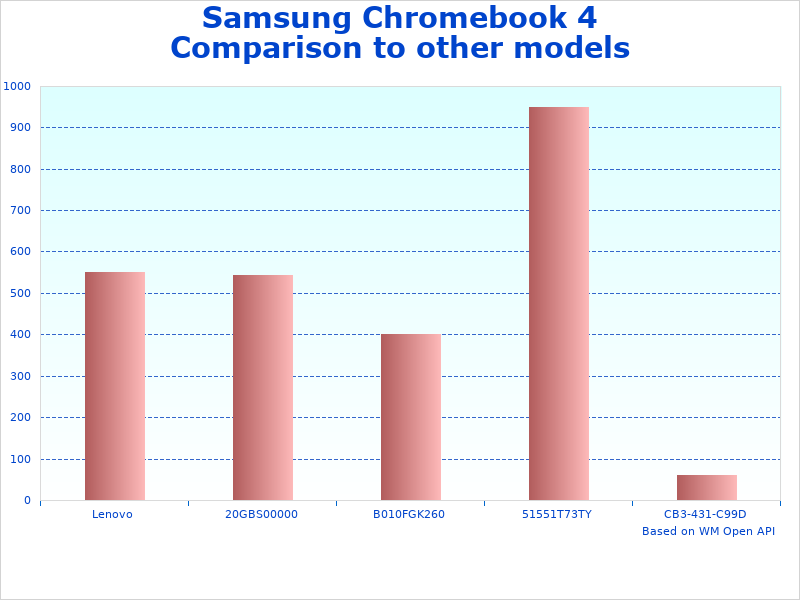
Compare Samsung 4 Chrome to similar products
Samsung Chromebook 4 Key Advantages
- Affordable pricing typically under $300 makes computing accessible to students
- Instant-on capability eliminates lengthy boot sequences for immediate productivity
- Automatic security updates protect against malware without user intervention
- Google Workspace integration provides seamless access to productivity applications
- Extended battery performance supports full-day usage without charging concerns
- Lightweight construction at approximately 2.6 pounds enhances mobile productivity
- Simple user interface reduces learning curve for technology newcomers
Understanding Chromebook 4 Functionality
The Samsung Chromebook 4 XE310XBA-K03US operates as a web-centric computing device designed for users whose primary activities involve internet-based applications. Chrome OS creates a simplified computing environment where web browsers serve as the primary application platform, running everything from email and document editing to media streaming and communication tools.
Google Workspace applications including Docs, Sheets, and Slides function identically to their web versions, providing familiar productivity tools without software installation requirements. The device supports Android applications through the Google Play Store, expanding functionality beyond web apps to include mobile applications optimized for larger screens and keyboard input.
Practical Use Cases and Scenarios
The Samsung Chromebook 4 serves students effectively for research, essay writing, and online learning platforms. Educational institutions often prefer Chromebooks because they require minimal IT support, update automatically, and provide consistent user experiences across multiple devices. The device handles standard academic workflows including online research, document collaboration, and video conferencing.
Remote workers who primarily use web-based tools find Chromebooks sufficient for email management, cloud-based project management, and virtual meetings. However, professionals requiring specialized software, local file processing, or high-performance computing capabilities should evaluate whether Chrome OS limitations align with their workflow requirements.
Home users seeking simple computing solutions for web browsing, social media, and entertainment consumption benefit from Chromebook simplicity and security. The device handles streaming services, online shopping, and basic communication tasks effectively while remaining affordable and low-maintenance compared to traditional computers.
Samsung Chromebook 4 XE310XBA-K03US Complete Specifications
| Model Name | Samsung Chromebook 4 XE310XBA-K03US |
|---|---|
| Category | Chromebook Laptop |
| Operating System | Chrome OS |
| Display Size | 11.6 inches HD (1366 x 768) |
| Processor | Intel Celeron N4000 Dual-Core |
| RAM | 4 GB LPDDR4 |
| Storage | 32 GB eMMC |
| Battery Life | Up to 12.5 hours (varies by usage) |
| Weight | Approximately 2.6 pounds |
| Connectivity | Wi-Fi 802.11ac, Bluetooth, USB-C, USB 3.0 |
| Price Range | Typically $200-300 |
| Target Users | Students, home users, remote workers with basic needs |
- Design Msi Z87 Motherboard
- Netgear Readynas 6 Rn426e6
- Quot 272 27 Bi
- Amd 7700k Kaveri Testing
- Xe Chromebook Xba K
Frequently Asked Questions About Samsung Chromebook 4
What is the Samsung Chromebook 4 XE310XBA-K03US best used for?
The Samsung Chromebook 4 XE310XBA-K03US excels at web browsing, document editing through Google Workspace, email management, and media streaming. It serves students doing research and writing assignments, remote workers using cloud-based tools, and home users seeking simple, secure computing for everyday tasks like online shopping and social media.
What are the actual specifications and capabilities?
The Samsung Chromebook 4 XE310XBA-K03US features an Intel Celeron N4000 processor, 4GB LPDDR4 RAM, and 32GB eMMC storage in an 11.6-inch form factor. Battery life typically ranges 8-12 hours depending on usage patterns. The device weighs approximately 2.6 pounds and includes USB-C and USB 3.0 ports for connectivity. Chrome OS provides automatic updates and built-in security features.
What limitations should I consider before purchasing?
The Chromebook 4 cannot run traditional Windows or Mac desktop software, requires internet connectivity for most functions, and offers limited local storage space. The Intel Celeron processor handles basic tasks well but struggles with resource-intensive applications like video editing or high-end gaming. Users requiring specialized professional software or extensive offline capabilities should consider traditional laptops instead.