CORSAIR SABRE v3 PRO PureVector: Personalized Bidirectional Aim Calibration
The CORSAIR SABRE v3 PRO PureVector features a 42,000 DPI MARKSMAN X optical sensor and 8,000Hz hyper-polling to deliver a 0.25ms average click latency. While standard mice rely on a single sensitivity value that assumes equal accuracy in every direction, the PureVector system uses bidirectional sensitivity calibration to adjust for individual human aiming biases. The CORSAIR SABRE v3 PRO PureVector suits competitive FPS players seeking consistent flicking, while office workers should look for standard peripherals.
Who should buy the CORSAIR SABRE v3 PRO PureVector and who should skip it
Readers who should buy the CORSAIR SABRE v3 PRO PureVector
- Competitive FPS players should buy the CORSAIR SABRE v3 PRO PureVector to achieve an 8% average performance increase by correcting micro-inconsistencies in their aim.
- Entry-level gamers should buy the CORSAIR SABRE v3 PRO PureVector to potentially improve Aim Speed by up to 81ms (33%) during flicking drills.
- Aimlabs users should buy the CORSAIR SABRE v3 PRO PureVector to export and store personalized calibration profiles directly into the hardware.
- Esports professionals should buy the CORSAIR SABRE v3 PRO PureVector to ensure identical, high-performance settings travel with the mouse to LAN events.
Readers who should skip the CORSAIR SABRE v3 PRO PureVector
- Mobile or tablet gamers should skip the CORSAIR SABRE v3 PRO PureVector and look for dedicated mobile gaming hardware.
- Office workers should skip the CORSAIR SABRE v3 PRO PureVector and choose standard productivity mice that do not require 8,000Hz polling or complex calibration.
What to do next about the CORSAIR SABRE v3 PRO PureVector
- Connect the CORSAIR SABRE v3 PRO PureVector to a PC to identify it within the Aimlabs app.
- Open the Aimlabs app and locate the PureVector section to unlock the calibration tools.
- Complete a 5-minute or 10-minute calibration task to generate a personalized directional sensitivity profile.
- Save the resulting profile directly to the mouse firmware to ensure settings remain active without a background application.
The problem with standard mouse sensitivity
Standard mouse sensitivity often feels inconsistent because it assumes a user is equally fast and accurate in every direction. Players often notice their mouse feels weird when moving left or they struggle with how to fix mouse flicking in specific axes. Because human movement follows a “squished” distribution rather than a perfect circle, a single DPI value creates a physical mismatch between the brain’s intent and the mouse’s execution.
Bidirectional sensitivity calibration addresses this by acknowledging that different directions require different weights. If a player is under-flicking one side but over-flicking the other, the system compensates for these specific biomechanical biases. This correction ensures that the execution feels seamless and frictionless compared to a single-value setup.
How PureVector solves directional aim bias
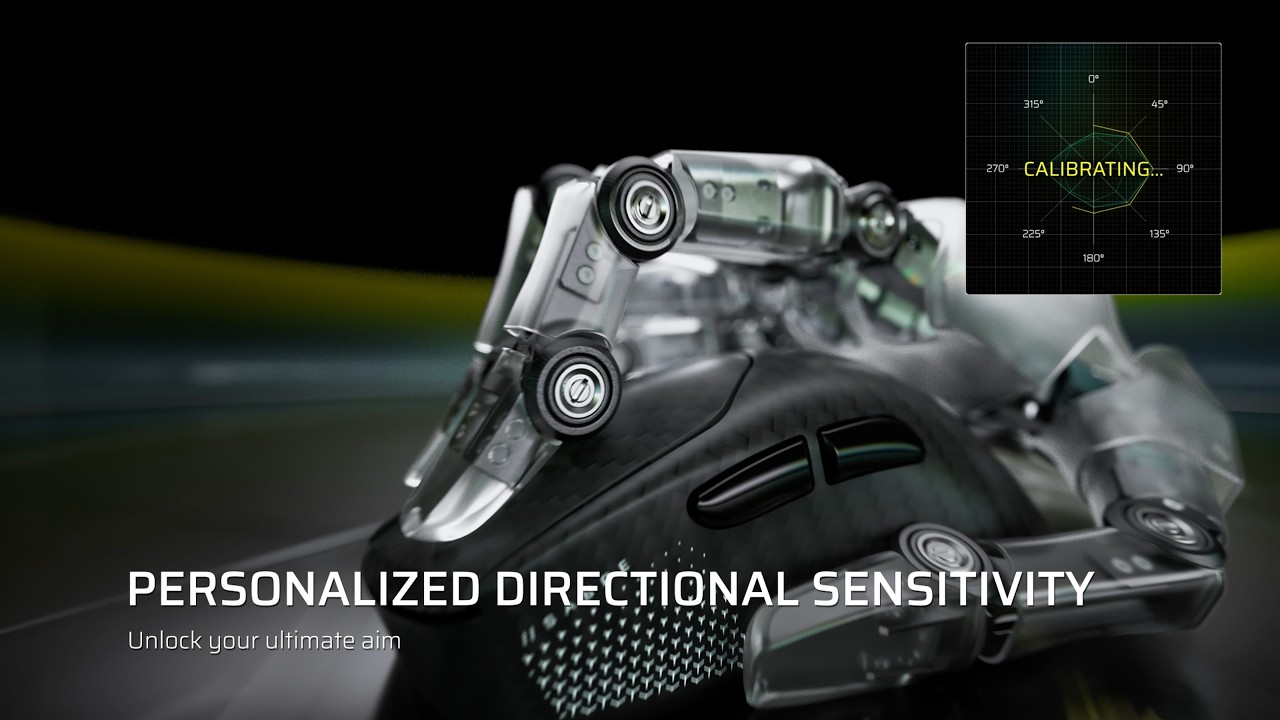
PureVector technology works by analyzing a player’s movement data to identify specific “squished” distribution shapes. The system then calculates a personalized directional sensitivity profile that mathematically adjusts the sensor output. This process effectively “fixes” the sensitivity by aligning the mouse’s movement with the user’s actual physical reach and muscle memory.
Aim improvement tech like PureVector requires a 5-to-10 minute calibration period to map these biases accurately. Once the data is processed, the mouse applies different sensitivity values based on the direction of the movement. This means the brain’s intent to hit a target results in a more accurate physical move on the screen.
The CORSAIR SABRE v3 PRO PureVector utilizes the MARKSMAN X sensor for 42,000 DPI
The CORSAIR SABRE v3 PRO PureVector utilizes the MARKSMAN X optical sensor to support up to 42,000 DPI, 800 IPS, and 70G acceleration. This sensor provides the precision needed for both micro-adjustments and large flicks in high-stakes environments. The device also supports true 8,000Hz hyper-polling to minimize input delay.
Nordic 54-series MCU powers the internal logic of the mouse to handle complex polling and sensor data efficiently. Optical switches and a scroll wheel encoder ensure a consistent click response and durable scrolling. The 0.25ms average click latency provides a significant advantage in fast-paced titles like Counter-Strike.
| Component | Specification |
|---|---|
| Sensor | MARKSMAN X |
| Max DPI | 42,000 |
| Max IPS | 800 |
| Acceleration | 70G |
| Polling Rate | 8,000Hz |
| Click Latency | 0.25ms |
| Starting Weight | 37g |
Weight and material options
Users can choose from different builds including Standard, Carbon Fiber, and Magnesium Alloy models. The Carbon Fiber option offers a lightweight construction for users who prefer a specific weight and feel for their grip style. The Magnesium Alloy model provides a durable and premium build alternative to the standard and carbon versions.
CORSAIR integrates calibration results into the CORSAIR SABRE v3 PRO PureVector firmware
CORSAIR integrates the calibration results directly into the mouse firmware to eliminate the need for background software during play. This ensures that the user’s directional sensitivity settings stay with the mouse regardless of the computer being used. Firmware-based profile storage is essential for competitive consistency at LAN events where installing software may be restricted.
Battery life and connectivity
Battery life on the CORSAIR SABRE v3 PRO PureVector varies significantly depending on the chosen polling rate and model type. The Ultralight series offers up to 140 hours of battery life at 1,000Hz or 25 hours at 8,000Hz. The MG and CF models offer up to 200 hours at 1,000Hz or 31 hours at 8,000Hz.
Battery drain occurs more rapidly when using 8,000Hz polling due to the increased frequency of data transmission. Users should monitor their power levels during long sessions when hyper-polling is active. High polling rates provide a responsiveness advantage while significantly reducing the total available hours of use.
How the CORSAIR SABRE v3 PRO PureVector differs from PureView
The CORSAIR SABRE v3 PRO PureVector uses PureVector technology, which is a bidirectional sensitivity calibration system. Some users may confuse this with “PureView,” which is a misheard term and not a feature of the hardware.
- PureVector
- A system that measures aiming movements and calibrates a personalized directional sensitivity profile to fix human bias.
- PureView
- A common mishearing of the PureVector technology name; there is no official “PureView” product or feature in this context.
CORSAIR SABRE v3 PRO PureVector Comparison
Competing products from Logitech G and Razer typically rely on static sensitivity settings where the user must manually find the best DPI. The CORSAIR SABRE v3 PRO PureVector differs by automating the optimization of these settings through Aimlabs data. While rivals offer high-performance sensors, the CORSAIR hardware provides a unique method for correcting physical aiming inconsistencies.
CORSAIR has not announced the official price of the CORSAIR SABRE v3 PRO PureVector
- CORSAIR has not announced the official price of the CORSAIR SABRE v3 PRO PureVector.
- CORSAIR has not specified the official warranty terms for the CORSAIR SABRE v3 PRO PureVector.
The CORSAIR has not priced the device, so readers should compare it against the current market price of other 8,000Hz gaming mice before buying. CORSAIR has not listed warranty terms, so users should check the official Corsair website for regional coverage and support paths before purchasing.
A scenario for a professional FPS player
Suppose Jimmy is a former pro player who realizes his vertical aim is poor and he has a heavy right-leaning bias during flick shots. Jimmy connects his CORSAIR SABRE v3 PRO PureVector to a PC and runs the 5-minute calibration task within the Aimlabs app. The software identifies his specific rightward lean and generates a profile that compensates for his physical limitations. The profile is then saved to the mouse firmware, allowing him to perform consistent micro-adjustments during his next tournament.
If Jimmy had perfectly symmetrical aiming ability, the calibration would show a circular distribution and result in no sensitivity adjustments. In that case, he would skip the calibration step and use the default sensor settings.
The CORSAIR SABRE v3 PRO PureVector provides a significant leap in aim improvement tech by moving beyond static numbers. Users who value precision and consistency should prioritize this device’s bidirectional capabilities.
Frequently Asked Questions
How much can the CORSAIR SABRE v3 PRO PureVector improve my aim?
The CORSAIR SABRE v3 Pro PureVector can improve Aim Speed by up to 81ms, or 33%, according to Aimlabs beta testing. This improvement is achieved by correcting for individual directional aiming biases.
Do I need a background app to run the PureVector profile?
The CORSAIR SABRE v3 Pro PureVector does not require a background app because the profile is saved directly to the mouse’s firmware. The settings stay active even when the mouse is used on a different computer or at a LAN event.
How long does the PureVector calibration take?
The PureVector calibration takes 5 to 10 minutes to complete within the Aimlabs app. Users can choose between these two durations to set their personalized directional sensitivity profile.
Why does my mouse feel different when I move it in different directions?
The mouse feels different because standard sensitivity assumes you are equally fast in all directions, but human aim has “biases” that result in different distribution shapes. PureVector corrects this by applying different sensitivities to different directions based on your unique movement data.
Reported from Mouse Sensitivity Is Broken, So We Fixed It – CORSAIR SABRE v3 PRO PureVector, published by CORSAIR.
More on CORSAIR SABRE v3 PRO PureVector
- CORSAIR SABRE v3 PRO PureVector: Directional Aim Calibration
- Corsair Nights V2 Mouse Adds a Virtual Stream Deck
ExtremeSpec is reader-supported: some links on this page are affiliate links, and as an Amazon Associate ExtremeSpec earns from qualifying purchases at no extra cost to you. Learn more.