
Can the RTX 3070 V2 OC Edition AI GPU train a small LoRA adapter on a 7B model?
ExtremeSpec is reader-supported: some links on this page are affiliate links, and as an Amazon Associate ExtremeSpec earns from qualifying purchases at no extra cost to you. Learn more.
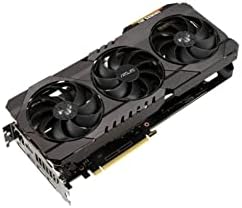
You must verify that your system provides enough power and has the correct software libraries to support this specific hardware. To start, ensure your environment is configured to recognize the NVIDIA Ampere multiprocessor architecture.
You can find the core hardware specifications in our detailed RTX 3070 V2 specs.
RTX 3070 V2 8 GB VRAM capacity for small LoRA training
The RTX 3070 V2 provides 8 GB of VRAM, which is the dedicated video memory that determines the maximum amount of data the processor can store in its local memory. Because LoRA (a method for fine-tuning models by only updating a small subset of weights) requires significant memory to hold the model and the gradients, 8 GB sits at the lower limit of what is functional. We selected this GPU for our review because it represents a common mid-range choice for users moving into local AI. For an AI GPU buyer, VRAM is the primary bottleneck because the model weights must fit entirely within this memory to avoid an Out of Memory (OOM) error, which is a crash occurring when the data exceeds available capacity. This card is a graphics card used for rendering images and processing data, and it handles the 8 GB requirement for small-scale training tasks.
For a final conclusion on performance, see the final RTX 3070 V2 verdict.
What to Check Before Buying the RTX 3070 V2
Because training puts a sustained load on the hardware, you should verify these specific requirements before purchasing:
If you are worried about memory limits, see if the RTX 3070 V2 handles large workloads.
- Verify your power supply unit (PSU) can handle the transient power spikes of this specific GPU under a constant training load.
- Confirm your motherboard provides enough PCIe lanes and bandwidth to prevent performance bottlenecks during high-throughput data transfers.
- Check that your specific CUDA version and library stack are compatible with your intended training framework.
- Ensure your physical space allows for a full height card with the axial-tech design cooling layout.
Comparing the RTX 3070 V2 to Other Options
The RTX 3070 V2 is a capable entry point for basic AI tasks, but it has clear limitations for larger projects. If you need to run a 13B parameter model at 4-bit quantization or generate images using Stable Diffusion XL, you should look at options with higher VRAM capacities. Those larger models require 10 to 12 GB or 12 to 16 GB respectively, which exceeds the 8 GB limit of this card. Buyers who prioritize high-capacity memory for large language models with 32k context windows will find that this card falls short of the 16 to 20 GB needed for those specific workflows.
Researching other options? compare the best GPU for gaming and AI.
If you only need to perform light fine-tuning on small models and are working within a strict budget, the RTX 3070 V2 is a viable choice. However, if your goal involves training larger models or running high-resolution image generation, you should choose a card with a higher VRAM capacity to avoid memory errors.
If you have a compact build, find the best GPU for small form factor PC.