
2020 Hp 15.6 15-DW0081WM Test: Comprehensive Breakdown
ExtremeSpec is reader-supported: some links on this page are affiliate links, and as an Amazon Associate ExtremeSpec earns from qualifying purchases at no extra cost to you. Learn more.
Table of Contents
2020 Hp 15.6 15-DW0081WM
The 2020 HP 15.6 15-DW0081WM is a budget-friendly laptop featuring Intel Pentium Silver N5000 processor, 4GB DDR4 RAM, and 500GB HDD storage that delivers reliable performance for basic computing tasks. This entry-level notebook computer offers a 15.6-inch HD display with micro-edge design, Windows 10 Home operating system, and up to 10 hours of battery life, making it suitable for students, home users, and professionals who need affordable computing solutions for everyday tasks like web browsing, document editing, and media streaming.
What Exactly Is This HP Laptop Model
The HP 15-DW0081WM represents HP’s entry-level laptop category, which targets budget-conscious consumers seeking basic computing functionality. This traditional laptop combines essential hardware components including the quad-core Intel Pentium Silver N5000 processor, integrated Intel UHD Graphics 605, and standard connectivity options like WiFi 802.11ac and Bluetooth 4.2. The laptop’s design emphasizes portability and affordability over high-performance features, positioning it as an ideal choice for users who prioritize cost-effectiveness and essential functionality.
Key Benefits This Laptop Provides
Benefits include exceptional value for basic computing needs, with the Intel Pentium processor delivering sufficient power for multitasking between web browsing, email, and office applications. The laptop provides reliable battery performance lasting up to 10 hours, which enables all-day productivity without frequent charging. Additional advantages encompass the lightweight design weighing approximately 4 pounds, built-in HD webcam for video conferencing, and comprehensive port selection including USB-C, USB 3.1, HDMI, and SD card reader for versatile connectivity options.
Limitations Users Should Consider
Limitations include restricted multitasking capability due to 4GB RAM, which constrains performance when running memory-intensive applications simultaneously. The 500GB traditional hard drive offers slower data access compared to solid-state drives, resulting in longer boot times and file transfer delays. Additional constraints encompass limited graphics performance restricting gaming and video editing capabilities, non-upgradeable processor, and HD resolution display that lacks the sharpness of Full HD alternatives commonly found in higher-priced laptops.
Design and Features

How Design Elements Work Together
The laptop’s design works by combining practical functionality with cost-effective materials, featuring a plastic construction that keeps weight manageable while maintaining structural integrity. The 15.6-inch micro-edge display reduces bezel thickness, which maximizes screen real estate within the compact form factor. HP’s keyboard design includes full-sized keys with decent key travel, while the touchpad responds accurately to multi-touch gestures. The laptop’s ventilation system operates through strategically placed vents that help manage thermal performance during extended use sessions.
Physical Characteristics Breakdown
Physical characteristics encompass lightweight portability at approximately 4 pounds, making this laptop suitable for students and mobile professionals who frequently transport their devices. The laptop measures roughly 14.1 x 9.5 x 0.9 inches, which fits comfortably in standard laptop bags and backpacks. Battery performance typically ranges from 6-10 hours depending on usage patterns, with lighter tasks like document editing extending battery life while multimedia streaming reduces overall runtime. The construction quality emphasizes affordability over premium materials, which may show wear with intensive daily use.
Performance and Graphics

How Processor Performance Delivers Results
The Intel Pentium Silver N5000 processor operates as a quad-core chip with base frequency of 1.1GHz and boost speeds reaching 2.7GHz, which provides adequate computing power for essential productivity tasks. This processor handles web browsing with multiple tabs, email management, and basic office applications smoothly, though it struggles with demanding software like video editing programs or modern games. The integrated Intel UHD Graphics 605 manages display output and basic graphics processing, supporting casual gaming and standard video playback while lacking the power needed for graphics-intensive applications or professional coding environments that require enhanced processing.
Memory and Storage Performance Analysis
The 4GB DDR4 SDRAM configuration limits multitasking capabilities, typically allowing 3-5 applications to run simultaneously before performance degradation occurs. Storage performance centers on the 500GB 5400RPM hard drive, which provides ample space for documents, media files, and basic software installations while delivering slower data access speeds compared to modern SSD alternatives. Boot times generally range from 45-60 seconds, and large file transfers may require several minutes depending on file sizes. Users seeking improved performance often consider office work optimization strategies including memory upgrades.
Price and Verdict
Cost Comparison and Value Assessment
Pricing typically ranges from $250-350 depending on retailer promotions and availability, positioning this laptop competitively within the budget laptop segment. The cost-per-feature ratio delivers solid value for users prioritizing essential computing functionality over premium performance. When compared to similar budget laptops from competitors like Acer Aspire or Lenovo IdeaPad series, the HP 15-DW0081WM offers comparable specifications while potentially providing better build quality and customer support through HP’s established service network.
Who Should Consider This Laptop
This laptop suits students attending online classes, seniors seeking user-friendly technology, and home users managing basic computing tasks like email, web browsing, and document creation. Small business owners requiring affordable devices for inventory management or point-of-sale systems also find value in this model’s reliability and cost-effectiveness. The laptop particularly benefits users who prioritize battery life and portability over high-performance computing, making it suitable for remote work scenarios and educational environments.
When To Choose Alternative Options
Alternative options become necessary when users require enhanced graphics performance for gaming, video editing capabilities, or professional design work. Users managing large datasets, running multiple virtual machines, or performing intensive calculations should consider laptops with more RAM and faster processors. Creative professionals, software developers working on complex projects, and users requiring streaming capabilities for content creation typically benefit from investing in higher-specification laptops despite increased costs.
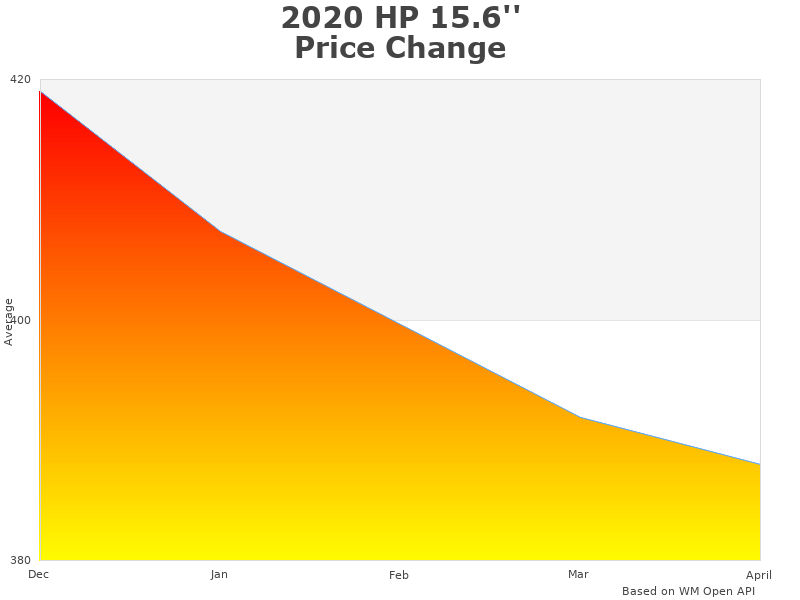
How 2020 Hp 15-DW0081WM analysis graph price was changing
Target User Scenarios and Use Cases
The HP 15-DW0081WM serves online learning environments effectively, supporting video conferencing through built-in webcam and microphone while handling educational software and research tasks. Students benefit from the laptop’s portability for campus use and sufficient battery life for attending full-day classes without charging concerns. Home office workers find the laptop adequate for email management, web-based applications, and basic document editing, though intensive multitasking may require workflow adjustments.
Performance Context Among Budget Laptops
Compared to other budget laptops in the $250-400 range, this HP model offers competitive specifications while emphasizing reliability over cutting-edge features. The Intel Pentium N5000 processor performs similarly to AMD A6 or A9 processors found in competing models, though it typically provides better power efficiency. Alternative budget options like the Acer Aspire 5 or ASUS VivoBook may offer slightly better displays or storage options, while Lenovo IdeaPad series often includes additional ports or enhanced keyboard designs.
Best Affordable Laptop Computers
Alternative Budget Laptop Options Worth Considering
Budget-friendly alternatives include the ASUS VivoBook 15 featuring similar Intel processors with potentially upgraded displays, and the Acer Aspire 5 series offering variations with SSD storage and enhanced graphics options. Lenovo IdeaPad 3 models provide comparable specifications with different design aesthetics and keyboard layouts. Refurbished business laptops from manufacturers like Dell Latitude or HP EliteBook series offer superior build quality and performance at similar price points, though they may lack modern connectivity features and warranty coverage.
Comparison With Chromebook Alternatives
Chromebook alternatives like the Acer Chromebook Spin 713 or HP Chromebook 14 offer different computing experiences focused on cloud-based applications and Google services integration. These devices typically provide faster boot times, enhanced security, and longer battery life while restricting software compatibility to web-based and Android applications. Traditional Windows laptops like the HP 15-DW0081WM offer broader software compatibility including desktop applications, offline functionality, and familiar Windows interface, making them suitable for users requiring specific software or preferring traditional computing environments.
Upgraded Models Within HP’s Lineup
HP’s Pavilion series offers enhanced specifications including Intel Core i3 or i5 processors, 8GB RAM configurations, and SSD storage options at moderate price increases. The HP Envy lineup provides premium features like Full HD displays, aluminum construction, and enhanced graphics performance for users willing to invest additional funds. HP’s gaming-focused models include dedicated graphics cards and improved cooling systems, though these typically exceed budget laptop price ranges significantly.
Timing for Purchase Decisions
Optimal purchase timing often coincides with back-to-school promotions during late summer, Black Friday sales events, and end-of-year clearance periods when retailers offer significant discounts on laptop inventory. Students may find additional educational discounts through institutional partnerships or manufacturer student programs. Users with immediate computing needs should evaluate current pricing against projected future requirements, considering whether waiting for sales events justifies potential delays in productivity or educational activities.
Features of Traditional Laptops
- Sleek and portable designs
- Long battery life of up to 10 hours
- Fast charging capabilities, up to 50% in 45 minutes with HP Fast Charge
- Quality displays with HD or higher resolutions, like the 15.6 ” HD SVA BrightView micro-edge WLED-backlit display
- Powerful processors, like the Intel Pentium Silver N5000 Quad Core processor with speeds up to 2.7GHz
- Plenty of storage space, like the 500GB HDD SATA 5400rpm hard drive
- Built-in webcams and speakers for easy video conferencing and entertainment
Efficiency Served With A Sleek Design
Design Philosophy and Aesthetic Choices
The HP 15-DW0081WM embodies HP’s design philosophy emphasizing functional simplicity over flashy aesthetics, featuring clean lines and practical construction that prioritizes durability within budget constraints. The 15.6-inch micro-edge display reduces visual distractions while maximizing screen real estate, creating an immersive viewing experience for productivity tasks and entertainment. Subtle branding and minimalist color schemes ensure the laptop maintains professional appearance suitable for business environments, educational settings, and personal use scenarios.
Ergonomics and Usability Features
Ergonomic considerations include keyboard layout with full-sized keys providing comfortable typing experiences during extended work sessions, while the precision touchpad supports multi-touch gestures for intuitive navigation. The laptop’s thermal design manages heat distribution effectively through strategically placed vents, preventing uncomfortable surface temperatures during normal operation. Port placement along the sides provides convenient access for external devices without cluttering the workspace, while the laptop’s balanced weight distribution ensures stable positioning on various surfaces.
Pros and Cons
Advantages This Laptop Offers Users
Advantages include excellent price-to-performance ratio for basic computing needs, with the Intel Pentium processor providing adequate power for web browsing, office applications, and media streaming. The laptop offers reliable build quality typical of HP’s manufacturing standards, comprehensive connectivity options including modern USB-C and traditional USB ports, and established customer support infrastructure. Battery performance consistently delivers 8-10 hours of usage for typical productivity tasks, while the pre-installed Windows 10 Home provides familiar user interface and broad software compatibility.
Drawbacks Users May Encounter
Drawbacks encompass limited RAM capacity restricting multitasking performance when running memory-intensive applications simultaneously, and traditional hard drive storage resulting in slower boot times and file access compared to SSD alternatives. The integrated graphics lack sufficient power for gaming or video editing tasks, while the HD display resolution appears less sharp compared to Full HD alternatives. Upgrade options remain limited due to soldered components, and the plastic construction may show wear signs with intensive daily use over extended periods.
Balanced Perspective for Potential Buyers
This laptop represents a balanced compromise between affordability and functionality, delivering essential computing capabilities without premium features that significantly increase costs. Users seeking basic productivity tools, reliable internet browsing, and standard office applications will find adequate performance, while those requiring advanced graphics, intensive multitasking, or professional software may need higher-specification alternatives. The laptop’s value proposition depends entirely on matching user expectations with actual computing requirements and budget constraints.
Long-Term Ownership Considerations
Long-term ownership involves considering software update compatibility, hardware longevity, and evolving computing needs over the laptop’s expected 3-5 year lifespan. Windows 10 support and security updates ensure continued functionality, though future Windows versions may require hardware upgrades. Users should evaluate whether current specifications meet anticipated future requirements, considering potential needs for increased storage, enhanced performance, or specific software compatibility that may develop over time.
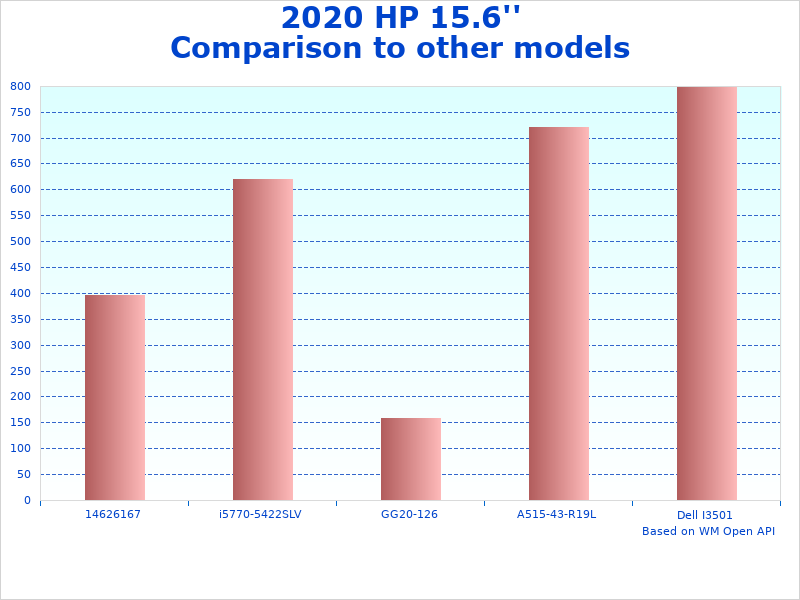
Compare 2020 15.6 Notebook to similar products
Specifications of Traditional Laptops
- Operating system: Windows 10 Home in S mode
- Graphics: Intel UHD Graphics 605
- Memory: 4 GB DDR4 SDRAM
- Connectivity: WiFi 802.11ac and Bluetooth 4.2
- Ports: 1 x USB-C, 2 x USB 3.1, 1 x HDMI, 1 x RJ45, 1 x AC smart pin, headphone jack
- Card reader: multi-format SD media card reader
- Display: 15.6 ” diagonal HD SVA BrightView micro-edge WLED-backlit, 220 nits, 45 NTSC (1366 x 768)
2020 Hp 15.6 15-DW0081WM functions
Core Computing Capabilities and Functions
The laptop functions as a comprehensive computing solution for basic productivity tasks, efficiently handling web browsing with multiple tabs, email management, document editing, and multimedia streaming. The Intel Pentium Silver N5000 processor manages these functions through its quad-core architecture, while the 4GB DDR4 RAM supports moderate multitasking scenarios. Windows 10 Home provides the operating environment supporting thousands of compatible applications, from Microsoft Office suite to educational software and entertainment platforms.
Durable Hardware
Hardware Reliability and Component Quality
Hardware reliability centers on HP’s manufacturing standards and component selection, with the Intel processor providing stable performance and established thermal characteristics. The 500GB hard drive offers proven storage technology with mechanical reliability, though users should implement regular backup strategies to protect important data. DDR4 memory provides stable system performance with error correction capabilities, while the integrated graphics maintain consistent output without requiring additional cooling or power management considerations.
Connectivity and Expansion Options
Connectivity features encompass modern standards including WiFi 802.11ac for reliable wireless internet, Bluetooth 4.2 for peripheral device connections, and comprehensive port selection supporting various external devices. The USB-C port enables future compatibility with newer devices and accessories, while traditional USB 3.1 ports support existing peripherals like external storage, printers, and input devices. HDMI output facilitates connection to external monitors or projectors, and the SD card reader provides convenient photo and file transfer capabilities.
Great Value
Value Proposition for Target Users
The value proposition emphasizes cost-effective computing for users prioritizing essential functionality over premium features, delivering reliable performance for everyday tasks at accessible price points. Students benefit from the laptop’s portability and battery life supporting all-day campus use, while home users appreciate the familiar Windows environment and broad software compatibility. Small businesses find value in the laptop’s reliability for basic office tasks, point-of-sale systems, and inventory management applications where high-end performance isn’t necessary.
Total Cost of Ownership Considerations
Total ownership costs include the initial purchase price, potential software licensing fees, and maintenance considerations over the laptop’s expected lifespan. Windows 10 includes ongoing security updates at no additional cost, while HP’s warranty coverage and customer support infrastructure provide value-added services. Users may consider optional accessories like external storage, laptop bags, or ergonomic peripherals, though the basic configuration includes all essential components for immediate productivity.
Specifications of the 2020 HP 15.6 15-DW0081WM in Traditional Laptops category:
| Display | 15.6 ” HD micro-edge WLED-backlit |
|---|---|
| Processor | Quad Core Intel Pentium Silver N5000 (1.1 GHz – 2.7 GHz) |
| Graphics | Intel UHD Graphics 605 |
| Memory | 4 GB DDR4 SDRAM |
| Storage | 500GB HDD SATA 5400rpm |
| Operating System | Windows 10 Home in S mode |
| Camera and Speakers | Built-in HD Webcam with Dual Speakers |
| Connectivity | WiFi 802.11ac and Bluetooth 4.2 |
| Ports | 1 x USB-C, 2 x USB 3.1, 1 x HDMI, 1 x RJ45, 1 x AC smart pin, headphone |
| Battery Life | Up to 10 hours |
| Fast Charge | 0 to 50% charge in 45 minutes with HP Fast Charge |
- Tuf Vg 27 Aql
- Readynas 6 Rn626xe6 Netgear
- 240 Cr Mag Full
- 327 Pxc 32
- Business H Lc 34
FAQ: 2020 Hp 15.6 15-DW0081WM
What are the main features of the 2020 Hp 15.6 15-DW0081WM?
The main features include a 15.6-inch HD micro-edge display providing clear visuals for productivity and entertainment, Intel Pentium Silver N5000 quad-core processor delivering reliable performance for basic computing tasks, and 4GB DDR4 RAM supporting moderate multitasking capabilities. Additional features encompass 500GB hard drive storage, Windows 10 Home operating system, built-in HD webcam for video conferencing, comprehensive port selection including USB-C and USB 3.1, and up to 10 hours of battery life for all-day productivity.
What is the battery life of the 2020 Hp 15.6 15-DW0081WM?
The battery life typically ranges from 8-10 hours depending on usage patterns and power management settings, with lighter tasks like document editing and web browsing extending runtime toward the maximum duration. Video streaming, multimedia applications, and intensive multitasking reduce overall battery performance, while power-saving modes and display brightness adjustments can optimize battery longevity. HP Fast Charge technology enables rapid charging, reaching 50% capacity within 45 minutes when using the included power adapter.
Can the RAM and storage capacity be upgraded in the 2020 Hp 15.6 15-DW0081WM?
RAM and storage upgrade options depend on the specific internal configuration, with some models featuring accessible memory slots allowing expansion up to 8GB or 16GB total capacity. The 2.5-inch drive bay typically accommodates standard SATA hard drives or solid-state drives for storage upgrades, though users should verify warranty implications before performing modifications. Professional installation services or manufacturer-authorized upgrades help ensure compatibility and maintain warranty coverage, while DIY upgrades require appropriate technical knowledge and tools for safe installation procedures. Additionally, the RAM and storage capacity of the 2020 Hp 15.6 15-DW0081WM may vary by region and specific model configuration.