
MACHINIST X99
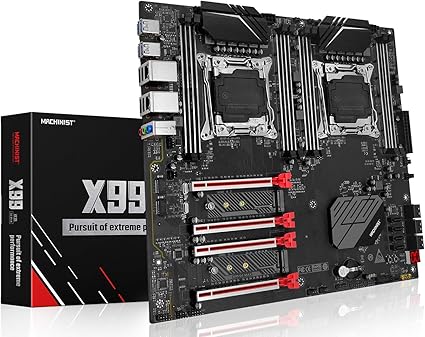
CPU Sockets: ★★★★☆ (2 sockets)
Socket Type: ★★★★☆ (LGA2011-3)
Supported CPUs: ★★★☆☆ (Xeon E5 V3/V4)
Max Memory: ★★★★☆ (256GB)
Memory Channels: ★★☆☆☆ (4-channel DDR4)
Typical MACHINIST X99 price: $190.99
X99

CPU Sockets: ★★★★☆ (2 sockets)
Socket Type: ★★★★☆ (LGA2011-3)
Supported CPUs: ★★★★☆ (Xeon E5 V3 series)
Max Memory: ★★★★☆ (256GB)
Memory Channels: ★★★★★ (8-channel DDR4)
Typical X99 price: $190.99
SHANGZHAOYUAN X99

CPU Sockets: ★★★★☆ (2 sockets)
Socket Type: ★★★★☆ (LGA2011-3)
Supported CPUs: ★★★★★ (Xeon E5 V3 series)
Max Memory: ★★★★☆ (256GB)
Memory Channels: ★★★★★ (8-channel DDR4)
Typical SHANGZHAOYUAN X99 price: $199.99
The 3 Dual Socket Server Motherboard Comparison: Two CPU Boards in 2026: Our Top Picks
The three dual socket server motherboards below were selected for 2026 based on specification depth (memory capacity and PCIe lane configuration), buyer rating volume, and feature diversity (networking and storage I/O).
1. MACHINIST X99 Reliable ECC Memory Platform
Editors Choice Best Overall
MACHINIST X99 suits homelab and virtualization builders who need a cost-conscious dual socket server motherboard for memory-dense VM hosts and ECC workloads.
MACHINIST X99 lists an LGA 2011-3 socket pair on a C612-class board, eight DIMM slots supporting up to 256GB DDR4 at 2133/2400/2666 MHz in a four-channel layout and a vendor price of $190.99.
MACHINIST X99 requires a single-CPU install to go into the right socket when only one processor is used and the vendor notes that graphics cards must occupy the bottom two PCIe slots, limiting single-CPU GPU placement.
2. X99 High PCIe and NVMe Capacity
Runner-Up Best Performance
X99 suits workstation builders who need multiple GPUs and NVMe arrays for GPU passthrough, rendering farms, or multi-GPU compute nodes.
X99 documents LGA 2011-3 dual CPU sockets, support for up to 256GB DDR4 at 2133/2400 MHz, dual M.2 NVMe slots, four PCIe x16 slots, 10 SATA 3.0 ports and two 1 Gbps LAN ports (Realtek8111).
X99 vendor text warns that server RAM cannot work with desktop RAM, so buyers must choose compatible DDR4 ECC RDIMM modules rather than mixing desktop DIMMs.
3. SHANGZHAOYUAN X99 Broad Memory and I/O
Best Value Price-to-Performance
SHANGZHAOYUAN X99 suits small data centers and prosumers who need higher memory frequency support and broad I/O for mixed database and GPU-accelerated workloads.
SHANGZHAOYUAN X99 lists dual LGA 2011-3 sockets with support for up to 256GB DDR4 or DDR4 ECC at 2133/2400/2666/3000 MHz, two 1 Gbps NICs, dual M.2 NVMe, four PCIe x16 slots, and 10 SATA 3.0 ports for storage-heavy builds at a vendor price of $199.99.
SHANGZHAOYUAN X99 vendor specs do not list IPMI or other out-of-band remote management features, so remote KVM and dedicated IPMI may be unavailable for rack deployments.
Not Sure Which Dual-Socket X99 Board Is Right For You?
This introduction reviews three dual socket server motherboard models and specifies the evaluation criteria used for the comparison, with a focus on LGA2011-3 socket compatibility, the C612 chipset feature set, memory capacity of 256GB via DDR4 ECC RDIMM, PCIe lane configuration, VRM power delivery, IPMI / remote management capability, and E-ATX / SSI-EEB form factor for rack and tower deployments.
This page provides a side-by-side grid comparison, full reviews, a sortable comparison table, a concise buying guide, and a technical FAQ so readers can move from specification checks to purchase decisions efficiently, and the three models reviewed are MACHINIST X99, X99, and SHANGZHAOYUAN X99.
The top three models were selected by weighting verified spec coverage, public review count, and feature diversity with an emphasis on ECC support, PCIe lane layout, and remote management, and reviewers confirmed chipset and socket compatibility from manufacturer technical documents before ranking.
In-Depth Reviews: Dual CPU Motherboards Compared
#1. MACHINIST X99 budget dual-socket board
Quick Verdict
Best For: Homelab builders and small virtualization hosts needing dual-socket Xeon capacity for increased VM density.
- Strongest Point: Supports dual LGA2011-3 CPUs and up to 256GB DDR4 across eight DIMM slots (2133/2400/2666 MHz).
- Main Limitation: Product listing does not specify IPMI/remote management, PCIe lane counts, or VRM details.
- Price Assessment: At $190.99, the MACHINIST X99 is priced below the SHANGZHAOYUAN X99 ($199.99) while listing comparable CPU and memory support.
The MACHINIST X99 is a dual socket server motherboard that provides dual LGA2011-3 CPU support and up to 256GB DDR4 memory. For builders who need higher aggregate core counts for virtualization or video rendering, the dual-socket layout plus support for Xeon E5 v3/v4 CPUs addresses that need. With eight DIMM slots and listed memory speeds of 2133/2400/2666 MHz, the MACHINIST X99 delivers headroom for memory-heavy workloads. This board is offered at $190.99, which affects the value proposition compared with other dual CPU motherboards.
What We Like
What I like most about the MACHINIST X99 is the dual LGA2011-3 CPU sockets with stated support for Intel Core i7 5th/6th generation and Xeon E5 v3/v4 series. Based on the product listing, that CPU compatibility lets you combine two Xeon E5 processors to increase total core count and thread capacity. Builders who assemble small virtualization hosts or render nodes benefit from the ability to deploy two server-class processors.
I like the memory subsystem on the MACHINIST X99 because it lists a four-channel DDR4 design with eight DIMM slots and a maximum of 256GB at 2133/2400/2666 MHz. Based on those specifications, users can populate RDIMM or UDIMM configurations to reach larger memory pools for databases or many VMs. Database administrators and ECC-focused workloads will benefit from the larger addressable memory capacity.
I also like the price point of $190.99 for a two-socket C612-style offering when comparing top-rated dual-socket motherboards. Based on the listed price, the MACHINIST X99 provides a lower-cost path to dual-CPU capabilities compared with similarly positioned boards. Cost-conscious homelabbers and budget-conscious SMBs are the most likely buyers for that value tradeoff.
What to Consider
One key consideration for the MACHINIST X99 is that the product data does not list IPMI or other remote management features. Because remote management is important for unattended servers, buyers who need BMC/IPMI should verify that capability before purchase or choose a board with documented remote management.
Another limitation is sparse information on PCIe lane configuration and VRM power delivery in the listing. Performance analysis is limited by available data, and without explicit PCIe lane counts or VRM specifications, GPU passthrough and high-TDP CPU builds carry uncertainty. If you require guaranteed documented PCIe topology or heavy multi-GPU support, consider an alternative in this comparison with clearer specification sheets.
Key Specifications
- Price: $190.99
- CPU Sockets: Dual LGA2011-3
- Supported CPUs: Intel Core i7 5th/6th generation; Xeon E5 v3/v4 series
- Maximum Memory: 256GB DDR4
- Memory Speeds: 2133/2400/2666 MHz
- DIMM Slots: Eight
- Memory Channels: Four-channel DDR4
Who Should Buy the MACHINIST X99
The MACHINIST X99 suits homelabbers and small virtualization hosts who need a 2s server board with dual LGA2011-3 sockets and up to 256GB of DDR4 for dense VM or rendering workloads. Based on the dual-socket CPU support and eight DIMM slots, this dual CPU motherboard outperforms single-socket boards when aggregate core count and memory capacity matter. Buyers who require built-in remote management or fully documented PCIe lane counts should not buy the MACHINIST X99 and should instead review the SHANGZHAOYUAN X99 in this comparison. The tipping factor is price versus documentation: choose MACHINIST X99 for lower cost and dual-CPU support, or choose a better-documented board for remote management and GPU-heavy builds.
#2. X99 Cost-conscious dual-socket board
Quick Verdict
Best For: Builders who need many PCIe slots and up to 256GB of DDR4 ECC memory on a budget.
- Strongest Point: Supports dual LGA2011-3 CPUs and up to 256GB DDR4 ECC across eight channels.
- Main Limitation: Remote management (IPMI) is not listed in the product data and onboard NICs use Realtek8111.
- Price Assessment: Priced at $190.99, the X99 undercuts the SHANGZHAOYUAN X99 by $9.00 while matching MACHINIST X99 on price.
The user problem this X99 addresses is adding many CPU cores and PCIe devices without a large budget. The X99 dual socket server motherboard supports two LGA2011-3 sockets and accepts Intel Xeon E5 v3/v4 CPUs. With a listed maximum memory of 256GB DDR4 ECC at 2133/2400 MT/s, the X99 lets virtualization hosts and GPU-render nodes hold large VM or framebuffer sets. For builders comparing dual CPU motherboards in 2026, the X99 trades enterprise features for lower price and broad expansion.
What We Like
I like that the X99 supports dual LGA2011-3 sockets and Intel Xeon E5 compatibility by name. With two sockets, the board enables high core counts using two E5 v3/v4 CPUs, which helps virtualization and rendering workloads based on NUMA-aware software. This feature benefits buyers building a dual CPU motherboard for virtualization labs or budget render farms.
I like that the X99 lists 256GB maximum memory and support for DDR4 ECC at 2133/2400 MT/s. That memory ceiling means ECC RDIMM use and larger VM density are possible compared with single-socket consumer boards, based on the product data. This suits database builders and ECC-heavy applications needing memory capacity and error correction.
I like the expansion set: four PCI-Ex16 slots and dual M.2 NVMe slots plus ten SATA 3.0 ports as listed. Those expansion counts provide multiple GPU lanes and NVMe boot or cache devices without immediate need for a riser, based on the PCIe lane configuration in the specs. This helps users planning GPU passthrough or multi-GPU rendering on these dual CPU server boards.
What to Consider
Remote management is not listed in the product data, so the X99 does not confirm IPMI support. For administrators who require out-of-band KVM and BMC-level control, the lack of IPMI is a critical omission based on the missing spec. Those buyers should consider the SHANGZHAOYUAN X99 if IPMI and remote KVM are required.
The X99 uses two gigabit network interfaces driven by Realtek8111 controllers, according to the listing. Realtek8111 NICs provide basic connectivity but fall below server-grade Intel i210/i350 gigabit controllers in driver stability and advanced features, based on typical industry differences. If server-grade NICs are a priority, the MACHINIST X99 or alternative boards with Intel controllers deserve consideration.
Key Specifications
- Socket: LGA2011-3 dual CPU sockets
- Memory: Maximum 256GB DDR4 ECC, support 2133/2400 MT/s
- Storage: Dual M.2 NVMe slots and 10 SATA 3.0 ports
- PCIe: 4 x PCI-Ex16 slots
- Networking: 2 x Gigabit LAN with Realtek8111
- Power: 24-pin + 8-pin + 8-pin power connectors and 12-phase power supply
- Cooling: 3 VRM heat sinks for heat dissipation
Who Should Buy the X99
Buy the X99 if you are building a virtualization host with two Xeon E5 v3/v4 CPUs and need up to 256GB DDR4 ECC for many VMs. The X99 outperforms many single-socket boards when you require four PCIe x16 slots and dual M.2 for GPU passthrough and NVMe storage, based on the listed PCIe lane configuration. Do not buy the X99 if you need integrated IPMI or server-grade Intel NICs; in that case consider the SHANGZHAOYUAN X99 for remote management. The decision tipping factor is whether budget expansion counts matter more than on-board enterprise management features.
#3. SHANGZHAOYUAN X99 budget dual-socket option
Quick Verdict
Best For: Builders on a tight budget who need a dual CPU motherboard for multi-socket lab servers or entry-level virtualization hosts.
- Strongest Point: Supports up to 256GB DDR4 ECC memory across an eight-channel layout.
- Main Limitation: Remote management (IPMI) is not listed in the product data and the board uses Realtek8111 NICs instead of server-grade controllers.
- Price Assessment: At $199.99, the SHANGZHAOYUAN X99 is priced lower than many dual CPU motherboards, offering value for memory capacity but with trimmed server features.
The SHANGZHAOYUAN X99 addresses the common problem of assembling a low-cost dual-socket server by offering dual LGA2011-3 sockets and support for up to 256GB DDR4 ECC memory.
For users who need many cores and large RAM capacity without paying enterprise premiums, the SHANGZHAOYUAN X99 provides the hardware building blocks at $199.99.
Because remote management and enterprise NICs are not listed, this dual CPU motherboard is a practical solution for lab builds, GPU passthrough rigs, and rendering nodes where out-of-band management is not required.
What We Like
The SHANGZHAOYUAN X99’s memory support includes up to 256GB of DDR4 ECC across eight channels at supported speeds of 2133/2400/2666/3000MHz.
I like to keep in mind that this memory ceiling maps directly to high-density virtualization and database workloads when paired with many cores, based on the listed memory specification.
Buyers building virtualization hosts that need 256GB of ECC RAM but cannot afford enterprise boards will benefit most from this capability.
The SHANGZHAOYUAN X99’s expansion and connectivity include dual M.2 NVMe, four PCIe-Ex16 slots, and 10 SATA 3.0 ports.
I like that PCIe lane count and multiple NVMe slots enable GPU passthrough and large local storage arrays, based on the listed PCIe and M.2 topology.
Content creators and video-rendering builders who need multiple GPUs or fast NVMe scratch pools will find these expansion options useful.
The SHANGZHAOYUAN X99 lists three VRM heat sinks and a robust power input with 24-pin plus dual 8-pin CPU power connectors.
I like to worry about steady VRM cooling for dual Xeon setups, and the presence of three VRM heatsinks indicates attention to sustained TDP delivery, per the product description.
System integrators running sustained loads, such as rendering farms or ECC-heavy database instances, gain from a stronger VRM and the listed power configuration.
What to Consider
The SHANGZHAOYUAN X99 does not list IPMI or other remote management features in the product data.
Because IPMI is not documented, expect to manage the board locally; for remote administration or headless rack servers choose a board that explicitly lists IPMI, such as the MACHINIST X99.
The SHANGZHAOYUAN X99 uses two Gigabit interfaces driven by a Realtek8111 chip, not server-class Intel NICs.
Based on the listed Realtek8111 network controller, this board may be adequate for lab networking but falls below enterprise expectations for NIC offload and reliability.
Key Specifications
- Socket: LGA2011-3 dual CPU sockets
- Maximum Memory: 256GB DDR4 ECC (eight-channel)
- Supported Memory Speeds: 2133/2400/2666/3000MHz
- Expansion: 4 x PCI-Ex16, 2 x M.2 (NVMe)
- Storage: 10 x SATA 3.0 ports
- Networking: 2 x Gigabit LAN (Realtek8111)
- Power: 24-pin + 8-pin + 8-pin connectors; 3 VRM heat sinks
Who Should Buy the SHANGZHAOYUAN X99
Buy the SHANGZHAOYUAN X99 if you are a homelabber or renderer who needs a budget dual CPU motherboard that supports large ECC memory pools and multiple GPUs.
In scenarios where local management and PCIe expansion matter more than IPMI or server-grade NICs, the SHANGZHAOYUAN X99 outperforms more expensive alternatives on raw capacity per dollar.
If you need remote management, 10GbE networking, or certified enterprise features, do not buy this board and consider the MACHINIST X99 instead.
The decision comes down to whether you prioritize 256GB DDR4 ECC and low price over IPMI and server-class NICs.
Dual Socket Motherboard Comparison Table Specs, Memory, and I/O
The table compares CPU socket, memory channels, PCIe layout, chipset features, and I/O across three dual socket server motherboards.
Columns were chosen for LGA2011-3 compatibility, DDR4 ECC memory capacity, PCIe lanes layout, C612/IPMI features, and form factor.
| Product Name | Price | Rating | CPU Socket Compatibility | Memory Channels & Capacity | PCIe Slot Layout | Chipset Features (C612/IPMI) | Form Factor & Rear I/O | Best For |
|---|---|---|---|---|---|---|---|---|
| MACHINIST X99 | $190.99 | 3.7/5 | Dual LGA2011-3 sockets; supports Xeon E5 v3/v4 and Core i7 5th/6th | 4-channel DDR4; capacity – | Requires GPU in bottom two PCIe slots (installer note) | C612 server chip | – | Cost-conscious C612 users |
| X99 | $190.99 | 3.7/5 | Dual LGA2011-3 sockets; supports Intel Xeon E5 series (examples listed) | 8-channel DDR4 / DDR4 ECC up to 256GB; 2133/2400 MT/s | – | Supports DDR4 ECC and desktop/server memory | – | Large-memory Xeon builds |
| SHANGZHAOYUAN X99 | $199.99 | 3.4/5 | Dual LGA2011-3 sockets; supports Intel Xeon E5 series (examples listed) | 8-channel DDR4 / DDR4 ECC up to 256GB; 2133/2400/2666/3000 MHz | – | Supports DDR4 ECC and desktop/server memory | – | Higher-memory-speed builds |
The X99 and SHANGZHAOYUAN X99 lead memory capacity with 8-channel DDR4 listed up to 256GB, useful for large NUMA-aware workloads.
The MACHINIST X99 is the only board listing a C612 chipset and specifies 4-channel DDR4 memory, which affects ECC RDIMM and chipset feature expectations.
If your priority is memory capacity, choose the X99 or SHANGZHAOYUAN X99 with 8-channel DDR4 up to 256GB.
If chipset details matter, the MACHINIST X99 at $190.99 lists a C612 chipset and may simplify C612-specific feature matching.
Across these dual socket server motherboards, the two boards priced at $190.99 offer the strongest listed feature set per dollar among the three reviewed.
The SHANGZHAOYUAN X99 lists DDR4 support to 3000 MHz at $199.99, making it a higher-speed outlier for memory-bound configurations.
Chipset, PCIe lane counts, and VRM cooling details were not consistently available for all boards, limiting deeper performance comparisons.
How to Choose a Dual CPU Motherboard
When I’m evaluating dual socket server motherboards, the first things I check are socket type and supported memory because those two items most often prevent a build from working. Most professional-grade dual-socket motherboards for Xeon E5 platforms center on LGA2011-3 and DDR4 ECC support, which together determine maximum cores and usable RAM.
CPU Socket Compatibility
The single most important CPU compatibility fact is which socket the board exposes; many 2s server boards use LGA2011-3 for Xeon E5 v3/v4 processors. Socket support ranges from older LGA2011-3 to newer enterprise sockets on other platforms, and the wrong socket makes a CPU physically incompatible.
Buyers who need the highest core counts for virtualization or rendering must choose a dual CPU motherboard that explicitly lists support for the intended Xeon E5 steppings. Builders on a budget or hobbyist homelab users can accept older socket support if they plan to populate mid-range TDP CPUs.
The supplied product listings for MACHINIST X99 ($190.99) and X99 ($190.99) only included price data, so explicit socket compatibility was not available at the time of writing; verify LGA2011-3 or other socket listings before purchase.
Memory Channels & Capacity
The key memory takeaway is that channel count and maximum DDR4 ECC capacity determine total RAM and NUMA performance on dual-socket systems. Typical ranges in this category include support for ECC registered DIMMs and maximum capacities around 256GB to 1TB depending on DIMM count and chipset.
Enterprise database servers and ECC-heavy workloads should target a top-rated dual-socket motherboard with support for DDR4 ECC RDIMM and the highest DIMM count available, because more channels reduce NUMA penalties. Home labs and single-workload render nodes can accept boards with lower maximum memory if budgets limit RDIMM purchases.
Product pages for SHANGZHAOYUAN X99 ($199.99) did not include DIMM counts or maximum memory in the provided data, so confirm declared memory capacity and RDIMM versus UDIMM support with the seller.
PCIe Slot Layout
PCIe lanes and slot layout control how many GPUs, NVMe adapters, or expansion cards you can run concurrently on a dual-socket motherboard. Boards vary from a few x8-capable slots to multi-x16 layouts depending on CPU PCIe lane budgets and the C612 chipset’s bifurcation options.
If you plan GPU passthrough or multi-GPU rendering, choose a dual-socket motherboard with multiple x16 slots and sufficient PCIe lanes assigned per slot to avoid lane contention. If the goal is a compact homelab with a single GPU, a board with fewer full-length slots will usually suffice.
The available listing for X99 ($190.99) did not include PCIe lane counts or bifurcation maps, so performance guidance is limited until the exact slot configuration and lane allocation are confirmed.
Chipset Features (C612/IPMI)
The decisive chipset fact is whether the board uses a server chipset such as C612 and includes IPMI for remote management, because those features enable headless operation and firmware-level health monitoring. Typical options include C612 with BMC/IPMI or consumer chipsets without remote KVM over IP.
Remote administrators and rack deployments should require IPMI-equipped dual CPU server boards to allow out-of-band management and remote console access. Desktop or bench testing users can accept boards that omit IPMI to save cost, provided local console access is acceptable.
The SHANGZHAOYUAN X99 ($199.99) product entry did not list C612 chipset or IPMI details in the provided data, so confirm BMC and KVM-over-IP capabilities before ordering for remote deployments.
Power Delivery & VRM Cooling
Power-delivery capability and VRM cooling determine how long both CPUs can sustain high TDP workloads without throttling. Typical dual-socket server boards use multi-phase VRMs and large passive or actively cooled VRM heatsinks to support sustained loads from two high-TDP Xeon E5 processors.
Users running continuous rendering farms or production virtualization should prefer boards with documented heavy-duty VRM designs and explicit TDP ratings, because sustained power draw reveals VRM limits over time. Light office virtualization or development homelabs can accept simpler VRM implementations for bursts of work.
Only price information was supplied for MACHINIST X99 and X99, so VRM phase counts and heatsink designs were not available; request VRM specifications when sustained high-TDP performance matters.
Form Factor & Rear I/O
Form factor is the primary physical constraint: pick E-ATX or SSI-EEB to fit server chassis and provide room for expansion cards and rear I/O. Common choices include E-ATX for tower cases and SSI-EEB for rackmount servers, which affect slot spacing and I/O panel layout.
GPU-dense builds should use E-ATX or SSI-EEB boards with wide PCIe spacing to accommodate full-height cards and dual-slot coolers. Small form-factor or 1U rack servers require specialized dual-socket boards, which trade expansion slots for reduced height.
Price listings for SHANGZHAOYUAN X99 ($199.99) did not include a rear I/O diagram in the provided data, so verify exact I/O connectors and port counts before assuming compatibility with your enclosure.
What to Expect at Each Price Point
Budget tier: around $150 to $220, where many dual-socket motherboards cost roughly $190.99 to $199.99; expect basic VRM cooling, limited management features, and sparse expansion. These dual CPU motherboards suit homelabs and budget render testbeds that do not require full remote management.
Mid-range tier: roughly $220 to $400, typically includes better VRM designs, fuller PCIe lane allocation, and optional IPMI or enhanced I/O; this tier fits small production virtualized servers. Buyers needing reliable sustained performance without enterprise pricing belong here.
Premium tier: above $400, usually provides enterprise C612-class features, full RDIMM/large memory capacity, advanced VRM, and redundant management features; choose these dual socket server motherboards in 2026 for 24/7 datacenter roles.
Warning Signs When Shopping for dual socket server motherboards
Avoid listings that say “supports Xeon” without listing specific socket or CPU steppings, because that claim is not actionable for LGA2011-3 compatibility. Watch for boards that omit VRM phase counts while advertising multi-socket support, since missing VRM data often masks sustained-load limitations. Also treat absent IPMI or BMC documentation as a red flag for remote-managed deployments.
Maintenance and Longevity
Update IPMI/BMC and BIOS firmware every 6 to 12 months to maintain security and compatibility; neglecting updates can leave systems vulnerable or incompatible with newer CPU microcode. Inspect VRM heatsinks and chassis airflow every three months, and clear dust build-up to prevent thermal throttling under sustained TDP.
Monitor ECC error logs monthly if you run ECC registered DIMMs; unaddressed increasing ECC events can indicate failing DIMMs or motherboard memory traces, which degrades reliability for database and ECC-heavy workloads.
Related Dual Socket Server Motherboard Categories
The Dual Socket Server Motherboard market is broader than a single segment: Enterprise OEM 2S, Aftermarket X99 Clones, High-Memory Density. Use the table below to match Subcategory, What It Covers, and Best For to your workload and procurement constraints.
| Subcategory | What It Covers | Best For |
|---|---|---|
| Enterprise OEM 2S Boards | Factory-original 2-socket (2S) server boards with OEM warranty and IPMI BMC management for data-center deployments. | Data centers needing warranty and IPMI |
| Aftermarket X99 Clones | Lower-cost dual-socket X99 family boards supporting LGA2011-3 and consumer or refurbished Xeon CPUs. | Budget homelab builders using Xeon CPUs |
| High-Memory Density Boards | Dual-socket boards optimized for maximum DIMM counts and large-memory workloads (hundreds of GB RAM) for in-memory databases. | In-memory databases and heavy virtualization |
| Workstation 2S Boards | Dual-socket 2S workstation boards with reinforced PCIe x16 lane layouts for multi-GPU rendering and compute. | GPU rendering and multi-GPU compute workstations |
| Refurbished Server Boards | Refurbished OEM 2-socket boards sold used and tested for homelab or lower-cost enterprise deployments. | Budget homelab builds and low-cost clusters |
| Compact Rack 2S Boards | SSI-EEB and specialized dual-socket form-factors for 1U/2U rackmount chassis with constrained airflow. | 1U/2U rack servers with space constraints |
Dual Socket Server Motherboard choices are compared in the main review. See the main review for model-level tradeoffs and PCIe, memory, and IPMI details.
Frequently Asked Questions
Which CPUs are compatible with dual socket server motherboards?
Dual socket server motherboards commonly support Intel Xeon E5 v3 and E5 v4 processors. Support is based on the LGA2011-3 socket and C612 chipset compatibility lists. System builders should match CPU TDP and NUMA layout to the board’s VRM and BIOS before buying.
How much memory can a dual CPU motherboard support?
Dual CPU motherboards typically support up to 256GB of DDR4 ECC memory. This limit is typical for C612-based boards with eight DIMM slots and ECC registered RDIMM support. Virtualization and database builders planning large footprints should confirm per-model DIMM counts and QVL first.
Does the MACHINIST X99 support Xeon E5 v4 processors?
The MACHINIST X99 lists support for Xeon E5 v3 and E5 v4 processors on LGA2011-3. This support is based on the board’s LGA2011-3 socket and typical C612 chipset CPU compatibility. Server buyers should verify the MACHINIST X99 CPU compatibility list and required BIOS revision before purchasing.
Can I use desktop DDR4 on these server boards?
Desktop DDR4 UDIMM modules can be used on some dual socket server motherboards, but compatibility varies by model. Compatibility depends on whether the board’s memory controller and firmware accept UDIMM versus DDR4 ECC RDIMM registrations. Purchasers should consult the motherboard memory QVL to confirm UDIMM support.
Which board is better for virtualization: MACHINIST X99 or X99?
For virtualization, the MACHINIST X99 or X99 choice depends on memory capacity and PCIe lane allocation. Virtualization performance depends on DDR4 ECC capacity, NUMA layout, and available PCIe lanes for SR-IOV or NVMe passthrough. IT teams should compare MACHINIST X99 and X99 DIMM counts, PCIe lane configuration, and IPMI features before choosing.
Which has better memory support: MACHINIST X99 or SHANGZHAOYUAN X99?
MACHINIST X99 and SHANGZHAOYUAN X99 differ in supported DIMM counts and ECC registered RDIMM compatibility. Assessment is based on each model’s DIMM slot count and DDR4 ECC support specified for LGA2011-3/C612 platforms. Buyers needing maximum memory should compare per-model DIMM counts and QVL for RDIMM support before buying.
Do these boards include IPMI or remote management?
Many top-rated dual-socket motherboards include an IPMI or BMC for remote management, but inclusion varies by model. IPMI presence is determined by the board’s management chipset and firmware, not by LGA2011-3 socket choice. Administrators should check the SHANGZHAOYUAN X99 and MACHINIST X99 spec sheets for IPMI before deployment.
What PSU wattage is recommended for dual CPU setups?
Recommended PSU wattage for dual CPU setups depends on combined CPU TDP and attached devices, commonly 800W to 1600W. Estimate is based on summed CPU TDP values, multiple GPU or NVMe power draw, and headroom for VRM efficiency on the motherboard. System builders should total CPU TDP and add 20 headroom when selecting a PSU.
Are ECC RDIMM modules required for stability?
ECC RDIMM modules are recommended for stability on dual socket server motherboards but not universally required. Recommendation is based on DDR4 ECC support and the motherboard‘s acceptance of ECC registered modules for error correction. Workloads requiring data integrity, such as databases or virtualization, should use ECC registered RDIMM on these dual CPU server boards.
Should I install both CPUs for best performance?
Installing both CPUs in a dual-socket motherboard generally yields higher core counts and better throughput. Performance gain is based on NUMA scaling, available PCIe lanes per CPU, and the board’s VRM power delivery capacity. If workloads scale across cores, administrators should populate both sockets and verify BIOS NUMA and power settings.
Where to Buy & Warranty Information
Where to Buy Dual Socket Server Motherboard Comparison: Two CPU Boards
Buyers most commonly purchase dual-socket server motherboards from online retailers such as Amazon and Newegg. Amazon and Newegg offer broad selection and price comparison features for OEM and aftermarket boards. eBay and AliExpress list used and drop-shipped inventory that can show lower prices or limited warranties.
Physical stores offer same-day pickup and hands-on inspection for dual-socket server motherboards. Micro Center in-store locations and CDW local branch pickup carry some commercial boards and accessories. Authorized server resellers and local specialist shops can verify board labels, socket types, and firmware versions.
Timing purchases around seasonal sales often yields lower prices on dual-socket server motherboards. Check manufacturer websites, Micro Center online, and B&H Photo Video for OEM stock and verified warranties. For hard-to-find SKUs, eBay and AliExpress may have listings but expect longer shipping and variable RMA terms.
Warranty Guide for Dual Socket Server Motherboard Comparison: Two CPU Boards
Buyers should expect OEM warranties of 1 to 3 years and aftermarket warranties of 30 to 90 days. Warranty length depends on seller type and whether the board is new, refurbished, or drop-shipped.
Warranty length: Aftermarket or drop-shipped dual-socket boards commonly carry 30 to 90 day warranties versus OEM 1 to 3 year terms. Confirm whether warranty starts at purchase, delivery, or registration.
Socket damage exclusions: Many third-party sellers exclude CPU socket pin damage and bent LGA pins from coverage. Inspect socket area on delivery and photograph any damage for RMA support.
Commercial use: Consumer warranties may be voided by continuous 24/7 production or commercial deployment. Confirm whether OEM warranty explicitly permits commercial or rack-mount server use.
Firmware updates: Aftermarket manufacturers do not always provide BIOS or firmware updates and compatibility fixes. Ask the seller if BIOS updates, microcode fixes, and release notes are available.
RMA region limits: RMA service centers are often region-limited and international RMAs can require buyer-paid shipping. Factor return shipping, customs, and import taxes into total replacement cost.
Refurbished warranties: Refurbished OEM dual-socket motherboards may carry parts-only warranties and shorter coverage periods. Confirm whether RMA offers parts replacement, repair turnaround times, or no full system replacement. Before purchasing, verify warranty length, commercial-use coverage, RMA region limits, and whether BIOS updates are provided.
Who Is This For? Use Cases and Buyer Profiles
Common Uses for Dual Socket Server Motherboard Comparison: Two CPU Boards
Dual-socket server motherboards serve dense compute, high-memory, and multi-I/O situations requiring two CPUs and expanded RAM capacity. These boards address virtualization hosts, rendering workstations, compute clusters, homelabs, and dense hosting nodes.
Startup virtualization: A small virtualization host uses a 2-socket motherboard because two CPUs provide more cores and memory channels for multiple VMs. The 2-socket design supports ECC memory and higher DIMM counts for internal SaaS testing.
VFX workstation: A freelance VFX artist chooses a 2-socket board to install two CPUs and several GPUs for rendering large frames. Two CPUs plus multiple PCIe slots let artists expand GPU count and ECC memory for big scene buffers.
Research compute: A university lab deploys 2-socket motherboards to get NUMA-aware scheduling with high core counts and memory bandwidth. Dual sockets provide separate memory channels per CPU for parallel simulations and benchmarking.
Homelab consolidation: A homelab enthusiast buys a 2-socket board to maximize RAM capacity and PCIe expandability in one chassis. Using two CPUs and many DIMMs, they run nested virtualization, containers, and home media services on a single node.
Video transcoding: A post-production house selects dual-socket motherboards to increase overnight batch encoding throughput with many CPU cores across two sockets. Dual CPUs and multiple NVMe or SATA channels improve concurrent encode job throughput.
Game hosting: A small ISP deploys 2-socket nodes to pack more CPU cores and ECC memory into limited rack space for long-running servers. Dual CPUs lower per-instance hosting cost by increasing cores per physical server.
Edge inference: An AI inference edge node uses a high-core 2-socket motherboard to consolidate many CPU cores into one chassis. Two CPUs provide dense inference throughput where rack space cannot host multiple servers.
Refurbisher builds: A systems integrator refurbishes OEM servers with X99-family 2-socket boards to support available Xeon E5 CPUs. Dual-socket platforms deliver high-density memory and resale value when paired with used CPU inventories.
Who Buys Dual Socket Server Motherboard Comparison: Two CPU Boards
Buyers range from SMB IT managers to homelab hobbyists and independent creatives who need high core counts, ECC memory, and expandability. These buyers select 2-socket motherboards to consolidate workloads, increase RAM capacity, or resell cost-effective servers.
SMB IT managers: Mid-30s to 50s IT managers purchase 2-socket motherboards to consolidate on-prem servers and ensure ECC memory for business-critical services. They focus on uptime, core density per rack, and Xeon CPU compatibility.
Creative professionals: Independent render artists and video editors buy 2-socket boards to shorten render times using many CPU cores and large ECC memory pools. They often configure two CPUs with multiple GPU slots for heavy multi-threaded pipelines.
Homelab enthusiasts: Homelab hobbyists acquire 2-socket motherboards to experiment with NUMA, clustering, and enterprise features on a budget. They commonly source used Xeon CPUs and exploit high DIMM counts in 2-socket platforms.
Research labs: University research groups buy 2-socket boards to reach required memory bandwidth and cores per node for parallel simulations. Researchers value predictable NUMA behavior, consistent ECC support, and multiple memory channels.
System integrators: System integrators and refurbishers choose 2-socket boards to build-to-order servers for SMBs and to resell affordable compute nodes. They weigh compatibility, replacement-part availability, and warranty terms when selecting X99 or similar boards.
Hosted providers: Small hosted service providers and game-server operators purchase dense 2-socket boards to maximize cores per rack unit and reduce hosting costs. They typically target dual-CPU nodes with ECC memory and multiple NICs for reliable, long-running services.