
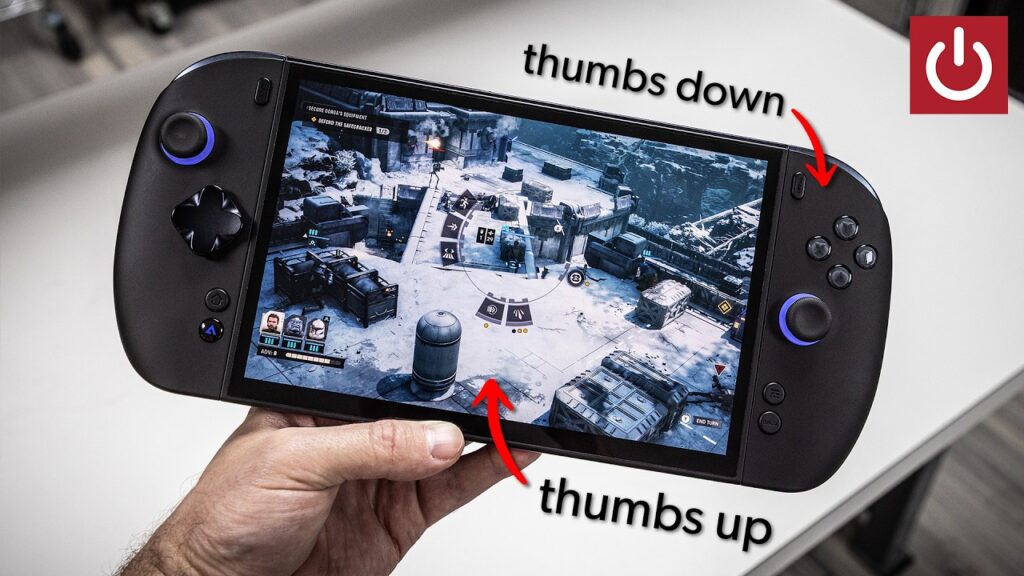
The Onexplayer X2 Mini Pro delivers a stable 60 FPS at native 1080p resolution powered by the AMD Ryzen AI Max plus 388 chip. The device’s bulky weight and “clacky” button sound profile create significant ergonomic friction during extended use. High-end enthusiasts seeking maximum power should choose the Onexplayer X2 Mini Pro, while users seeking a lightweight or slim handheld should skip it.
Is the Onexplayer X2 Mini Pro the right choice for you?
Readers who should buy the Onexplayer X2 Mini Pro
- High-end handheld enthusiasts should pick the Onexplayer X2 Mini Pro because it utilizes the Strix Halo 388 chip to deliver high-wattage performance.
- Docked-first gamers should pick the Onexplayer X2 Mini Pro because the Strix Halo chip allows for a high-quality 4K experience without needing an eGPU.
- Users needing extra storage should pick the Onexplayer X2 Mini Pro because it includes a unique mini SSD slot for high-capacity storage.
Readers who should skip the Onexplayer X2 Mini Pro
- Users seeking a slim or lightweight device should skip the Onexplayer X2 Mini Pro and look at reviews for smaller, more balanced handhelds like the Steam Deck.
- Users needing a primary laptop replacement should skip the Onexplayer X2 Mini Pro and look at reviews for dedicated portable workstations or 2-in-1 laptops.
What to do next about the Onexplayer X2 Mini Pro
- Verify the early bird pricing of $2,500 to ensure it fits your current hardware budget.
- Check dock accessory availability to confirm the best use case for 4K TV gaming.
The Onexplayer X2 Mini Pro features an 8.8-inch OLED with 30-144Hz VRR
The Onexplayer X2 Mini Pro features an 8.8-inch OLED display capable of a 144Hz refresh rate and a variable refresh rate (VRR) range of 30-144Hz. This screen is the same panel used in the Lenovo Legion Go, providing a high-quality visual experience for gaming. The display’s 8.8-inch size sits on the larger side of the handheld market, offering a large canvas for 1080p and 4K content.
What is VRR?
VRR stands for Variable Refresh Rate, which allows the screen to sync its refresh rate with the game’s frame rate. This prevents screen tearing and ensures smoother motion during gameplay. For a handheld, VRR is essential for maintaining a fluid experience when frame rates fluctuate.
The Onexplayer X2 Mini Pro utilizes the AMD Ryzen AI Max plus 388 chip, which is the gaming variant of the Strix Halo architecture. This APU (accelerated processing unit—a chip combining a CPU and GPU) provides massive power for a handheld form factor. The chip can reach up to 80W of power when the device is plugged into the mains via a barrel jack.
What is Strix Halo?
Strix Halo is an AMD high-performance APU architecture designed for high-wattage gaming and heavy workloads. It allows for high-end performance in smaller form factors by integrating a powerful GPU with a high-core-count CPU. For the X2 Mini Pro, this architecture provides the foundation for its high-performance claims.
The Onexplayer X2 Mini Pro doubles the MSI Claw ATX’s 1080p gaming performance
The Onexplayer X2 Mini Pro provides roughly double the performance of the MSI Claw ATX in real-world 1080p gaming scenarios. While the MSI Claw ATX relies on the Intel Arc G3 extreme, the X2 Mini Pro achieves a stable 60 FPS at native 1080p with medium-to-high settings. This is a significant jump from the roughly 30 FPS performance observed on the MSI Claw ATX in comparable tests.
The AMD Ryzen AI Max plus 388 chip handles demanding titles with ease, though drivers can occasionally impact specific titles like Horizon Zero Dawn. The device excels when plugged into a wall outlet, allowing the Strix Halo chip to scream through tasks. This power allows the device to function as a high-end gaming machine that doesn’t rely on external GPU (eGPU) assistance for 4K output.
The Onexplayer X2 Mini Pro includes a mini SSD slot and detachable battery
The Onexplayer X2 Mini Pro includes a mini SSD slot, which provides a third, unique storage option alongside the internal NVMe M.2 (2280 size) and a micro SD card slot. Mini SSDs are a newer and more expensive format than standard cards, but they offer a middle ground between the convenience of micro SD and the reliability of a full-sized drive. Users should check the specific compatibility list for mini SSDs before purchasing.
The Onexplayer X2 Mini Pro features a detachable battery rather than an integrated one in the body. This design allows the device to become significantly lighter when the battery is removed for docked use. The detachable battery is also essential for using the device in non-handheld modes, as it provides the necessary power for the kickstand and laptop configurations.
The Onexplayer X2 Mini Pro suffers from awkward, high-reach button placement
The Onexplayer X2 Mini Pro suffers from awkward button placement, specifically for the start and back buttons which are located in a high-reach position. The device also features a loud, clacky button profile and a D-pad that feels too tall and lacks a smooth nature. The volume rocker is oriented backwards, with the left key increasing volume and the right key lowering it, which feels unnatural compared to other handhelds.
The physical weight of the Onexplayer X2 Mini Pro becomes a factor when the battery is attached, causing potential wrist strain. Because the detachable controllers are made of mostly hollow plastic, sound reverberates inside the housing, amplifying the clacking of the buttons. The grip is somewhat bulky, and while it provides a good handle, it lacks the natural feel of the Lenovo Legion Go controller.
The Onexplayer X2 Mini Pro functions as a 4-in-1 handheld, tablet, and docked device
The Onexplayer X2 Mini Pro functions as a 4-in-1 device, supporting handheld, tablet, laptop, and docked modes. The docked mode is the primary strength of the device, allowing it to act as a mini PC with a screen that can be connected to a TV or a workstation. In this mode, the Strix Halo chip provides more power than needed for many gaming tasks without requiring an eGPU.
The laptop mode relies on an optional keyboard that doubles as a screen protector, but this keyboard is not recommended for heavy typing. It is too small and has too much flex, making it better suited for light use or as a protective cover. To use the device in laptop mode effectively, users should consider a Bluetooth mouse and keyboard instead of the included accessory.
How the X2 Mini Pro differs from the X3
The Onexplayer X2 Mini Pro differs from the Onexplayer X3 in both chip selection and design focus. The X2 Mini Pro uses the AMD Ryzen AI Max plus 388 (Strix Halo) chip, while the X3 was shown at Computex with Intel Arc G3 extreme hardware. Additionally, the X2 Mini Pro focuses on a convertible 4-in-1 design, whereas the X3 was one of the first devices to showcase the Intel Arc G3 extreme in a handheld form factor.
| Feature | Onexplayer X2 Mini Pro | MSI Claw ATX |
|---|---|---|
| Processor | AMD Ryzen AI Max plus 388 | Intel Arc G3 extreme |
| 1080p Performance | ~60 FPS | ~30 FPS |
| Screen | 8.8-inch OLED | Standard |
| Storage Options | Internal, Mini SSD, Micro SD | Standard |
What Onexplayer has not yet confirmed about the Onexplayer X2 Mini Pro
- Onexplayer has not announced the official release date.
- Onexplayer has not confirmed the specific warranty terms.
A Desktop Replacement Scenario
Suppose Marcus is a gamer who wants a handheld that can also serve as a desktop replacement when he is at his desk. Marcus buys the Onexplayer X2 Mini Pro for $2,500 and uses it docked to his 4K TV for his main gaming sessions, where it performs flawlessly. Because the Strix Halo chip handles 4K without an eGPU, Marcus is satisfied with the performance and storage options, though he avoids using the included keyboard for typing. If Marcus instead prioritized a slim, light device for long commutes, he would find the weight and bulk of the Onexplayer X2 Mini Pro too taxing and would likely choose a different handheld.
Frequently Asked Questions
What is the price of the Onexplayer X2 Mini Pro?
The Onexplayer X2 Mini Pro has an early bird price starting at $2,500. This high price point reflects its status as a high-end “best of the best” device with top-tier hardware.
How does it perform compared to the MSI Claw ATX?
The Onexplayer X2 Mini Pro roughly doubles the performance of the MSI Claw ATX in several tests. It allows for stable 60 FPS at native 1080p where the MSI Claw ATX often struggles to maintain 30 FPS.
Does it have an internal battery?
The Onexplayer X2 Mini Pro does not have an integrated battery inside the body of the device. It uses a detachable battery system that can be removed when the device is used in docked mode.
Can I use it as a laptop?
The Onexplayer X2 Mini Pro can be used in laptop mode with an optional keyboard that acts as a screen protector. However, the keyboard is small and has significant flex, so it is not recommended for heavy typing or as a primary laptop replacement.
Based on PCWorld’s Is the X2 Mini Pro the "best of the best"?.