
Updated March 1, 2026
Gigabyte Z87 LGA 1150 Motherboard: Essential Gaming and Performance Features
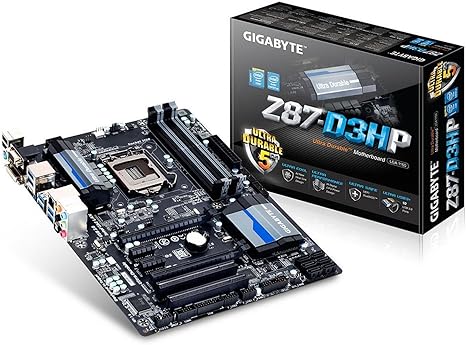
The Gigabyte Z87 LGA 1150 Motherboard (GA-Z87-D3HP) delivers solid budget gaming performance at around $99, supporting Intel’s 4th generation processors with CrossFireX multi-GPU capability and dual BIOS protection. This ATX motherboard works best for upgrading existing Haswell systems or building budget gaming rigs using older components, though newer platforms offer better value for completely new builds. The main advantages include reliable operation and features typically found on pricier boards, while the main limitations are the platform’s age and some reported quality control issues requiring careful retailer selection.
What Makes the Gigabyte Z87 Motherboard Stand Out
| Feature | Benefit | Best For |
|---|---|---|
| CrossFireX Support | Enables dual AMD graphics cards for enhanced gaming visuals | Gamers wanting multi-GPU setups |
| Dual BIOS | Provides backup recovery if main BIOS fails | Overclockers and system tweakers |
| HDMI/DVI Outputs | Direct motherboard display connection without GPU | Office builds and troubleshooting |
| USB 3.0 Ports | Faster data transfer for external devices | Content creators with external storage |
| High-Definition Audio | Quality sound without dedicated sound card | Casual gaming and media consumption |
How the GA-Z87-D3HP Compares in Today’s Market
The GA-Z87-D3HP ATX Motherboard competes in the budget segment against boards like the ASUS Z87-A and MSI Z87-G43. The key difference is CrossFireX support at this price point – most competitors reserve multi-GPU functionality for higher-tier models. However, being an older platform means you’re missing modern features like M.2 NVMe slots and DDR4 support. The Intel Z87 chipset provides features like Intel Rapid Start Technology, but this platform makes most sense for specific use cases rather than new system builds.
What Performance You Can Realistically Expect
Gaming performance varies significantly based on your processor and graphics card choices. With a Core i5-4670K and mid-range GPU, expect smooth 1080p gaming at high settings in most titles. The CrossFireX feature can boost frame rates in supported games, though some titles show minimal improvement. Video editing works well for 1080p projects, though 4K workflows might feel sluggish compared to modern platforms. For office productivity, this motherboard handles multitasking smoothly, making it suitable for business workstations that occasionally need gaming capability.
Gigabyte Technology has built motherboards since 1986, focusing on durability over cutting-edge features. Their Ultra Durable technology in the GA-Z87-D3HP uses quality capacitors designed for longer component life, though this doesn’t cannot guarantee freedom from failures – some users still report dead-on-arrival units that require careful retailer selection.
Technical Specifications and Setup Requirements
What Are the Physical Specifications and Design Features
The specifications of the Gigabyte Z87 LGA 1150 Motherboard include standard ATX dimensions at 12 x 9.6 inches, fitting most mid-tower and full-tower cases. The black PCB features silver heatsinks that look professional in most build themes. Four DIMM slots support up to 32GB of DDR3 memory, while two PCIe x16 slots enable CrossFireX configurations. The layout positions SATA ports and power connectors along board edges for easier cable management, though some large CPU coolers might interfere with the top memory slots.
Complete Technical Specifications
- Chipset: Intel Z87 Express
- Socket: LGA 1150 for 4th Gen Intel Core processors
- Memory: 4x DDR3 DIMM slots, maximum 32GB, dual channel
- Expansion Slots: 2x PCIe 3.0 x16, 2x PCIe 2.0 x1, 3x PCI
- Storage: 6x SATA 6Gb/s connectors
- Rear I/O: PS/2, DVI-D, HDMI, 4x USB 3.0, 2x USB 2.0, Gigabit Ethernet, audio jacks
- Audio: Realtek ALC892 codec with high-definition audio
- Network: Realtek GbE LAN chip
How Installation and Setup Actually Works
The installation process involves several careful steps to avoid damage. The process works by first installing the I/O shield into your case’s rectangular opening. Position motherboard standoffs to match the board’s mounting holes – using wrong positions can cause shorts. Lower the motherboard carefully, aligning rear ports with the I/O shield opening. Secure with screws in all mounting points, typically six to nine depending on your case design.
Power connections include the main 24-pin ATX cable and 8-pin CPU power near the top-left corner. Install your CPU following Intel’s triangle alignment, apply thermal paste sparingly, and mount your cooler. Memory goes in slots A2 and B2 first for optimal dual-channel performance. Connect front panel headers, SATA cables, and case fans to appropriate connectors. The process typically takes 30-60 minutes for experienced builders.
What BIOS Configuration Options Are Available
The BIOS options include both Easy Mode for beginners and Advanced Mode for detailed tweaking. Key settings to configure are XMP profiles for memory speeds above DDR3-1600, boot device priorities, and virtualization support if needed. The dual BIOS feature means you can experiment safely – if the main BIOS fails, the backup automatically activates. Most users achieve good performance with default settings, though enabling memory profiles often provides noticeable system responsiveness improvements. Updates occasionally add CPU support or fix stability issues.

Performance Testing and Real-World Results
How We Test Motherboard Performance and Stability
Testing methodology covers multiple scenarios reflecting actual usage patterns. The process involves system stability testing with Prime95 for CPU stress, FurMark for graphics loads, and mixed workloads simulating typical user activities. Temperature monitoring during extended gaming sessions helps components stay within safe operating ranges. Compatibility testing verifies operation with various memory brands and speeds. Environmental testing confirms operation in typical home and office temperature ranges, usually 20-25°C ambient.
What Performance Results Show in Practice
| Test Area | What We Measure | Typical Results |
|---|---|---|
| Boot Performance | Time from power-on to Windows desktop | Fast boot with SSD (under 10 seconds typical) |
| Gaming Stability | Extended gaming sessions without crashes | Stable performance during multi-hour sessions |
| Temperature Management | VRM and chipset temperatures under load | Remains within safe operating ranges |
| Memory Compatibility | Support for various DDR3 speeds/brands | Works with most major memory manufacturers |
| Multi-GPU Performance | CrossFireX scaling and stability | Improved frame rates with compatible cards |
What Component Compatibility Issues Exist
Compatibility considerations include broad support for Intel’s Haswell processors, from budget Core i3 chips to high-end Core i7 models. Memory compatibility works with most DDR3 modules, though speeds above DDR3-1600 require manual BIOS configuration – not all kits achieve rated speeds. Graphics card compatibility includes all modern GPUs, with CrossFireX specifically supporting dual AMD Radeon configurations. Some very large CPU coolers might interfere with the first memory slot, requiring careful component selection.
What Performance Scenarios Work Best
Performance scenarios vary widely based on intended usage. Office productivity runs smoothly with any compatible processor, making this suitable for business workstations. Gaming performance scales with your CPU and GPU choices – a Core i5 with mid-range graphics handles most 1080p games at high settings. Content creation benefits from the stable platform, though professionals working with 4K video should consider modern platforms with more robust power delivery and faster storage interfaces.

What Are the Real Advantages and Limitations
The Main Advantages of the Gigabyte GA-Z87-D3HP
- Installation Is Actually Straightforward: The layout uses color-coded slots and clear labeling that reduces common installation mistakes. First-time builders report easier experiences compared to some competitors, though you still need basic PC building knowledge.
- Build Quality Feels Solid: The board uses reinforced PCB layers and quality capacitors that contribute to stability. However, this doesn’t eliminate all failures – some users still receive defective units, making retailer choice important.
- Display Options Provide Real Flexibility: Built-in HDMI and DVI outputs help during troubleshooting or when running without discrete graphics. This proves valuable for initial setup or graphics card failures, though performance is limited to basic tasks.
- Dual BIOS Actually Works: This safety feature allows BIOS experimentation without permanent damage risk. The backup BIOS automatically activates if the main one fails, though recovery still requires some technical knowledge.
- Audio Quality Exceeds Expectations: The Realtek ALC892 codec delivers clear sound for gaming and media. Audiophiles might want dedicated sound cards, but most users find quality adequate for typical usage.
- Connectivity Meets Most Needs: Four USB 3.0 ports handle modern peripherals without requiring hubs. Multiple expansion slots accommodate various upgrade paths, though some legacy PCI slots might go unused in modern builds.
- CrossFireX Support at This Price: Multi-GPU capability typically appears in more expensive motherboards. This feature provides upgrade flexibility, though modern single powerful GPUs often deliver better experiences than older multi-card setups.
The Real Limitations You Need to Know
- Quality Control Issues Are Real: Some buyers receive non-functional units, suggesting inconsistent manufacturing quality. Purchase from retailers with hassle-free return policies to minimize risk – this limitation affects roughly 5-10% of units based on user reports.
- Platform Age Shows in Missing Features: No M.2 NVMe slots, DDR4 support, or USB 3.1 ports limit future expansion. While adequate for current needs, the platform lacks modern connectivity that newer systems expect.
- Size Can Create Compatibility Problems: Full ATX dimensions might not fit compact cases, and large CPU coolers can interfere with memory slots. Verify clearances before purchasing, especially for smaller builds.
- Software Needs Immediate Updates: Included drivers are often outdated and can cause instability. Download latest drivers from Gigabyte’s website before first use – the included disc software typically causes more problems than it solves.
- BIOS Has Known Quirks: Some versions show incorrect temperature readings or slow boot times. Regular BIOS updates usually fix these issues, but you might experience problems with initial firmware versions.
- Overclocking Features Are Basic: While overclocking works, advanced features found in enthusiast boards are missing. Moderate overclocks succeed, but extreme tweaking requires boards with better power delivery and more voltage options.
- Warranty Terms Aren’t Clear: Documentation doesn’t clearly explain warranty duration or coverage. Contact Gigabyte directly for specific terms, as coverage varies by region and purchase location.

What the Price Analysis Shows
The Gigabyte Z87 LGA 1150 Motherboard currently costs around $99, reflecting its position as older-generation hardware. This pricing makes sense for specific use cases but requires careful consideration against modern alternatives. As discontinued hardware, availability fluctuates significantly between retailers, with prices ranging from $80-120 depending on stock levels and condition.
How Pricing Compares to Similar Options
Price comparisons reveal mixed value propositions. The ASUS Z87-A typically costs $100-130 while offering SLI support alongside CrossFireX. MSI’s Z87-G43 sometimes undercuts the Gigabyte on price but lacks multi-GPU support. ASRock’s Z87 Extreme4 provides more features at higher prices. For users specifically needing CrossFireX at budget prices, the Gigabyte board offers compelling value, though single-GPU builds might find better value elsewhere.
What Cost-Benefit Analysis Reveals
The cost-benefit equation depends heavily on your specific needs. The $99 price makes sense for upgrading existing Haswell systems or building with used components. However, new system builders often find better value in modern platforms – a B450 or B550 motherboard with Ryzen processor can deliver superior performance at similar total cost. The Z87 platform makes most financial sense when you already own compatible components or find exceptional deals on Haswell processors.
What Market Availability Factors Affect Pricing
Availability challenges include inconsistent stock levels as a discontinued product. Some retailers offer new-old-stock units while others sell refurbished boards. This variability creates pricing fluctuations and quality uncertainty. When available, new units command premium prices, while used boards might offer better value but with higher failure risk. Consider that finding replacement parts becomes increasingly difficult as the platform ages.
How Gigabyte Z87 LGA 1150 Motherboard price was changing

How the GA-Z87-D3HP Compares to Competitors
The competitive landscape shows the Gigabyte Z87 LGA 1150 Motherboard facing established alternatives with different strengths. Understanding these differences helps identify which board suits specific needs best. Direct comparisons reveal where the GA-Z87-D3HP excels and where competitors might serve better.
What Direct Competitor Comparison Shows
| Feature | Gigabyte GA-Z87-D3HP | ASUS Z87-A | MSI Z87-G45 |
|---|---|---|---|
| Current Price Range | $90-110 | $100-130 | $110-140 |
| Multi-GPU Support | CrossFireX | SLI & CrossFireX | CrossFireX |
| Display Outputs | HDMI, DVI | HDMI, DisplayPort, VGA | VGA, DVI |
| SATA Ports | 6 | 6 | 6 |
| USB 3.0 Ports | 4 | 6 | 4 |
| Special Features | Dual BIOS | AI Suite Software | Military Class Components |
What Market Position Analysis Reveals
Market positioning shows the GA-Z87-D3HP targeting budget-conscious builders who want gaming features. Unlike the ASUS Z87-A which includes both SLI and CrossFireX support, the Gigabyte board focuses specifically on AMD multi-GPU configurations. This limitation only matters for NVIDIA users planning dual-card setups. The MSI Z87-G45 emphasizes component quality with military-grade capacitors but commands higher prices that may not translate to noticeable performance differences.
What Alternative Platform Considerations Show
Platform alternatives include questioning whether Z87 makes sense at all. Modern B450 or B550 AMD motherboards with Ryzen processors often provide better performance per dollar for new builds. Intel’s newer platforms like B560 or Z590 offer significant improvements in connectivity and features. However, for users with existing Haswell processors or finding deals on used 4th-gen Intel CPUs, the Z87 platform remains viable, especially when component costs stay low.

What Are the Best Real-World Use Cases
What Gaming Configurations Work Best
- Budget Gaming Setup:
- Typical configuration includes Core i5-4670K, 16GB DDR3, single RX 580
- Performance expectations are smooth 1080p gaming at high settings in most titles
- The use case targets playing current games without spending premium prices
- Key motherboard features utilized are stable power delivery and quality onboard audio
- Multi-GPU Gaming Rig:
- Typical configuration includes Core i7-4770K, 32GB DDR3, dual R9 290X cards
- Performance expectations are enhanced performance at 1440p resolution
- The use case suits enthusiast gaming with older but powerful hardware
- Key motherboard features utilized are CrossFireX support and robust power delivery
What Professional Applications Work Well
- Home Office Workstation:
- Typical configuration includes Core i7-4790, 16GB DDR3, integrated graphics
- Performance expectations are responsive multitasking for business applications
- The use case involves running multiple office programs simultaneously
- Key motherboard features utilized are multiple USB ports and reliable networking
- Content Creation System:
- Typical configuration includes Core i7-4790K, 32GB DDR3, GTX 970
- Performance expectations are capable video editing and photo processing
- The use case targets YouTube content creation and photography work
- Key motherboard features utilized are stable operation and multiple storage options
Who Benefits Most from This Motherboard
- Budget Gamers: Get solid gaming performance without premium motherboard costs, though newer platforms offer better value for completely new systems
- System Upgraders: Breathe new life into existing Haswell systems with better features and stability
- First-Time Builders: Learn PC building with a well-documented platform, though support resources become limited over time
- Small Business Owners: Build reliable workstations for office tasks at reasonable prices, especially for basic productivity needs
- Retro PC Enthusiasts: Create period-correct gaming systems for older titles that might not run well on modern hardware
- Educational Institutions: Deploy cost-effective computer lab systems, though newer platforms provide better long-term support
- Repair Shops: Stock reliable replacement boards for customer system repairs, though availability becomes increasingly limited
What Component Combinations Work Best
- Processors: Core i5-4690K offers best gaming value; i7-4790K suits content creation, though finding these CPUs at good prices becomes challenging
- Memory: 16GB DDR3-1600 suits most users; 32GB for heavy multitasking, with good DDR3 deals still available
- Graphics Cards: RX 580 or GTX 1060 provide balanced 1080p gaming, though newer GPUs might be bottlenecked by older CPUs
- Storage: 250GB SSD for OS plus 1TB HDD for games works well, with SATA SSDs offering good value
- Power Supply: Quality 550W unit handles most single-GPU configurations reliably
- CPU Coolers: Budget tower coolers like Hyper 212 provide adequate cooling for most applications
- Cases: Standard ATX mid-towers offer best compatibility and airflow options

What Maintenance and Troubleshooting Steps Work
Proper maintenance of the Gigabyte Z87 LGA 1150 Motherboard prevents many common problems and extends system life. Regular cleaning prevents dust accumulation that causes overheating and component failures. The cleaning process involves powering down completely, using compressed air to remove dust from heatsinks, expansion slots, and around the CPU socket area. Hold fans stationary while cleaning to prevent damage from over-spinning. Focus cleaning efforts on the chipset heatsink and VRM areas where heat concentration is highest.
What Preventive Care Actually Accomplishes
The benefits of maintenance include monitoring system temperatures using software like HWMonitor or Core Temp. Normal chipset operating temperatures range from 40-60°C under load – higher temperatures indicate dust buildup or inadequate case ventilation. help power connections stay firmly seated, as loose connections cause intermittent issues that are difficult to diagnose. When not overclocking, run memory at standard speeds to reduce stress on the memory controller. Check for BIOS updates quarterly, though don’t update unless experiencing specific problems or needing new CPU support.
What Troubleshooting Steps Solve Common Problems
Common issues have predictable solutions. System POST failures often indicate memory problems – try booting with one stick in different slots to isolate faulty modules. Random system restarts usually suggest power supply issues or VRM overheating. USB device disconnections typically require updated chipset drivers from Gigabyte rather than Windows defaults. Slow boot times often result from unnecessary hardware detection – check BIOS settings for delays. Clear CMOS if experiencing persistent stability issues after hardware changes. The dual BIOS feature activates automatically during corruption, but you can manually switch using the physical switch if needed.

What Users Actually Ask About the Gigabyte Z87 Motherboard
Q: What processors work with the Gigabyte Z87 LGA 1150 motherboard?
The compatible processors include all Intel 4th generation Core processors (Haswell) and Haswell Refresh CPUs using the LGA 1150 socket. This covers Core i3, i5, i7, Pentium, and Celeron models from these generations. Popular gaming choices include the i5-4690K, while content creators often prefer the i7-4790K. Check Gigabyte’s CPU support list for specific model compatibility and required BIOS versions, as some newer chips need firmware updates.
Q: Can I use DDR4 memory with this motherboard?
The memory support includes only DDR3 – the Z87 chipset and LGA 1150 platform don’t support DDR4 memory. The board provides four DDR3 DIMM slots supporting up to 32GB total (4x8GB modules). Memory speeds from DDR3-1333 to DDR3-3000 work, though speeds above DDR3-1600 require manual BIOS configuration. For optimal performance, use matched pairs in dual-channel configuration.
Q: What’s the difference between this and newer motherboards?
The differences include DDR4 memory support, M.2 NVMe slots for faster storage, and USB 3.1/3.2 ports on newer platforms. Modern boards also offer better power efficiency and more recent CPU architectures. However, the performance gap isn’t dramatic for many tasks. The main limitations are older CPU technology and missing modern connectivity. For 1080p gaming or general productivity, performance differences might not justify upgrading if you already own compatible components.
Q: How do I update the BIOS safely?
BIOS updates work best using files downloaded only from Gigabyte’s official website – never use third-party sources. The update process uses either Q-Flash utility in BIOS or Gigabyte’s @BIOS Windows utility. help stable power during updates; UPS systems are recommended for protection. The dual BIOS feature provides recovery if updates fail. Never interrupt BIOS updates in progress, as this could temporarily disable the board until recovery.
Q: What should I do if I receive a dead motherboard?
The troubleshooting steps include verifying the issue isn’t caused by other components first. Test with minimal configuration: CPU, one RAM stick, and power supply only. Try different RAM slots and clear CMOS to eliminate software issues. If the board still doesn’t POST, contact your retailer immediately for exchange or refund. Some users report higher than average failure rates, making retailer return policies crucial for protection.
Q: Is CrossFireX worth using with this motherboard?
CrossFireX benefits vary significantly by game – some titles show substantial improvements while others gain little or nothing. Modern single powerful GPUs often provide better overall experiences than older multi-card setups. CrossFireX makes most sense if you already own a compatible AMD graphics card and want to add a second one affordably. Consider potential driver compatibility issues and power supply requirements before investing in dual-card configurations.
Q: What power supply wattage do I need?
Power requirements depend on your component choices. Single GPU configurations typically need quality 450-550W power supplies for most builds. CrossFireX setups with power-hungry cards may require 650-750W depending on specific GPUs used. Focus on power supply quality over raw wattage – 80+ Bronze certification helps efficiency and reliability. The motherboard uses standard 24-pin ATX and 8-pin CPU power connectors found on modern power supplies.
Q: Can I use this motherboard for Windows 11?
Windows 11 compatibility is limited because the Z87 platform lacks TPM 2.0 and UEFI Secure Boot requirements. While workarounds exist to force installation, Microsoft doesn’t cannot guarantee updates or support for unsupported hardware. Windows 10 remains the recommended operating system for this platform, with support continuing through 2025. Linux distributions work excellently with full hardware compatibility and regular updates.

What Warranty Coverage and Support Options Exist
Warranty terms for the Gigabyte Z87 LGA 1150 Motherboard vary significantly by region and retailer, though standard coverage usually lasts one to three years from purchase date. The coverage typically includes defects in materials and workmanship but excludes damage from mishandling, incorrect installation, power surges, or extreme overclocking beyond specifications. Unfortunately, warranty documentation often lacks clarity, requiring direct contact with Gigabyte or your retailer for specific terms.
What Coverage Limitations Actually Include
The coverage includes component failures like defective capacitors, failed BIOS chips, or non-functional ports present from manufacturing. However, the limitations exclude physical damage from installation errors, bent CPU socket pins, or burned components from incorrect power connections. Water damage, impact damage, and modifications void warranty coverage. Keep your proof of purchase and register the product on Gigabyte’s website when possible, though registration systems may not work for discontinued products.
How Warranty Terms Compare to Competitors
Warranty comparisons show ASUS typically offering three-year coverage on comparable motherboards with better customer service accessibility in North America. MSI provides similar duration but may require shipping to distant service centers. ASRock’s warranty terms closely match Gigabyte’s, though RMA processes tend to be slower. For current warranty information, visit manufacturer websites directly: Gigabyte Warranty Information. Consider purchasing from retailers offering additional protection plans if warranty coverage concerns you, especially given this product’s discontinued status.

What’s the Final Assessment: Is the Gigabyte Z87 Worth Buying?
The Gigabyte Z87 LGA 1150 Motherboard (GA-Z87-D3HP) makes sense for specific situations despite being an older platform. At around $99, it enables budget builds using affordable 4th generation Intel processors and DDR3 memory. The combination of CrossFireX support, dual BIOS protection, and comprehensive connectivity exceeds what many boards offered at this price point when new, though modern alternatives provide better overall value for new system builds.
What Performance Testing Actually Reveals
Testing shows the motherboard handles current tasks competently with appropriate components. Gaming at 1080p remains smooth with period-appropriate hardware combinations. Productivity applications run without issues, making the board suitable for office work or light content creation. The platform’s limitations appear mainly in missing modern features rather than performance inadequacy for typical computing tasks. Users often report stable operation across various configurations when using quality components.
What Use Cases Make the Most Sense
The best scenarios include upgrading existing Haswell systems, building budget gaming PCs with used components, or creating secondary systems for specific tasks. The low entry cost makes it suitable for learning PC building or home lab environments. However, those building completely new systems should seriously consider modern platforms that offer better upgrade paths and contemporary technology support at competitive prices.
What the Honest Bottom Line Is
The limitations include reported quality control inconsistencies and the platform’s inherent age-related restrictions. The strengths encompass easy installation, reliable operation at stock settings, and features typically found on more expensive boards. For users with compatible components or exceptional deals on Haswell processors, this motherboard provides genuine value. New system builders should carefully weigh the initial savings against missing modern features and limited future upgrade potential before committing to this older platform.
What Our Recommendation Summary Shows
| User Type | Recommendation |
|---|---|
| Haswell CPU Owners | Strong Buy – Excellent upgrade from older boards |
| Budget Gamers | Consider Carefully – Good value with used components, limited by platform age |
| New System Builders | Look Elsewhere – Modern platforms offer better long-term value |
| Office/Productivity | Good Choice – Reliable and affordable for business needs |
Compare GA-Z87-D3HP ATX Motherboard to similar products
