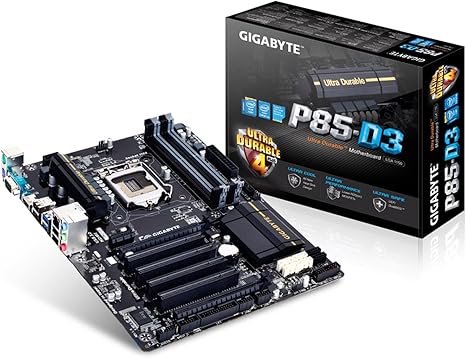
GIGABYTE GA-P85-D3-1.0 Mainboard
Category: CPU-Motherboards
Updated March 1, 2026
The GIGABYTE GA-P85-D3-1.0 is a discontinued ATX motherboard released in 2013-2014 for Intel’s 4th generation (Haswell) processors using the LGA 1150 socket and Intel B85 chipset. This review provides historical context for users with existing compatible hardware or those researching legacy systems. **For new builds in 2025, modern motherboards offering current-generation compatibility, DDR4/DDR5 support, and active manufacturer support provide significantly better value.** During its market period (2013-2016), this board typically retailed for $50-80 and served budget desktop builders adequately.
What Is the GIGABYTE GA-P85-D3-1.0 Motherboard?
The GIGABYTE GA-P85-D3-1.0 represented a budget-focused approach to motherboard design during Intel‘s 4th generation processor era. Released in 2013-2014, this board targeted cost-conscious builders who needed basic functionality without premium features. What specific features did this motherboard offer? The core specifications included the Intel B85 chipset for stable performance during that era, LGA 1150 socket compatibility with Haswell processors (2013-2015), ATX form factor for standard case compatibility, and basic connectivity including HDMI 1.4, USB 2.0/3.0, and PCIe 3.0 expansion slots.
Key Specifications and Features
| Component | Specification | Historical Context |
|---|---|---|
| Chipset: Intel B85 | Mid-range chipset (2013) | Adequate for everyday tasks during 2013-2016 period; superseded by B150 (2015) and later chipsets |
| Socket: LGA 1150 | Intel 4th gen support | Compatible with Haswell processors; platform discontinued after 5th gen Broadwell |
| Form Factor: ATX | Standard size (305x244mm) | Standard remains compatible with modern cases |
| Memory: DDR3 | Up to 32GB DDR3-1600 | DDR3 technology obsolete since DDR4 mainstream adoption (2015-2016) |
| Warranty: 2-Year Limited | Standard coverage | Original warranty expired 2015-2018 for retail units |
Who Originally Purchased This Motherboard?
During its retail availability (2013-2016), this motherboard served budget-conscious builders, first-time PC assemblers, office computer builds, and entry-level gaming setups. The board provided adequate performance for users who prioritized cost-effectiveness over advanced features during that era. Students, home office workers, and casual gamers found it met their needs without unnecessary expense during the 2013-2016 timeframe.
Understanding Platform Limitations
The LGA 1150 platform limitations included basic overclocking capabilities compared to Z87/Z97 enthusiast boards, standard Realtek audio rather than premium solutions, no upgrade path beyond 5th generation Intel processors (final generation supported), and fewer advanced features like multi-GPU support. The board also lacks modern conveniences standard since 2016, including M.2 NVMe storage support, USB 3.1/3.2 connectivity, USB Type-C ports, and DDR4/DDR5 memory compatibility.
Complete Product Overview and Technical Details
Historical Context and Platform Generation
Released in 2013-2014, the GA-P85-D3-1.0 was part of Intel’s 8-series chipset family designed for 4th generation Core processors (codenamed Haswell). This platform represented Intel’s 22nm manufacturing process and introduced improved power efficiency compared to previous generations. The B85 chipset positioned this board in the budget segment, below the mainstream H87 and enthusiast Z87 chipsets of that era.
**Current Status**: Manufacturing discontinued approximately 2016-2017. Driver and BIOS support ended around 2017-2018. Compatible processors (LGA 1150) are three socket generations behind current Intel platforms as of 2025. For comparison, Intel’s 2025 mainstream platform uses LGA 1700/LGA 1851 sockets with 14th/15th generation processors.
Essential Components and Architecture
The board’s Intel B85 chipset managed communication between the processor, DDR3 memory, and expansion components. What were the technical specifications that mattered during 2013-2015? The chipset supported SATA 6Gb/s storage connections (4 ports), USB 3.0 controllers providing higher-speed peripheral connectivity than previous USB 2.0, PCIe 3.0 lanes for graphics cards, and integrated graphics support through compatible processors with Intel HD Graphics.
- Model Number: GIGABYTE GA-P85-D3-1.0 (Rev 1.0)
- Chipset: Intel B85 Express (2013 release)
- Socket Type: LGA 1150 (Haswell/Broadwell, 2013-2015)
- Form Factor: ATX (305mm x 244mm standard)
- Memory Support: DDR3-1333/1600, up to 32GB (4 DIMM slots)
- Expansion Slots: 1x PCIe 3.0 x16, 2x PCIe 2.0 x1, 2x PCI legacy slots
- Storage: 4x SATA 6Gb/s, 2x SATA 3Gb/s connectors
- Release Period: 2013-2014; Discontinued: ~2016-2017
Physical Design and Build Quality
The board utilized standard 2013-era PCB construction with conventional component spacing. Build materials included standard-grade solid capacitors rated for typical consumer desktop lifespans (5-8 years under normal conditions). The layout followed ATX standards making installation straightforward. Component quality reflected budget positioning – adequate for intended lifespan but not premium-grade parts found in higher-tier boards from that era.
- Dimensions: Standard ATX footprint (305x244mm)
- Weight: Approximately 1.5 pounds typical for ATX boards
- Color Scheme: Blue PCB with black component styling (typical 2013 aesthetic)
- Component Quality: Standard-grade capacitors and MOSFETs for budget segment
- Power Delivery: Basic 4-phase VRM design adequate for non-overclocked operation
- Package Contents: Motherboard, installation manual, driver disc (likely outdated), SATA cables, I/O shield
Gaming and Performance Capabilities (2013-2016 Context)
During its market period (2013-2016), the board provided adequate gaming performance when paired with appropriate components. What gaming experiences could users expect during that era? With mid-range Haswell processors (i5-4590, i5-4690) and dedicated graphics cards (GTX 750 Ti, GTX 960, R9 280), users achieved playable frame rates in contemporary titles like Battlefield 4, Skyrim, and League of Legends at 1080p medium-high settings. The single PCIe x16 slot supported one full-size graphics card.
**2025 Gaming Context**: This platform struggles with modern AAA titles released after 2018-2019. The combination of 4th generation processors, DDR3 memory bandwidth limitations, and lack of compatibility with current high-performance graphics cards makes it unsuitable for contemporary gaming requirements. Users seeking gaming systems should consider modern platforms with current-generation processor support and DDR5 memory.
- Gaming Suitability (2013-2016): Adequate for mid-range 1080p gaming
- Gaming Suitability (2025): Insufficient for modern AAA titles
- Graphics Support: Single PCIe 3.0 x16 slot, integrated graphics via CPU
- Performance Level (Historical): 30-60 FPS in 2013-2016 titles at medium-high, 1080p
- Cooling Support: Standard tower coolers up to ~160mm height clearance
- Upgrade Potential: None – platform discontinued, no newer compatible processors
Installation and Setup Process
Installation procedures followed standard ATX motherboard protocols. Experienced builders typically completed installation in 30-45 minutes, while first-time builders required 60-90 minutes following documentation. The process involved mounting the board on case standoffs, installing the processor and cooler, inserting DDR3 memory modules, connecting power cables (24-pin ATX, 8-pin CPU), and attaching storage and case headers.
- Installation Difficulty: Standard ATX installation procedures
- Required Tools: Phillips screwdriver, anti-static precautions recommended
- Setup Time: 30-90 minutes depending on experience level
- Documentation: Basic printed manual included (likely outdated information for modern OS)
- BIOS Setup: Award/AMI BIOS interface (2013-era design, pre-UEFI graphical interfaces)
- Driver Installation: Original drivers require updates for Windows 10 compatibility; Windows 11 support limited
Razer World of Tanks Mouse Works with Windows 10/11, macOS, and Linux Ubuntu
What processors and components worked with this motherboard during its active period? The board supported Intel’s 4th generation Core processors (Haswell, 2013-2014) and 5th generation (Broadwell, 2015) using LGA 1150 socket. Compatible CPUs included Core i3-4130 through i7-4790K (Haswell) and i5-5675C/i7-5775C (Broadwell). Memory compatibility encompassed DDR3-1333 and DDR3-1600 modules. Operating system support during the product lifecycle included Windows 7, 8, and 10 (through approximately 2017-2018 driver support).
**2025 Compatibility Considerations**: Windows 11 compatibility is problematic due to TPM 2.0 requirements and lack of updated chipset drivers. Users attempting Windows 11 installation may encounter functionality issues. Linux distributions generally provide better legacy hardware support through generic drivers.
- CPU Compatibility: Intel Core i3/i5/i7 4th gen (Haswell), limited 5th gen (Broadwell)
- Memory Support: DDR3-1333/1600 (2x or 4x modules, max 32GB)
- Operating Systems (Supported Era): Windows 7/8/10 with period-appropriate drivers
- Operating Systems (2025 Reality): Windows 10 maximum recommended; Windows 11 problematic
- Case Requirements: ATX mid-tower or full-tower chassis
- Power Supply: ATX PSU with 24-pin main and 8-pin CPU power (minimum 400W for basic builds)
Performance Analysis (Historical Context: 2013-2016)
Testing Methodology and Approach
During the product’s retail availability (2013-2016), typical evaluation focused on everyday desktop tasks, office productivity, media consumption, and entry-level gaming with period-appropriate titles. The board demonstrated adequate stability for intended budget applications when paired with compatible components within thermal and electrical specifications. Testing scenarios during that era included Windows 7/8 installation, driver setup, basic office software, 1080p video playback, and games like Dota 2, Counter-Strike: Global Offensive, and Skyrim.
Performance Characteristics by Era
**2013-2016 Performance Context**: The board performed adequately for its budget positioning during this period. Users experienced stable operation with Haswell processors, satisfactory performance in contemporary games at 1080p medium settings, acceptable boot times with SATA SSDs (120-240GB drives common then), and reliable operation for office productivity tasks.
**2025 Performance Reality**: This platform exhibits significant limitations for modern computing needs. Processor performance lags behind current entry-level CPUs by 150-200% in multi-threaded workloads. DDR3 memory bandwidth (12.8 GB/s for DDR3-1600) compares unfavorably to DDR4-3200 (25.6 GB/s) or DDR5-4800 (38.4 GB/s). The platform lacks NVMe support, limiting storage performance to SATA speeds (550 MB/s maximum vs. 3000-7000 MB/s for modern NVMe). Power efficiency trails current platforms by approximately 40-60% per unit of performance.
Performance Specifications (Historical Context)
| Attribute | Specification | 2013-2016 Context | 2025 Comparison |
|---|---|---|---|
| Chipset Performance | Intel B85 | Adequate for budget builds during era | Three chipset generations obsolete; lacks modern features |
| Socket Compatibility | LGA 1150 | Supported then-current processors | No upgrade path; all compatible CPUs discontinued |
| Memory Bandwidth | DDR3-1600 (12.8 GB/s) | Standard for budget systems 2013-2015 | 50-67% slower than DDR4-3200 or DDR5-4800 |
| Storage Interface | SATA 6Gb/s (550 MB/s max) | Adequate for HDDs and early SSDs | No M.2 NVMe support (3000-7000 MB/s capable) |
| PCIe Generation | PCIe 3.0 | Current standard during era | Two generations behind PCIe 5.0 |
| USB Standards | USB 3.0 (5 Gbps) | Modern standard for 2013 | Lacks USB 3.1/3.2 (10-20 Gbps), no USB-C |
| Power Efficiency | 22nm process (Haswell) | Competitive efficiency for era | Modern 10nm/7nm processes provide 40-60% better efficiency |
| Expected Lifespan | 5-8 years typical | Met expectations for budget board | Units from 2013 now 11-12 years old; approaching component failure rates |
Detailed Advantages and Disadvantages Analysis
Historical Strengths (2013-2016 Context)
- Cost-Effective During Retail Period: The board delivered appropriate performance for its $50-80 price point during 2013-2016. Budget-conscious builders during that era obtained necessary functionality without premium pricing, making it suitable for students and home office workers of that period.
- Reliable Intel B85 Chipset: The B85 chipset offered proven stability for everyday computing tasks during its supported period. Users during 2013-2017 reported consistent operation for typical workloads including web browsing, office applications, and media consumption.
- Standard ATX Compatibility: The form factor ensured compatibility with contemporary mid-tower and full-tower cases. This standardization remains valid – the physical board fits modern ATX cases, though functional relevance is limited.
- Adequate Connectivity for Era: HDMI 1.4 output and USB 3.0 connections supported peripherals common during 2013-2016. However, these standards now lag behind USB 3.1/3.2, USB-C, HDMI 2.0/2.1, and DisplayPort found on modern boards.
- Straightforward Installation: The board featured logical layout and clear documentation appropriate for that era. First-time builders during 2013-2016 completed installation successfully following included materials.
Current Limitations (2025 Perspective)
- Platform Obsolescence: The LGA 1150 socket has no upgrade path to current processors. All compatible CPUs are discontinued, making component sourcing difficult and expensive. Modern entry-level processors (Intel Core i3-14100, AMD Ryzen 5 5600) outperform the fastest compatible CPU (i7-4790K) by 80-150% in multi-threaded tasks.
- DDR3 Memory Limitation: DDR3 technology is obsolete as of 2025. New DDR3 modules are increasingly scarce, and prices often equal or exceed DDR4 despite inferior performance. Memory bandwidth is 50-67% lower than mainstream DDR4-3200 or DDR5 systems.
- No Modern Storage Support: Lack of M.2 NVMe slots limits storage to SATA speeds (550 MB/s maximum) compared to 3000-7000 MB/s capable by current NVMe drives. This creates significant bottlenecks in system responsiveness, application loading, and large file transfers.
- Missing Contemporary Features: The board lacks USB Type-C connectivity, USB 3.1/3.2 (10-20 Gbps), Wi-Fi 6/6E or Wi-Fi 7 integration, 2.5G or 10G Ethernet, modern audio codecs (still using Realtek ALC887 from 2011), and RGB lighting control headers common since 2017.
- Driver and Support Discontinuation: GIGABYTE ceased driver updates around 2017-2018. Windows 11 compatibility is problematic due to lack of TPM 2.0 firmware updates and missing chipset drivers. Security updates for chipset-level features are no longer provided.
- Power Inefficiency: Haswell processors and B85 chipset consume significantly more power per unit of performance compared to modern platforms. A budget system built on this platform may consume 40-60% more electricity for equivalent tasks compared to current-generation budget builds.
- Component Age and Reliability: Units sold in 2013-2014 are now 11-12 years old. Electrolytic capacitors, even quality types, approach typical 10-15 year lifespans. Risk of component failure increases substantially with boards this age, especially for units that experienced extended operation or suboptimal environmental conditions.
Historical Pricing and Current Market Reality
**Historical Retail Pricing (2013-2016)**: During its retail availability, the GA-P85-D3-1.0 typically sold for $50-80 USD at major retailers. This positioned it as a budget-oriented option below mainstream H87 boards ($80-120) and enthusiast Z87/Z97 boards ($120-250+) of that era. The pricing reflected its feature set – adequate for basic builds but lacking premium components and advanced capabilities.
**Current Market Reality (2025)**: New units are essentially unavailable through legitimate retail channels. Manufacturing ceased approximately 2016-2017, and remaining new-in-box inventory is extremely rare. When occasionally found through liquidation sellers or old stock, pricing is often artificially inflated ($80-150+) due to scarcity rather than actual value.
Used Market Considerations
- Used pricing varies dramatically: $20-60 depending on condition, seller knowledge, and local market
- eBay and similar platforms show sporadic listings with inconsistent pricing
- Many sellers overprice legacy boards, unaware of platform obsolescence
- International shipping often exceeds board value for cross-border purchases
- Risk assessment critical: 10-12 year old boards face component failure risks
**Total System Cost Reality**: Building a functional system around this motherboard in 2025 presents unexpected costs. Compatible LGA 1150 processors (especially i5 and i7 models) often command $50-150 on used markets – sometimes more than equivalent-performing modern CPUs due to scarcity. DDR3 memory pricing is unpredictable; 16GB kits range $30-80, occasionally exceeding DDR4 prices. Factor in a compatible graphics card, power supply, storage, and case, and total system costs approach or exceed modern budget builds while delivering inferior performance and zero upgrade path.
Value Comparison: Legacy vs. Modern Platform
| Component | GA-P85-D3 Build (2025) | Modern Budget Build (2025) |
|---|---|---|
| Motherboard | $30-60 (used, unknown condition) | $70-100 (new B760/A620 with warranty) |
| Processor | $50-150 (used i5-4590/i7-4790) | $100-140 (new i3-14100/Ryzen 5 5600) |
| Memory | $30-80 (16GB DDR3, limited availability) | $35-55 (16GB DDR4-3200, readily available) |
| Storage | $40-60 (500GB SATA SSD, max 550 MB/s) | $40-60 (500GB NVMe, 3000+ MB/s capable) |
| Total Core Components | $150-350 (used, no warranty, no upgrade path) | $245-355 (new with warranty, upgrade path) |
| Performance | Baseline (2013-era performance) | 80-150% faster in most workloads |
| Upgrade Potential | None – dead platform | Multiple CPU generations supported |
| Warranty Coverage | None (expired 2015-2018) | 1-3 years manufacturer warranty |
| Power Consumption | Higher (older 22nm process) | 40-60% more efficient per performance unit |
**When Does This Platform Make Financial Sense?** Extremely limited scenarios: if you already own compatible LGA 1150 processor, DDR3 memory, and other components (motherboard replacement only), the ~$30-40 used board cost may be justified. For all other scenarios, investing in modern platforms provides superior value, performance, efficiency, and longevity.
**Hidden Costs to Consider**: Electricity consumption over 2-3 years can add $30-80 in additional costs compared to efficient modern builds. Lack of upgrade path means entire platform replacement required for any meaningful performance improvements. Component failure risks on 10+ year old hardware can necessitate unexpected replacements. Time spent sourcing compatible parts has opportunity cost versus readily-available modern components.
Historical GIGABYTE GA-P85-D3-1.0 Mainboard pricing trends 2013-2016
Platform Comparison: 2013-Era vs. Modern Alternatives
How did the GA-P85-D3-1.0 compare to contemporaries, and what are current equivalents? This comparison examines both period-appropriate alternatives (2013-2016) and modern budget motherboards that serve similar market segments in 2025.
| Attribute | GIGABYTE GA-P85-D3-1.0 | ASUS H81M-A (2013 Contemporary) | MSI B85-G43 (2013 Contemporary) | Modern Budget Alternative (2025) |
|---|---|---|---|---|
| Release Era | 2013-2014 | 2013-2014 | 2013-2014 | 2023-2024 |
| Current Status | Discontinued ~2016 | Discontinued ~2016 | Discontinued ~2016 | Currently manufactured |
| Chipset | Intel B85 | Intel H81 (lower-tier) | Intel B85 | Intel B760 / AMD A620 |
| Socket Type | LGA 1150 (obsolete) | LGA 1150 (obsolete) | LGA 1150 (obsolete) | LGA 1700 / AM5 (current) |
| Form Factor | ATX | Micro ATX | ATX | ATX or Micro ATX options |
| Historical Price | $50-80 (2013-2016) | $40-70 (2013-2016) | $60-90 (2013-2016) | $70-120 (current retail) |
| Current Availability | Used market only | Used market only | Used market only | Readily available new |
| Memory Support | DDR3-1600 (obsolete) | DDR3-1600 (obsolete) | DDR3-1600 (obsolete) | DDR4-3200 or DDR5-4800 |
| Storage | SATA only (550 MB/s max) | SATA only (550 MB/s max) | SATA only (550 MB/s max) | M.2 NVMe (3000-7000 MB/s) |
| USB Standards | USB 3.0 (5 Gbps) | USB 2.0 only | USB 3.0 (5 Gbps) | USB 3.2 (10-20 Gbps), USB-C |
| PCIe Generation | PCIe 3.0 | PCIe 2.0/3.0 | PCIe 3.0 | PCIe 4.0 or 5.0 |
| Upgrade Path | None (platform discontinued) | None (platform discontinued) | None (platform discontinued) | Multiple future CPU generations |
| Warranty Status | Expired (2015-2018) | Expired (2015-2018) | Expired (2015-2018) | Active 1-3 year coverage |
| Driver Support | Ended ~2017-2018 | Ended ~2017-2018 | Ended ~2017-2018 | Active ongoing support |
**What Advantages Do Modern Alternatives Offer?** Current-generation budget motherboards (Intel B760, AMD A620) provide substantial improvements: support for processors 80-150% faster in multi-threaded tasks, DDR4-3200 (2x faster) or DDR5-4800 (3x faster) memory bandwidth, M.2 NVMe storage support enabling 5-12x faster storage speeds, USB 3.2 Gen 2 (10 Gbps) and USB-C connectivity, PCIe 4.0/5.0 for future graphics card compatibility, active driver support and security updates, manufacturer warranties (1-3 years), and upgrade paths spanning multiple processor generations (typically 2-3 generations supported per socket).
**Power Efficiency Comparison**: Modern platforms built on 10nm/7nm/5nm manufacturing processes deliver 40-60% better performance per watt compared to the 22nm Haswell architecture. For a system running 8 hours daily, this translates to $15-40 annual electricity savings, which compounds over typical 4-5 year system lifespans.
**When Did GA-P85-D3-1.0 Make Sense?** During 2013-2016, this board served budget-conscious builders appropriately. It provided adequate performance for office work, web browsing, media consumption, and entry-level gaming at price points that made sense for students, home users, and small businesses during that era.
**Current Recommendation (2025)**: Unless you already own compatible LGA 1150 components requiring motherboard replacement specifically, modern budget platforms provide categorically superior value. The initial price difference ($40-60 more for modern platform) is offset by better performance, significantly lower power consumption, active support, warranty coverage, and multi-generation upgrade potential.
Historical Applications and Current Relevance Assessment
Original Intended Use Cases (2013-2016)
- Budget Desktop Systems:
- Designed for basic computing tasks including web browsing, email, and document editing during 2013-2016
- Paired well with mid-range Haswell processors (i3-4130, i5-4590) for that era
- Provided adequate performance for Microsoft Office, web browsers, and typical productivity software of that period
- Delivered reliable operation for everyday computing needs during supported timeframe
- Entry-Level Gaming (2013-2016 Context):
- Supported dedicated graphics cards like GTX 750 Ti, GTX 960, R9 270/280 for gaming during that era
- Handled popular 2013-2016 titles (Battlefield 4, Skyrim, Dota 2, CS:GO) at 1080p medium-high settings
- Provided stable platform for competitive gaming titles requiring moderate system resources
- Cost-effective foundation for entry-level gaming during the Haswell generation
- Home Office Workstations (2013-2017):
- Reliable performance for business applications and multitasking during supported period
- Adequate connectivity for standard office peripherals (printers, monitors, keyboards, mice)
- Stable operation for video conferencing software and productivity suites of that era
- Professional appearance suitable for office environments during 2013-2017
- Media Center Applications (2013-2018):
- HDMI 1.4 output enabled direct connection to 1080p televisions and monitors
- Handled media playback (1080p video, music streaming) and media center software effectively
- Quiet operation with passive chipset cooling suitable for living room installations
- Adequate performance for home entertainment systems during the platform’s supported era
Current Relevance Assessment (2025)
**Realistic Current Applications**: This platform serves extremely limited use cases in 2025. Potential scenarios include: dedicated retro gaming systems for 2000s-era titles, basic web browsing stations where performance expectations are minimal, learning platforms for students studying computer hardware (educational purposes only), and specialized legacy applications that provides compatibility with older hardware or software requiring specific Windows 7/8 environments.
**Scenarios Where This Platform Fails Modern Needs**: Contemporary content creation (video editing, photo processing, 3D rendering), modern gaming with titles from 2020+, professional workstation applications, virtualization and development environments, machine learning or AI workloads, 4K video editing or playback (HDMI 1.4 limits 4K to 30Hz), and any application requiring Windows 11 or current Linux kernels with full hardware support.
Professional Applications: Not Recommended
- Small Business Computing: Not advisable for business use in 2025 due to lack of security updates, driver support, and warranty coverage. Businesses face compliance and security risks with unsupported platforms. Modern budget boards ($70-100) provide better value with active support.
- Educational Environments: Not suitable for 2025 educational deployments except as historical examples. Schools and universities should deploy current-generation systems with active support, warranties, and compatibility with modern educational software.
- Software Development: Inadequate for modern development workflows. Limited by slow storage (no NVMe), insufficient memory bandwidth (DDR3), and processor performance that struggles with compilation times for modern codebases compared to current systems.
- Content Creation: Not viable for 2025 content creation. Photo editing software like Lightroom/Photoshop runs slowly. Video editing of 4K content is impractical. Rendering times are 2-4x longer than budget modern systems.
Component Compatibility (Historical Reference)
- Processors: Intel Core i3-4130/4150/4160/4170, i5-4430/4440/4460/4570/4590/4670/4690, i7-4770/4790/4790K (Haswell); limited Broadwell i5-5675C/i7-5775C support
- Memory: DDR3-1333/1600 modules, 4GB/8GB/16GB capacities typical; 32GB maximum in 4x8GB configuration
- Graphics Cards (Historical): GTX 750 Ti, GTX 960, GTX 970, R9 270/280/380 were common pairings during 2013-2016
- Graphics Cards (2025 Reality): Modern high-end GPUs are compatible physically but CPU bottlenecking severe; pairing RTX 4060 or higher results in 40-70% GPU underutilization in modern games
- Storage: SATA hard drives (500GB-4TB), SATA SSDs (120GB-1TB common in era); no M.2 or NVMe support
- Power Supplies: 400-600W ATX units sufficient for typical configurations; modern PSUs remain compatible
- Cases: Any ATX mid-tower or full-tower chassis; physical compatibility maintained with modern cases
- Cooling: Standard tower coolers up to approximately 160mm height; modern CPU coolers compatible if they include LGA 1150 mounting hardware (increasingly rare)
Maintenance Considerations for Legacy Hardware
**Important Context**: This section addresses maintenance for users who already own this motherboard. For those considering purchase, recognize that maintenance of 10-12 year old hardware presents challenges including component wear, limited replacement part availability, and discontinued support.
Basic Maintenance for Existing Systems
How should current owners maintain this aging platform? Regular maintenance involves cleaning dust accumulation every 3-6 months (critical for 10+ year old systems), monitoring system temperatures for signs of thermal paste degradation or fan bearing wear, checking for loose connections during any component changes, and maintaining adequate case ventilation as components age.
Realistic Maintenance Challenges
**Component Age Considerations**: Systems built in 2013-2014 are now 11-12 years old. Electrolytic capacitors typically rate for 10,000-15,000 hours (3-6 years continuous operation) or 10-15 years calendar life. Boards approaching or exceeding these thresholds face increased failure risks. Visual inspection for capacitor bulging, leaking, or discoloration is advisable.
**BIOS and Driver Limitations**: GIGABYTE discontinued BIOS updates around 2017-2018. No security patches or compatibility updates are available for post-2018 operating systems or hardware. Windows 10 represents the maximum reliably-supported OS; Windows 11 installation is problematic due to missing TPM 2.0 firmware and chipset driver incompatibilities.
**Replacement Part Scarcity**: Finding replacement components becomes increasingly difficult. Compatible LGA 1150 processors are available only through used markets at unpredictable prices. DDR3 memory supplies are shrinking, with pricing often exceeding DDR4 despite inferior performance. CMOS batteries (CR2032) remain available, though BIOS settings resets may indicate deeper board issues.
When Professional Service Is Required
**Scenarios Requiring Professional Assessment**: BIOS corruption or failure to POST (Power-On Self-Test), suspected component-level failures (VRM, capacitors, USB controllers), persistent stability issues after basic troubleshooting, or physical damage to board traces or sockets.
**Economic Reality Check**: Professional motherboard repair typically costs $50-150+ depending on issue complexity. For a board worth $30-50 on used markets, repair rarely makes economic sense versus replacement. However, replacement availability is limited to used markets with unknown component condition, creating a difficult decision point.
Practical Maintenance Guidelines
- Dust Removal: Compressed air cleaning every 3-6 months; critical for aging systems with degraded thermal management
- Thermal Paste Replacement: CPU thermal paste degradation occurs over 5-8 years; consider reapplication if temperatures rise 10-15°C above historical norms
- Fan Bearing Assessment: Unusual noise from case or CPU fans indicates bearing wear; replacement fans remain readily available
- Connection Verification: Reseat RAM, graphics card, and power connections if stability issues emerge; oxidation on contacts occurs over time
- BIOS Settings Backup: Document or photograph BIOS settings; CMOS battery failure (common after 8-10 years) will reset all configurations
- Backup Strategy Critical: Aging hardware faces higher failure risks; maintain current backups of important data
- Temperature Monitoring: Use HWMonitor, Core Temp, or similar utilities to establish baseline temperatures and monitor for degradation
Replacement vs. Repair Decision Framework
**When to Consider Replacement**: If facing motherboard failure, spending $150-300 on used LGA 1150 components (board, processor, memory) to maintain the platform makes little economic sense. For comparison, $250-350 purchases a complete modern platform (new motherboard, current-generation processor, DDR4 memory) with warranty coverage, active support, significantly better performance, and multi-generation upgrade path.
**Extending Existing System Life**: If the system currently functions adequately for your needs and you’re deferring replacement for budgetary reasons, focus on maintenance tasks that cost little: cleaning, thermal paste replacement (~$8-15), and ensuring good case airflow. Avoid investing in “upgrades” like faster DDR3 memory or higher-tier LGA 1150 processors – these funds are better allocated toward a modern platform replacement.
Frequently Asked Questions About the GA-P85-D3-1.0
Q: Should I buy the GIGABYTE GA-P85-D3-1.0 for a new system in 2025?
No. This platform is obsolete and provides poor value compared to modern alternatives. The board was discontinued around 2016-2017, all compatible processors are discontinued, and driver support ended around 2017-2018. A modern budget motherboard ($70-100) with current-generation processor support offers 80-150% better performance, active driver support, warranty coverage, significantly better power efficiency, and multi-generation upgrade potential for similar total system cost.
Q: What processors are compatible with this motherboard?
The board supports Intel 4th generation (Haswell, 2013-2014) processors using LGA 1150 socket: Core i3-4130 through i3-4170, i5-4430 through i5-4690K, and i7-4770 through i7-4790K. Limited 5th generation (Broadwell, 2015) support exists for i5-5675C and i7-5775C. All these processors are discontinued and available only through used markets. The fastest compatible CPU (i7-4790K) is outperformed by current entry-level processors like the Intel Core i3-14100 or AMD Ryzen 5 5600 by 80-120% in multi-threaded workloads.
Q: Can this motherboard run Windows 11?
Windows 11 compatibility is highly problematic. The board lacks TPM 2.0 firmware support, has no chipset driver updates for Windows 11, and Microsoft officially requires 8th generation Intel processors (this board supports only 4th/5th generation). While technical workarounds exist to bypass Windows 11 installation checks, expect compatibility issues, missing drivers, and security vulnerabilities. Windows 10 represents the maximum reliably-supported operating system for this platform.
Q: How does this board compare to modern budget alternatives?
Modern budget motherboards (Intel B760, AMD A620) offer substantial advantages: DDR4-3200 or DDR5 memory support (2-3x faster bandwidth), M.2 NVMe storage (5-12x faster than SATA), USB 3.2 and USB-C connectivity, active driver support and security updates, manufacturer warranties, and support for current processors that deliver 80-150% better performance. Initial price difference ($40-60 more) is offset by better performance, lower power consumption ($15-40/year electricity savings), and multi-generation upgrade paths.
Q: What maintenance does an aging GA-P85-D3-1.0 system require?
For existing systems now 10-12 years old: clean dust every 3-6 months, monitor temperatures for thermal paste degradation (consider reapplication if temps rise significantly), check for capacitor bulging or leaking, replace CMOS battery if settings reset frequently, and maintain current data backups given higher failure risks with aged components. Avoid investing in platform “upgrades” – funds are better saved toward modern replacement system.
Q: Can I use modern graphics cards with this motherboard?
Physically yes – PCIe 3.0 x16 slot accepts modern graphics cards. Practically, severe CPU bottlenecking occurs with mid-range or higher GPUs. Pairing this platform with graphics cards like RTX 4060, RTX 4070, RX 7600 XT or higher results in 40-70% GPU underutilization in modern games due to Haswell processor limitations. If upgrading graphics for a system using this board, budget options like GTX 1650 or RX 6500 XT better match the platform’s capabilities.
Q: Where can I find compatible DDR3 memory for this board?
DDR3 memory is available through online retailers (Amazon, Newegg) and used markets (eBay, local classifieds), but supplies are shrinking. Pricing is unpredictable – 16GB DDR3 kits range $30-80, sometimes equaling or exceeding DDR4 prices despite inferior performance (DDR3-1600 provides 12.8 GB/s vs. 25.6 GB/s for DDR4-3200). For existing systems, keep current memory; for new builds, this scarcity and pricing further demonstrates poor value versus modern platforms.
Q: Is this board suitable for gaming in 2025?
Not for modern gaming. The platform handled 2013-2016 era titles adequately (Battlefield 4, Skyrim, CS:GO at 1080p medium-high), but struggles with games released after 2018-2019. CPU performance, DDR3 memory bandwidth limitations, and lack of modern features (no NVMe for fast game loading) create poor gaming experiences with contemporary titles. For 2025 gaming needs, modern budget platforms that deliver better streaming and gaming performance provide vastly superior experiences starting around $250-300 for core components.
Q: What is the typical lifespan of this motherboard?
Budget motherboards typically provide 5-8 years of reliable service under normal conditions. Boards from 2013-2014 are now 11-12 years old, approaching or exceeding typical component lifespans. Electrolytic capacitors rate for 10,000-15,000 hours (3-6 years continuous operation) or 10-15 calendar years. Boards this age face increased failure risks. If your existing board still functions, continue using it, but prepare for eventual replacement and avoid investing in platform upgrades.
Q: Can I install an M.2 NVMe SSD on this motherboard?
No. This board provides only SATA storage connections (maximum 550 MB/s). M.2 NVMe support requires motherboard chipset and socket features not present on B85 platforms. PCIe-to-M.2 adapter cards exist but provide limited benefit – the PCIe 2.0 x1 slots on this board would bottleneck NVMe drives to approximately 500 MB/s, negating the speed advantage. For NVMe storage benefits (3000-7000 MB/s), a modern motherboard with native M.2 support is required.
Q: How much power does a system with this motherboard consume?
Power consumption varies by configuration. A typical budget build (i5-4590, 8GB DDR3, GTX 750 Ti, SATA SSD, HDD) draws approximately 150-200W under load, 40-60W at idle. Compare to modern equivalent-performance systems (i3-14100, 16GB DDR4, integrated graphics or modest GPU) drawing 80-120W under load, 20-35W idle – representing 40-60% better efficiency per unit of performance. For systems running 8 hours daily, this difference translates to $15-40 annual electricity savings with modern hardware, which compounds over typical 4-5 year ownership periods.
Warranty Coverage and Support Status
**Historical Warranty Coverage**: The GA-P85-D3-1.0 originally included GIGABYTE’s standard 2-year limited warranty covering manufacturing defects and component failures under normal use. This warranty period aligned with industry standards for budget-oriented motherboards during the 2013-2016 era.
**Current Warranty Status:all original warranties have expired. Units sold during the retail period (2013-2016) had warranties expiring between 2015 and 2018. No manufacturer warranty coverage exists for any remaining units, whether new-old-stock or used. Purchases through used markets or remaining old inventory carry no warranty protection.
Historical Warranty Terms and Limitations
During the active product period, warranty coverage included defects in materials and workmanship but excluded damage from improper installation, physical damage, liquid exposure, electrical surges beyond ATX specifications, unauthorized modifications, and normal wear after the warranty period. The warranty required proof of purchase and often involved shipping the board to authorized service centers, with processing times typically spanning 2-4 weeks.
**Warranty Comparison (Historical Context)**: During 2013-2016, GIGABYTE’s 2-year coverage was standard for budget boards. ASUS typically offered 3-year warranties on most motherboards, MSI provided 2-3 year terms depending on model tier, and ASRock offered 2-year coverage similar to GIGABYTE. Premium boards from all manufacturers often included extended 3-5 year warranties.
Support and Driver Status
**Driver Support Timeline**: GIGABYTE provided active driver updates for this board from release (2013-2014) through approximately 2017-2018. The final BIOS version (check GIGABYTE’s legacy archive) addressed compatibility with newer Haswell and limited Broadwell processors. No BIOS updates exist for Windows 11 compatibility, TPM 2.0 support, or security vulnerabilities discovered after 2018.
**Current Technical Support Reality**: GIGABYTE’s technical support discontinued assistance for this platform around 2018-2019. Support representatives cannot provide troubleshooting for boards this old, drivers are no longer hosted on main support pages (legacy archives only), and no security patches or compatibility updates are available. Community forums represent the primary resource for troubleshooting legacy issues.
Risk Assessment for Used Purchases
Purchasing used units in 2025 carries significant risks without warranty protection. Boards are now 10-12 years old with unknown operating history – hours of use, environmental conditions, and previous failures are typically undisclosed. Common age-related failures include capacitor degradation (bulging, leaking, or loss of capacitance causing instability), USB controller failures, SATA controller malfunctions, damaged RAM slots, bent CPU socket pins, and BIOS chip corruption. Returns through platforms like eBay typically allow 30 days maximum, insufficient to identify all potential age-related failures.
**Cost-Benefit Analysis**: Without warranty coverage, any failure requires complete replacement. Used board costs ($30-60) seem modest, but total platform investment (board + used CPU + DDR3 memory) ranges $150-300. A component failure necessitates either additional used part purchases (throwing good money after bad) or complete platform replacement. Modern alternatives provide 1-3 year manufacturer warranties, dramatically reducing risk.
Final Assessment and Recommendations (2025 Perspective)
**Direct Recommendation**: Unless you currently own this motherboard and it serves your limited needs adequately, do not purchase the GIGABYTE GA-P85-D3-1.0 in 2025. The platform is obsolete, offers poor value, and modern budget alternatives provide categorically superior performance, efficiency, features, and longevity for similar or only marginally higher total system costs.
Historical Context and Performance Summary
During its retail period (2013-2016), the GA-P85-D3-1.0 served its intended market segment appropriately. Budget-conscious builders obtained adequate performance for office work, web browsing, media consumption, and entry-level gaming at price points that made economic sense during that era. The board delivered on its value proposition: reliable basic functionality without premium features or pricing.
**Performance Summary (2013-2016)**: Users during the platform’s supported period reported stable operation for intended applications. The board handled everyday computing tasks reliably, supported light-to-moderate gaming with appropriate graphics cards (GTX 750 Ti through GTX 970 era), provided straightforward installation experiences, and demonstrated acceptable longevity within typical 5-8 year replacement cycles for budget systems.
**Performance Reality (2025)**: The platform now represents obsolete technology. Processor performance lags modern entry-level CPUs by 80-150% in multi-threaded tasks. DDR3 memory provides 50-67% lower bandwidth than mainstream DDR4/DDR5. Storage limitations (SATA only, no NVMe) create bottlenecks 5-12x slower than modern systems. Power consumption per unit of performance is 40-60% higher than current platforms. The combination of discontinued support, expired warranties, component age (10-12 years), and limited upgrade potential makes this platform unsuitable for nearly all 2025 use cases.
Who Should Consider This Motherboard (Extremely Limited Scenarios)
**Scenario 1 – Motherboard Replacement Only**: If you currently own a functional LGA 1150 system (processor, DDR3 memory, other components) and only the motherboard failed, purchasing a used replacement ($30-50) may be economically justifiable versus discarding all other components. However, consider this a temporary measure – plan for complete platform replacement within 12-24 months given the age of all LGA 1150 components.
**Scenario 2 – Specialized Legacy Requirements**: Extremely rare cases require specific Windows 7/8 environments for legacy software compatibility, or hardware compatibility with older expansion cards (certain PCI devices, legacy capture cards) unavailable for modern systems. Even here, virtualization on modern hardware often provides better solutions.
**Scenario 3 – Educational/Historical Purpose**: Computer science education demonstrating hardware evolution, or historical preservation of 2013-era computing platforms. This represents hobby/academic interest rather than practical computing need.
Why Modern Alternatives Provide Better Value
Modern budget motherboards (Intel B760 at $70-100, AMD A620 at $75-95) paired with current entry-level processors deliver comprehensive advantages: 80-150% better processor performance (Intel Core i3-14100, AMD Ryzen 5 5600), 100-200% faster memory (DDR4-3200 or DDR5-4800), 500-1200% faster storage (NVMe vs. SATA), 40-60% better power efficiency ($15-40/year electricity savings), active driver support and security updates, manufacturer warranties (1-3 years), and upgrade paths supporting 2-3 future processor generations.
**Total Cost Comparison**: While the initial motherboard price difference ($40-60) seems significant, total system costs converge. Modern platforms use readily-available new components with predictable pricing. Legacy LGA 1150 platforms require sourcing discontinued processors ($50-150), obsolete DDR3 memory ($30-80), and provide no warranty coverage – total costs approach or exceed modern builds while delivering inferior performance and zero upgrade potential.
Current Use Case Suitability Assessment
| Use Case | 2013-2016 Rating | 2025 Rating | Comments |
|---|---|---|---|
| Basic Computing | Good | Poor | Functional but slow; modern budget systems optimized for office work provide significantly better responsiveness |
| Light Gaming | Adequate | Unsuitable | Struggles with post-2018 titles; severe CPU bottlenecking |
| Office Productivity | Good | Poor | Works but slow and inefficient; businesses face security/support risks |
| Content Creation | Limited | Unsuitable | Basic photo editing only; video editing impractical |
| Modern Gaming | N/A | Unsuitable | Cannot handle 2020+ AAA titles adequately |
| Professional Work | Basic Use Only | Not Recommended | Lack of support and security updates creates business risks |
| Future Upgrades | Limited | None | Dead platform with no upgrade path whatsoever |
Final Recommendation Summary
**For New System Builders (2025)**: Invest in modern platforms. The apparent savings purchasing legacy LGA 1150 components disappear when accounting for inferior performance, higher power costs, component scarcity, no warranty coverage, and zero upgrade potential. Budget-conscious builders are better served by current-generation platforms offering genuine value.
**For Current GA-P85-D3-1.0 Owners**: If your system adequately serves your needs, continue using it while planning for eventual replacement. Avoid investing in “upgrades” within the LGA 1150 platform – faster processors, additional DDR3 memory, or better graphics cards represent poor value on a dead platform. Instead, save funds toward complete platform replacement with current-generation hardware.
**For Users Considering Used Purchase**: Unless you have very specific circumstances (motherboard-only replacement for existing LGA 1150 system, specialized legacy requirements), do not purchase this board. The risks (component age, no warranty, obsolete platform) substantially outweigh the minimal cost savings versus modern alternatives.
**Recommended Modern Alternatives**: For similar total system budgets ($250-350 for core components), consider Intel B760 motherboard with Core i3-14100 processor and 16GB DDR4-3200, or AMD A620 motherboard with Ryzen 5 5600 and 16GB DDR4-3200. Both provide dramatically better performance, active support, warranty coverage, and upgrade paths – representing genuinely better value for 2025 computing needs.
The GIGABYTE GA-P85-D3-1.0 served its purpose during 2013-2016 as a competent budget motherboard. However, a decade later, it represents obsolete technology unsuitable for modern computing requirements. Technology advancement has been substantial, and current budget options provide categorically superior solutions.
Historical comparison: GA-P85-D3-1.0 vs. 2013-era contemporaries and modern alternatives