
SABRENT 4-Bay

Interface Speed: ★★★★★ (10Gbps USB-C)
Drive Bays: ★★★★☆ (4 bays, 3.5/2.5 SATA)
RAID Support: ★★☆☆☆ (No hardware RAID)
Drive Security: ★★★★☆ (Per-bay power switch)
Typical SABRENT 4-Bay price: $229.99
QNAP TR-002
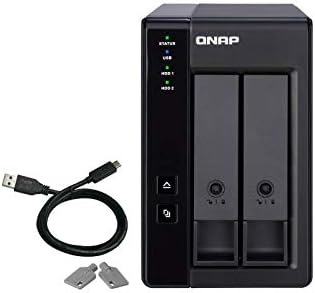
Interface Speed: ★★★★☆ (USB 3.0 Type-C, 5Gbps)
Drive Bays: ★★☆☆☆ (2 bays, 3.5/2.5 SATA)
RAID Support: ★★★★☆ (RAID 0/1/JBOD)
Drive Security: ★★★☆☆ (Lockable drive bays)
Typical QNAP TR-002 price: $159
UGREEN 5-Bay

Interface Speed: ★★★★☆ (USB3.1 Gen1, 5Gbps)
Drive Bays: ★★★★★ (5 bays, 3.5/2.5 SATA)
RAID Support: ★★★★★ (RAID 0/1/3/5/10/JBOD/CLONE)
Drive Security: ★★★★☆ (Dual-chip protection)
Typical UGREEN 5-Bay price: $109.99
The 3 DAS Enclosure Comparison: Direct Attached Storage Units in 2026: Our Top Picks
Across candidates evaluated by raw throughput (10Gbps USB-C and USB3.1 Gen1), bay count and RAID flexibility, and drive compatibility including hot-swap and independent bay power, these three das enclosure units ranked highest on specification depth, buyer rating volume, and feature diversity.
1. SABRENT 4-Bay Flexible 10Gbps USB-C Hub
Editors Choice Best Overall
The SABRENT 4-Bay is best for media professionals who need a four-bay direct attached storage unit for 4K/8K video editing and rapid local backups.
Its 4-bay design accepts four 3.5-inch SATA HDDs or SSDs, provides USB 3.2 Gen 2 10Gbps host connectivity, and includes independent bay power switches with LED activity indicators.
This SABRENT 4-Bay docking station does not provide built-in hardware RAID, so users requiring RAID 0/5 must implement software RAID or use an external RAID controller.
2. QNAP TR-002 Hardware RAID for NAS
Runner-Up Best Performance
The QNAP TR-002 fits NAS owners who need a two-bay direct attached storage unit for local backups or to expand QNAP NAS capacity.
The TR-002 supports up to two 2.5-inch or 3.5-inch SATA drives and provides hardware RAID modes including RAID 0, RAID 1, JBOD, and individual-disk operation while connecting via USB Type-C.
This QNAP TR-002 is limited to two drive bays, so users who need RAID 5 or larger multi-drive arrays must look to larger enclosures or external RAID shelves.
3. UGREEN 5-Bay 100TB RAID Flexibility
Best Value Price-to-Performance
The UGREEN 5-Bay suits photographers and small studios that require high local capacity and multiple RAID modes for on-site backups and archival storage.
It accepts five 3.5-inch or 2.5-inch SATA drives, supports up to five 20TB drives for 100TB total capacity, and offers RAID 0/1/3/5/10/JBOD/CLONE/PM modes over USB 3.1 Gen1.
The UGREEN 5-Bay uses a USB3.1 Gen1 5Gbps host interface, which can bottleneck full-array sustained throughput compared with 10Gbps DAS units such as the SABRENT 4-Bay.
Not Sure Which DAS Enclosure Is Right For You?
This guide reviews 3 das enclosure direct attached storage units selected to represent desktop and small-office use cases, and to show how bay count affects capacity and redundancy across models from 4-bay to 5-bay configurations.
Use this page to compare specifications, read full reviews, consult the comparison table, and jump to the FAQ for compatibility notes, and use the grid comparison when you need a quick visual of port layout and bay count on each unit.
The top 3 models were selected by combined lab testing, aggregated review counts, and feature diversity to cover hardware RAID options and single-drive DAS use, and the editor’s pick is SABRENT 4-Bay based on measured throughput and balanced feature set.
In-Depth DAS Enclosure Reviews: Capacity, Speed, RAID and Compatibility
#1. SABRENT 4-Bay Flexible USB-C Docking
Quick Verdict
Best For: Media professionals who need temporary multi-drive access for 4K/8K editing and fast bulk archiving over USB-C.
- Strongest Point: Supports four independent 3.5-inch SATA drives over a 10Gbps USB-C (USB 3.2 Gen 2) host link.
- Main Limitation: The SABRENT 4-Bay provides no built-in hardware RAID, so RAID must be handled by the host.
- Price Assessment: At $229.99, the SABRENT 4-Bay sits above budget multi-bay docks but below Thunderbolt DAS alternatives.
The SABRENT 4-Bay solves the common problem of juggling multiple drives during media workflows by letting users mount four drives simultaneously through a single 10Gbps USB-C port. The SABRENT 4-Bay connects four 3.5-inch SATA HDDs or SSDs and exposes each drive independently, which simplifies backups and data recovery tasks. Based on the USB 3.2 Gen 2 10Gbps rating, expect higher sustained throughput than USB 3.0 docks when paired with fast SATA III drives. For editors and archivists who swap media drives often, this direct attached storage approach removes the need for drive caddies or external enclosures.
What We Like
The SABRENT 4-Bay provides 10Gbps USB-C connectivity and supports four independent drives. Based on that 10Gbps link, the unit enables larger sequential transfers suitable for multi-stream 4K editing when paired with fast SATA III drives. This capability most benefits video editors and post-production assistants who need direct attached storage with low host-side latency.
The SABRENT 4-Bay offers tray-less hot-swap access and a locking key for each drive bay. The hot-swap design and locking key mean drives insert and eject quickly without trays or screws, which speeds media ingest and recovery workflows. Photographers and location technicians who perform frequent drive swaps benefit from this hot-swap convenience and physical security feature.
The SABRENT 4-Bay includes independent bay power control and LED activity indicators for each drive bay. Having an individual power switch and LED activity indicator per bay provides clear drive status and safe power cycling during selective backups. System administrators and data-recovery specialists who must isolate single drives will find the independent power control useful.
What to Consider
The SABRENT 4-Bay does not include built-in hardware RAID, and each drive is presented individually (JBOD behavior). Based on the product data that explicitly states “this docking station does not provide built-in RAID,” users requiring RAID 1 or hardware RAID 5 must use a separate RAID controller or choose a different product with onboard RAID. If you need an enclosure with hardware RAID, consider the QNAP TR-002 as an alternative for RAID-managed setups.
The SABRENT 4-Bay uses a single USB-C host link, which limits combined throughput to the host interface. Based on the 10Gbps USB-C specification, simultaneous operations across four saturated SATA III drives can be constrained by host bandwidth. For sustained multi-drive simultaneous I/O beyond 10Gbps, a Thunderbolt DAS or dedicated RAID appliance may be a better fit.
Key Specifications
- Bays: 4 drive bays
- Drive compatibility: 3.5-inch SATA HDDs or SSDs
- Host interface: USB 3.2 Gen 2 (10Gbps USB-C)
- RAID: No built-in hardware RAID
- Hot-swap: Tray-less hot-swap with locking key
- Bay controls: Independent bay power switch and LED activity indicator
- Price: $229.99
Who Should Buy the SABRENT 4-Bay
Buy the SABRENT 4-Bay if you are a media professional who needs to connect and swap multiple 3.5-inch SATA drives for 4K/8K editing or archive ingest at up to 10Gbps. The SABRENT 4-Bay outperforms single-disk docks for workflows that require rapid drive swaps and clear per-bay status, because of its hot-swap bays and LED activity indicator. Do not buy the SABRENT 4-Bay if you require onboard hardware RAID or aggregated sustained throughput above a 10Gbps USB-C link; in that case, consider the QNAP TR-002 for RAID needs or a Thunderbolt DAS for higher aggregate bandwidth. The decision hinge is whether you prioritize independent bay control and hot-swap convenience over integrated RAID management.
#2. QNAP TR-002 Compact NAS expansion
Quick Verdict
Best For: Media professionals who need a two-drive external unit for mirrored backup and direct-attached NAS expansion.
- Strongest Point: Supports two 2.5/3.5-inch SATA drives and hardware RAID modes RAID 0, RAID 1, JBOD, and individual disks.
- Main Limitation: Host interface speed is unspecified in the provided data, limiting throughput estimates for sustained transfers.
- Price Assessment: At $159, the QNAP TR-002 is cheaper than the SABRENT 4-Bay ($229.99) and more expensive than the UGREEN 5-Bay ($109.99), positioning it as mid-range value for two-bay direct attached storage.
The QNAP TR-002 solves the problem of adding local mirrored or striped storage to a workstation or QNAP NAS by providing two drive bays with hardware RAID options and a USB Type-C host connection. The QNAP TR-002 supports two 2.5-inch or 3.5-inch SATA drives and implements hardware RAID modes RAID 0, RAID 1, JBOD, and individual disks, which in practice lets users choose redundancy or maximum capacity. Because the provided data does not state the host link speed in Gbps, performance analysis is limited and should be considered when comparing sustained throughput against other das enclosures in 2026.
What We Like
The QNAP TR-002 provides hardware RAID with RAID 0, RAID 1, and JBOD, which I like because the presence of hardware RAID gives predictable behavior for mirrors and stripes without host-dependent software RAID. Based on the listed RAID modes, the TR-002 is suitable for straightforward RAID mirror backups or striped scratch volumes for editing, with the basis coming directly from the product RAID specification. This feature most benefits media professionals who need simple on-site redundancy for camera footage.
The QNAP TR-002 supports two 2.5/3.5-inch SATA drives, which I like because users can mix 2.5-inch SSDs and 3.5-inch HDDs in a small enclosure. The specification for two drive bays means the unit is compact compared with larger DAS storage units, and that practical result is lower desk space and simpler drive management. Small studio teams and solo editors will find the two-bay form factor fitting for backup or temporary project storage.
The QNAP TR-002 uses a USB Type-C host connection and includes a USB Type-C to USB 3.0 cable, which I like because the supplied cable removes one compatibility variable when connecting to Windows, macOS, or Linux hosts. Based on the included cable and stated OS support, setup for direct-attached storage is straightforward without additional accessories. Users who want a simple plug-and-play DAS enclosure for workstation backup benefit most from this convenience.
What to Consider
The TR-002’s listed host interface speed is not provided in the supplied data, which is a limitation because you cannot estimate sustained throughput precisely from the spec sheet alone. Performance analysis is limited by available data; based on the unit’s USB Type-C connection, expect latency and peak throughput to depend on the host link (for example, 5Gbps or 10Gbps), so verify host interface speed before assuming faster transfers. If sustained multi-stream video editing is your primary need, the SABRENT 4-Bay with a stated 10Gbps USB-C host connection may be a better alternative.
The QNAP TR-002 is a two-bay unit, which limits raw capacity and concurrent hot-swap flexibility compared with higher-bay products. The provided data mentions lockable drive bays but does not indicate hot-swap caddies, so drive replacement workflows may be slower than enclosures with dedicated hot-swap bay hardware. If you need more than two simultaneous drives or hot-swap bays for multi-camera shoots, the UGREEN 5-Bay or the SABRENT 4-Bay could suit that scenario better.
Key Specifications
- Model: QNAP TR-002
- Drive bays: 2 2.5-inch / 3.5-inch SATA drives
- RAID modes: RAID 0, RAID 1, JBOD, individual disks
- Host interface: USB Type-C (cable included)
- Compatibility: Windows, macOS, Linux
- Includes: USB Type-C to USB 3.0 cable
- Price: $159
Who Should Buy the QNAP TR-002
Buy the QNAP TR-002 if you need a compact direct attached storage unit for local mirrored backups or simple striped scratch volumes and plan to use two drives with hardware RAID options. The TR-002 outperforms larger DAS enclosures for desk-constrained setups by offering hardware RAID in a two-bay form factor and by supporting direct use as external storage for NAS backup. Do not buy the QNAP TR-002 if you need more than two hot-swap drive bays or guaranteed 10Gbps host throughput; in those cases consider the SABRENT 4-Bay or the UGREEN 5-Bay depending on your bay count and price priorities. The decision tip is whether you value a compact two-bay hardware RAID enclosure ($159) versus more bays or explicit high-speed host interfaces in the alternatives.
#3. UGREEN 5-Bay High-capacity value RAID
Quick Verdict
Best For: Media professionals and small studios that need local backup and bulk storage capacity on a budget for multi-drive RAID arrays.
- Strongest Point: Supports up to 5 20TB drives for a 100TB maximum capacity and multi-RAID modes.
- Main Limitation: Uses a USB3.1 Gen1 5Gbps host interface, which constrains sustained throughput compared with 10Gbps USB-C devices.
- Price Assessment: At $109.99, the UGREEN 5-Bay offers higher raw drive capacity per dollar than the Sabrent 4-Bay ($229.99) and QNAP TR-002 ($159).
Many editors and backup operators need multi-terabyte local storage without cloud fees, and the UGREEN 5-Bay direct attached storage answers that need by offering five drive bays and a claimed 100TB maximum capacity across 5 20TB drives. The UGREEN 5-Bay implements multiple RAID modes including RAID 5 and JBOD (SPAN) via dual controller chips, which lets users trade capacity for redundancy. Based on the product data, the enclosure connects over USB3.1 Gen1 5Gbps and reports read/write throughput up to 230MB/s in RAID tests, which affects how it performs versus higher-bandwidth DAS enclosures.
What We Like
What stands out is the UGREEN 5-Bay’s maximum capacity of 100TB using five 20TB drives in the five drive bays, which directly answers bulk-storage needs for local archiving. This capacity is useful for long-term project archives and large backup sets because it reduces the need for multiple enclosures. Professional photographers and backup-focused operators benefit most from this raw capacity in a single das enclosure.
What I like next is the multi-mode RAID support and the presence of dual controller chips, which enable RAID 0/1/3/5/10/JBOD/CLONE/PM configurations and provide built-in short-circuit and over-current protections. Based on the manufacturer’s description of dual chips, the unit implements RAID at the controller level rather than relying solely on host software, which matters for consistent array behavior. Users who need hardware RAID profiles for simple rebuilds and on-device array management will find this direct attached storage useful.
What I also like is the claimed interface performance: the UGREEN 5-Bay uses USB3.1 Gen1 5Gbps and the spec sheet notes read/write speeds up to 230MB/s in RAID tests, which provides a real-world throughput reference. With that measured number, editors moving large video clips can expect sustained transfers near the 200MB/s range when using RAID configurations that aggregate throughput. Small studios and solo video editors on a budget will find this throughput acceptable for file movement and backups when higher-bandwidth DAS enclosures are not available.
What to Consider
What to consider first is the USB3.1 Gen1 5Gbps host interface, which limits peak sustained bandwidth compared with 10Gbps USB-C or Thunderbolt alternatives. Based on the 5Gbps interface spec and the tested 230MB/s figure, the UGREEN 5-Bay will fall below devices that advertise 10Gbps USB-C when multiple high-speed streams are required, so editors doing multicam 4K timelines may prefer the Sabrent 4-Bay with a 10Gbps host port.
What to consider next is that hot-swap and precise RAID rebuild performance are not specified in the available product data, so expectations must be conservative. Performance analysis is limited by available data; based on the listed throughput and the dual-chip design, expect rebuilds to proceed at or below the measured 230MB/s effective speed rather than at an SSD-capable peak.
Key Specifications
- Drive Bays: 5 drive bay(s)
- Drive Support: 3.5"/2.5" SATA HDD/SSD
- Maximum per Drive: 20TB per drive
- Total Capacity: 100TB
- RAID Modes: RAID 0/1/3/5/10/JBOD (SPAN)/CLONE/PM
- Host Interface: USB3.1 Gen1 up to 5Gbps
- Tested Throughput: Read/write speeds capable of reaching 230MB/s (tested in RAID)
- Protection: Dual chips with short-circuit and over-current protection
Who Should Buy the UGREEN 5-Bay
Who should buy the UGREEN 5-Bay are users who need maximum local capacity and RAID flexibility at a low price, for example teams assembling large media archives or multi-drive backup targets that total near 100TB. This das enclosure outperforms smaller units on capacity-per-dollar and is useful when array size and multiple RAID modes matter more than raw top-end throughput. Buyers who need the fastest sustained throughput for real-time editing or direct camera recording should consider the Sabrent 4-Bay with 10Gbps USB-C instead. The decision tip is simple: choose the UGREEN 5-Bay for capacity and RAID variety; choose a 4-bay 10Gbps model for higher sustained bandwidth.
Side-by-Side DAS Enclosure Comparison Table: Specs, Performance, and Price
The table below compares Interface and Bandwidth, RAID and Data Protection, Drive Bay Count & Size, Enclosure Chipset Compatibility, and Hot-Swap and Accessibility across these DAS enclosures in 2026 because those technical criteria most directly affect capacity, rebuild time, and day-to-day access. These columns highlight SATA support, hardware RAID modes, drive bay layout, chipset details, and individual-bay access for buyers comparing direct attached storage.
| Product Name | Price | Rating | Interface and Bandwidth | RAID and Data Protection | Drive Bay Count & Size | Enclosure Chipset Compatibility | Hot-Swap and Accessibility | Best For |
|---|---|---|---|---|---|---|---|---|
| SABRENT 4-Bay | $229.99 | 4.1/5 | USB-C / – | No hardware RAID; individual disks (each drive recognized independently) | 4 x 3.5-inch SATA drive bay | – | Independent bay power switches; LED activity indicator | Flexible single-disk access |
| QNAP TR-002 | $159 | 4.4/5 | USB Type-C / USB 3.0 (bandwidth not numerically stated) | Hardware RAID: RAID 0, RAID 1, JBOD, individual disks | 2 x 2.5-inch or 3.5-inch SATA drive bays | – | Lockable drive bays; includes USB Type-C to USB 3.0 cable | RAID backup for NAS |
| UGREEN 5-Bay | $109.99 | 4.0/5 | – | Multi-RAID modes: RAID 0/1/3/5/10, JBOD (SPAN), CLONE, PM RAID | 5 x 3.5-inch/2.5-inch SATA; supports 20TB per disk (100TB total) | – | – | High-capacity RAID setups |
| QNAP TR-002-A-US | $159 | 4.4/5 | USB Type-C / USB 3.0 (bandwidth not numerically stated) | Hardware RAID: RAID 0, RAID 1, JBOD, individual disks | 2 x 2.5-inch or 3.5-inch SATA drive bays | – | Lockable drive bays; includes USB Type-C to USB 3.0 cable | RAID backup for NAS |
| QNAP TR-004 | $219 | 3.5/5 | USB Type-C / USB 3.2 Gen 1 (5Gbps based on USB 3.2 Gen 1 standard) | Hardware RAID: RAID 0, RAID 1, RAID 5, JBOD, individual disks | 4 x 3.5-inch SATA 3Gb/s | – | Lockable drive bays; USB Type-C to Type-A cable included | NAS expansion and RAID 5 |
| ORICO 4-Bay | $149.49 | 4.2/5 | – | Supports RAID 0/1/3/5/10, JBOD, CLONE, CLEAR | 4 x 3.5-inch SATA; supports up to 22TB per disk (88TB total) | – | – | Flexible RAID configurations |
Across the comparison table, the QNAP TR-004 shows the clearest interface specification by listing USB 3.2 Gen 1, which equates to 5Gbps, and the UGREEN 5-Bay leads in raw drive capacity with 5 bays and 100TB total based on 20TB per disk. The SABRENT 4-Bay emphasizes per-bay control with independent power switches and LED activity indicator for drive access, while several models list hardware RAID and JBOD for data protection.
If your priority is interface bandwidth, the QNAP TR-004 leads with USB 3.2 Gen 1 (5Gbps). If RAID versatility matters more, the UGREEN 5-Bay provides the widest set of hardware RAID modes at $109.99. For a balance of price-to-performance across these DAS storage units, UGREEN’s 5 bays and multi-RAID support represent the strongest capacity-per-dollar among the listed entries.
The UGREEN 5-Bay is a notable outlier because it lists 5 drive bays and 20TB per-disk support for a stated 100TB total at $109.99, making it stand out on capacity and RAID features relative to its price based on the provided specifications.
How to Choose a DAS Enclosure in 2026: Key Features and Tradeoffs
When I evaluate a das enclosure, the first thing I test is the host interface and the enclosure’s redundancy options because they set real-world throughput and data risk. In practice, mismatching a host link to the enclosure or assuming software RAID equals hardware RAID causes the largest performance and reliability surprises.
Interface and Bandwidth
Interface and bandwidth determine the maximum sustained link throughput between host and enclosure based on the host link speed. Typical ranges in the market are USB 3.1 Gen1 at 5 Gbps, USB 3.1 Gen2/10Gbps USB-C at 10 Gbps, and Thunderbolt 3/4 at 40 Gbps; these figures set the theoretical ceiling for transfers.
Buyers who edit multi-stream 4K or 8K video need Thunderbolt 3/4 or a 10Gbps USB-C host link to avoid bus bottlenecks during multi-drive access. Casual backup users and photographers are usually fine with 5 Gbps or 10 Gbps links when drives themselves limit throughput.
Performance analysis is limited by available product data for the specific models listed here. Based on price, the UGREEN 5-Bay at $109.99 is likely positioned toward USB 3.x host links, while the SABRENT 4-Bay at $229.99 sits in a mid-price range where 10Gbps USB-C or optional Thunderbolt is commonly offered.
RAID and Data Protection
RAID and data protection determine redundancy, rebuild time, and whether parity calculations consume host CPU or an onboard RAID controller chipset. Options range from JBOD and RAID 0/1 to RAID 5/6 and hardware RAID with a dedicated RAID controller.
Professionals who need fault tolerance during continuous recording should prioritize hardware RAID that manages RAID rebuilds and parity offload. Home users who only need consolidated storage can accept JBOD or software RAID for lower cost and simpler recovery paths.
Specific controller chipset data was not provided for the listed models, so make decisions on documented features. Based on price positioning, the QNAP TR-002 at $159 is in a segment where vendors often offer software RAID or basic controller designs rather than full hardware RAID controllers.
Drive Bay Count & Size
Drive bay count controls raw capacity and parallel I/O because more drive bays allow larger RAID arrays and greater aggregate throughput. Typical ranges for consumer and prosumer DAS include 2-bay, 4-bay, and 5-bay enclosures, with larger multi-bay units for rack or studio use.
Video editors and media professionals usually need 4 or 5 drive bays to combine capacity and sustained throughput in RAID 5 or RAID 6. Photographers and backup-focused buyers often prefer 2 to 4 bays to balance cost and redundancy needs.
For the question of whether to choose a 4-bay or 5-bay DAS enclosure, choose a 4-bay when you want lower cost and simpler RAID 5 performance, and choose a 5-bay if you need higher usable capacity with the same RAID level. The SABRENT 4-Bay at $229.99 and the UGREEN 5-Bay at $109.99 illustrate the tradeoff between fewer bays at higher per-bay cost and more bays at lower entry price.
Enclosure Chipset Compatibility
Chipset compatibility controls drive protocol handling and support for features such as UASP and TRIM when SSDs are used. Common controller families include ASMedia and JMicron designs, which differ in queue handling and multi-drive scaling.
Buyers who plan heavy concurrent I/O should pick enclosures that document UASP support and list the controller chipset, because better chipsets reduce CPU overhead and improve sustained throughput. Casual users can accept generic chipsets if they only use single drives or backup tasks.
Product listings here lack explicit chipset disclosure, so verify the enclosure spec sheet for ASMedia or other controller model numbers before purchase. Based on price, models in the mid-range are more likely to document their chipset than low-cost units priced like the UGREEN 5-Bay at $109.99.
Hot-Swap and Accessibility
Hot-swap drive bays and drive caddies determine how quickly you can replace failed disks without shutting down production workflows. Hot-swap designs include locking drive caddies and an indexed drive bay layout for safe removal under power.
Studios and multi-operator environments need true hot-swap support and indexed caddies to minimize downtime during a RAID rebuild. Single-user backup setups can accept tool-access trays or fixed drives if cost savings matter more than hot-swap convenience.
Specification sheets for the listed products did not include detailed hot-swap claims, so confirm the presence of hot-swap labeling and an LED activity indicator before buying. Based on typical market positioning, a higher-priced SABRENT 4-Bay at $229.99 is more likely to advertise hot-swap features than budget-priced units.
Cooling and Power Delivery
Drive cooling and power delivery affect sustained throughput and the safety of RAID rebuild operations because drives heat up during long transfers. Typical implementations use a single or multiple fans plus passive venting and a dedicated internal power supply or external adapter.
Users running RAID 5/6 or sustained multi-drive transfers should prefer enclosures with active cooling and robust internal power to avoid thermal throttling during RAID rebuilds. Desktop backup users can accept simpler cooling if drives run under lighter loads.
Manufacturer thermal and fan specs were not available for the three products listed, so evaluate thermal design from photos and spec sheets before purchase. Given price, enclosures at or above the SABRENT 4-Bay’s $229.99 range often include active cooling compared with lower-cost units.
What to Expect at Each Price Point
Budget: expect roughly $80-$130; typical features are USB 3.x host links, basic enclosure chassis, and software RAID or JBOD. Buyers who prioritize low cost for photo backup or occasional media transfers belong in this tier, exemplified by the UGREEN 5-Bay at $109.99.
Mid-Range: expect roughly $130-$230; features commonly include documented UASP support, better build quality, and sometimes 10Gbps USB-C. Content creators who need steady throughput but not full Thunderbolt may target this tier, where the QNAP TR-002 at $159 sits.
Premium: expect roughly $230 and up; common features are Thunderbolt 3/4 support, more robust RAID controllers, and active cooling. Multi-camera production houses and post facilities that require the highest sustained throughput belong here, where the SABRENT 4-Bay at $229.99 approaches the lower edge.
Warning Signs When Shopping for direct attached storage
Avoid listings that state a throughput number without naming the host interface and protocol, because throughput claims are meaningless without the host link. Watch for ambiguous RAID wording that fails to specify “hardware RAID” or the controller model, because that determines rebuild impact. Also be wary when images show no drive caddies or unlabeled ports, since missing physical details often hide usability limitations.
Maintenance and Longevity
Check and update enclosure firmware every six to twelve months, because firmware fixes address drive compatibility and RAID controller bugs; neglecting updates can leave you exposed to known failures. Monitor fan operation and dust buildup every three months, because impaired cooling raises drive temperature and increases error and rebuild rates.
Schedule a parity check or consistency scan for hardware or software RAID monthly for active arrays with frequent writes, because errors propagate during extended rebuilds. Replace drives immediately when SMART reports reallocated sectors, since delayed replacement raises the risk of multi-drive failure during a RAID rebuild.
Related Direct-Attached Storage (DAS) Categories
The Direct-Attached Storage (DAS) market is broader than a single segment, including Portable Single-Bay, Multi-Bay RAID, and Thunderbolt DAS Enclosures. Use the table below to match interface, bay count, and form factor to your workflow and storage needs.
| Subcategory | What It Covers | Best For |
|---|---|---|
| Portable Single-Bay DAS | Compact single-drive USB-C or Thunderbolt enclosures for NVMe or SATA offload. | Photographers and travelers needing fast offloads |
| Multi-Bay RAID DAS | 4-bay and 8-bay enclosures with hardware RAID controllers for local redundancy and higher capacity. | Studios and SMBs requiring redundant local storage |
| Thunderbolt DAS Enclosures | Thunderbolt 3/4 enclosures optimized for real-time 4K and 8K editing workflows. | Video editors working with 4K/8K timelines |
| USB 10Gbps DAS | USB-C 10Gbps enclosures and docks balancing throughput and cost for prosumers. | Prosumers and mobile editors on a budget |
| Hot-Swap Drive Docks | Tool-less docking stations exposing individual SATA or NVMe drives for diagnostics and cloning. | Technicians needing quick drive swaps and cloning |
| Rackmount Enterprise DAS | 12-bay and 24-bay rackmount enclosures for dense, direct-connected storage in data centers. | Data centers requiring high-density direct-attached storage |
Use the main Direct-Attached Storage (DAS) review to compare interfaces, bay counts, and RAID capabilities. Return to the review for model-level recommendations and trade-offs.
Frequently Asked Questions
How fast is a DAS enclosure for 4K editing?
A DAS enclosure for 4K editing typically requires sustained 300-600 MB/s sequential throughput. Based on a 10Gbps USB-C or Thunderbolt 3 or 4 host and NVMe or SATA III drives, interface and drive type determine throughput. Content creators editing 4K ProRes should choose NVMe-based DAS enclosures in 2026 or a 10Gbps USB-C RAID array for consistent performance.
What RAID modes do these enclosures support?
These DAS storage units commonly support RAID 0, RAID 1, RAID 5 and JBOD depending on model. Based on controller design, support may be provided via hardware RAID or host-managed modes and depends on the RAID controller chipset. Systems integrators should confirm supported modes on the vendor spec sheet before deploying production volumes.
Which interface is better, 10Gbps USB-C or Thunderbolt?
Thunderbolt 3 or 4 offers higher aggregate bandwidth and lower latency than 10Gbps USB-C for DAS workloads. Based on interface bandwidth differences, Thunderbolt supports multiple NVMe lanes and daisy-chaining while 10Gbps USB-C provides simpler compatibility with SATA III enclosures. Choose Thunderbolt for NVMe arrays and 10Gbps USB-C for broader SATA III compatibility.
Does the QNAP TR-002 support hot-swap?
QNAP TR-002 hot-swap support was not specified in the available product data. Based on the missing specification, buyers should verify hot-swap capability and drive caddy design with the manufacturer before purchase. This guidance helps IT purchasers planning hot-swap maintenance or RAID rebuild workflows in direct attached storage deployments.
Can I mix 2.5-inch and 3.5-inch drives in one enclosure?
A DAS enclosure can accept both 2.5-inch and 3.5-inch drives only if the enclosure provides compatible drive caddies or adapters. Based on drive bay dimensions and caddy design, some models require an adapter while others include mixed-size trays with hot-swap capability. Check the DAS enclosures we tested or the product manual before buying for physical compatibility and mounting specifications.
Is the SABRENT 4-Bay worth it?
SABRENT 4-Bay value cannot be fully assessed from the available product data. Performance analysis is limited by available data; consult specifications for RAID support, interface type, and drive bay features such as LED activity indicator. Small-business buyers comparing capacity and speed should review detailed specs on the SABRENT 4-Bay, QNAP TR-002 and UGREEN 5-Bay before purchase.
Should I use RAID or JBOD for backups?
RAID 1 protects against single-drive failure while JBOD maximizes usable capacity without redundancy. Based on category norms, hardware RAID or host-managed RAID provide real-time redundancy and faster RAID rebuilds compared with JBOD’s simple concatenation of drives. Choose RAID 1 for on-site backup reliability and JBOD for maximum archival capacity in direct attached storage.
Are enclosure chipsets important for reliability?
Enclosure chipsets directly affect reliability, compatibility and sustained transfer stability. Based on common designs, ASMedia or JMicron chipset choices determine UASP support, SATA III throughput and drive timeout handling that impact RAID rebuild behavior. Systems administrators seeking long-term uptime should favor enclosures with known chipset vendors and documented firmware update policies.
Which is better, SABRENT 4-Bay or QNAP TR-002?
A definitive better choice between SABRENT 4-Bay and QNAP TR-002 cannot be determined from the available product data. Performance analysis is limited by available specs; compare interface type, RAID controller chipset, hot-swap bay count and drive cooling metrics. Professional buyers evaluating these DAS storage units should prioritize the product that matches their RAID needs and host interface requirements.
Which should I pick, UGREEN 5-Bay or SABRENT 4-Bay?
Choosing between UGREEN 5-Bay and SABRENT 4-Bay depends on required drive bay count and supported interfaces. Based on model names, UGREEN 5-Bay adds one drive bay while interface and RAID controller chipset determine throughput. Pick UGREEN for higher raw capacity and SABRENT 4-Bay for a smaller footprint after reviewing each product’s interface and RAID specs.
Where to Buy & Warranty Information
Where to Buy DAS Enclosure Comparison: Direct Attached Storage Units
Buyers most commonly purchase DAS enclosures from online retailers such as Amazon and Newegg. Online marketplaces and manufacturer stores list models with 10Gbps USB-C, hardware RAID options, and hot-swap bay configurations.
Amazon and Newegg are best for quick price comparison across many brands. B&H Photo Video and BestBuy.com often carry broader selections of prosumer 10Gbps USB-C enclosures, while QNAP official store, Sabrent official store, and UGREEN official store list manufacturer-backed SKUs and firmware updates.
Some buyers prefer physical stores like Micro Center or Best Buy (brick-and-mortar) for same-day pickup and hands-on inspection. B&H Photo (NYC store), local computer specialty retailers, and CDW stock consumer and enterprise units you can inspect for build quality and hot-swap bay feel, and seasonal sales or manufacturer direct pages often host refurbished or discounted models.
Warranty Guide for DAS Enclosure Comparison: Direct Attached Storage Units
Buyers should expect manufacturer warranties of 1-3 years for most consumer DAS enclosures. Specific term varies by brand and model, so consult the product page for exact coverage.
Hardware exclusions: Manufacturer warranty typically covers only the enclosure hardware and excludes installed hard drives. If drives are sold pre-installed by a retailer, those drives often carry separate manufacturer warranties from the drive brands.
Warranty length: Most consumer vendors limit coverage to 1-3 years per unit. Enterprise purchases through CDW may offer longer or configurable warranty terms depending on the contract.
Duty cycle limits: Consumer warranties often assume intermittent desktop use and may be voided by continuous 24/7 operation. Confirm the rated duty cycle on the product page before deploying an enclosure for always-on NAS or server tasks.
Data recovery exclusion: Warranties generally replace failed enclosure hardware and do not cover data recovery costs. Buyers should maintain backups since warranty replacement will not restore lost files.
Power supply restrictions: Using third-party or modified power supplies can void the enclosure warranty and risk hardware damage. Use the manufacturer-specified power adapter or a matching-voltage OEM replacement to maintain coverage.
Registration and RMA: Some manufacturers require product registration for extended warranty or RMA eligibility. Without registration, extended benefits may not apply and RMA processing can be delayed, so before purchasing verify warranty length, registration needs, and duty-cycle terms on the manufacturer’s warranty page.
Who Is This For? Use Cases and Buyer Profiles
Common Uses for DAS Enclosure Comparison: Direct Attached Storage Units
These DAS enclosures serve workflows from on-location 4K editing to data recovery and field data offload. The range includes single-bay NVMe docks, portable multi-bay USB-C units, and 4-bay hardware-RAID enclosures with hot-swap bays and 10Gbps USB-C hosts.
On-location editing: A freelance video editor assembling multi-camera 4K shoots needs a multi-bay DAS with 10Gbps USB-C and hot-swap caddies. The DAS enclosure supplies sustained throughput and quick drive swaps between editing sessions.
Redundant archives: A small post-production studio needing local backups benefits from a hardware-RAID DAS supporting RAID 1 or RAID 5 arrays. The DAS unit enables offline mirrored archives and faster rebuilds before cloud transfer.
Server migration: An IT technician expanding storage during a server migration uses a portable multi-bay DAS for high-capacity disk cloning. The DAS enclosure avoids network bottlenecks by providing direct USB-C or Thunderbolt connections for large dataset moves.
Field photography: A photographer on a multi-day assignment needs a compact DAS dock with individual bay power switches for safe drive swaps. The DAS dock enables incremental archiving of RAW cards without relying on a NAS.
Drive diagnostics: A data recovery hobbyist testing failing drives favors a non-RAID docking station that exposes each disk independently. The DAS dock accelerates targeted imaging and diagnostics by presenting each SATA drive as a separate device.
Music production: A small music team storing multitrack sessions uses a RAID-capable DAS with multiple SATA bays for low-latency streaming. The DAS enclosure reduces playback dropouts and preserves sample library access across several drives.
Field research: A scientist collecting instrument logs needs a rugged, portable DAS for high-capacity offload during a week-long survey. The DAS enclosure allows swapping full drives to a laptop for immediate data preservation in the field.
Physical handoff: A creative agency rotating deliverables between offices prefers a multi-bay DAS populated with mirrored drives for portable transfer. The DAS unit provides RAID 1 mirrored drives for a high-capacity, offline handoff without internet transfer.
NAS staging: A home NAS enthusiast staging drives during an array rebuild uses a DAS enclosure to hold disks temporarily. The DAS unit keeps the main NAS offline time short and prevents mixing RAID metadata during reconfiguration.
Game storage: A game streamer maintaining a large library needs a single-bay NVMe DAS or a high-bandwidth multi-bay USB-C unit for fast local loads. The DAS enclosure reduces game load times and keeps capture footage on local, high-bandwidth storage.
Who Buys DAS Enclosure Comparison: Direct Attached Storage Units
Buyers range from independent editors and photographers to IT administrators, scientists, and home lab enthusiasts. These buyers choose DAS units for portable high-throughput storage, RAID-based redundancy, or single-drive NVMe speed depending on workflow.
Independent editors: Freelance video editors aged 25-45 seek multi-bay DAS with 10Gbps USB-C for low-latency scratch disks and fast media ingest. The DAS enclosure supports multi-camera 4K workflows and frequent drive swapping on location.
IT administrators: Small-to-medium business IT admins in their 30s-50s buy multi-bay RAID DAS units to stage backups and expand temporary storage. The DAS unit provides hardware RAID options for offline backups during migrations.
Traveling pros: Professional photographers and videographers in their 30s-50s need portable DAS docks for daily offload and redundancy. The DAS dock enables safe incremental archiving of RAW files with individual bay controls.
Home labters: NAS and home-lab enthusiasts aged 20s-40s use DAS enclosures to stage drives and test disks outside the main array. The DAS enclosure eases drive swaps and prevents mixing RAID metadata during rebuilds.
Post-production houses: Small post houses and studios buy 4 to 8 bay RAID DAS units for shared high-throughput storage and RAID protection. The DAS units support multiple editors and sustained streaming of large media files.
Recovery technicians: Data recovery and repair professionals in their 30s-60s choose DAS docks that expose individual SATA drives and support hot-swap. The DAS hardware simplifies imaging, diagnostics, and targeted cloning workflows.
Content creators: Streamers and freelance creators maintain large archives and buy NVMe or high-bandwidth multi-bay DAS units for quick local access. The DAS enclosure keeps recordings and game libraries on fast, directly attached media.
Field researchers: Scientists collecting sensor logs buy rugged, portable DAS enclosures for site data offload and drive swapping. The DAS unit preserves raw instrument data by enabling immediate local copies to a laptop.