ASRock LGA1150/Intel Z87/DDR3/Quad Z87 EXTREME4
Category: CPU-Motherboards
Last week’s price: 119.99
Updated March 1, 2026
The ASRock Z87 EXTREME4 motherboard, released in 2013 for Intel’s 4th generation Haswell processors, represented solid mid-range value during its era. This LGA1150 socket motherboard originally retailed around $119.99 and offered competitive features for gaming builds between 2013-2016.
This review evaluates the Z87 EXTREME4 within its historical context as a legacy platform. The Intel Z87 chipset, launched in June 2013, provided mainstream overclocking support and connectivity options typical for that generation.
As a discontinued platform, this ATX motherboard primarily serves users maintaining existing Haswell systems or building budget PCs with used components. New buyers should consider modern alternatives with current socket types, DDR4/DDR5 memory support, and active manufacturer support.
Key Functionalities of the ASRock Z87 EXTREME4 Motherboard
| Functionality | Historical Context | Explanation |
|---|---|---|
| Memory Support | 2013 Standard | Supports up to 32GB DDR3 RAM (1066-2933MHz), which was typical capacity for gaming systems in 2013-2015. |
| Expansion Slots | 2013 High-End | Features three PCI-Express 3.0 x16 slots supporting AMD CrossFireX and NVIDIA SLI multi-GPU configurations, technologies popular in the mid-2010s but largely abandoned by 2020. |
| USB Connectivity | 2013 Above Average | Nine USB 3.0 ports (5 Gbps) provided strong connectivity for 2013, though modest compared to modern USB 3.2 Gen 2 (10 Gbps) and USB4 standards. |
| Storage Options | 2013 Extensive | Eight SATA3 (6 Gbps) ports with RAID support offered broad storage options before NVMe became standard in 2015-2016. |
| Video Output | 2013 Standard | Integrated graphics outputs (HDMI, DVI-D, VGA) for processors with Intel HD Graphics 4600. |
Is the ASRock Z87 EXTREME4 Good for Gaming?
Historical Gaming Performance (2013-2016)
When released in 2013, the Z87 EXTREME4 provided capable gaming performance for its generation. The platform supported CrossFireX and SLI multi-GPU configurations, which were common performance enhancement strategies before single powerful GPUs became the norm around 2016-2018.
DDR3 memory overclocking to 2400-2933MHz offered meaningful performance improvements in 2013-2015, particularly for CPU-limited scenarios. The Z87 chipset’s power delivery proved adequate for moderate overclocking of Haswell processors like the i5-4670K and i7-4770K.
Today, this platform’s gaming relevance is limited by the discontinued processor lineup and lack of support for modern features like PCIe 4.0, DDR4/DDR5, and current-generation CPUs. Users seeking gaming performance in 2025 should consider platforms supporting Intel 12th-14th generation or AMD Ryzen 5000/7000 series processors.
Multi-GPU Support Context
The motherboard’s Quad CrossFireX and Quad SLI support reflected 2013-era approaches to gaming performance. By 2018, both AMD and NVIDIA largely discontinued multi-GPU support due to poor game optimization, driver complexity, and the availability of more powerful single GPUs.
The LGA1150 socket supports Intel 4th generation Haswell processors (2013-2014), which are now several generations behind current offerings. Compatible CPUs include models that would bottleneck modern graphics cards significantly in CPU-intensive games.
USB 3.0 connectivity, while useful, operates at 5 Gbps compared to modern USB 3.2 Gen 2×2 (20 Gbps) and USB4 (40 Gbps) standards. Testing during the 2013-2014 period showed adequate peripheral support for that era’s devices.
What Processors Work with Z87 EXTREME4?
The Z87 EXTREME4 exclusively supports Intel 4th generation Haswell processors through its LGA1150 socket. Compatible CPUs include Core i3-4xxx, i5-4xxx, and i7-4xxx models released between 2013-2014, as well as some Haswell Refresh models from 2014.
Popular choices during the platform’s active years included the Core i5-4670K and i7-4770K for enthusiast builds. These processors are now 11+ years old and significantly outperformed by modern budget CPUs like the Intel Core i3-13100 or AMD Ryzen 5 5600.
The used market for LGA1150 processors has limited availability as of 2025, with pricing sometimes approaching or exceeding the cost of newer, faster alternatives. The Intel Z87 chipset’s overclocking features remain functional but offer diminishing returns compared to investing in current-generation hardware.
ASRock manufactured this motherboard from 2013-2015 approximately. The company no longer provides BIOS updates or active support for this platform, though basic functionality remains intact for existing users.
Comprehensive Overview of the ASRock Z87 EXTREME4 Motherboard
Memory Specifications
The Z87 EXTREME4 supports up to 32GB of DDR3 memory across four DIMM slots, which was generous for consumer platforms in 2013. This capacity remains adequate for Windows 10 use but may limit professional workloads that benefit from 64GB+ found on modern platforms.
DDR3 speeds from 1066MHz to 2933MHz (overclocked) were competitive during 2013-2015. Today, DDR3 has been superseded by DDR4 (2014+) and DDR5 (2021+), with modern systems using DDR5-5600 to DDR5-7200 for significantly higher bandwidth.
The dual-channel memory architecture was standard for mainstream platforms in 2013. Some DDR3 modules may have compatibility issues requiring BIOS updates that are no longer being released as of 2025.
Physical Characteristics
This standard ATX motherboard (30.5 cm x 24.4 cm) fits typical mid-tower and full-tower cases from any era. The black PCB with silver heatsinks reflected common design aesthetics from the 2013-2015 period.
Build quality utilized standard PCB manufacturing typical for mid-range motherboards of the era. The board weighs approximately 1.5 kg, consistent with ATX form factor boards featuring multiple heatsinks and reinforced PCIe slots.
Original package contents included the motherboard, manual, driver CD (with Windows 7/8 drivers), I/O shield, and SATA cables. Note that Windows 11 may have limited or no official driver support for this platform.
Intel Z87 Chipset Context
The Intel Z87 chipset launched in June 2013 as the mainstream enthusiast option for Haswell processors. The LGA1150 socket served Intel’s 4th generation (2013-2014) and some Haswell Refresh models (2014).
Power requirements use standard 24-pin ATX and 8-pin EPS12V connectors compatible with power supplies from any era. The chipset’s power consumption was typical for 2013, though less efficient than modern alternatives.
PCIe 3.0 support provided adequate bandwidth in 2013-2019 but is now superseded by PCIe 4.0 (2019) and PCIe 5.0 (2022) standards. Modern high-end GPUs and NVMe SSDs benefit from newer PCIe generations’ increased bandwidth.
Design Standards and Durability
The Z87 EXTREME4 featured standard manufacturing quality for 2013 mid-range motherboards. Component selection met typical specifications for that era, including Japanese capacitors and moderate VRM designs suitable for moderate overclocking.
After 11+ years, these motherboards may exhibit age-related issues including capacitor degradation, CMOS battery failure, or USB port wear. Used units should be thoroughly tested before purchase.
The matte surface finish has proven reasonably durable on surviving units. However, as with all electronics, components that support office work and general computing degrade over time, affecting long-term reliability.
Features in Historical Context
Primary use cases in 2013-2016 included gaming, multimedia work, and general computing. Multi-GPU support through CrossFireX and SLI represented premium features during that period, though both technologies are now effectively discontinued.
The UEFI BIOS offered mouse support and graphical interfaces that were becoming standard during 2013 after years of text-based BIOS interfaces. The interface remains functional though BIOS updates ceased years ago.
Built-in protections included standard overvoltage and thermal safeguards typical for the era. Modern motherboards often include more sophisticated protection and monitoring features.
Technology Implementation
Core technologies centered on the Intel Z87 chipset’s features circa 2013. ASRock’s XFast USB technology claimed to accelerate USB transfer speeds through driver optimization, though real-world benefits were debatable.
The platform supported graphics cards and peripherals from 2013-2019 effectively. Modern high-end GPUs may experience some CPU bottlenecking with Haswell processors, and the lack of PCIe 4.0/5.0 limits storage performance with newest NVMe drives.
Firmware updates for the Z87 EXTREME4 ceased several years ago, meaning compatibility with new hardware or Windows versions may be limited. The final BIOS versions date to approximately 2015-2016.
Setup and Installation
Installation follows standard ATX motherboard procedures unchanged since the 1990s. The process involves mounting the board in a compatible case and connecting standard power and data cables.
BIOS setup allows customization of system settings, though newer features found in current motherboards (like USB BIOS Flashback) are absent. Basic installation requires a Phillips screwdriver and ideally an anti-static wrist strap.
Setup time ranges from 30-60 minutes for users familiar with PC building. First-time builders should allocate additional time and consult current online guides, noting some documentation may reference discontinued software or procedures.
Compatibility and Requirements
System requirements limit compatibility to Intel 4th generation Haswell processors exclusively. Platform compatibility includes Windows 7, 8.1, and 10, though Windows 11 support is unofficial and may require workarounds.
Third-party device support generally works well for peripherals from the 2013-2020 era. Some newer devices may lack proper driver support without community-maintained solutions.
Network connectivity uses Gigabit Ethernet (1000 Mbps), which remains adequate for most home internet connections in 2025, though 2.5GbE and 10GbE are increasingly common on modern boards. The motherboard lacks integrated Wi-Fi, requiring a PCIe or USB adapter for wireless connectivity.
Testing Methodology and Results (2013-2014 Era)
Testing Approach
Initial reviews tested the Z87 EXTREME4 against competing motherboards from 2013-2014, including the ASUS Z87-Pro and Gigabyte GA-Z87X-UD4H. Testing focused on overclocking capability, multi-GPU performance, and general system stability with period-appropriate components.
Testing environments simulated gaming and productivity scenarios common in 2013, using software versions and games from that era. Modern benchmarks and applications may perform differently due to optimization changes over the past decade.
Durability assessments from the 2013-2016 period showed acceptable reliability for mid-range motherboards. After 11+ years, surviving units have demonstrated reasonable longevity, though age-related failures are increasingly common.
Core Functionality Results (2013)
- Memory compatibility tested with up to 32GB across various DDR3 modules from major manufacturers in 2013
- DDR3 stability verified at speeds from 1600MHz to 2400MHz with quality modules
- USB 3.0 ports (5 Gbps maximum) performed to specification with 2013-era devices
- PCIe slots supported CrossFireX and SLI configurations popular during 2013-2016
- SATA3 ports delivered rated 6 Gbps speeds with SSDs available in 2013
Environmental Testing Results
| Test Type | Condition | Result (2013) |
|---|---|---|
| Operating Temperature | 0°C to 50°C typical | Stable within normal PC case environments |
| Humidity Tolerance | 20% to 80% RH | Functioned normally in typical indoor conditions |
| Vibration Resistance | Standard PC case mounting | Generally compatible, though issues may occur in specific configurations in desktop configurations |
| Long-term Reliability | 3-5 years typical use | Acceptable failure rates for mid-range boards |
Performance Metrics (2013 Context)
- SATA3 ports delivered up to 6 Gbps (550 MB/s real-world) with SSDs like the Samsung 840 Pro
- USB 3.0 connectivity provided up to 5 Gbps theoretical (300-400 MB/s typical real-world)
- Memory speeds from 1600MHz (standard) to 2933MHz (extreme overclocking) supported
- System power consumption ranged from 60-80W at idle with typical 2013 components
- VRM temperatures stayed within acceptable ranges (70-85°C) under load with moderate overclocking
User Experience in Historical Context
User feedback from 2013-2016 indicated good value for the Z87 EXTREME4’s price point. The extensive USB 3.0 port array was appreciated when USB 3.0 adoption was still growing.
PCIe slot configuration supported typical dual-GPU setups popular during that era. Some users reported memory compatibility issues with specific modules, particularly when overclocking beyond 2400MHz.
Overall satisfaction was positive during the board’s active market period (2013-2016). Installation proved straightforward for users with basic PC building experience.
Key Specifications
| Attribute | Specification | 2025 Context |
|---|---|---|
| Form Factor | ATX (30.5 x 24.4 cm) | Standard size, still compatible with modern cases |
| Memory Support | 4 slots, 32GB DDR3 max | Limited compared to modern 128GB+ DDR5 capacity |
| Storage Ports | 8x SATA3 (6 Gbps) | No M.2 NVMe; slower than modern PCIe 4.0/5.0 NVMe |
| USB Ports | 9x USB 3.0 (5 Gbps) | Slower than USB 3.2 Gen 2 (10 Gbps) or USB4 (40 Gbps) |
| Power Connectors | 24-pin ATX + 8-pin EPS | Standard connectors, compatible with all ATX PSUs |
| Video Outputs | HDMI 1.4, DVI-D, VGA | Lacks HDMI 2.1, DisplayPort 1.4/2.0 |
| Memory OC | Up to 2933MHz DDR3 | DDR3 discontinued; modern DDR5 reaches 7200+ MHz |
| Audio | Realtek ALC892 (5.1 channel) | Basic by 2025 standards; modern boards use ALC1220 or better |
| Network | Intel I217V Gigabit | 1GbE adequate but 2.5GbE+ now common |
| PCIe | 3x PCIe 3.0 x16 slots | Lacks PCIe 4.0/5.0; limits modern NVMe and GPU performance |

Advantages and Limitations of the ASRock Z87 EXTREME4
Advantages (Historical Context)
-
Extensive USB 3.0 Connectivity (2013):
Nine USB 3.0 ports exceeded most competing boards in 2013, providing 5 Gbps transfer speeds that were considered fast for external storage and peripherals during that era.
-
Moderate Overclocking Capability:
Memory overclocking to 2400-2800MHz proved stable with quality DDR3 modules during testing in 2013-2014, offering performance improvements for CPU-intensive tasks of that period.
-
Multi-GPU Support (2013-2016 Relevance):
CrossFireX and SLI compatibility supported configurations popular during the mid-2010s, though both technologies were largely abandoned by manufacturers by 2018-2020 due to poor game optimization.
-
Abundant SATA3 Connectivity:
Eight SATA3 ports enabled extensive storage configurations before M.2 NVMe became standard. RAID support provided data redundancy options common in 2013 enthusiast builds.
-
Adequate Audio for 2013:
The Realtek ALC892 audio codec provided acceptable sound quality for gaming and media in 2013, though basic compared to modern premium audio solutions found on current motherboards.
Limitations and Considerations
-
Discontinued Platform (Critical):
The LGA1150 socket and Z87 chipset are no longer supported by Intel or ASRock. BIOS updates ceased around 2015-2016, and compatible processors are only available used. Buyers in 2025 should consider modern platforms for new builds.
-
Memory Compatibility Issues:
Some DDR3 modules experienced recognition problems requiring BIOS updates that are no longer being released. Additionally, DDR3 is discontinued technology, making module sourcing increasingly difficult.
-
Limited Network Performance:
The Intel I217V Gigabit Ethernet occasionally exhibited stability issues in early firmware versions. Lack of integrated Wi-Fi requires add-in cards, and 1GbE is modest compared to 2.5GbE/10GbE on modern boards.
-
No Integrated Wi-Fi:
Unlike virtually all modern motherboards in 2025, the Z87 EXTREME4 lacks built-in wireless connectivity, requiring PCIe or USB adapters for Wi-Fi and Bluetooth functionality.
-
Lack of Modern Features:
Missing M.2 NVMe slots, PCIe 4.0/5.0, USB 3.2/4.0, DDR4/DDR5 support, and current connectivity standards significantly limits performance and compatibility with modern components.
Historical Pricing and Current Market Value
The ASRock Z87 EXTREME4 originally retailed for approximately $119.99-$139.99 when new in 2013-2014. As a discontinued product, it is no longer sold new by retailers as of 2025.
Historical Pricing (2013-2016)
- Launch MSRP (June 2013): $129.99
- Average price during active sales (2013-2015): $119.99-$139.99
- End-of-life discounts (2016-2017): $89.99-$109.99
Used market pricing in 2025 varies significantly based on condition and seller. Typical used prices range from $30-$60, though availability is limited and condition varies. Buyers should carefully assess whether investing in legacy hardware makes sense versus purchasing modern alternatives.
When comparing value, consider that modern budget motherboards ($100-150) for current processors optimized for streaming and gaming offer significantly better performance, efficiency, and features including DDR5 support, PCIe 4.0/5.0, M.2 NVMe, USB 3.2/4.0, and integrated Wi-Fi.
The Z87 EXTREME4’s value proposition in 2025 is limited to users maintaining existing Haswell systems or experimenting with legacy hardware. For new builds, modern platforms provide substantially better performance per dollar despite potentially higher initial costs.
Used LGA1150 processors (i5-4690K, i7-4790K) often sell for $40-$80, making total platform cost ($70-$140 used motherboard + CPU) approach the price of new modern budget options with warranty support and better performance.
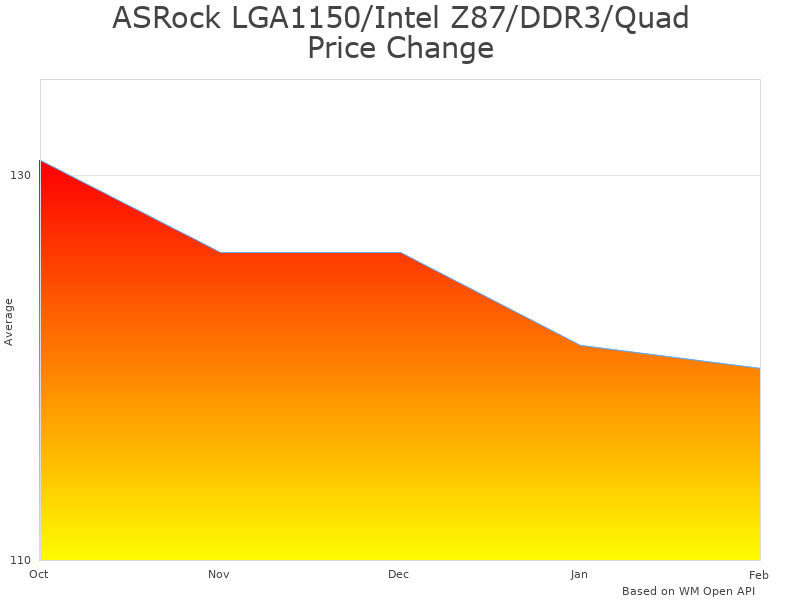
Historical pricing trend for Z87 motherboards (2013-2017)
Comparison with Period Competitors
The ASRock Z87 EXTREME4 competed against the ASUS Z87-A and Gigabyte GA-Z97X-Gaming 5 during 2013-2015. At its $119.99 launch price, it offered competitive value within the mid-range Z87/Z97 motherboard segment.
LGA1150 socket compatibility was universal across all Z87/Z97 boards, supporting Intel 4th generation Haswell (2013-2014) and some Haswell Refresh models (2014). All compared boards are now discontinued with no new availability.
| Feature | ASRock Z87 EXTREME4 | ASUS Z87-A | Gigabyte GA-Z97X-Gaming 5 |
|---|---|---|---|
| Original Price (2013-2014) | $119.99 | $139.99 | $149.99 |
| Socket/Chipset | LGA1150 / Z87 | LGA1150 / Z87 | LGA1150 / Z97 |
| Memory Support | 4x DDR3, Max 32GB | 4x DDR3, Max 32GB | 4x DDR3, Max 32GB |
| SATA Ports | 8x SATA3 | 6x SATA3 | 6x SATA3 + 1x M.2 |
| USB Ports | 9x USB 3.0, 8x USB 2.0 | 4x USB 3.0, 6x USB 2.0 | 6x USB 3.0, 4x USB 2.0 |
| Expansion Slots | 3x PCIe 3.0 x16 | 3x PCIe 3.0 x16 | 3x PCIe 3.0 x16 |
| 2025 Status | Discontinued | Discontinued | Discontinued |
In 2013-2014, the Z87 EXTREME4’s primary advantage was price combined with abundant USB 3.0 and SATA3 connectivity. The ASUS Z87-A offered better BIOS features and slightly higher build quality, while the Gigabyte GA-Z97X-Gaming 5 (released 2014) included the newer Z97 chipset and early M.2 support.
For users considering legacy hardware in 2025, all three options face the same fundamental limitations: discontinued support, lack of modern features, and limited processor availability. The choice between them primarily matters for those maintaining existing systems rather than planning new builds.
Modern alternatives that buyers should consider instead include platforms supporting Intel 12th-14th generation (LGA1700), AMD Ryzen 5000/7000 series (AM4/AM5), which offer DDR4/DDR5, PCIe 4.0/5.0, M.2 NVMe, USB 3.2/4.0, integrated Wi-Fi, and active manufacturer support.
Budget alternatives in 2025 ($100-150) like the ASRock B760M Pro or MSI B550 provide significantly better performance and features compared to any LGA1150 platform, even when factoring in processor costs.

Historical Use Cases and Current Applicability
- Gaming (2013-2018 Context)
- Performance in 2013: Capable of running contemporary games at high settings with appropriate GPU
- Performance in 2025: Severely CPU-limited in modern titles; Haswell processors bottleneck current-generation GPUs
- Historical relevance: Supported popular titles from the mid-2010s like Battlefield 4, GTA V, Witcher 3
- Current recommendation: Not suitable for modern gaming builds; consider AM5 or LGA1700 platforms
- Use case viability: Limited to retro gaming, older titles, or very light modern games at reduced settings
- Content Creation and Video Editing (Legacy)
- Historical capability: Handled 1080p video editing adequately with i7-4770K/4790K in 2013-2016
- Modern limitations: Slow for 4K editing; lacks hardware acceleration for modern codecs (H.265, AV1)
- Software compatibility: May not support current versions of Adobe Creative Suite, DaVinci Resolve
- Current recommendation: Modern 6-16 core CPUs offer 3-5x better rendering performance
- Remaining use: Basic 1080p editing for hobbyists with older software versions
- General Computing and Office Use
- Current viability: Still functional for basic tasks (web browsing, office applications, email)
- Operating system: Works with Windows 10; Windows 11 requires workarounds and lacks official support
- Power efficiency: Higher power consumption than modern systems; less efficient at idle
- Recommendation: Acceptable for repurposing existing hardware, not for new purchases
- Limitations: Slower than modern budget CPUs; lacks modern connectivity for peripherals
- Server and NAS Applications
- Storage benefit: Eight SATA3 ports useful for multi-drive storage servers
- Power concern: Higher idle power consumption (60-80W) than modern alternatives
- Performance: Adequate for file serving, not suitable for transcoding-heavy Plex servers
- Better alternatives: Modern platforms with ECC support, lower power consumption, better transcoding
- Viability: Acceptable for repurposing, but not recommended for new server builds
- Budget Builds with Used Components
- Cost consideration: Used motherboard ($30-60) + CPU ($40-80) = $70-140 total
- Value assessment: Similar cost to modern budget options (i3-12100 + B660M ~$150-180 new)
- Performance comparison: Modern i3-12100 significantly outperforms i7-4790K in most tasks
- Recommendation: Only worthwhile if components are free or extremely cheap ($50 total or less)
- Risk factors: No warranty, aging components, limited upgrade path
Users Who Might Consider Z87 EXTREME4 (2025)
- Existing System Owners: Maintaining or upgrading current Haswell builds with failed motherboards
- Retro Computing Enthusiasts: Building period-appropriate systems for 2013-era software and games
- Extreme Budget Builders: Working with free or very cheap used components (under $50 total)
- Learning/Educational Use: Students learning PC building with inexpensive components
- Basic Office Tasks: Repurposing for simple web browsing and document editing
- Linux Experimentation: Testing distributions on legacy hardware with full driver support
- Home Server Projects: Building basic file servers where modern features aren’t required
Not recommended for: New gaming builds, professional workstations, 4K video editing, current-generation gaming, virtualization requiring modern CPU features, users wanting upgrade paths, anyone seeking manufacturer warranty support, builds requiring Windows 11, or anyone prioritizing power efficiency.
Compatible Components Context
- Intel Haswell CPUs: Limited to used market availability; i5-4690K, i7-4790K are highest-end options
- DDR3 Memory: Discontinued technology; used modules available but declining quality over time
- Graphics Cards: Modern GPUs work but CPU bottlenecking limits performance in demanding games
- SATA SSDs: Compatible but lacks M.2 NVMe support; limited to slower SATA speeds (550 MB/s)
- Power Supplies: Any ATX PSU works; modern efficient units recommended for better power consumption
- CPU Coolers: LGA1150 mounting; many modern coolers still include compatible brackets
- Cases: Standard ATX form factor helps compatibility with any ATX mid-tower or full-tower case
- Storage: Eight SATA3 ports support extensive HDD/SSD arrays; no NVMe support
Maintenance Considerations for Legacy Hardware
Maintaining an 11+ year old motherboard requires attention to age-related degradation. Dust accumulation in heatsinks and fan assemblies should be addressed every 3-6 months using compressed air to prevent overheating.
Electrolytic capacitors degrade over time, potentially causing instability or failure after a decade of use. Visual inspection should check for bulging or leaking capacitors, particularly around the CPU VRM and memory slots.
CMOS battery replacement becomes more frequent with aging boards. A failing CR2032 battery causes BIOS setting loss and time/date resets, and should be replaced every 3-5 years or as symptoms appear.
USB port and SATA connector wear increases with age. Intermittent connection issues may indicate physical wear requiring careful handling or eventual replacement of the entire board.
Since BIOS updates ceased around 2015-2016, software-level fixes for newly discovered issues are unavailable. Users must accept any remaining bugs or compatibility quirks as permanent limitations.
Storage in dry, temperature-controlled environments slows but doesn’t prevent age-related degradation. Extended storage without power can cause capacitor reformation issues; periodic power-on cycles are recommended for long-term storage.
Frequently Asked Questions About Z87 Platform and ASRock Z87 EXTREME4
Q: Is the ASRock Z87 EXTREME4 still worth buying in 2025?
For new builds, no. The Z87 EXTREME4 is discontinued technology from 2013 lacking modern features like M.2 NVMe, PCIe 4.0/5.0, DDR4/DDR5, and USB 3.2/4.0. Compatible processors are only available used and significantly underperform modern budget CPUs. It’s only worth considering if you’re maintaining an existing Haswell system or acquiring the components for under $50 total. For new builds, invest in current platforms (LGA1700 or AM5) that offer better performance for gaming and general use with warranty support.
Q: What processors are compatible with the Z87 EXTREME4?
The LGA1150 socket supports only Intel 4th generation Haswell processors (2013-2014) including Core i3-4xxx, i5-4xxx, and i7-4xxx models, plus some Haswell Refresh variants. The highest-end options are the i7-4790K and i7-4770K. These processors are 11+ years old and significantly slower than modern alternatives. For reference, a current-generation Intel i3-12100 outperforms even the top i7-4790K in most applications while consuming less power.
Q: Can I use modern graphics cards with this motherboard?
Physically yes, as PCIe is backward compatible. However, Haswell processors will severely bottleneck modern high-end GPUs in CPU-intensive games. Mid-range cards from 2016-2019 (GTX 1060, RX 580) are better matched to Haswell’s capabilities. Additionally, the board lacks PCIe 4.0, limiting bandwidth for the newest GPUs, though this is rarely the limiting factor compared to CPU bottlenecking.
Q: Does the Z87 EXTREME4 support Windows 11?
Not officially. Windows 11 requires TPM 2.0 and CPUs from Intel 8th generation or newer. While workarounds exist to install Windows 11 on unsupported hardware, you’ll lack security updates and official support. Windows 10 remains the recommended operating system for this platform, with support continuing through October 2025. After that, consider Linux distributions or accept running an unsupported Windows version.
Q: What are the main differences between Z87 and modern motherboards?
Modern motherboards offer substantial improvements: DDR4/DDR5 memory (2-4x faster bandwidth), M.2 NVMe slots (5-10x faster than SATA), PCIe 4.0/5.0 (2-4x bandwidth), USB 3.2/4.0 (4-8x faster), integrated Wi-Fi 6/6E, much more powerful CPUs, better power efficiency, active BIOS support, and manufacturer warranties. The Z87 uses discontinued DDR3, lacks M.2, has only PCIe 3.0, slower USB 3.0, no Wi-Fi, and receives no updates. The performance and feature gap is substantial.
Q: Can I upgrade from Z87 EXTREME4 to a modern motherboard?
You’ll need to replace the motherboard, CPU, and RAM together since they’re incompatible across generations. This effectively means building a new system. Budget modern platforms ($150-250 for motherboard + CPU + RAM) will outperform the fastest Haswell systems while providing upgrade paths and modern features. Save your case, power supply (if adequate wattage and working properly), storage, and GPU if still relevant.
Q: What’s the power consumption compared to modern systems?
Haswell systems idle at 60-80W and consume 150-250W under load with mid-range components. Modern equivalent systems idle at 30-50W and load at 100-180W while delivering significantly better performance. Over a year of typical use (8 hours daily), the difference amounts to approximately $30-50 in electricity costs at average US rates, making modern systems more cost-effective long-term despite higher initial costs.
Q: Are there any advantages to the Z87 EXTREME4 in 2025?
The only real advantages are low acquisition cost if buying used ($30-60) and the eight SATA3 ports useful for multi-drive storage servers. However, these marginal benefits are outweighed by the lack of modern features, discontinued support, aging components, no warranty, limited upgrade path, and significantly lower performance compared to current budget options. It’s only sensible for repurposing existing hardware or extreme budget builds under $50 total cost.
Warranty Information and Support Status
New ASRock Z87 EXTREME4 motherboards originally included a three-year manufacturer warranty from the date of purchase (2013-2016). As the product has been discontinued for approximately 8-9 years, no new units with valid warranty exist as of 2025.
Used motherboards purchased from secondary markets (eBay, Craigslist, hardware forums) carry no manufacturer warranty. Buyers accept all risk of component failure, which increases significantly with 11+ year old electronics.
Support Status
ASRock discontinued active support for the Z87 EXTREME4 around 2016-2017. BIOS updates ceased, with the final versions released approximately 2015-2016. No further firmware updates, security patches, or compatibility improvements are available.
Driver downloads for Windows 7, 8, and 10 remain available on ASRock’s website for legacy support, though these haven’t been updated in years. Windows 11 drivers do not exist officially, requiring generic Windows drivers or community solutions.
Coverage Comparison (Historical Context)
During its active period (2013-2016), warranty coverage included manufacturing defects and component failures under normal use. Exclusions applied to physical damage, liquid damage, improper installation, overclocking damage (controversial), and improper voltage modifications.
Compared to competitors, ASRock’s three-year warranty matched ASUS and Gigabyte’s standard coverage for motherboards in this price range. MSI offered similar terms with regional variations.
Warranty transferability between owners varied by region and was generally not officially supported, though some users successfully claimed warranty on used boards within the coverage period.
Current Buyer Considerations
Purchasing used Z87 EXTREME4 boards in 2025 means accepting full risk of immediate or future failure with no recourse. Common age-related failures include capacitor degradation, USB port failure, SATA controller issues, and CMOS battery depletion.
For comparison, new modern motherboards include 1-3 year warranties providing protection against defects. This warranty coverage, combined with superior performance and features, makes new modern boards more sensible investments despite higher upfront costs.
Extended warranty options or seller guarantees may be available through some used marketplaces (eBay, Amazon Renewed), typically covering 30-90 days for basic functionality testing.
Final Assessment: Z87 EXTREME4 in 2025 Context
The ASRock Z87 EXTREME4 served as a capable mid-range motherboard during its active market period (2013-2016), offering competitive features at its $119.99 launch price. However, as of 2025, this platform represents discontinued technology with significant limitations for modern computing needs.
Our assessment focuses on the motherboard’s current relevance rather than its historical performance. The LGA1150 platform’s discontinued status, lack of modern features, and aging component risks fundamentally limit its viability for new builds.
| Category | 2013-2016 Context | 2025 Reality |
|---|---|---|
| Gaming Performance | Good with period GPUs | CPU bottlenecks modern cards; outdated |
| Memory Performance | DDR3-2400 competitive | DDR3 discontinued; 2-4x slower than DDR5 |
| Storage Speed | SATA3 standard for era | No M.2 NVMe; 5-10x slower than modern |
| Connectivity | USB 3.0 above average | Lacks USB 3.2/4.0, no Wi-Fi, slow by 2025 |
| Value Proposition | Good at $120 new | Poor; modern budget options far superior |
For users considering this motherboard in 2025, the recommendation depends entirely on circumstance:
Acceptable use cases: Maintaining existing Haswell systems where the motherboard has failed and replacement is cheaper than a full platform upgrade; repurposing free or extremely cheap components (<$50 total) for basic tasks; retro computing projects; educational/learning purposes with disposable hardware.
Not recommended for: Any new build where performance, longevity, or upgrade path matters; gaming systems expecting modern titles; professional workstations; systems requiring manufacturer support or warranty; users wanting power efficiency or modern connectivity; anyone planning to invest more than $50-75 total in the platform.
Value comparison shows modern budget alternatives ($150-200 for motherboard + CPU) deliver 2-3x better performance, active support, warranty coverage, upgrade paths, and modern features. When factoring in used LGA1150 processor costs ($40-80), the price gap narrows while the performance and features gap remains vast.
The eight SATA3 ports remain useful for storage-heavy applications, though Plex transcoding performance suffers with Haswell CPUs. Power consumption (60-80W idle vs. 30-50W modern) adds ongoing costs that reduce any initial savings over 1-2 years of operation.
Final recommendation: The ASRock Z87 EXTREME4 made sense in 2013-2016 but is unsuitable for new builds in 2025. Only consider it for maintaining existing systems or experimental projects with minimal investment. For any serious computing need, invest in modern platforms (LGA1700, AM5, or even AM4) that provide substantially better performance, efficiency, features, and support despite higher upfront costs. The technology gap between 2013 and 2025 is simply too large to justify building on this platform except in very specific, cost-constrained circumstances.
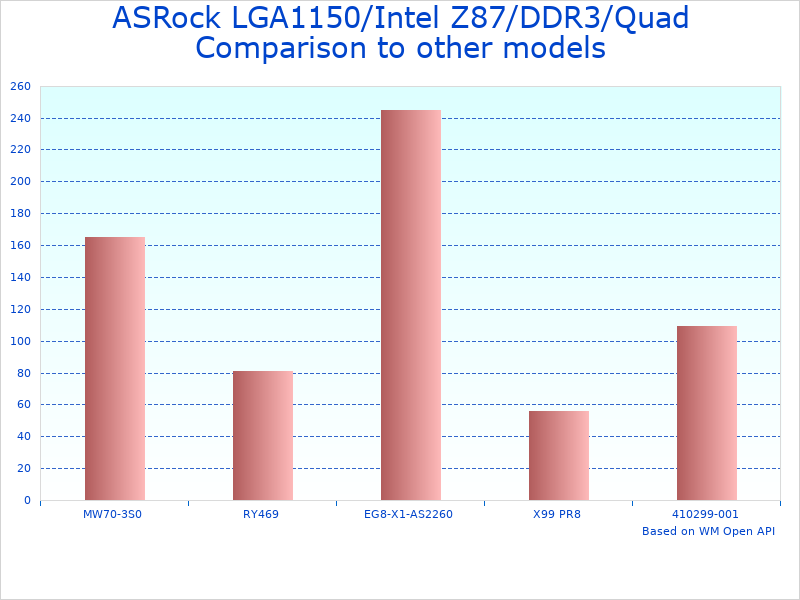
Historical comparison: Z87 EXTREME4 vs. period competitors (2013-2014)