
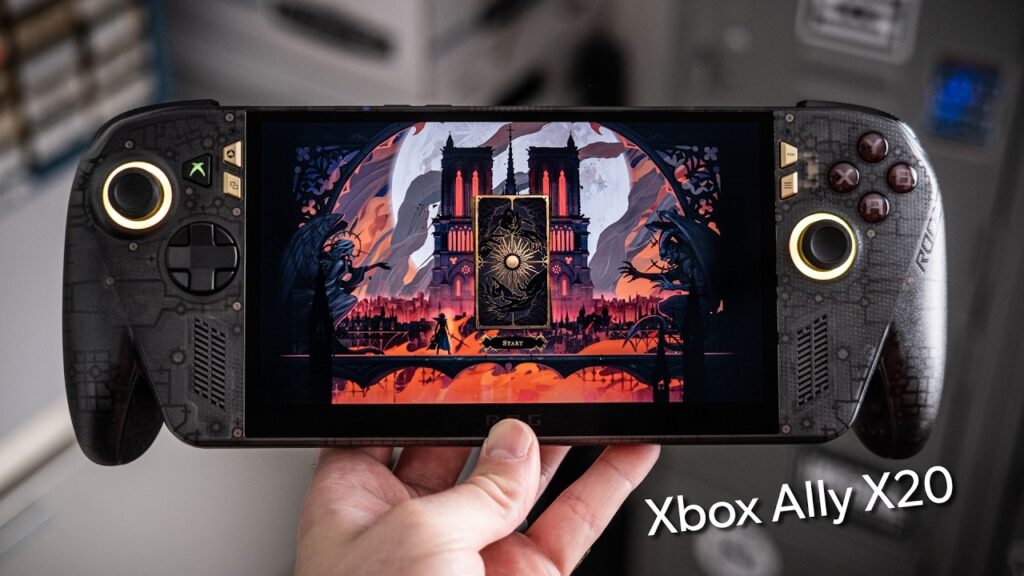
The Xbox Ally X20 delivers a premium 7.4-inch OLED screen and TMR sticks for the 20th anniversary. The $300 price jump over the standard model is the primary drawback for most users. Collectors and OLED enthusiasts should choose the Xbox Ally X20, while budget-conscious gamers should stick to the standard Asus ROG Ally X.
Who should choose the Xbox Ally X20 — and who should skip it
Readers who should buy the Xbox Ally X20
- OLED enthusiasts should buy the Xbox Ally X20 to gain a high-quality 7.4-inch OLED panel with an anti-reflective coating.
- Collectors of special edition hardware should buy the Xbox Ally X20 for its unique smoky transparent black shell and gold accents.
- Users who use Micro SD cards for storage should buy the Xbox Ally X20 to take advantage of the faster read and write speeds of the Micro SD Express slot.
- Long-term owners should buy the Xbox Ally X20 to benefit from the TMR sticks designed for better durability over time.
Readers who should skip the Xbox Ally X20
- Budget-conscious gamers should skip the Xbox Ally X20 and look at the standard Asus ROG Ally X instead.
- Users waiting for the next generation should skip the Xbox Ally X20 and wait for the ROG Ally 3.
Readers who should wait for the Xbox Ally X20
- Users looking for the next generation of hardware should wait for the ROG Ally 3, as the X20 is an anniversary edition rather than a generational leap.
What to do next about the Xbox Ally X20
- Verify the 756g weight of the Xbox Ally X20 on a scale to confirm the 41g increase over the standard model.
- Test the USB 4 ports for DisplayPort 2.1 output to a high-refresh-rate TV to confirm high-bandwidth connectivity.
- Connect a 68W power adapter to measure charging speeds and confirm the upgrade over the 65W unit.
- Insert a Micro SD Express card to measure read and write speeds for large game libraries.
The 20th Anniversary Aesthetic and Build
The Xbox Ally X20 features a smoky transparent black shell with gold accents to celebrate the 20th anniversary. The design uses translucent plastic to give the device a premium feel, though the complexity of the aesthetic can be visually overwhelming. The rubberized grip texture provides extra friction on the rear of the handheld, though it only covers a specific section of the grip.
The Xbox Ally X20 includes a 68W charger to replace the 65W charger
The Xbox Ally X20 includes a 68W charger to replace the 65W charger that came with the original model. The USB 4 ports have been upgraded to support DisplayPort 2.1, allowing for higher refresh rates on external monitors. The Micro SD Express slot provides a significant upgrade for users who rely on external storage by enabling faster read and write speeds.
What is Micro SD Express?
Micro SD Express is a standard for micro SD cards that provides faster read and write speeds. It uses a different interface than standard SD cards to move data more quickly. This helps the Xbox Ally X20 load large games and move files faster.
What is DisplayPort 2.1?
DisplayPort 2.1 is a standard for high-bandwidth video output allowing for higher refresh rates on external displays. It provides the necessary bandwidth to push high resolutions and high frame rates. This allows the Xbox Ally X20 to work better with modern gaming monitors and TVs.
The Xbox Ally X20 uses TMR sticks for improved long-term durability
The Xbox Ally X20 uses TMR sticks to provide a theoretical advantage in long-term durability over standard stick technology. Think of TMR sticks like a more durable foundation for a building; the structure stays the same, but it is built to withstand wear better over years. The sticks are designed to perform better as they age, though they do not offer tighter tension than the previous model.
What are TMR sticks?
TMR sticks are Tunnel Magnetoresistance sticks designed to offer better performance and longevity over time. These sticks use magnetic properties to track movement, which reduces wear compared to standard mechanical designs. This helps the controller stay responsive for longer periods of heavy use.
The adjustable D-pad allows users to pull the piece up and rotate it into a shield style, serving as a tactile “fidget” feature. This mechanic offers a different layout than a standard cross. Rounded face buttons offer a softer, less “clacky” feel than the buttons on the original Asus ROG Ally X.
The 7.4-inch OLED Display Experience
The 7.4-inch OLED screen on the Xbox Ally X20 provides deep blacks and a higher nit range than the 7-inch LCD on the original model. The larger screen fills the handheld’s body more naturally, creating a more balanced design. The jump from the high-quality LCD of the original X to this OLED is less dramatic than the jump seen in the Steam Deck transition.
The anti-reflective coating on the X20 further narrows the visual gap between the two technologies. Windows HDR implementation can be inconsistent and sometimes difficult to manage on the OLED panel, which may cause users to disable it for a more stable experience.
The Xbox Ally X20 costs $300 more than the Asus ROG Ally X
The Xbox Ally X20 sits at a $300 price jump over the standard Asus ROG Ally X. The standard model remains highly desirable because it offers nearly identical internals for a significantly lower cost. The Xbox Ally X20 represents a “little bit extra” for those who specifically want the premium anniversary features, while the $300 premium might be hard to justify for the average gamer.
The recommendation to choose the X20 for its screen holds as long as the premium remains under $300; if the price jump exceeds this, the standard model becomes the superior value. Guessing wrong on the X20’s value means overspending $300 on incremental upgrades, while skipping it means missing out on the OLED and TMR stick durability. The X20 serves as a stop-gap to prevent users from jumping to a non-existent next-generation device.
A gamer seeking a better screen chooses the Xbox Ally X20
Sarah owns a standard Asus ROG Ally X and wants a better screen for her OLED TV. She looks at the X20 and notes the $300 price difference. She weighs the 41g weight increase and the 7.4-inch OLED against her current 7-inch LCD. She also considers the TMR sticks for longevity. She decides the X20 is a worthwhile premium upgrade because it fits her budget better than the MSI Claw 8 EX while providing the OLED screen she wants. If Sarah wanted the absolute lowest price, she would stay with her current device, as the X20 is “just a little bit extra”.
The Xbox Ally X20 has an unconfirmed official MSRP
- The manufacturer has not confirmed the official MSRP for the Xbox Ally X20.
- Compare the local retail listing against the standard model’s price before purchasing.
Frequently Asked Questions
Does the X20 have a better processor than the standard X?
The Xbox Ally X20 has the same processor, RAM, and storage as the standard X. ASUS provides the same Z2 Extreme internals in both models. This means performance will not increase due to the anniversary edition hardware.
How much heavier is the X20 compared to the standard X?
The Xbox Ally X20 weighs 756g, which is 41g more than the 715g standard X. This weight increase is minor enough that it should not impact most users. The difference is barely noticeable in hand.
What is the difference between the X and X20 sticks?
The Xbox Ally X20 uses TMR sticks, which are designed to perform better over time. These sticks offer a durability advantage rather than a change in tension. The design is a long-term longevity play.
How does the X20 screen compare to the Legion Go?
The Xbox Ally X20 has a 7.4-inch OLED, while the Lenovo Legion Go has an 8.8-inch OLED. The X20 provides a more compact display for handheld use. The Legion Go remains the option for those seeking a larger screen.
How do I change the D-pad style?
To change the D-pad style on the Xbox Ally X20, you pull up and rotate the component into a shield style. This allows for a customizable control layout. The movement serves as a tactile fidget for the user.
Details first shown in Xbox Ally X20 review: Not a huge upgrade… by PCWorld.