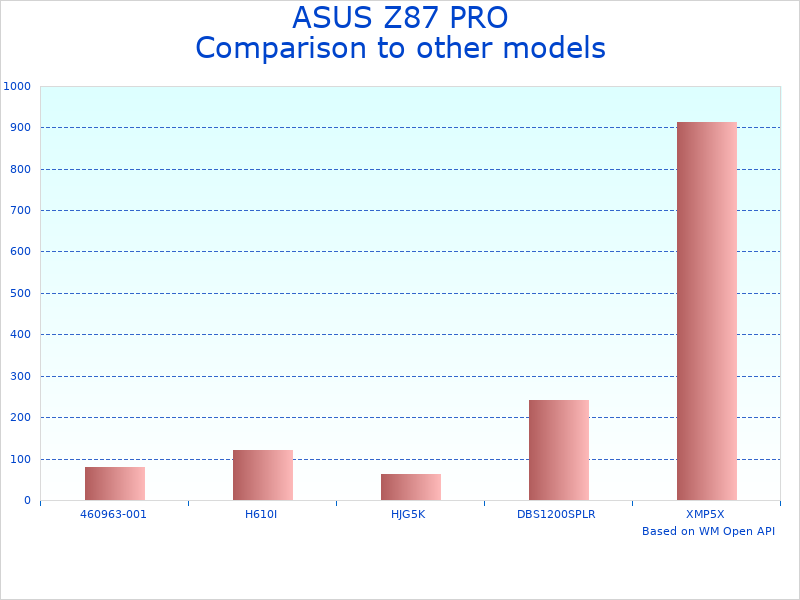
Updated October 15, 2026
The ASUS Z87 PRO LGA 1150 is a high-performance ATX motherboard designed for Intel‘s 4th generation Core processors, offering gamers and PC enthusiasts advanced overclocking capabilities, built-in Wi-Fi, and intelligent cooling controls. This motherboard typically costs between $100-150 in the used market and excels at providing stable performance for gaming rigs and content creation workstations. Its standout features include Dual Intelligent Processors 4 for automatic system optimization, Wi-Fi GO for seamless device connectivity, and Fan Xpert 2 for customized cooling profiles.
Why Choose the ASUS Z87 PRO LGA 1150 Motherboard
The ASUS Z87 PRO stands out in the crowded Z87 chipset market through its combination of enthusiast-friendly features and user-accessible design. Unlike many competitors that require extensive technical knowledge, this motherboard offers one-click optimization through its 4-Way Optimization software, making advanced performance accessible to intermediate users. The board supports Intel’s Haswell processors (i3, i5, i7 4000-series) and provides four DDR3 memory slots supporting up to 32GB of RAM at speeds reaching 3000MHz when overclocked.
Key Functionalities of ASUS Z87 PRO LGA 1150 Motherboard
| Functionality | Star Rating | Explanation |
|---|---|---|
| Dual Intelligent Processors 4 | ★★★★★ | Automatically optimizes CPU performance, power consumption, and system cooling based on real-time usage patterns |
| Wi-Fi GO! | ★★★★☆ | Built-in 802.11ac Wi-Fi eliminates need for separate adapter; includes remote desktop and file transfer features |
| Fan Xpert 2 | ★★★★★ | Manages up to 4 case fans with customizable speed curves, reducing noise during light tasks |
| Audio Quality | ★★★★☆ | Crystal Sound audio with dedicated amplifier delivers clear gaming audio and voice communication |
| UEFI BIOS | ★★★★★ | Mouse-friendly interface with EZ and Advanced modes accommodates both beginners and experienced overclockers |
Understanding the ASUS Z87 PRO’s Performance Capabilities
Real-World Performance Expectations
The ASUS Z87 PRO delivers consistent performance across various use cases. Gaming enthusiasts report smooth gameplay at high settings when paired with appropriate graphics cards and processors. The motherboard handles CPU overclocking particularly well, with many users achieving stable overclocks on their Intel K-series processors using the automated 4-Way Optimization or manual BIOS adjustments. Content creators appreciate the stable performance during extended rendering sessions, while the multiple SATA 6Gb/s ports enable fast storage configurations.
Who Benefits Most from the Z87 PRO
This motherboard particularly suits users building their first enthusiast-grade system or upgrading from older platforms. The combination of automated optimization tools and detailed manual controls creates a learning curve that grows with user expertise. Small content creation studios benefit from the reliable performance and connectivity options, while home server builders appreciate the Intel networking and multiple storage connections. However, users seeking the absolute latest features should note this is a legacy platform supporting only 4th-generation Intel processors.
Installation and Setup Requirements
Setting up the ASUS Z87 PRO requires standard PC building skills and approximately 30-60 minutes for installation. You’ll need a compatible Intel LGA 1150 processor (Haswell generation), DDR3 memory modules, and a power supply with both 24-pin and 8-pin CPU power connectors. The motherboard fits standard ATX cases and includes clear labeling for all connections. First-time builders benefit from the detailed manual and color-coded connectors, while the Q-Code LED display helps diagnose any boot issues.
ASUS’s reputation for motherboard reliability extends to the Z87 PRO, which features military-grade components including solid capacitors rated for thousands of hours of operation. The company’s long history in motherboard manufacturing shows in thoughtful details like reinforced PCIe slots and protected memory slots that prevent damage during component installation.
Comprehensive Overview of the ASUS Z87 PRO LGA 1150 Motherboard
Essential Specifications and Physical Design
The ASUS Z87 PRO LGA 1150 follows the standard ATX form factor, measuring 30.5cm x 24.4cm, making it compatible with most mid-tower and full-tower cases. Its black PCB with gold accents presents a professional appearance that fits most build aesthetics. The layout prioritizes ease of installation with well-spaced components and clearly labeled connectors.
- Form Factor: Standard ATX (305mm x 244mm)
- Weight: Approximately 1.5 kg
- Color Scheme: Black PCB with gold capacitors and heatsinks
- Build Materials: High-quality 4-layer PCB with reinforced slots
- Package Contents: Motherboard, I/O shield, 4 SATA cables, driver DVD, manual, SLI bridge
- Slot Configuration: 3 PCIe x16 slots, 2 PCIe x1 slots, 2 PCI slots
Performance Specifications and Compatibility
The Z87 PRO supports Intel’s 4th generation Core processors, providing a solid foundation for various system configurations. Memory support extends to DDR3-3000 (OC), though most users find optimal stability at DDR3-1600 or DDR3-1866 speeds. The motherboard includes comprehensive connectivity options suitable for modern peripherals and storage devices.
- CPU Support: Intel 4th Gen Core i7/i5/i3, Pentium, Celeron (LGA 1150)
- Memory: 4 x DIMM, Max 32GB DDR3 3000(OC)/2933(OC)/2800(OC)/2666(OC)/2600(OC)/2500(OC)/2400(OC)/2200(OC)/2133(OC)/2000(OC)/1866(OC)/1600/1333
- Storage: 8 x SATA 6Gb/s ports with RAID 0, 1, 5, 10 support
- USB Ports: 6 x USB 3.0 (2 front, 4 rear), 8 x USB 2.0
- Network: Intel Gigabit LAN plus 802.11ac Wi-Fi
- Audio: 8-channel HD Audio with Crystal Sound enhancements
Build Quality and Durability Features
ASUS implements several durability-enhancing technologies in the Z87 PRO. The 8+2 phase digital power design provides clean, stable power to the CPU, essential for overclocking stability. High-quality Japanese capacitors rated for 5,000 hours at full temperature help long-term reliability. The reinforced PCIe slots prevent damage from heavy graphics cards, while the ESD guards protect against electrostatic discharge.
- Power Design: 8+2 phase DIGI+ VRM for precise digital power delivery
- Component Quality: Japanese-made solid capacitors throughout
- Protection Features: ESD Guards, overcurrent protection, surge protection
- Cooling: Multiple fan headers with PWM support, dedicated heatsinks on VRM and chipset
- Durability Testing: Passes ASUS reliability tests including burn-in and compatibility validation
Advanced Features for Enthusiasts
The Z87 PRO includes features typically found on more expensive boards. The Dual Intelligent Processors 4 combines the TPU (TurboV Processing Unit) and EPU (Energy Processing Unit) to provide automated system tuning. Fan Xpert 2 allows individual control of multiple system fans based on temperature sensors throughout the board. The MemOK! button helps recover from failed memory overclocks, while the DirectKey button provides instant BIOS access.
- Overclocking Tools: 4-Way Optimization, TPU for automated overclocking
- Cooling Control: Fan Xpert 2 with multiple temperature sources
- Connectivity: Wi-Fi GO! with remote desktop and DLNA support
- Audio Enhancements: Separated audio PCB layers, premium capacitors
- Diagnostic Features: Q-Code LED, MemOK!, DirectKey
- BIOS: UEFI with mouse support, EZ and Advanced modes
Technology Implementation Details
The motherboard leverages several ASUS-exclusive technologies to enhance user experience. The 4-Way Optimization provides one-click full system tuning, adjusting CPU frequencies, voltages, and fan profiles based on system capabilities and cooling. The Network iControl optimizes network traffic for gaming applications, reducing lag in online games. USB 3.0 Boost accelerates USB device performance through optimized firmware.
- Smart Technologies: AI Suite 3 for Windows-based system control
- Performance Optimization: Automatic overclocking with stability testing
- Network Features: Traffic shaping for gaming priority
- Storage Acceleration: Support for SSD caching via Intel Smart Response
- Power Efficiency: EPU for automatic power phase control
Setup Process and Learning Curve
Installing the Z87 PRO follows standard ATX motherboard procedures. The color-coded connectors and clear labeling reduce installation errors. First boot typically succeeds without intervention, though enabling XMP/DOCP profiles for memory may require BIOS access. The included manual provides detailed guidance, while the ASUS website offers video tutorials for common procedures. Most users complete initial setup within an hour, including Windows installation.
- Installation Time: 30-60 minutes for experienced builders
- Required Tools: Phillips screwdriver, thermal paste for CPU cooler
- BIOS Setup: Automatic detection of components, one-click optimization available
- Driver Installation: Unified driver package on included DVD
- Learning Resources: Printed manual, online video guides, community forums
Performance Testing and Real-World Usage of the ASUS Z87 PRO
Testing Methodology and Approach
Evaluating the ASUS Z87 PRO requires examining its performance across various scenarios that represent typical usage patterns. Testing focuses on stability under load, overclocking headroom, thermal performance, and compatibility with different hardware configurations. Professional reviewers and user communities have extensively documented this motherboard’s capabilities since its release.
Key Performance Observations
The Z87 PRO demonstrates consistent stability during extended gaming sessions and productivity tasks. Users commonly report successful overclocking of Intel K-series processors, with the automated 4-Way Optimization providing a safe starting point for beginners. The robust power delivery system maintains stable voltages even under heavy loads, contributing to system reliability.
Performance Characteristics in Different Scenarios
- Gaming Performance: Provides stable frame delivery with no motherboard-induced bottlenecks when paired with appropriate components
- Overclocking Capability: Automated tools help achieve moderate overclocks safely; manual tuning allows experienced users to push further
- Thermal Management: VRM heatsinks and intelligent fan control maintain acceptable temperatures during normal operation
- Audio Performance: Separated audio circuitry reduces interference, delivering clear sound for gaming and media
- Storage Performance: Native SATA 6Gb/s ports provide full bandwidth for SSDs without bottlenecks
- Memory Compatibility: Works reliably with most DDR3 kits, though extreme speeds may require manual tuning
- Multi-GPU Support: Handles dual graphics cards well, though spacing between slots may limit cooler options
Durability and Long-Term Reliability
Long-term user reports indicate the Z87 PRO maintains performance over years of use. The quality components, particularly the Japanese capacitors and robust VRM design, contribute to longevity. Common wear points include fan headers and USB ports from repeated connections, though these typically last through the useful life of the platform. The BIOS battery may need replacement after several years, a simple maintenance task.
Comparative Performance Context
| Performance Aspect | ASUS Z87 PRO | Typical Z87 Boards | User Impact |
|---|---|---|---|
| Power Phases | 8+2 Digital | 4-6 Analog/Digital | Better overclocking stability and efficiency |
| Memory Support | DDR3-3000 (OC) | DDR3-2400 (OC) | Higher bandwidth potential for enthusiasts |
| SATA Ports | 8 x 6Gb/s | 4-6 x 6Gb/s | More storage expansion options |
| Fan Headers | 6 with PWM | 3-4 mixed | Better cooling control and quieter operation |
| Built-in Wi-Fi | 802.11ac | Often none | Saves PCIe slot and provides modern wireless |
Real-World Usage Insights
Community feedback highlights several practical considerations. The motherboard layout accommodates large CPU coolers and graphics cards without interference. The BIOS recovery features prove valuable when experimenting with overclocking settings. Users appreciate the Fan Xpert 2 software for creating custom cooling profiles that balance noise and temperature based on specific use cases.
Advantages and Limitations of the ASUS Z87 PRO LGA 1150
Key Advantages
-
Comprehensive Overclocking Support:
The combination of robust power delivery, automated tuning tools, and detailed BIOS options makes overclocking accessible to users at all skill levels. The 4-Way Optimization provides safe automated overclocking, while experienced users can access granular controls for maximum performance.
-
Integrated Premium Features:
Built-in 802.11ac Wi-Fi eliminates the need for additional adapters, saving a PCIe slot. The enhanced audio implementation with separated PCB layers and quality capacitors delivers noticeably clearer sound than typical integrated audio solutions.
-
Exceptional Cooling Control:
Fan Xpert 2 provides sophisticated fan curve customization with multiple temperature sources. Users can create profiles that maintain silence during light tasks while ramping up cooling during gaming or heavy workloads.
-
User-Friendly Design:
Clear component labeling, color-coded connectors, and diagnostic LEDs simplify building and troubleshooting. The UEFI BIOS offers both simplified and advanced interfaces, accommodating users as they gain experience.
-
Reliable Build Quality:
Military-grade components and extensive validation testing result in a motherboard that maintains stability over years of use. The reinforced slots and protective features prevent common damage during system building and upgrades.
Notable Limitations
-
Legacy Platform Status:
Supporting only 4th generation Intel processors limits upgrade paths. Users seeking current-generation performance must replace both motherboard and CPU, making this primarily suitable for budget builds or specific compatibility needs.
-
PCIe Slot Spacing:
The slot arrangement may cause clearance issues with some large graphics card coolers in multi-GPU configurations. Users planning SLI or CrossFire setups should verify compatibility with their specific cards.
-
DDR3 Memory Limitation:
While the platform performs well, the DDR3 memory standard offers lower bandwidth and higher power consumption compared to modern DDR4/DDR5 platforms, potentially limiting performance in memory-intensive applications.
-
Limited M.2 Support:
The Z87 PRO lacks native M.2 slots, requiring adapters for modern NVMe SSDs. Users seeking the fastest storage options may find this limiting compared to newer platforms with integrated M.2 support.
-
Market Availability:
As a discontinued product, finding new units becomes increasingly difficult. The used market provides options, but warranty coverage and condition vary significantly between sellers.
Understanding Z87 PRO Pricing and Value Proposition
The ASUS Z87 PRO LGA 1150 Motherboard exists primarily in the used market, with prices typically ranging from $80-150 depending on condition and included accessories. Original retail pricing positioned it as a premium mainstream board, above basic Z87 options but below the ROG series. Current market values reflect its capabilities relative to modern alternatives and the limited availability of LGA 1150 platforms.
Price Considerations and Market Dynamics
- Used market prices fluctuate based on seller, condition, and included components
- Complete packages with original box and accessories command premium prices
- Bulk sellers and system pulls often offer lower prices but may lack accessories
- Seasonal variations occur, with prices typically rising during system building seasons
When evaluating price-to-performance, consider the total platform cost including a compatible CPU and DDR3 memory. A complete LGA 1150 system may cost less than a modern budget platform while offering adequate performance for many users. This makes the Z87 PRO attractive for budget gaming builds or office systems requiring more performance than entry-level modern options provide.
Comparing against modern alternatives reveals interesting value propositions. While newer B560 or B660 boards support current processors, a used Z87 PRO with an i7-4790K may match or exceed the gaming performance of modern budget combinations at similar total cost. The integrated Wi-Fi and premium audio features often missing from budget modern boards add value for users who would otherwise purchase separate components.
Price stability depends largely on the broader used component market. As compatible processors become scarcer, motherboard values may increase for users maintaining existing systems. Conversely, as the platform ages beyond typical use cases, prices may decline. Smart shoppers watch for deals from upgraders moving to current platforms.
The long-term value proposition depends on use case. For gaming at 1080p or general productivity, the platform remains viable for several more years. Users requiring cutting-edge features or maximum performance should consider the total cost of staying current versus the limitations of the aging platform. The Z87 PRO’s build quality suggests it will outlast the platform’s practical usefulness.
ASUS Z87 PRO market positioning and value
Comparing the ASUS Z87 PRO to Alternative Motherboards
Understanding how the ASUS Z87 PRO compares to other LGA 1150 motherboards helps identify its unique value proposition. Within the Z87 chipset category, several manufacturers offered competing products with different feature sets and price points. Direct comparisons reveal where ASUS prioritized features and where competitors may offer advantages for specific use cases.
| Feature | ASUS Z87 PRO | Gigabyte GA-Z87X-UD3H | MSI Z87-G45 Gaming | ASRock Z87 Extreme4 |
|---|---|---|---|---|
| Current Used Price Range | $80-150 | $70-130 | $60-110 | $70-120 |
| Power Phases | 8+2 Digital | 8+1 Digital | 6+2 Digital | 12 Phase |
| Built-in Wi-Fi | 802.11ac | No | No | No |
| Audio Solution | Crystal Sound | ALC898 | Audio Boost | Purity Sound |
| SATA Ports | 8 x 6Gb/s | 8 x 6Gb/s | 6 x 6Gb/s | 10 x 6Gb/s |
| Overclocking Tools | 4-Way Optimization | EasyTune | OC Genie | Formula Drive |
The distinctions between these motherboards often come down to specific user priorities. The ASUS Z87 PRO’s integrated Wi-Fi provides significant value for users who would otherwise purchase a separate adapter. The Gigabyte board offers similar core performance at potentially lower cost but requires additional investment for wireless connectivity. MSI’s Gaming series emphasizes aesthetic design and gaming-specific features, while ASRock provides the most SATA connectivity for storage-heavy builds.
Beyond the primary competitors, several other manufacturers offered Z87 solutions worth considering. EVGA’s Z87 boards targeted extreme overclockers with enhanced power delivery. Biostar provided budget-friendly options with fewer features. Intel’s own branded boards emphasized stability and compatibility over enthusiast features. Each represents different philosophies in motherboard design, from maximum performance to optimal value.
For users considering alternatives outside the Z87 chipset, the H87 and B85 chipsets offer reduced features at lower costs. These boards typically lack overclocking support and have fewer expansion options but work well for non-K processors. Within the same socket, Z97 boards provide minor improvements and broader CPU compatibility, including 5th generation Intel processors, though at typically higher used market prices.
Optimal Use Cases for the ASUS Z87 PRO Motherboard
- Budget Gaming Systems:
- Performance expectations: Handles modern games at 1080p with appropriate GPU
- Typical configuration: i5-4690K or i7-4790K with mid-range graphics
- Cost advantage: Complete platform often costs less than modern budget options
- Key benefits: Integrated Wi-Fi saves money, overclocking extends usable life
- Limitations: Cannot support newest CPU instruction sets
- Best for: Gamers prioritizing value over cutting-edge features
- Home Office and Productivity:
- Performance expectations: Excellent for office applications and multitasking
- Typical configuration: i7-4770 with integrated graphics or basic GPU
- Reliability: Stable platform proven over years of use
- Key benefits: Built-in Wi-Fi, multiple SATA ports for storage
- Power efficiency: Moderate, higher than modern platforms
- Best for: Users with existing DDR3 memory or specific software requirements
- Media Production Workstations:
- Performance expectations: Handles 1080p video editing, photo processing
- Typical configuration: i7-4790K with dedicated GPU and fast storage
- Expansion options: Multiple PCIe slots for capture cards or accelerators
- Audio benefits: Enhanced onboard audio reduces need for separate interface
- Limitations: Memory bandwidth limits for 4K video work
- Best for: Hobbyists and semi-professionals on budgets
- Legacy System Maintenance:
- Use case: Replacing failed boards in existing systems
- Compatibility: Drop-in replacement for other LGA 1150 boards
- Availability challenges: Decreasing supply of new units
- Cost consideration: May be economical versus full system replacement
- Feature upgrade: Adds Wi-Fi and better audio to older builds
- Best for: Organizations maintaining specific hardware configurations
- Learning and Education:
- Educational value: Excellent platform for learning overclocking
- Cost effectiveness: Affordable entry into enthusiast computing
- Documentation: Extensive community resources available
- Safety features: Recovery options prevent permanent damage
- Upgrade path: Skills transfer to modern platforms
- Best for: Students and hobbyists learning system building
Professional Applications and Specialized Uses
- Small Business Servers: Reliable platform for light server duties with ECC memory support on Xeon E3 processors
- Development Systems: Adequate for web development, programming, and testing environments
- Digital Signage: Stable platform for display systems requiring long-term reliability
- Home Automation Hubs: Multiple USB ports and stable operation suit automation controllers
- Network Attached Storage: Eight SATA ports enable extensive storage arrays
- Virtualization Hosts: Supports VT-x and VT-d for running multiple virtual machines
- Retro Gaming Machines: Perfect for systems requiring Windows 7 or era-specific hardware
Component Combinations for Maximum Value
- CPUs: i7-4790K offers best performance; i5-4690K provides value; Xeon E3-1231v3 adds HyperThreading without integrated graphics
- Memory: 16GB DDR3-1600 provides optimal balance; 32GB possible for specific workloads
- Graphics Cards: GTX 1060/RX 580 level provides balanced 1080p gaming without CPU bottlenecks
- Storage: SATA SSDs for OS and applications; HDDs for bulk storage utilizing multiple ports
- Cooling: Mid-range air coolers sufficient for moderate overclocks; AIO liquid cooling for maximum OC
- Power Supplies: 550-650W quality units handle typical configurations with headroom
Maintaining Your ASUS Z87 PRO for Long-Term Performance
Regular maintenance extends the lifespan of the ASUS Z87 PRO motherboard significantly. Dust accumulation remains the primary concern, potentially causing overheating and component failure. Clean the system every 3-4 months using compressed air, focusing on heatsinks, fan headers, and expansion slots. Remove graphics cards and memory modules annually for thorough cleaning of contacts with isopropyl alcohol.
Temperature monitoring helps identify developing issues before they cause failures. The motherboard’s built-in sensors track CPU, VRM, and system temperatures through the BIOS or AI Suite software. Watch for gradually increasing temperatures that may indicate thermal paste degradation or dust buildup. VRM temperatures particularly matter for overclocked systems, with sustained temperatures above 80°C suggesting need for improved case airflow or heatsink cleaning.
Common Maintenance Tasks and Intervals
- Monthly: Check system temperatures and fan operation through software monitoring
- Quarterly: Clean dust filters and blow out accumulated dust from components
- Semi-annually: Verify all connections remain secure; reseat components if necessary
- Annually: Deep clean including contact cleaning and thermal paste replacement
- Every 2-3 years: Replace CMOS battery to prevent BIOS setting loss
- As needed: Update BIOS only for specific compatibility or stability improvements
BIOS updates deserve special consideration on this mature platform. ASUS no longer releases regular updates, with the latest versions addressing compatibility and stability rather than adding features. Only update if experiencing specific issues that release notes indicate are fixed. typically use the USB BIOS Flashback feature when available, providing recovery options if updates fail. Save current BIOS settings before updating, as updates may reset custom configurations.
Frequently Asked Questions About the ASUS Z87 PRO LGA 1150
Q: What processors work with the ASUS Z87 PRO motherboard?
The ASUS Z87 PRO supports all Intel 4th generation Core processors (Haswell) using the LGA 1150 socket. This includes Core i7, i5, i3, Pentium, and Celeron models like the i7-4790K, i5-4690K, and i3-4130. Some boards may also support 5th gen (Broadwell) CPUs with a BIOS update, though this varies. The board works with both K-series unlocked processors for overclocking and non-K locked processors.
Q: Can I use DDR4 memory with this motherboard?
No, the ASUS Z87 PRO only supports DDR3 memory. The board has four DIMM slots supporting up to 32GB total (4x8GB) of DDR3 RAM at speeds up to DDR3-3000 when overclocked. Most users find optimal stability with DDR3-1600 or DDR3-1866. The platform cannot be upgraded to use DDR4 memory as this requires a different CPU and motherboard architecture.
Q: How does the built-in Wi-Fi perform compared to add-on cards?
The integrated 802.11ac Wi-Fi performs comparably to quality PCIe Wi-Fi cards from the same era. It supports both 2.4GHz and 5GHz bands with theoretical speeds up to 867Mbps on 5GHz. The convenience of not occupying a PCIe slot and having antenna mounting points on the I/O shield makes it particularly valuable. Modern Wi-Fi 6 cards would offer better performance, but the built-in solution remains adequate for most users.
Q: What’s the maximum GPU configuration supported?
The Z87 PRO supports both AMD CrossFireX and NVIDIA SLI in 2-way configurations using the first two PCIe x16 slots. When using two graphics cards, the slots operate at x8/x8 mode, which provides sufficient bandwidth for GPUs from this era. Modern single high-end graphics cards work perfectly in the primary x16 slot. The board can technically support three graphics cards, though the bottom slot’s x4 bandwidth limits performance.
Q: Is this motherboard still worth buying in 2024-2025?
The ASUS Z87 PRO remains viable for budget builds, office systems, or as replacement boards for existing LGA 1150 systems. At typical used prices of $80-150, a complete system with an i7-4790K can match modern budget platforms in many tasks while costing less. However, the platform’s age means no upgrade path, higher power consumption than current systems, and lack of modern features like PCIe 4.0, DDR4/DDR5, or current USB standards.
Q: What are common problems with the Z87 PRO?
Most Z87 PRO boards prove reliable, but some users report issues including: failed memory slots (often from physical damage during installation), USB 3.0 ports becoming unreliable over time, and occasional cold boot issues requiring multiple start attempts. The CMOS battery typically needs replacement after 4-5 years. Some boards developed capacitor issues, though this affects a small percentage and visual inspection reveals problematic capacitors.
Q: How do I update the BIOS safely?
Download the latest BIOS from ASUS support website and use the built-in EZ Flash utility accessed through the UEFI BIOS. Alternatively, use USB BIOS Flashback by renaming the file according to instructions and using the dedicated USB port and button. Never interrupt the flashing process, help stable power (preferably with UPS), and save your current settings first. Only update if experiencing specific issues, as the latest BIOS versions mainly provided compatibility fixes rather than performance improvements.
Q: What alternatives should I consider?
Within LGA 1150, consider these alternatives based on your needs:
- ASUS Z97-A: Newer chipset with M.2 support and broader CPU compatibility
- Gigabyte GA-Z87X-UD3H: Similar features without Wi-Fi at lower cost
- MSI Z87-G45 Gaming: Gaming-focused aesthetics and features
- ASRock Z87 Extreme6: More SATA ports for storage-heavy builds
- ASUS H87-PRO: Non-overclocking option for locked processors
- Modern alternatives: B560/B660 boards with 10th/11th/12th gen Intel CPUs
Each offers different advantages depending on whether you prioritize features, aesthetics, or specific capabilities.
Understanding Warranty Coverage for the ASUS Z87 PRO
As a discontinued product, the ASUS Z87 PRO no longer carries manufacturer warranty for new purchases. Original warranties typically covered three years from purchase date, protecting against manufacturing defects in materials and workmanship. Most boards in circulation today exist beyond their warranty period, making seller return policies and testing procedures crucial for used purchases.
Buying Protection Strategies
When purchasing used Z87 PRO motherboards, protection comes from choosing reputable sellers and understanding return policies. Many eBay sellers offer 30-60 day return windows, providing time to thoroughly test functionality. Business sellers sometimes include limited warranties ranging from 30 days to one year. Request detailed photos showing capacitors, PCIe slots, and CPU socket pins before purchase. Sellers should confirm tested functionality and any known issues.
Common Failure Points and Prevention
Understanding typical failure modes helps in evaluation and prevention. Physical damage to CPU socket pins remains the most common issue, often from improper CPU installation. Memory slots may fail from forceful installation or removal of RAM modules. USB 3.0 ports show higher failure rates than USB 2.0 due to increased complexity and power delivery requirements. Preventive measures include careful component handling, avoiding excessive force during installation, and maintaining proper cooling to prevent thermal stress on components.
While professional repair services exist, motherboard repair costs often approach replacement prices for this platform. Component-level repair requires specialized skills and equipment, making it economical only for specific high-value situations. Some repair shops offer diagnostic services to confirm motherboard issues before committing to repair costs. For most users, replacement represents the more practical option when failures occur outside warranty coverage.
Final Assessment: Is the ASUS Z87 PRO Right for You?
The ASUS Z87 PRO LGA 1150 motherboard represents a mature platform that continues to offer value in specific use cases. Its combination of enthusiast features, build quality, and current availability in the used market creates opportunities for budget-conscious builders and those maintaining existing systems. Understanding where this motherboard excels and where it shows its age helps make informed purchasing decisions.
Performance in Modern Context
Testing and long-term user experiences confirm the Z87 PRO maintains relevance for many computing tasks. Gaming at 1080p remains entirely viable when paired with appropriate graphics cards and CPUs like the i7-4790K. Productivity applications, web browsing, and content consumption show no meaningful limitations for typical users. The platform’s age becomes apparent in scenarios requiring cutting-edge features: no PCIe 4.0 for fastest SSDs, limited USB connectivity compared to modern boards, and higher power consumption than current platforms.
Value Proposition Analysis
At current used market prices ranging from $80-150, the Z87 PRO offers compelling value in several scenarios:
- Complete LGA 1150 platform builds often cost less than modern budget options while delivering comparable real-world performance
- Integrated Wi-Fi and premium audio features typically require additional investment on budget modern boards
- Extensive SATA connectivity suits users with multiple drives from older systems
- Proven reliability and extensive documentation reduce risks for inexperienced builders
Ideal User Profiles
| User Type | Suitability | Key Benefits | Limitations to Consider |
|---|---|---|---|
| Budget Gamers | Excellent | Low platform cost, overclocking headroom, integrated Wi-Fi | No upgrade path, missing newest features |
| Office Users | Good | Reliable performance, multiple USB ports, quiet operation possible | Higher power use than modern systems |
| System Upgraders | Excellent | Drop-in replacement, adds features to existing builds | Availability decreasing over time |
| Enthusiast Learners | Very Good | Safe overclocking practice, extensive documentation | Skills partially transfer to modern platforms |
Making the Decision
Choose the ASUS Z87 PRO if you need a reliable, feature-rich motherboard for an LGA 1150 system and can find it at a reasonable price. The integrated Wi-Fi, quality audio, and overclocking capabilities provide tangible benefits over basic boards. Skip it if you need current-generation performance, plan significant future upgrades, or require modern connectivity standards. The platform’s maturity means no surprises—both capabilities and limitations are well-documented.
Future Outlook
The Z87 PRO and LGA 1150 platform will likely remain viable for basic computing needs through 2025-2026, with decreasing suitability for gaming as requirements increase. Availability will continue declining, potentially increasing prices for quality examples. Users should consider stockpiling spare components if planning long-term use. As Windows 10 support ends in 2025, security-conscious users may need to evaluate platform replacement for continued updates.
The ASUS Z87 PRO exemplifies the longevity possible from quality components and thoughtful design. While no longer cutting-edge, it continues serving users who match their needs to its capabilities. Whether building a budget system, replacing a failed board, or learning enthusiast techniques, the Z87 PRO provides a solid foundation backed by years of proven performance. Understanding its place in the current market enables informed decisions that balance performance, features, and value.
ASUS Z87 PRO positioning in the motherboard market